

Viki: Asian Dramas & Movies
- 52.30K
- 4.7
- Installs
- 100.00M
- Price
- Free

Screenshots



Analysis by Reviewed
My first useful step with Viki was simple: I picked a drama that already sounded appealing, searched for it, and started an episode rather than spending ages browsing. That is still my advice to a first-time user. The app makes the most sense when you arrive with a genre or title in mind, then let its catalogue help you decide what to watch next.
What to expect from the catalogue
Viki is an entertainment app from Viki, Inc, built around Asian dramas, films, and variety programming. Its audience is substantial: it has over 50 million installs and a 4.7 average from around 1.1 million ratings. Those figures suggest broad appeal, but the more useful point for me is that it gives fans of Korean, Chinese, and Japanese screen entertainment a dedicated place to browse instead of relying only on a general-purpose streaming app.
The app is free to install, with optional in-app purchases ranging from $0.99 to $119.99 per item. I’d treat that as a reason to explore before committing to a purchase or subscription: check whether the titles you care about are available to you and whether any viewing option is marked as paid. Viki is rated Teen, so it is sensible to check an individual show’s subject matter if you are choosing something for a younger viewer.
That focused catalogue changes the way I’d use it. Rather than opening Viki whenever I want any kind of entertainment, I’d reach for it when I’m specifically in the mood for a drama or show from East Asia. If I’m choosing something for a shared evening, I’d first agree on a language, genre, or title with the other person; that makes the catalogue feel like a useful set of options instead of a large menu to sort through.
Hey there! If you're a fan of Asian dramas and movies like me, then you're probably on a constant hunt for a platform that offers a wide variety of content with decent subtitles. Well, let me introduce you to Viki: Asian Dramas & Movies. I recently dived into this app, and I must say, it's like finding a hidden gem in the vast sea of streaming services.
Endless Content at Your Fingertips
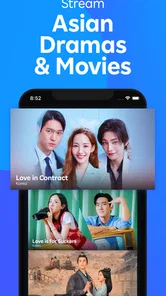
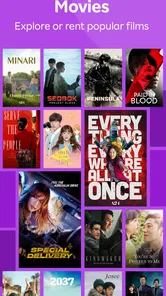
One of the first things that struck me about Viki: Asian Dramas & Movies is its extensive library. From Korean dramas to Chinese historical epics and everything in between, this app seems to have it all. I was particularly impressed with how up-to-date the content is. Whether you're into heartwarming romances or edge-of-your-seat thrillers, there's something for everyone.
For me, a useful way to test that range is to search for one familiar kind of story and one I wouldn’t normally choose. A favourite genre tells me whether Viki has the comfort viewing I came for; a second, more adventurous pick shows whether browsing might lead me somewhere new. I wouldn’t assume every title will suit every viewer, but that two-search approach gives a first session a clear purpose without demanding a big time commitment.
More From Our News Desk

 Gmail
GmailGmail in a Busy Inbox: Who Benefits Most?
From first account to crowded workday, Gmail earns its place through dependable search and flexible sorting—but its best fit depends on how much inbox maintenance you can tolerate.

 Prime Video
Switching to Prime Video: What Changes in Your Viewing Routine
Prime Video can make a compelling second home for streaming, but switching means learning a different catalog, rental layer, and route from browsing to playback.

 Universal TV Remote Control
Universal TV Remote Control Works Best as a Reliable Backup
A phone remote earns its place through quick setup and reliable habits. Here is how to get more from Universal TV Remote Control—and where its limits show.

 Weather - By Xiaomi
Weather by Xiaomi Review: Clear at a Glance, Less Clear Up Close
Xiaomi’s weather app makes everyday forecasts quick to scan, but its calm surface can leave useful details and recovery paths harder to find than they should be.

 X
XX Under Pressure: Can It Recover When Posting Goes Wrong?
A resilience-focused review of X, examining setup, mistaken posts, interruptions, weak connections, and the gaps that matter when recovery needs to be dependable.

 Clash of Clans
Clash of Clans Is Won Between the Battles
Its raids are quick; its community is a long-term project of coordination, teaching, rivalry, and shared responsibility—with all the friction that entails.
Latest News



User-Friendly Interface
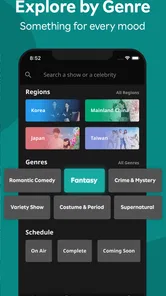
Now, let's talk about the user experience. Navigating through Viki is as smooth as butter. The interface is clean and intuitive, making it super easy to find what you're looking for. The search functionality is top-notch, and I love how the app suggests shows based on your viewing history. It's like having a personal assistant who knows your taste better than you do!
Search and recommendations serve different moods, so I use them differently. Search is the quicker route when I’ve heard a title mentioned or already know the country or genre I want. Recommendations are more useful when I have time to browse and am willing to try something unfamiliar. A practical tip is to avoid treating a recommendation as a commitment: open a title’s details first, check whether it looks like the kind of viewing you want, and only then settle in.
One small trade-off with personalised suggestions is that they can keep reinforcing whatever you watched most recently. If I’ve just finished a run of romances, I may need to search deliberately for suspense or variety programming rather than expecting the first row to broaden my taste. That isn’t a serious obstacle, but it’s a good reason to keep using search as well as recommendations when I want a change.
Making the first session count
For a less overwhelming start, I’d search for one specific show, open its details, and use that as a test of whether the service suits my tastes. If I’m undecided, I’d choose a genre—romance, suspense, or historical drama—and sample a title rather than adding several possibilities to a mental list. On a busy evening, that small choice helps me get from installing the app to actually watching something without turning the first session into a long browsing exercise.
One useful habit is to keep track of the names of shows you want to return to, especially if you are exploring several countries’ productions at once. Recommendation rows can be a pleasant shortcut, but I wouldn’t rely on them as the only way to find a particular title. Searching directly is better when I know what I want; browsing is better when I’m open to being surprised.
A realistic first evening might look like this: I have half an hour free, remember a friend mentioning a historical drama, and search for it rather than browsing every category. I check the title details and subtitle options, start an episode, and decide afterward whether I want to continue. If I don’t, I try a different search another day. That low-pressure trial is more helpful than assuming I need to choose a long series before I know whether the app’s catalogue and viewing style suit me.
If you’re new to Asian dramas, I’d also avoid picking solely by the most dramatic image or title. Choose a premise you can explain to yourself in one sentence—mystery, family conflict, romance, or a historical setting—and use that as your filter. It is an easy way to narrow a broad selection without needing to know actors, production labels, or genre conventions in advance.
Subtitles That Don’t Disappoint
Subtitles are a crucial aspect when it comes to enjoying foreign content, and Viki doesn’t disappoint. The app offers subtitles in multiple languages, and the community-contributed translations ensure that you're getting the best possible experience. Gone are the days of poorly translated lines that leave you scratching your head. With Viki, you can just sit back, relax, and enjoy the show.
In practice, subtitles are worth checking before settling in, particularly if you are watching with someone who needs a specific language. Community translations are a distinctive part of Viki’s appeal, though translation availability can vary between titles and episodes. If a subtitle choice is missing or not quite right for your needs, trying another show may be more satisfying than assuming every programme will offer the same options.
I’d make that check early, not after getting invested in a story. Open the programme’s information and look for the language that matters to you; then confirm it while starting the episode. This is especially useful if I’m planning to watch with a family member or friend who depends on a particular subtitle language. It also helps avoid the frustrating surprise of discovering that a specific episode doesn’t fit the group’s needs after everyone has sat down.
For language learners, subtitles can make a familiar story easier to follow while exposing you to the sound and rhythm of another language. I’d treat that as a bonus rather than a structured learning tool: the app is for watching, and subtitles may differ in availability and translation style. If accuracy or study exercises are the main goal, a dedicated language-learning resource is a better companion; Viki is more rewarding when the story itself comes first.
Compared with a general streaming service, Viki’s specialism is its main advantage: it is a more natural starting point when Asian dramas are what you want to watch, rather than one interest among many. A broader service may suit you better if you mainly want a mixed catalogue of international and local productions in one place. I’d use Viki as a focused destination, not necessarily as a replacement for every other streaming app.
Community Features
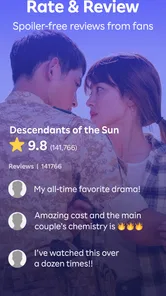
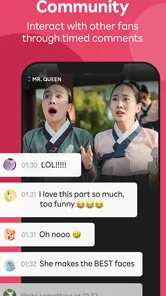
What sets Viki apart from other streaming services is its vibrant community. The app allows users to interact through comments on episodes, which I find adds a whole new layer of enjoyment. It's fun to see what others think about a plot twist or a character's decision, and it makes watching dramas a more communal experience. Plus, you can even join fan clubs and connect with fellow enthusiasts.
That social side is best treated as an optional extra. I enjoy seeing reactions after an episode, but comments can also distract from a tense scene or reveal how other viewers interpret a surprise. My practical approach is to watch first and visit the discussion afterward, especially for a show where spoilers would spoil the fun. If you prefer a quiet, uninterrupted viewing experience, you can simply ignore the community conversation and focus on the programme.
Episode discussions can be particularly enjoyable when I’m watching a series alone but want a little shared enthusiasm afterward. I’d still be selective about when I read them: a quick glance after finishing an episode is safer than scrolling through comments before the big reveal. For a viewer who likes to form an opinion privately, the community is easy to treat as a post-watch extra rather than part of the viewing itself.
There is a simple trade-off here. Comments and fan spaces can add context and companionship, but they are not essential to understanding the programme. If I’m watching with someone in the room, I’d rather talk about the episode together than split my attention between the screen and discussion. Viki’s social layer works best when I choose to engage with it, rather than feeling that every show needs an online conversation.
Who will get the most from it
I’d recommend Viki to someone who regularly seeks out Korean dramas, Chinese series, Japanese shows, or Asian films and enjoys discovering titles beyond the most familiar hits. It is also a good fit if subtitles and fan discussion are part of the pleasure of watching. On the other hand, if you only watch occasionally, want a very broad mix of every kind of entertainment, or dislike reading subtitles, a general streaming app may be a more convenient everyday choice.
It is also a strong option for someone who wants to follow a particular kind of storytelling without having to sift through a general catalogue first. A viewer who watches one episode during a commute break or chooses a series for a quiet weekend can use the same basic routine: search, check the details, and decide whether the programme fits the moment. The key is that Viki rewards a specific interest. It is less compelling if your main aim is to find whatever is popular across every genre.
For households, I’d make the choice based on who will actually watch. A subtitle-friendly viewer who enjoys Korean or Chinese dramas may use Viki often, while another person who mainly wants mainstream films could find it too specialised. If the app is for a younger viewer, remember its Teen rating and consider the subject matter of the individual programme rather than assuming all titles are suitable for the same age or temperament.
Price is another reason to start with a small test rather than make assumptions. The app costs nothing to install, but optional purchases are part of the experience, so I’d check the viewing options for the exact show I want before planning a regular routine around it. That simple check answers the practical question—whether the title I care about works for me—better than deciding in advance that every programme will be available on the same terms.
The app is listed at version 25.11.0 and supports devices running Android 9 or later. For a first-time user, the simplest next step is to install it, search for one title you genuinely want to watch, check the available subtitle language, and start an episode. That quick trial tells you more than an extended tour of menus: whether the catalogue fits your interests, the presentation works for you, and the community element feels enjoyable or unnecessary.
After that first test, I’d make one deliberate follow-up choice: either continue with the series that worked or search for a different country or genre. This keeps the app useful without letting recommendations define the whole experience. If the first programme is a miss, that doesn’t necessarily mean Viki is a poor fit; it may simply mean the title wasn’t right. A second, carefully chosen search is a fairer test than endless scrolling or abandoning the app after one episode.
My overall advice is to think of Viki as a specialist shelf rather than a universal television replacement. Keep it for the times you want Asian stories, use direct search when you have a title in mind, and check subtitles and any paid viewing option before settling down. If that matches your habits, it can be an easy place to turn a passing interest into a satisfying evening of watching.
In conclusion, Viki: Asian Dramas & Movies is a must-have app for anyone who loves Asian entertainment. With its wide array of content, user-friendly interface, reliable subtitles, and engaging community features, it's a platform that truly enhances your viewing experience. So, if you haven't checked it out yet, I highly recommend giving Viki a try. Happy watching!
Viki: Asian Dramas & Movies Frequently Asked Questions
Does Viki require an internet connection to watch shows?
Viki is designed for streaming Asian dramas, movies, and shows, so you should plan to have an internet connection when watching. This is especially useful to consider if you expect to watch while travelling or somewhere with limited connectivity. The app is focused on online viewing, making a reliable Wi-Fi or mobile-data connection important for accessing its content.
How much storage space should I set aside for Viki?
Viki is an entertainment streaming app, so its main purpose is watching content rather than storing a library of episodes on your device. If you are deciding whether to install it, leave enough room for the app itself and normal app updates. Your available storage can also affect how comfortably your device runs other apps while you stream.
Is Viki available in my preferred language?
Viki is best known for Asian entertainment, and its subtitle options can make shows more accessible to viewers who do not speak the original language. Language availability can differ from title to title, so check the options shown for a particular program before settling in to watch. This is particularly helpful if subtitles are an important part of your viewing experience.
Can I watch Viki on a television as well as a phone?
Viki is a mobile app for watching Asian dramas, movies, and shows, and it is convenient for viewing on a compatible device. If you prefer a larger screen, check the viewing options supported by your television and device before relying on that setup. The app’s core experience is streaming, so the available way to watch can depend on the devices you use.
Is Viki a good choice for fans of Korean dramas?
Viki’s focus on Asian entertainment makes it a natural app to consider if you enjoy Korean dramas. Its catalog also includes shows and movies from other parts of Asia, so it can suit viewers who like exploring beyond one country’s productions. Whether it becomes a regular choice depends on whether its available titles and viewing options match your tastes.
Pros
- Extensive library of Asian content
- High-quality video streaming
- Subtitles available in multiple languages
- User-friendly interface
- Offline viewing option
Cons
- Frequent ads in free version
- Limited free content
- Occasional subtitle syncing issues
- Requires stable internet for streaming
- Subscription is relatively expensive











