Airalo: eSIM Travel & Internet
- 3.93K
- 4.5
- Installs
- 5.00M
- Price
- Free

Screenshots

Analysis by Reviewed
I like to sort out mobile data before a trip rather than arrive tired and immediately start looking for airport Wi-Fi. That’s the problem Airalo: eSIM Travel & Internet is designed to address: it lets you arrange an eSIM through an app instead of buying and swapping a physical SIM after landing. The setup still depends on having a compatible phone and following its eSIM steps, but the idea is appealing when I want a connection ready for the first leg of a journey.
Before you leave: check the essentials
Before choosing a plan, I’d check that my phone supports eSIM and is able to use a different carrier. That small check matters more than browsing plans first: an eSIM won’t help if the device can’t install or use one. I’d also think about what I need data for. Maps, messages and looking up a train platform call for a different amount of use than frequent video calls or streaming.
Airalo is a free travel and local app from Airalo, with a 4.5 average from around 136,000 ratings and over five million installs. It is rated for Everyone, and version 2.8.0 requires Android 7.0 or later. Those details make it easy to see why it attracts travelers, but the practical question is whether its digital-SIM approach fits the way you travel.
Seamless Connectivity on the Go
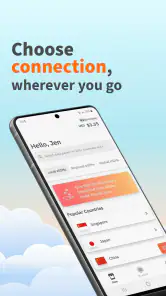
So, what exactly is Airalo? In simple terms, it’s a digital platform that offers eSIMs, allowing you to connect to the internet without the hassle of physical SIM cards. You download the app, purchase a data plan for your destination, and boom – you're online! It's like magic, minus the wand.
Easy Peasy Setup
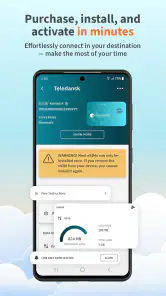
Setting up Airalo is as easy as pie. I downloaded the app before my flight, browsed through the list of countries, and picked a plan that suited my data-needs and budget. The installation process was a breeze – just a few taps and I was ready to roll. No more fiddling with tiny SIM cards or dealing with grumpy store clerks.
Make the handoff before landing
The part I’d plan carefully is the handoff between buying a plan and actually using it. I’d install the eSIM while I still have a dependable connection, then keep my usual line available for calls or texts if needed and choose the travel eSIM for mobile data when appropriate. Menu names vary by phone, so I’d follow the device’s own eSIM instructions rather than assume every screen looks the same. I’d also avoid deleting an installed eSIM just to troubleshoot casually; removing it can turn a simple settings problem into a fresh setup task.
For a realistic arrival, imagine landing late and needing directions to a hotel. Having the eSIM arranged beforehand can make it easier to open a map or message someone without first asking a café for Wi-Fi. I’d still keep the hotel address saved offline and use airport Wi-Fi as a backup while checking that the phone has selected the intended data line. That extra preparation is useful because an eSIM removes the physical-SIM shuffle, not every possible setup snag.
More From Our News Desk

Weather by Xiaomi Review: Clear at a Glance, Less Clear Up Close

X Under Pressure: Can It Recover When Posting Goes Wrong?

Clash of Clans Is Won Between the Battles

Android Auto Makes the Case for Quieter Car Software

MobiOffice: Transforming Mobile Productivity with Seamless Integration

EA SPORTS FC™ Mobile Soccer: Redefining Mobile Sports Gaming
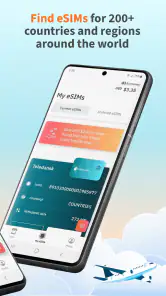
Global Coverage
With coverage in over 190 countries, Airalo is like your trusty Swiss Army knife for global connectivity. Whether you're wandering through the bustling streets of Tokyo or chilling on a beach in Bali, Airalo has got you covered. The internet speed was consistently reliable, which is more than I can say for some public Wi-Fi hotspots I’ve tried in the past.
Choose a plan around your habits
I wouldn’t pick a plan based only on the destination or the lowest-looking cost. First, I’d check how long I expect to be away, whether the plan covers the places on my itinerary, and how much I rely on data-heavy habits. For a short city break with maps and messaging, a modest data allowance may be enough; a work trip with calls and file transfers needs more careful planning. Downloading maps and tickets before leaving Wi-Fi also stretches the data I do have.
One detail worth thinking through is how your phone will divide its jobs. If your regular line remains active for calls or verification texts while the travel eSIM handles data, you can preserve familiar contact access without using that home line for every online task. I’d check the selected data line after installation and again after restarting the phone, especially if I’ve changed settings while tired or in a hurry. That small check can prevent the confusing situation where the eSIM is installed but the phone is still trying to use another line for internet access.
I’d also prepare for the moments when a connection matters most, rather than treating the eSIM as a reason to travel without backups. Before leaving a hotel or home, I’d save a map area, keep booking details accessible offline, and note the destination address in text. This is useful not because the eSIM is inherently unreliable, but because mobile reception is shaped by buildings, terrain and where you are. The best setup is one that still lets you find your way if the first signal is weak.
Compared with international roaming, an eSIM can be a useful way to separate travel data from a home carrier’s roaming arrangement. Compared with a local physical SIM, it saves the shop visit and the tiny-card swap, but a local option may suit someone who wants a local number or prefers in-person help. If I’m staying in one place for a long time, I’d compare both approaches rather than assume an app-based plan is automatically the best value.
Cost-Effective Plans
Travel can already be expensive, so finding a way to stay connected without breaking the bank is a huge win. Airalo offers a variety of data plans that cater to different needs and budgets. I was pleasantly surprised at how affordable the plans were compared to local SIM options or international roaming charges.
For a multi-stop trip, I’d compare the plan’s destination coverage with the actual route, not just the first airport on the itinerary. A traveler crossing a border may find that a plan suited to one country does not match the next leg, so I’d review the plan details before departure and decide whether one option covers the journey or separate arrangements make more sense. This is a better use of a few minutes at home than discovering a mismatch after crossing a border with maps and messages suddenly more important.
There is also a practical trade-off between buying more data for peace of mind and choosing a smaller allowance that better matches light use. I’d estimate from my habits: navigation and messaging are different from uploading lots of photos, tethering another device, or watching video on mobile data. When I’m unsure, I’d make Wi-Fi the default for large updates and downloads, and reserve mobile data for things I need while moving. That way I’m not paying for a plan based on an unusually data-heavy day if the rest of the trip is mostly offline.
Where the convenience has limits
An eSIM is mainly a data solution in the workflow described here, so I wouldn’t assume it replaces every part of my regular phone service. I’d check what my chosen setup means for ordinary calls and texts, and keep a messaging app or another contact method ready for people who need to reach me. Coverage and performance can also vary by location; a map of supported destinations doesn’t guarantee identical reception in every building, rural area or underground station.
Airalo is less suitable if my phone cannot use eSIM, if I need hands-on help installing a SIM, or if I depend on a traditional local number. It also takes a little preparation: choosing a destination plan, installing it, and checking the phone’s data settings are small jobs, but they are not the same as simply turning on roaming. I’d keep Wi-Fi as a backup and check the plan details in the app before relying on it for essential work.
Support and Usability
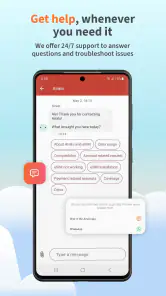
The app's interface is intuitive and user-friendly, even for those who aren't tech-savvy. If you ever find yourself in a pickle, their customer support is just a tap away. They were super helpful when I had questions about data usage and plan expiration.
Because the key steps involve both the app and the phone’s system settings, I’d treat setup as a two-part task instead of expecting the app alone to finish everything. I’d install the plan while I have stable Wi-Fi, then confirm on the handset that the eSIM is present and selected for mobile data as intended. If the labels or prompts differ from what I expect, I’d use the phone’s built-in instructions and avoid rushing through screens. That approach is particularly helpful for someone setting up an eSIM for the first time.
If data does not work immediately, I’d troubleshoot in a calm order: confirm the travel line is enabled, check that it is selected for data, and see whether the phone has a usable signal. I’d avoid removing the eSIM as an early fix, since that can create more work than checking settings. If I’m still stuck, Wi-Fi gives me a way to consult support rather than trying to solve a setup issue with no connection at all.
Airalo is free to install, but the data plans are the part to budget for; I’d review the destination, allowance and validity shown for the plan before buying. I’d also check usage during the trip rather than wait until data runs low, then switch to Wi-Fi for large downloads where practical. Those habits make it easier to judge whether the chosen allowance matches my real travel routine.
One question I’d settle before buying is whether the trip is truly data-first. If I mainly need navigation, chat and occasional searches, an eSIM can be a neat fit. If I need a local number for calls, or expect to rely on a phone for extensive work without Wi-Fi, I’d compare the complete service I need against a local SIM or my carrier’s roaming option. The right choice depends less on the novelty of eSIM and more on whether the plan and the phone together cover the way I communicate.
In a nutshell, Airalo: eSIM Travel & Internet is a traveler's best friend when it comes to staying connected on the go. It's convenient, easy to use, and most importantly, reliable. So next time you’re packing your bags, make sure to download Airalo and say goodbye to the Wi-Fi scavenger hunt. Your future self will thank you!
Who I’d recommend it to
I’d recommend it most to travelers with an eSIM-ready phone who want mobile data soon after arrival and are comfortable checking a few settings themselves. It can be especially handy when an itinerary crosses several destinations and buying a new physical SIM in each place would interrupt the day. If I’m traveling with someone, I’d set up my connection before departure rather than make the whole group wait while I troubleshoot at the airport.
It is also a sensible choice for a solo traveler arriving late, a short-break visitor who wants maps and messaging from the airport onward, or someone who prefers to handle arrangements before leaving home. On the other hand, a person with an older or incompatible phone, a traveler who wants a local number, or someone who wants a shop employee to install a SIM may be happier with another route. I’d especially compare options for a longer stay, where the convenience of skipping a shop may matter less than getting the right local service for everyday use.
My final take is positive, with one practical caveat: Airalo makes travel connectivity easier to arrange, but it doesn’t remove the need to check device compatibility, plan details and local signal conditions. For a compatible phone and a data-first trip, I’d consider it a sensible alternative to roaming or a last-minute SIM-shop search. If I need a local phone number, personal setup assistance, or the simplest possible option with no settings to manage, I’d look elsewhere.
Airalo: eSIM Travel & Internet Frequently Asked Questions
Can I browse Airalo’s eSIM options before deciding to buy one?
Yes. You can use the Airalo app to explore eSIM options for a destination and consider which plan suits your travel needs before purchasing. The app is free to download, but the eSIM data plans are separate purchases. It can be useful to compare the available choices in advance so you are ready to install the option you select.
Can I use Airalo on a trip that includes more than one destination?
Airalo offers eSIM options for travelers, and the app lets you choose a destination and look at available plans. If your itinerary covers several places, review the plan details for the destinations you expect to visit before buying. Choosing an option that matches your route can help you prepare for mobile data access as you travel.
Do I need internet access to set up Airalo before traveling?
It’s sensible to prepare the eSIM while you have a reliable internet connection, since you need to download the Airalo app and install the eSIM on your device. After choosing a destination and plan, follow the app’s setup instructions and check that the eSIM appears in your device settings. Preparing in advance can make it easier to get connected when you arrive.
Can I keep my regular phone number while using an Airalo eSIM?
Airalo provides eSIMs for travel connectivity, so using one does not necessarily mean you have to remove your physical SIM. If your phone supports multiple SIMs, you can generally manage the lines in its settings and choose which one handles mobile data. Check your device’s options before traveling, and review your regular carrier’s terms if you plan to keep that line active.
Is Airalo free to download, and what does the app offer?
Airalo is free to download and is a travel and local app from developer Airalo. Its main purpose is to help travelers find eSIM options for staying connected, with the store summary describing it as an affordable global connection. The app itself is free, while the eSIM data plans you choose are separate purchases. Its content rating is Everyone.
Pros
- Easy eSIM setup process
- Affordable global data plans
- Supports multiple countries
- No physical SIM card needed
- 24/7 customer support
Cons
- Limited data plan options
- Occasional connectivity issues
- App interface needs improvement
- Not compatible with all devices
- Requires internet for activation
- Category
- Travel & Local
- Version
- 2.8.0