AI Photo Editor: Face Beauty
- 317.00
- 4.0
- Installs
- 1.00M
- Price
- Free

Screenshots
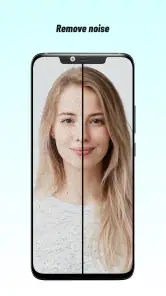
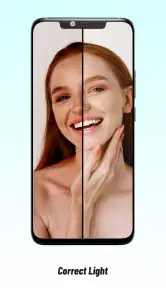
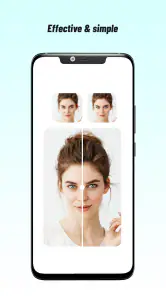
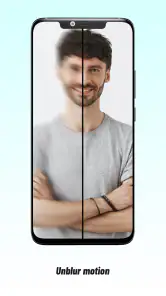
Analysis by Reviewed
When it comes to photo editing apps, there seems to be an endless list of options available on the app stores. But let me tell you, the AI Photo Editor: Face Beauty app is one that truly stands out. I recently got the chance to play around with it, and I must say, it’s got some pretty nifty features that might just make it your next go-to photo editor.
What the free starting point means
Because the app is free to install, I can try its portrait-editing approach before deciding whether it belongs in my routine. Optional in-app purchases run from $1.99 to $36.99 per item. That range is useful to know, but it doesn’t tell me which individual tools cost extra or whether one purchase covers everything, so I wouldn’t treat the highest price as the cost of simply trying the app.
My practical advice is to begin with a photo you don’t urgently need to post, explore the free experience, and see whether the results suit your taste. If an optional purchase becomes tempting, first identify the exact problem it would solve: perhaps you want a particular kind of finish, or you find yourself returning to a control that is only available through a paid item. That is a more reliable way to judge value than buying because an editor sounds powerful in general.
Where a face-first editor can save time
The strongest reason to choose a dedicated portrait app is convenience. If I have a selfie or a head-and-shoulders photo and want to make a modest adjustment, a face-focused workflow can feel more direct than opening a full editor and sorting through tools intended for landscapes, product shots, and elaborate composites. That focus is helpful when the task is small and the goal is to get back to the rest of the day.
It is less compelling when the photo needs several kinds of work at once. A portrait with distracting background objects, uneven overall color, and a crop that needs rebuilding may be easier to handle in a broader editor. I would think of this app as a portrait touch-up option, not as a complete replacement for every photography tool on my phone.
For a realistic everyday example, imagine taking a quick photo with a friend before heading home. The light is a little unkind, but the moment is worth keeping. I’d use an automatic enhancement as a first pass, inspect both faces and the whole frame, and compare the result with the original before sharing. If the edit makes one person look much more polished than the other, I’d reduce it or leave the image alone rather than chase a uniform, artificial finish.
Intuitive Design and User-Friendly Interface
From the moment you launch the app, you're greeted with a sleek and intuitive interface that even a first-timer can navigate with ease. Everything is laid out in a manner that makes photo editing not only simple but actually quite fun. No more fumbling around trying to find that one feature you want to use. It’s all there, organized and ready for you to explore.
More From Our News Desk

Weather by Xiaomi Review: Clear at a Glance, Less Clear Up Close

X Under Pressure: Can It Recover When Posting Goes Wrong?

Clash of Clans Is Won Between the Battles

Android Auto Makes the Case for Quieter Car Software

MobiOffice: Transforming Mobile Productivity with Seamless Integration

EA SPORTS FC™ Mobile Soccer: Redefining Mobile Sports Gaming
That straightforward layout matters most when you have one photo to fix and don’t want to learn a full editing suite. For example, after taking a group picture at a family gathering, I’d use a portrait editor like this to make a quick, restrained adjustment before sharing, rather than spend time learning layers and masks in a more complex app. I’d still keep the original image untouched and compare the edited result before saving or posting; a convenient workflow is only useful if I can tell the edit hasn’t changed the person’s appearance too much.
Advanced AI Features
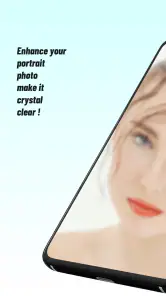
Now, let’s talk about the AI features. The AI Photo Editor: Face Beauty isn’t just about standard filters and adjustments; it’s about using artificial intelligence to enhance your photos in a way that looks natural. The app’s AI is designed to automatically detect facial features and apply beauty enhancements with just a few taps. It’s like having a personal beauty consultant right on your phone!
Whether it’s smoothing out skin imperfections, brightening eyes, or even reshaping certain features, the app makes it possible to achieve that polished look without any prior editing experience. The magic of AI here is not just in its capability but also in maintaining the authenticity of your photos. It doesn’t overdo it, leaving your snapshots looking both enhanced and genuine.
My main practical tip with automatic face edits is to treat the first result as a starting point, not a finished instruction. A close-up selfie and a dim group photo can call for very different levels of correction, so I’d inspect the whole image after applying an enhancement. If the face looks noticeably smoother or brighter than the surrounding scene, dialing back the effect is usually better than adding another adjustment. That small check helps keep a portrait believable, especially when you plan to use it as a profile picture or send it to people who know you well.
Customization at Your Fingertips
What I particularly enjoyed is the level of customization available. While the AI does a great job on its own, you have the option to tweak the results to better suit your preferences. Want a bit more color in your cheeks or less shine on your skin? No problem. The manual adjustment tools give you control over every little detail. It feels like a collaborative process between you and the app, resulting in photos that truly reflect your personal style.
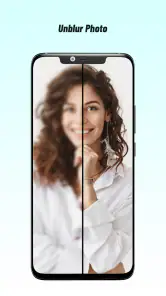
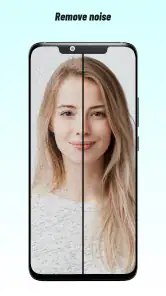
Another cool feature is the before-and-after slider that lets you see the transformations in real-time. It’s satisfying to see how a few adjustments can significantly enhance a photo, and it’s a handy tool for those who like to compare results as they edit.
The slider is more than a visual extra: I’d use it as a stopping point. Compare the edit at normal viewing size, not only zoomed in on a face, because heavy smoothing can look acceptable close up while making the portrait feel artificial as a whole. For a set of photos from the same occasion, keeping the strength of edits similar also helps the images look like they belong together. This is a useful middle ground between a one-tap filter and the fine-grained controls in a desktop editor.
Social Sharing Made Easy
In today’s social media-centric world, sharing your creations is as important as the editing process itself. The app provides seamless integration with various social platforms, allowing you to share your enhanced photos directly with your followers. It’s quick, it’s easy, and it’s sure to get you some extra likes!
For a casual user who mainly wants portraits ready to share, that direct route can be more appealing than moving between a camera roll, a general-purpose editor, and a separate sharing step. But it also makes a quick review worthwhile: check the crop, the face, and the overall look before sending anything out. If you want careful color grading, detailed object removal, or extensive work across many image layers, a broader photo editor is likely a better fit. This app’s appeal is its face-oriented, approachable workflow, not replacing every tool a photographer might need.
How it fits alongside other editing choices
Compared with a basic filter app, this one is more useful when I want a face-specific adjustment rather than the same color treatment across the entire image. Compared with a general-purpose editor, it offers a narrower path: less suited to rebuilding a scene or making detailed edits outside a portrait, but more approachable for someone who wants to focus on a face. The right choice depends on the job, not on which app claims to do the most.
That distinction matters for people who edit several kinds of photos. I would keep a general editor for landscapes, food shots, or images that need broader corrections, and reach for a face-focused tool only when the portrait is the main subject. If I’m unsure whether an edit is improving the picture, I’d save a copy and revisit it later with fresh eyes. A short pause often makes over-editing easier to spot.
Another useful habit is to judge a portrait in the context where it will appear. A face that looks natural when enlarged on a phone may seem overly smooth as a small profile image, while a subtle edit can disappear when viewed in a busy social feed. I’d check both sizes before settling on the final version, especially for a picture I plan to use repeatedly.
Overall, the AI Photo Editor: Face Beauty app offers a fantastic blend of simplicity and sophistication. It’s perfect for those who want to enhance their photos with minimal effort and maximum results. Whether you're a casual user looking to improve your selfies or a more serious photographer wanting to polish your shots, this app has something to offer.
Who is likely to get the most from it?
Its audience is clearest when the goal is a quick portrait touch-up rather than a complete photography workflow. I’d recommend it to someone who takes selfies, refreshes profile photos, or wants a simple way to make a face look more polished without starting from scratch. I’d skip it if I prefer unretouched portraits, need broad creative controls, or want one editor for every kind of image task. The app is rated for Everyone, has a 4.0 average from around 19,000 ratings, and has been installed over a million times; those figures offer context, but they don’t tell me whether its particular look will suit you.
It may also be a poor fit if you routinely edit images where faces are not the focus, or if your preferred style depends on precise manual work across the whole frame. Someone who wants a natural record of a moment may find any beauty treatment unnecessary, while a photographer seeking detailed control over color and composition will probably be happier in a more comprehensive editor. I’d choose based on the kind of changes I actually make, rather than expecting one app to suit every photo.
My recommendation before you spend
If you’re in the market for a new photo editor, I’d definitely recommend giving this one a try. It’s a powerful tool that brings professional-level editing to the palm of your hand, all while keeping things fun and user-friendly. Happy editing!
The app was released on July 9, 2023, and version 1.7.1 is listed for devices running Android 7.0 or later. I’d check that your device meets the minimum before planning to use it. For value, the sensible approach is to try the free app first and judge the actual result on your own photos; the paid items may be worthwhile for someone who finds a specific option useful, but I wouldn’t buy on the assumption that every advanced control is included. With 317 written reviews and a 4.0 average, there is some public feedback to consider, though the best test is still whether the adjustments look natural on the kinds of portraits you take.
My bottom line is simple: start free, test it on a few different portraits, and be honest about whether you like the look after comparing each edit with its original. If it gives you a quick, tasteful result for the photos you take most often, it may earn a place on your phone. If you need detailed whole-image editing or prefer untouched portraits, I’d skip the optional spending and choose a tool better suited to that style.
AI Photo Editor: Face Beauty Frequently Asked Questions
Does AI Photo Editor: Face Beauty require an internet connection?
Whether an internet connection is needed can depend on the editing tools and how the app processes a photo. If you expect to edit while offline, check the app’s behavior after installing it and before relying on it for a trip or another situation without reliable access. This is especially useful if you plan to use AI-assisted enhancements, since the available workflow may vary by feature.
Can I use AI Photo Editor: Face Beauty without creating an account?
If you prefer not to create an account for a photo editor, review the app’s sign-in prompts when you first open it. You can then see whether the editing tools you want are accessible without registration before committing to a particular workflow. This is also a sensible moment to read any permission requests and decide whether you are comfortable granting access to the photos you want to edit.
Can I save or share edited photos from AI Photo Editor: Face Beauty?
An editor is most useful when you can keep the finished image or share it where you need it. After making an edit, check the available save and sharing options in the app and confirm that the result appears in the intended location on your device. If you plan to post a photo online, review the final image first to ensure the edits look the way you want.
Will AI Photo Editor: Face Beauty preserve the original photo?
Before editing an important image, it is wise to make sure you have an untouched copy available. Photo editors can handle originals and edited versions differently, so check the app’s saving workflow and confirm whether your changes create a separate result or affect the source image. Keeping a backup gives you more flexibility to compare versions or start again if an enhancement does not suit the photo.
What is the current version of AI Photo Editor: Face Beauty?
The current version is 1.7.1. If you already have the app installed, compare your installed version with the one available for download to decide whether an update is relevant to you. Keeping apps up to date can be helpful, but it is still a good idea to check that your device meets the operating-system requirement before installing or updating.
Pros
- Intuitive user interface for easy navigation.
- Wide range of editing tools available.
- Enhances photo quality significantly.
- Regular updates with new features.
- No watermark on edited photos.
Cons
- In-app purchases for premium features.
- Occasional ads may disrupt editing.
- Requires internet for some features.
- Limited free filters available.
- High battery consumption during use.
- Category
- Photography
- Version
- 1.7.1












