Piano Fire: Edm Music & Piano
- 5.82K
- 4.6
- Installs
- 100.00M
- Price
- Free
Screenshots



Analysis by Reviewed
For me, the appeal of Piano Fire: Edm Music & Piano is its central idea: following music by tapping the tiles as they arrive. That turns listening into a small coordination challenge, rather than leaving a song in the background. The game is built around that simple connection between beat and touch, and it suits short sessions when I want something lively that I can pick up quickly.
What the rhythm-tile idea feels like
In practice, each run asks me to watch the incoming tiles and time my taps to the music. The basic action is easy to understand, but keeping attention on both the visual cues and the beat is what gives it some bite. I wouldn’t treat it as piano instruction: it’s a rhythm game, not a substitute for learning keys, reading music, or practising an instrument. Its strength is making familiar listening more active.
The mix of piano melodies and energetic electronic tracks gives the tapping a distinct mood. A useful way to approach a new song is to listen for its pulse before trying to chase every visual cue; that can make the first attempt feel less frantic. If you’re playing on a small screen, holding the device steadily and keeping your tapping hand clear of the display also helps avoid mistimed touches. Those small adjustments matter more here than any claim that the game will teach formal musical technique.
Reads About Piano Fire: Edm Music & Piano
Making each attempt feel more manageable
I find it helps to treat the first go at an unfamiliar track as a chance to learn its rhythm, rather than a test I must ace. Watch how the tiles relate to the beat, settle into a comfortable grip, and let the music guide your timing. If a run starts to feel messy, a brief pause between attempts is more useful than tapping faster in response; rushing can make it harder to separate what you hear from what you see.
That approach also makes the game easier to share. If a friend wants a turn, passing over the phone after a song gives both of you a clear, comparable challenge without needing to explain a complicated control layout. I’d keep the device still on a table or hold it securely rather than shifting it between hands mid-song. The small practical detail matters because the screen is both the instrument and the source of the visual cues.
A good fit for a spare moment
I can see myself opening it while waiting for a ride or taking a quick break: one song offers a contained challenge without asking for a long session. It also works as a casual pass-around game with a friend, since you can compare how each person handles the same kind of rhythm task. The competitive element may appeal to players who like a score to chase, while tile customization gives a little visual variety between sessions.
Compared with music games that focus on a dance mat, instrument controller, or more involved note charts, this is much more immediate: the phone screen is the whole playing surface, and the interaction is finger taps. That convenience is also a limit. It won’t give you the physical movement of a dance game or the richer musical practice of a keyboard-based title. If you mainly want to listen to albums, a music player is the better choice; if you want to train piano technique, choose a dedicated learning tool instead.
More From Our News Desk

Clash of Clans Is Won Between the Battles

Android Auto Makes the Case for Quieter Car Software

MobiOffice: Transforming Mobile Productivity with Seamless Integration

EA SPORTS FC™ Mobile Soccer: Redefining Mobile Sports Gaming

How Microsoft OneDrive Became a Mobile Productivity Giant

How Google Translate Breaks Language Barriers Effortlessly
Where it fits in a music-game routine
The most natural place for this game is in the gaps that are too short for a larger activity but long enough to focus on a song. I might open it while waiting for someone to arrive, play a track, and put the phone away when the moment passes. That keeps the experience light and helps me avoid turning a quick diversion into an obligation to keep chasing a better result.
It also offers a different kind of musical engagement from simply replaying a favorite track. A listener can sit back and enjoy a song; here, attention has to move between the sound and the tiles. That change can make a familiar melody feel newly demanding, but it means the game is not ideal when I want background audio while reading, talking, or doing another task. The tapping asks for enough focus that multitasking tends to undermine the point.
For someone choosing between this and a conventional rhythm title, the key question is how much setup they want. A phone-tapping game is easier to pick up than a title built around a separate controller or large play area, and it can be played in a small space. In return, it offers less bodily movement and less room for elaborate instrument-like input. I’d choose it for convenience and quick musical timing challenges, not because it reproduces the feel of playing a piano or dancing to a track.
A lively game with a narrow focus
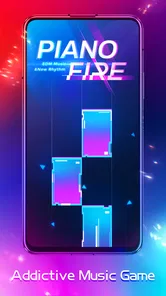
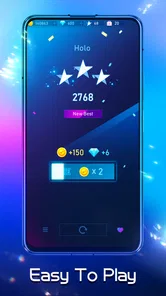
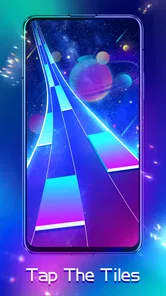
Right from the get-go, the app welcomes you with a vibrant interface that screams fun and excitement. The colors are bright, the graphics are sleek, and the overall vibe is just electric. It's like stepping into a digital concert hall where you're both the audience and the performer.
Gameplay That Strikes a Chord
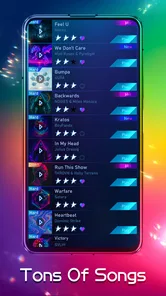
The gameplay is straightforward yet addictive. You tap on the tiles as they slide down your screen, syncing perfectly with the beat of the music. It’s a bit like Dance Dance Revolution, but for your fingers! And trust me, once you start, it’s hard to stop. The app offers a wide variety of songs, from classic piano pieces to the latest EDM hits, which keeps things fresh and exciting.
One thing that really stands out is how the app manages to blend the soft, melodic tunes of the piano with the high-energy beats of EDM. It’s a unique combination that somehow just works, giving you the best of both worlds.
Features That Hit the Right Notes
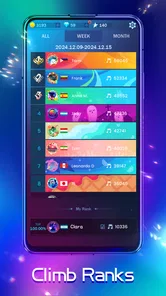
Aside from the engaging gameplay, Piano Fire is packed with features that enhance your musical journey. The app allows you to compete against other players, adding a competitive edge to your practice. Plus, with regular updates, there’s always new content to look forward to.
Another cool feature is the ability to customize your tiles. You can change their appearance to match your style, which is a neat little touch that adds a personal flair to the game.
Keeping the challenge enjoyable
Tile customization is a small but useful personal touch, especially if I’m returning to the game often. I’d favor a look that keeps the moving tiles easy for me to distinguish, rather than choosing a style only because it looks striking. In a game where visual timing matters, readability is part of comfort: a design that feels busy to me could make an already demanding run harder to follow.
The competitive side can be motivating when I want a clear reason to replay a track, but I wouldn’t use a score as a measure of musical ability. It reflects how well I handled that particular screen-based challenge, not whether I can play the melody on an instrument. If comparisons make a relaxed pastime stressful, I’d simply treat each run as a personal timing exercise and ignore the urge to turn every song into a contest.
Likewise, the game’s energetic presentation is part of its appeal, but it may not suit every mood. When I’m tired or looking for something soothing, the visual activity and concentration can feel like more effort than I want. I’d save it for moments when I’m alert enough to follow the beat and in the mood for a lively interaction, rather than expecting it to serve as a calm music app.
One practical point for anyone deciding whether to install it: it is a free music game from Adaric Music, rated Everyone, and its current version is 1.0.208. It has a 4.5 average from around 664,000 ratings and has passed 100 million installs, so it is clearly familiar to a large audience. Optional in-app purchases range from $0.99 to $9.99 per item; I’d start with the free experience and only consider spending if the game’s song-and-tap loop genuinely becomes part of your routine. It is designed for Android 5.0 and later.
What to expect before settling in
The easiest way to decide whether it belongs on your phone is to try a few songs without treating the first session as a commitment. The core appeal is immediate, but your enjoyment will depend on whether you like watching cues while listening and tapping in time. If that combination feels satisfying, the game can make a short wait more engaging; if it feels like visual busywork, a playlist or a less demanding music game will be a better use of your time.
It is also worth being deliberate about optional spending. Because the game is free to start, I’d first see whether the basic rhythm loop holds my attention over more than a single novelty session. The listed in-app items are optional, so there is no reason to buy anything just to find out whether the style suits you. For younger players, the Everyone rating is a helpful starting point, while an adult can still set household expectations around play time and purchases.
Who will enjoy it—and who may not
This is an easy recommendation for someone who likes EDM, piano-flavored tracks, and quick tests of timing but doesn’t want to learn a complex control scheme. A realistic routine might be playing a song during a coffee break, then stopping when the break ends; the short, focused format makes that more natural than settling in for a long gaming session. Younger players can also consider it within its Everyone age rating, though a parent should still decide what screen time and purchases are appropriate.
I’d skip it if I find repeated tapping tiring, if I want a calm listening session, or if competition makes a casual game feel like work. The rhythm can demand more concentration than the bright presentation suggests, and a missed tap can break the flow. It is also a poor fit when I need dependable piano practice: timing taps to a track may sharpen attention to rhythm, but it does not build finger technique or teach music theory. That distinction is important when choosing between this and a lesson-based app.
Why You Should Download It
If you’re a fan of music games, or just love music in general, this app is definitely worth a download. It’s perfect for killing time, improving your rhythm skills, or just having fun with friends. Plus, it’s free, which is always a bonus!
In conclusion, Piano Fire: Edm Music & Piano offers a refreshing take on the music game genre. It’s fun, it’s challenging, and most importantly, it’s all about the music. So go ahead, give it a try, and let the music take control!
Piano Fire: Edm Music & Piano Frequently Asked Questions
Can I play Piano Fire: Edm Music & Piano with headphones?
Headphones can make it easier to focus on the beat and enjoy the music while tapping the tiles. As with any rhythm game, playing somewhere quiet and setting a comfortable volume can help you follow the timing. The game’s appeal comes from matching your taps to the rhythm, so clear audio may make the experience more immersive.
Does Piano Fire: Edm Music & Piano have a music-focused gameplay style?
Yes. Piano Fire: Edm Music & Piano is a music game built around tapping tiles in time with EDM tracks. Its store summary describes the play as pinging tiles, chasing the rhythm, and dancing with piano, which captures the quick, beat-driven feel. It is best suited to players who enjoy responding to music with fast, focused taps.
Is Piano Fire: Edm Music & Piano free to download, and what does it cost to buy extras?
Piano Fire: Edm Music & Piano is free to download, so you can try its music-tapping gameplay without paying upfront. Optional in-app purchases are available, with individual items priced from $0.99 to $9.99. Those extras are not required to enjoy the basic game, but keep them in mind if you prefer to avoid spending inside mobile games.
What age group is Piano Fire: Edm Music & Piano intended for?
Piano Fire: Edm Music & Piano has an Everyone content rating, making it suitable for a broad audience. Its central activity is tapping tiles in time with music, rather than engaging with complex themes. As with any game, parents may want to review the purchase options and decide whether to enable or supervise in-app spending on a child’s device.
What is Piano Fire: Edm Music & Piano and how does it work?
Piano Fire: Edm Music & Piano is a dynamic mobile game that combines the thrill of EDM music with the rhythm of piano playing. Players tap on tiles in rhythm with popular electronic dance music tracks. The game is designed to test your reflexes and musical skills, offering an immersive experience with vibrant visuals and a wide variety of songs to choose from.
Pros
- Engaging music gameplay
- Variety of songs available
- User-friendly interface
- Regular updates with new songs
- Offline mode available
Cons
- Contains ads
- In-app purchases needed
- Limited free song options
- Can be addictive
- High battery usage













