Tiles Hop Music & Ball Game
- 80.34K
- 4.3
- Installs
- 500.00M
- Price
- Free

Screenshots






Analysis by Reviewed
When I want a music game that gives me something to do with a song rather than just letting it play in the background, Tiles Hop EDM Rush Music Game is an easy one to pick up. Its basic appeal is immediate: guide a bouncing ball across tiles in time with the music. I find that simple idea satisfying in short bursts, though the timing can turn a casual session into a surprisingly focused one.
What the purchase details mean in practice
The game is free to download, while optional in-app purchases range from $0.99 to $49.99 per item. That gives you a clear starting point without requiring a purchase just to try the core idea. I’d treat the higher end of that range as a reason to check what an item does before buying, rather than assuming it is necessary for a better experience. The developer is AMANOTES PTE. LTD.; the game is rated for Everyone 10+ and has a 4.3 average from around 3.3 million ratings.
It has passed 500 million installs, so it is a familiar pick in the mobile music-game space, but popularity alone doesn’t tell me whether it suits a particular player. The current version is 7.6.4, and it runs on Android 7.0 or later. I’d see those details as useful compatibility context, not a promise that every device or session will feel identical.
Choosing a sensible way to play
I’d start with the free experience and give myself a few short sessions before deciding whether I want to spend anything. That lets me separate two questions that are easy to muddle together: do I enjoy steering the ball to a beat, and do I want any particular paid item? The first is about the core game; the second deserves its own decision. Since the listed purchase range is broad, checking the exact item and its cost at the point of purchase is a better habit than treating every purchase as a small add-on.
If a child is playing, I’d make the same distinction explicit. The Everyone 10+ rating is a useful age guide, but it is not a spending plan. I’d set device purchase controls before handing over the phone and talk through the difference between playing for free and buying an optional item. That keeps the focus on the game itself instead of turning an impulsive tap into a surprise expense.
Progress without turning every run into a test
The ball-and-tile format makes it easy to understand what I’m meant to do: swipe to steer and keep the ball landing on the moving tiles. The useful skill is not simply reacting quickly. I get better results when I watch the path ahead and let the beat guide my timing, instead of making a last-second swipe whenever a tile appears. That small change makes play feel more controlled.
For a realistic everyday use, I’d open it during a short wait or between tasks, choose a track, and play a run or two rather than treating it like a long session. If I keep missing the same kind of landing, I slow down mentally and focus on the next tile instead of trying to recover the whole run at once. That approach is a practical way to enjoy the rhythm without letting a difficult stretch become irritating.
More From Our News Desk

 Gmail
GmailGmail in a Busy Inbox: Who Benefits Most?
From first account to crowded workday, Gmail earns its place through dependable search and flexible sorting—but its best fit depends on how much inbox maintenance you can tolerate.

 Prime Video
Switching to Prime Video: What Changes in Your Viewing Routine
Prime Video can make a compelling second home for streaming, but switching means learning a different catalog, rental layer, and route from browsing to playback.

 Universal TV Remote Control
Universal TV Remote Control Works Best as a Reliable Backup
A phone remote earns its place through quick setup and reliable habits. Here is how to get more from Universal TV Remote Control—and where its limits show.

 Weather - By Xiaomi
Weather by Xiaomi Review: Clear at a Glance, Less Clear Up Close
Xiaomi’s weather app makes everyday forecasts quick to scan, but its calm surface can leave useful details and recovery paths harder to find than they should be.

 X
XX Under Pressure: Can It Recover When Posting Goes Wrong?
A resilience-focused review of X, examining setup, mistaken posts, interruptions, weak connections, and the gaps that matter when recovery needs to be dependable.

 Clash of Clans
Clash of Clans Is Won Between the Battles
Its raids are quick; its community is a long-term project of coordination, teaching, rivalry, and shared responsibility—with all the friction that entails.
Latest News



One useful adjustment is to treat each attempt as a chance to notice a specific mistake, not as a verdict on whether I have good reflexes. If my swipe is consistently late, I can concentrate on anticipating the next landing; if I overcorrect, I can make smaller, calmer movements. I also avoid playing while hurried. The game’s short-session appeal makes it tempting to squeeze in a run while doing something else, but divided attention is likely to make the timing feel less fair to me, not more exciting.
It works best for someone who likes music-driven challenges and is happy to repeat a section while improving timing. If you mainly want a calm listening app, or you dislike games that ask for continuous attention, this is probably not the right fit. A music player is better for listening without input; a traditional rhythm game may suit you better if you prefer tapping fixed notes over steering a ball through a changing path.
Where it sits among music games
The distinctive choice here is the combination of a song and a moving route. Compared with a conventional piano-tile game, where the main task is to hit notes in lanes, this asks me to steer across a path and read where the ball needs to land. That makes spatial anticipation part of the rhythm challenge. If you enjoy visual movement and directional decisions, that difference can keep the familiar beat-based idea engaging; if you want a clear sequence of taps, a lane-based game will probably feel more direct.
It also serves a different purpose from a music player or a rhythm title built around score practice. I wouldn’t open it to leave a playlist running while I work, because the play itself needs attention. Nor would I choose it when I want precise instrument-style timing practice. I’d choose it when I want to turn listening into an active, compact challenge, especially when I have enough focus to follow the route rather than just hear the track.
Fairness, control, and sensible expectations
Because the game is free to start and has paid items, I’d decide on a spending limit before browsing purchases, especially if I’m handing my phone to a younger player. The age rating is Everyone 10+, but that doesn’t answer every family’s question about spending habits. I would check purchase controls on the device and make sure the player knows that optional items cost money.
I also wouldn’t assume that buying something guarantees easier play, a better score, or access to a particular song. The purchase range tells me that paid items exist, but it doesn’t establish what each one changes. For a fair comparison, I’d first play without spending and judge whether the basic rhythm-and-swiping loop is enjoyable on its own. If it is, any purchase can be considered on its own merits rather than as a supposed requirement.
That approach matters because spending and skill are separate considerations. I would not buy an item simply because a run went badly; a missed landing may be down to timing, distraction, or an unfamiliar sequence, and a purchase should not be treated as a fix unless its description clearly explains what it does. If I’m unsure, I’d leave the purchase alone and keep playing the free version until I can name a specific benefit I actually want.
What I’d check before settling in
One practical question is whether I can use the music I personally want. The game’s store summary emphasizes music and tiles, but I wouldn’t plan a session around a particular song or assume that every track I like will be available. If a specific soundtrack matters to you, check the current in-game options before deciding that this is your music game.
I’d also keep expectations modest about how the experience behaves across devices and play situations. A rhythm game depends on being able to see the path and respond comfortably, so I’d try it in a quiet moment with the screen at a comfortable brightness rather than expecting it to work well while walking or multitasking. It calls for attention; playing near traffic or while doing another task is a poor trade-off.
Questions worth answering before you commit
Can I enjoy it without spending? That is the first thing I’d test for myself: install it free, try the basic play, and only consider an optional purchase if I understand what it offers. The existence of paid items does not by itself tell me whether I need one, so I would not budget for a purchase before experiencing the game.
Is it suitable for a quick break? Yes, that is one of the situations where I’d reach for it. A run gives me an active task rather than passive listening, though I’d choose a moment when I can look at the screen and concentrate. If I only have time to glance at my phone, I’d save it for later rather than expect a satisfying session while distracted.
Will it work for someone who is not especially good at rhythm games? The basic control is easy to understand, which gives newcomers a straightforward way in, but the timing still asks for attention and practice. I’d recommend trying it with modest expectations: the appeal is learning to read the path and respond more consistently, not necessarily succeeding immediately.
Can I play the songs I already love? I would check the available music in the game before relying on it for a particular track. The idea is strongly tied to music, but a player who needs a specific song should confirm it is an option rather than assuming a personal library will work the way they expect.
A Beat-Bouncing Adventure
Okay, picture this: you’re in a world where music isn’t just something you listen to, but something you play with. The game starts with a simple concept. You have a ball that bounces on tiles, and your job is to keep it hopping to the beat of the music. Sounds easy, right? Well, that’s until you find yourself bobbing your head and tapping your foot, completely lost in the rhythm.
Gameplay That Hooks You
What’s really cool about Tiles Hop EDM Rush Music Game is how it hooks you with its simplicity yet challenges your reflexes and timing. You swipe to control the ball, making sure it lands on the tiles as they appear. The catch? The tiles move to the beat of the song that’s playing, and trust me, things can get pretty intense!
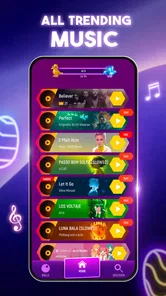
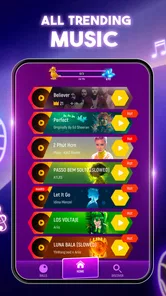
One of the things I love is the variety of music tracks available. Whether you’re into pop, rock, or hardcore EDM, there’s something for everyone. And the visuals? Oh, they’re dazzling. Each level is a vibrant spectacle of colors that sync perfectly with the beats, making the experience not just a game, but a visual treat.
Making the visuals work for you
The bright presentation is part of the fun, but I find it helps to treat the path as the main information on screen. When the colors are lively, it is easy to get drawn into the spectacle and stop looking ahead. I try to keep my attention on the next landing area and use the music as a timing cue, rather than letting the visual effects become the thing I follow. That small shift makes the screen feel less busy and the play more deliberate.
This is also why I would not recommend playing while walking, riding a bike, or trying to watch something else. The game asks for visual attention as well as a response to the beat, and a phone-sized display is not something I’d want to monitor in an unsafe setting. It is a better fit for a seated break, a quiet commute stop, or a moment at home when I can focus without rushing.
Soundtrack: The Heart of the Game
Let’s talk about the soundtrack because, let’s face it, it’s the heart of the game. The developers have done an amazing job curating a list of tracks that are not only catchy but also challenging. You might find yourself discovering new artists and songs that you’ll want to add to your playlist. It’s like having a mini concert in your pocket!
And if you’re someone who likes to personalize their gaming experience, you’re in luck. The game allows you to upload your own tracks, which means you can bounce to your personal favorites. Talk about a custom experience!
Keeping the music expectation realistic
Music tastes are personal, so I’d judge the game by the interaction as much as the selection. A track that I enjoy hearing might not be the one I most enjoy playing, because the useful question is whether its rhythm makes the movement feel satisfying. If I’m choosing a session for a particular mood, I’d browse what is available first, then pick a song that suits the kind of focused, beat-led play I want.
I would also avoid treating it as a replacement for a dedicated music library. Its appeal is turning a song into a game, not providing uninterrupted listening for chores or work. If I mainly want to discover music, I’d use a listening service; if I want to interact with a beat for a few minutes, this is the more playful option. That distinction helps set expectations before the first session.
Who will enjoy the trade-off
I’d recommend it most to someone who likes casual arcade play but wants music to shape the challenge. It can suit a player who enjoys retrying a short section and noticing gradual improvements, and it gives a music-game fan a different kind of input from simply tapping lanes. Someone who dislikes repeated attempts, bright visual movement, or games that demand ongoing focus may find the same traits tiring instead of fun.
It is also not the best choice for every music-game preference. If I want to tap a fixed pattern with clear note lanes, I’d pick a more traditional rhythm game. If I want to listen without touching my phone, I’d use a music player. I see this one in the middle: the song is central, but steering and reading the route are what make it a game.
Final Thoughts
In the end, Tiles Hop EDM Rush Music Game is more than just a game; it’s a full-on music experience. It’s perfect for those quick breaks or when you just want to lose yourself in some good tunes. The combination of addictive gameplay, stunning visuals, and a killer soundtrack make it a must-try for any music game fanatic.
So, if you’re ready to test your reflexes and immerse yourself in a world where music and gaming collide, give this app a go. Your inner DJ will thank you!
Tiles Hop Music & Ball Game Frequently Asked Questions
What should I know about the game’s age rating before downloading?
Tiles Hop: EDM Rush is rated Everyone 10+, which can help families decide whether it suits a younger player. Its focus is music, timing, and guiding a bouncing ball across tiles. Parents may also want to consider that optional in-app purchases are available and review the purchase settings on the device before letting a child play.
Will Tiles Hop: EDM Rush work on my device?
The game’s current version is 7.6.4, and the minimum operating system requirement is Android 7.0. Check your device’s software version before downloading so you can confirm compatibility. Tiles Hop: EDM Rush is available for Android and iOS, and meeting the operating system requirement is the key first step when deciding whether to install it.
Does Tiles Hop: EDM Rush cost anything to download?
Tiles Hop: EDM Rush is free to download, so you can try its rhythm-based gameplay without paying upfront. Optional in-app purchases range from $0.99 to $49.99 per item. These purchases are separate from the free download, so it is worth checking purchase controls on your device if you want to avoid accidental spending while playing.
Is Tiles Hop: EDM Rush suitable for beginners?
Yes. The basic idea is easy to pick up: guide a bouncing ball from tile to tile in time with the music. The challenge comes from keeping your timing steady as the track continues and the tiles shift, so newcomers can start with the simple controls and improve through practice. Its music-game format makes it approachable even if you have not played rhythm games before.
What kind of music and gameplay can I expect from Tiles Hop: EDM Rush?
Tiles Hop: EDM Rush is a music game built around rhythm and quick reactions. You guide a ball across tiles in time with the beat, with EDM tracks at the center of the experience. The store describes it as a game of music, balls, songs, and magic piano tiles. If you enjoy following a beat while trying to maintain a high score, its central loop is designed for that kind of play.
Pros
- Intuitive touch controls
- Vibrant graphics
- Diverse music tracks
- Addictive gameplay
- Frequent updates
Cons
- Ads can be intrusive
- In-app purchases required
- Limited offline play
- Repetitive levels
- Battery drain issues