Piano Star
- 3.40K
- 4.3
- Installs
- 100.00M
- Price
- Free

Screenshots

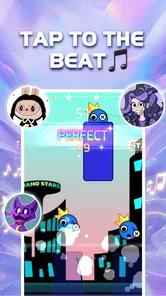
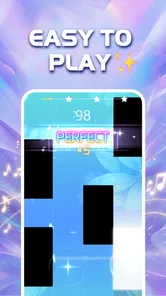

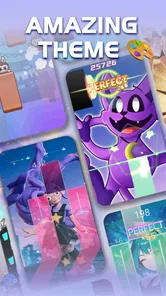
Analysis by Reviewed
I’d treat Piano Star as a quick music game for spare moments, not as a substitute for learning piano technique. Its tap-along format is easy to approach, but the first frustration can be working out what kind of practice it actually supports: following notes on a screen is different from building hand position, reading sheet music, or learning to play an acoustic instrument. Knowing that distinction helps set expectations before you start.
Where the first snags can happen
On a phone, a rhythm game can feel less forgiving than it looks. Your fingers may cover part of the screen, and tapping accurately while holding a device can be awkward, especially during a longer session. I’d begin with the phone on a stable surface and use light, deliberate taps rather than trying to play at full speed immediately. If a passage feels messy, pausing to reset your grip is more useful than repeating it while uncomfortable.
Timing can also feel inconsistent when you are still learning how the game responds to taps. Before deciding that a song is too difficult, try a short section again with your attention on the beat rather than the visual clutter. A quiet setting helps too: music games depend on listening as well as watching, and background noise can make it harder to judge whether you are early or late.
Simple checks before a session
For a smoother start, close other demanding apps, make sure your device has enough battery, and check that its operating system is compatible. Piano Star’s current version is 1.7.7, and it supports Android 5.1 or later. The game is free to install, with optional in-app purchases priced from $0.99 to $19.99 per item, so I’d pay attention to purchase prompts if you are handing the phone to a child.
It is rated Everyone 10+, which is worth considering when choosing a game for a younger player. The developer is TINYMAX HONGKONG LIMITED. I would also check the device’s sound level before handing it over: a comfortable volume makes it easier to follow the music without turning a quick round into an unnecessarily loud one.
A more comfortable way to play and judge it
If taps do not register as you expect, first check your grip and screen position, then try a simpler passage before changing several things at once. That makes it easier to tell whether the trouble comes from your timing, the way you are holding the phone, or a temporary device slowdown. I find this kind of small, controlled reset more helpful than assuming the game is broken.
Getting Started with Your Musical Journey
First off, downloading Piano Star is a breeze. It's available on both Android and iOS, so no one's left out of the fun. Once you have it installed, you're greeted with a sleek and user-friendly interface that even someone with zero musical knowledge can navigate. It’s like the app holds your hand and says, “Don’t worry, we got this!”
More From Our News Desk

Weather by Xiaomi Review: Clear at a Glance, Less Clear Up Close

X Under Pressure: Can It Recover When Posting Goes Wrong?

Clash of Clans Is Won Between the Battles

Android Auto Makes the Case for Quieter Car Software

MobiOffice: Transforming Mobile Productivity with Seamless Integration

EA SPORTS FC™ Mobile Soccer: Redefining Mobile Sports Gaming
Features That Hit the Right Notes
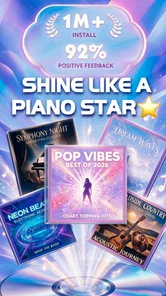
So, what does Piano Star bring to the table? For starters, it has a vast library of songs from different genres. Whether you’re into classic Beethoven or the latest pop hits, there's something for everyone. The app breaks down songs into manageable pieces, making it easier for beginners to catch up.
The interactive lessons are a game-changer. They provide real-time feedback, correcting your mistakes as you play. It’s almost like having a personal instructor right there with you. Plus, the gamified elements keep you hooked; you earn points and unlock new levels as you improve, which is super motivating.
Why You'll Love It
One of the things I genuinely appreciate about Piano Star is its ability to cater to different skill levels. Whether you're a newbie or a seasoned player looking to polish your skills, the app adjusts to your pace. The practice mode allows you to slow down songs, so you don’t feel overwhelmed while learning a new piece.
Another cool feature is the ability to record your sessions. This not only helps track your progress but is also a fun way to share your musical journey with friends and family. Imagine sending them a clip of you playing your first tune perfectly!
Choosing it for the right reason
With an average rating of 4.3 from around 166,000 ratings, and over 100 million installs, Piano Star clearly appeals to a broad audience. That popularity is useful context, but I would still choose it for the short, game-like musical challenge rather than assume it will teach conventional piano skills. Its 3,400 reviews suggest plenty of players have shared detailed reactions, though an individual experience will depend on what you want from a music game.
For a realistic everyday use, I can see it fitting into a commute break or a few minutes waiting for an appointment: play a short session, stop when attention dips, and return later rather than turning a casual game into a long practice obligation. That is also a sensible way to judge whether the tap timing feels comfortable on your particular phone. If you want to learn an instrument in a structured way, a dedicated piano-learning app or an in-person teacher is a better match; if you want a quick, song-led challenge, this is closer to the usual rhythm-game experience.
When another option makes more sense
The main trade-off is that a screen-based game rewards the actions it can recognize, not every part of musicianship. It can make musical practice feel approachable, but it should not be your only route if your goal is to develop piano technique, understand notation, or play with both hands on a real keyboard. Likewise, if you dislike score-chasing or find fast visual prompts stressful, a calmer music-learning tool may suit you better.
If a round suddenly feels harder, I would first take a short break and try again with the device steady and the volume comfortable. If the same problem persists across different passages, close and reopen the game and check that the device is responding normally in other apps. That simple comparison helps separate a momentary performance hiccup from a passage that simply needs more practice, without changing settings at random.
Features That Hit the Right Notes
So, what does Piano Star bring to the table? For starters, it has a vast library of songs from different genres. Whether you’re into classic Beethoven or the latest pop hits, there's something for everyone. The app breaks down songs into manageable pieces, making it easier for beginners to catch up.
The interactive lessons are a game-changer. They provide real-time feedback, correcting your mistakes as you play. It’s almost like having a personal instructor right there with you. Plus, the gamified elements keep you hooked; you earn points and unlock new levels as you improve, which is super motivating.
Why You'll Love It
One of the things I genuinely appreciate about Piano Star is its ability to cater to different skill levels. Whether you're a newbie or a seasoned player looking to polish your skills, the app adjusts to your pace. The practice mode allows you to slow down songs, so you don’t feel overwhelmed while learning a new piece.
Another cool feature is the ability to record your sessions. This not only helps track your progress but is also a fun way to share your musical journey with friends and family. Imagine sending them a clip of you playing your first tune perfectly!
Who will get the most from it
I’d recommend this game to someone who wants music to be part of a short break, enjoys chasing a cleaner run, or likes familiar melodies as a reason to keep tapping. It can also work well for a parent and child taking turns: one person can focus on a song while the other listens for the beat, making a simple shared activity out of a phone game. The Everyone 10+ rating gives families a useful age marker, though I’d still stay nearby if a child is likely to tap through purchase prompts.
It is less suited to players looking for a quiet, open-ended music experience. The screen-led challenge asks you to react, so it may feel busy when you are tired, in a noisy place, or trying to relax without concentrating. Someone who wants to create original music, learn notation, or practice on a keyboard should look at tools designed for those goals instead. I see the best fit as casual play with a musical theme, rather than a lesson plan disguised as a game.
Make a short session count
A useful approach is to pick one song and use a first attempt to learn its visual rhythm, not to chase a perfect result. On the next try, focus on one troublesome stretch and keep your grip steady. If the game’s practice mode lets you slow a song, use that as a temporary aid, then return to the regular pace once the sequence feels familiar. That keeps the slower setting from becoming a crutch and gives you a clearer sense of whether your timing is improving.
For a realistic routine, imagine waiting for a ride with a few minutes to spare. I’d play one or two short rounds with the phone supported on my bag or a bench, then stop before my fingers get tense. That is more comfortable than playing one-handed while walking or trying to tap accurately on a moving commute. It also makes it easier to hear the track and notice whether missed notes come from rushing or from an awkward screen position.
How it compares with other music games
Compared with a conventional piano-learning app, Piano Star puts more weight on immediate interaction and a game-like response than on building transferable technique. That can make it easier to pick up when you have no musical background, but it does not replace learning how to sit at a keyboard, coordinate both hands, or read written music. A lesson-focused app is a better choice if progress toward playing a real instrument is the point.
Against other rhythm games, its piano framing and song-led play are the draw. The trade-off is familiar: a quick, accessible format can be satisfying in short bursts, while repeated attempts may become frustrating if a section demands more precision than you want from a casual game. I would choose it over a structured course for lightweight play, but choose a calmer listening app if I wanted music in the background without having to watch and react.
When the problem is somewhere else
If taps seem unreliable only when the phone is charging, warm, or running several demanding apps, I would test the game again after letting the device settle and closing those apps. If the screen also responds slowly elsewhere, the game may not be the source of the trouble. On the other hand, if ordinary taps work normally and only one passage feels difficult, I would treat that as a timing or familiarity issue before changing device settings.
Sound can create a similar false alarm. A low volume or noisy room may make it harder to stay with the beat, even when the touch response is fine. I’d try a quieter spot and a comfortable volume before deciding that the timing feels off. These checks are deliberately simple: change one condition at a time, replay a familiar stretch, and see whether the result changes. That avoids spending time on speculative fixes when the issue may simply be the environment or the passage itself.
What to expect from the free version
The game is free to install, while optional purchases are available in the app. I would treat any purchase prompt as a choice rather than as a requirement for deciding whether the basic play suits me. Since individual items can cost from $0.99 to $19.99, it is sensible to review a prompt before confirming, especially on a shared device. A free starting point makes it easy to test whether the rhythm format is enjoyable before spending anything.
One practical question is whether a player can keep coming back without turning every session into a commitment. The best way to answer that for yourself is to try a few short visits rather than judge the game by one long sitting. Notice whether you look forward to retrying a song or whether the prompts and repetition begin to feel like work. If the latter happens, there is no need to force it: the appeal here depends on enjoying quick, active play.
Final Thoughts
In conclusion, Piano Star is more than just an app; it’s a gateway to discovering the musician within you. It's designed to be engaging, educational, and entertaining. While it might not replace traditional piano lessons entirely, it’s a fantastic supplement that fits right into your pocket.
If you're someone who's always wanted to play the piano but thought it was out of reach, give Piano Star a shot. Who knows, it might just be the start of your new favorite hobby. So go ahead, download it, and let the music play!
Piano Star Frequently Asked Questions
Who developed Piano Star, and what is its main appeal?
Piano Star is a music game developed by TINYMAX HONGKONG LIMITED. Its central appeal is tapping along to music in a piano-themed rhythm game, with a mix of pop and classic songs highlighted in its store summary. If you enjoy matching taps to a song’s timing, its straightforward music-game concept may be a good fit.
How much storage space should I set aside for Piano Star?
Before downloading Piano Star, make sure your device has enough free space for the game and any content it may add as you play. The amount needed can vary with device and app updates, so check the download screen on your platform and leave some room for your other apps and files. Keeping a little extra space available can also help avoid installation interruptions.
What kind of game is Piano Star?
Piano Star is a music game built around playing along with songs by tapping on-screen tiles in time with the music. Its store summary describes the experience as being a magic pianist with pop and classic songs. It is free to download, though optional in-app purchases are available for players who want to buy additional content.
What devices can run Piano Star?
Piano Star is available on both Android and iOS platforms. Users can download the app from the Google Play Store for Android devices and the Apple App Store for iOS devices. On Android, it requires version 5.1 or later, so it is worth checking your device’s software before downloading. It is designed to provide an engaging musical experience across different devices.
What platforms is Piano Star available on?
Piano Star is available on both Android and iOS platforms. Users can download the app from the Google Play Store for Android devices and the Apple App Store for iOS devices. It is designed to provide an engaging musical experience across different devices, ensuring accessibility for a wide range of users.
Pros
- Easy-to-use interface for beginners
- Wide variety of songs to play
- Customizable keyboard settings
- Offline mode available
- Regular updates with new features
Cons
- Contains in-app purchases
- Ads can be disruptive
- Limited free song selection
- Occasional lag during gameplay
- Requires significant storage space