Temple Run 2: Endless Escape
- 372.50K
- 4.1
- Installs
- 1.00B
- Price
- Free

Screenshots
Analysis by Reviewed
I like to judge an endless runner not just by how exciting its first minute feels, but by whether I can comfortably read the screen, learn its controls, and enjoy it in the situations where I actually have my phone out. Temple Run 2 is a fast, swipe-led action game from Imangi Studios, and its appeal is easy to understand: it asks for little setup and gets straight to the run. That immediacy is a strength, though the pace and gestures also shape who is likely to enjoy it.
Reading the route and finding your way
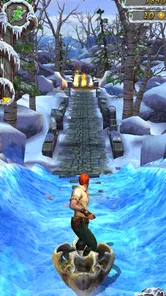
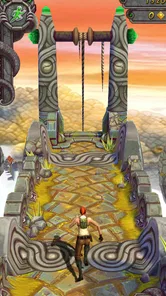
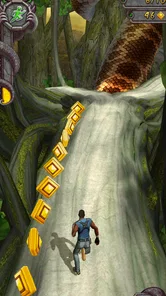
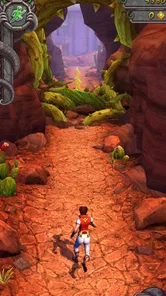
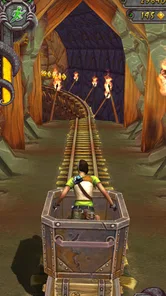
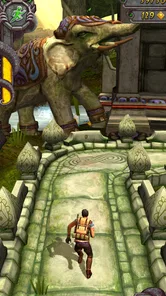
The main action is visually direct: the runner moves forward, and the path ahead gives you the cues you need to choose a turn, jump, or slide. I find that clarity helpful when I return for a quick session after a break; there is no complicated menu of moves to relearn. The changing jungle and mine scenery gives the route a sense of place, although the scenery is also moving quickly, so this is not a game I would pick when I want to study detailed visuals at a relaxed pace.
Temple Run 2 is a familiar name in mobile gaming, with over a billion installs and an average rating of 4.1 from around 10 million ratings. Those figures suggest a broad audience, but they do not mean every player will find the format comfortable. The game is free to download, carries an Everyone 10+ age rating, and includes optional in-app purchases priced from $0.99 to $49.99 per item. I would treat spending as something to manage deliberately, especially if a child is playing, rather than assume that a free download means every part of the experience is cost-free.
Reads About Temple Run 2: Endless Escape
Running, reacting, and deciding if it fits
From the moment I launched Temple Run 2, I was hooked. The game wastes no time throwing you into the action. One second you're admiring the lush graphics, and the next, you're sprinting away from a monstrous ape. The objective is simple: run as far as you can while collecting coins and avoiding obstacles. But let me tell you, it’s not as easy as it sounds.
Gameplay That Keeps You on Your Toes
The controls in Temple Run 2 are intuitive, meaning you'll pick them up quicker than you can say "run for your life!" Swiping left and right turns your character, while swiping up and down makes them jump or slide. It’s all about timing, my friends. The faster you react, the further you'll go. And don’t forget those power-ups; they’re lifesavers when the going gets tough.
Motor and sensory demands
Those swipes are simple to explain but not always easy to perform consistently. Turns, jumps, and slides arrive while the character is moving, so a small delay or a gesture that does not register can end a run. In my view, this makes the game less suitable for someone who finds rapid touch input tiring, has difficulty with precise swipes, or wants a slow, forgiving pace. It is also a poor fit when you cannot comfortably hold the phone steady and use the screen at the same time.
The sound and motion are part of the excitement, but they can make a short session feel intense rather than calming. I would keep the volume at a level that suits the setting and take a break if the rushing visuals become uncomfortable. The game’s fast rhythm is a core part of its identity, not a mode I would expect to switch off; players looking for quiet, low-stimulation play may prefer a slower puzzle or turn-based game.
More From Our News Desk

Weather by Xiaomi Review: Clear at a Glance, Less Clear Up Close

X Under Pressure: Can It Recover When Posting Goes Wrong?

Clash of Clans Is Won Between the Battles

Android Auto Makes the Case for Quieter Car Software

MobiOffice: Transforming Mobile Productivity with Seamless Integration

EA SPORTS FC™ Mobile Soccer: Redefining Mobile Sports Gaming
Have I mentioned the different environments? One minute you're dashing through a jungle, and the next, you're navigating treacherous mines. Each setting offers its own unique challenges and keeps things fresh. You’ll never get bored because you never know what’s around the next corner.
Graphics and Sound That Elevate the Experience
Let’s talk about the visuals. Stunning is an understatement. The developers have outdone themselves with the detailed environments and fluid animations. It’s a feast for the eyes, and the sound design is just as impressive. The rush of wind in your ears and the distant roar of the beast chasing you add a layer of immersion that pulls you in deeper.
Where it fits into an ordinary day
I can see this working well while waiting for a friend, sitting through a short commute as a passenger, or taking a quick break between tasks. A run has a clear start and finish, so it is easy to pick up without committing to a long story or remembering a complicated plot. I would not play while walking through a crowded place or doing anything that needs my attention: the game rewards watching the path, and divided attention makes its quick decisions harder.
A realistic use for me is a few attempts while waiting for a delayed appointment. I can start immediately, play until a run ends, then put the phone away without losing my place in a story. I would keep the phone in one hand only if I can hold it securely and swipe without straining; otherwise, sitting down and using both hands to steady the device is the more sensible choice. That small adjustment can make the controls feel less awkward, but it does not remove the need for quick, repeated gestures.
Compared with other mobile action games, this is a better match for someone who wants immediate reflex play than for someone seeking exploration, narrative choices, or precise manual control. Its swipes make the basic idea approachable, but they also leave little room to recover when a gesture is late. If you prefer a more deliberate pace, a puzzle game is likely a better everyday choice; if you want an action game that starts quickly and tests timing, this runner has a clearer fit.
That comparison matters if you are choosing a game for a particular mood. Temple Run 2 does not ask me to plan a route through a large world or master a long sequence of buttons; it asks me to notice the next hazard and respond. That makes it easier to sample than a story-driven action game, but less satisfying for players who want a strong sense of progression through a campaign. The choice is not simply whether you like action: it is whether rapid, repeated reactions are the kind of challenge you want from a phone game.
Small choices that make runs more useful
One practical way to approach a new run is to focus on surviving the route before trying to collect every coin. Chasing a coin line can pull your attention away from an upcoming turn or obstacle, and a longer run gives you more chances to learn how the path signals its next move. I also find it useful to treat a failed attempt as practice with the timing, rather than immediately repeating the same risky choice just to improve a score.
Another useful habit is to keep your eyes slightly ahead of the character instead of following the runner alone. The action moves quickly, but reading the path early gives you a moment to prepare the next swipe rather than reacting only when an obstacle is already close. This does not make every run predictable, and it takes attention, but it can help separate a deliberate attempt from frantic swiping. If the screen is hard to see in bright surroundings, I would save the run for a place where I can comfortably make out the route rather than compensate by holding the phone closer or playing while distracted.
The environments keep a run from feeling visually identical, but the basic task remains familiar: react to the next obstacle and keep moving. That consistency is convenient when I only have a minute, yet it can become repetitive if I want new goals, a narrative, or a markedly different play style. The game’s broad reach and its roughly 385,000 written reviews reflect its long-running popularity, but popularity alone cannot make a reflex-based format suit everyone.
Choosing a comfortable way to play
Screen readability is not only about whether I can see the runner. I also need enough time to notice the shape of the route and distinguish an upcoming hazard from the scenery, then translate that cue into the right swipe. When I am tired, hurried, or looking at the phone from an awkward angle, that sequence feels less forgiving. I get a better sense of the game when I sit comfortably, keep the screen in a stable position, and give the path my attention instead of trying to fit a run into every spare second.
That makes the game a better choice for a quiet wait than for a noisy, crowded commute where I may be jostled or have to keep looking up. A passenger with a secure seat can enjoy the same short-session convenience, while someone standing on a moving bus may find the combination of balancing a phone and swiping needlessly awkward. If motion on screen tends to bother you, a very brief trial in a comfortable place is more useful than pushing through a long session just because the game is easy to start.
Why You Should Download It
If you’re searching for a game that offers endless fun and a bit of a challenge, look no further. Temple Run 2 is perfect for short bursts of play or long sessions when you’re trying to beat your high score. Plus, it’s free, so there’s really no reason not to give it a try. Just be warned, once you start playing, you might find it hard to stop.
For a first try, I would play a few runs somewhere calm and see whether the swipe timing feels natural before settling into longer sessions. The current version is 1.121.0, and the game runs on Android 5.1 or later. That makes it an option for a range of Android devices, though a compatible operating system does not by itself tell you how comfortable the controls or visuals will feel on your particular screen.
If you are deciding whether it suits a younger player, I would look beyond the age label and consider the way they handle fast visual action and optional spending. The Everyone 10+ rating is a useful starting point, while the purchase range makes it worth agreeing on clear limits before handing over a device. Since the game is free to download, trying a short session together can help a parent or caregiver judge the pace and the touch controls before it becomes a regular pastime.
Managing a quick session
One small but useful distinction is that a quick game is not automatically a low-effort game. A single run may be brief, yet the repeated concentration can feel demanding if I keep restarting immediately after each mistake. I prefer to decide in advance whether I am playing for a handful of attempts or settling in to practise. That boundary helps the game stay a welcome pause rather than a habit that stretches a short wait into a much longer break.
For a child or anyone sharing a device, I would also make the spending conversation separate from the question of whether the game is free to install. Optional purchases can be tempting when a player is focused on continuing or improving, so a clear household rule is more practical than relying on a quick explanation at the moment a purchase appears. The game can still be enjoyed as a reflex challenge without treating spending as part of the basic reason to try it.
A fair fit, not a universal one
I recommend it to players who enjoy quick reflex challenges, like chasing a personal best, and are comfortable making repeated swipes on a moving screen. I would suggest skipping it if you need slower input, dislike sudden visual motion, or want a game built around calm exploration. For younger players, the age rating and purchase options are worth discussing with a parent or caregiver before play.
For anyone unsure about the controls, the most useful test is not whether the first run goes well, but whether the gestures feel comfortable after several attempts. A missed swipe can be frustrating, especially when you feel you saw the obstacle in time, so I would not treat a low early score as proof that you are bad at the game. Still, if repeated input causes discomfort or the movement feels unpleasant, there is little reason to push through: a slower game can be a better fit rather than a compromise.
In conclusion, Temple Run 2 delivers an exhilarating experience that’s both familiar and refreshing. Whether you’re a seasoned gamer or just looking for something to pass the time, this game is sure to keep you entertained. So go ahead, download it, and unleash your inner adventurer!
My inclusive verdict
What I value most is that the core idea is easy to understand without making the physical challenge disappear. The route communicates the immediate task clearly, and a player can begin without studying a large set of rules. That is a genuine point in its favour for people who want an uncomplicated entry into mobile action. At the same time, clarity is not the same as accessibility for every ability: the repeated, time-sensitive swipes remain central, and the busy movement may not suit every sensory preference.
I would choose it for someone who enjoys quick visual decisions, has comfortable touch control, and wants an action game that can be sampled between everyday tasks. I would choose something slower for a player who needs more time to process what is on screen, wants to play without sustained hand movement, or is looking for a calmer experience. For me, the best recommendation is conditional: try a few runs in a settled setting, pay attention to comfort as well as score, and keep playing only if the pace feels enjoyable rather than like a test to endure.
Temple Run 2: Endless Escape Frequently Asked Questions
Can I play Temple Run 2 in portrait or landscape orientation?
Temple Run 2 is designed around mobile touch and tilt controls, so the way you hold your phone or tablet can affect how comfortable steering feels. Before settling into a run, try the orientation that lets you swipe and tilt naturally without blocking your view. A comfortable grip matters because quick turns and obstacles require attention throughout each attempt.
Does Temple Run 2 require quick reactions?
Yes. Reacting quickly is part of the central challenge: you need to respond to turns and obstacles as they appear while keeping your runner moving. The basic idea is easy to grasp, but longer runs can ask more of your timing and attention. If you prefer slower, less reflex-focused games, the pace may take some getting used to.
Can children play Temple Run 2?
Temple Run 2 carries an Everyone 10+ age rating, which gives parents a useful starting point when deciding whether it is suitable for a child. The gameplay focuses on a fast chase, obstacles, and quick decisions. Parents should also consider the optional in-app purchases and review purchase settings if a child will be using the device.
Does Temple Run 2 include optional purchases?
Yes. Temple Run 2 is free to download, with optional in-app purchases available for players who want to buy items. You can enjoy the core running challenge without buying anything, but purchase options may appear during play. If you share your device with a child or want to avoid accidental spending, review the device’s purchase controls before playing.
Can I play Temple Run 2 with one hand?
Temple Run 2 uses swipes and device tilt, so whether one-handed play feels comfortable depends on your device size and how you hold it. Swiping and tilting may be easier with two hands for some players, particularly during fast sections. Try a short run in a safe, stationary setting first to see whether you can control the game comfortably.
Pros
- Stunning graphics and environments
- Smooth and responsive controls
- Variety of power-ups and achievements
- Challenging and engaging gameplay
- Regular updates with new content
Cons
- Can be addictive and time-consuming
- Occasional in-app purchase prompts
- Requires steady internet connection
- Repetitive gameplay after a while
- Limited character customization options