Words of Wonders: Crossword
- 38.88K
- 4.9
- Installs
- 100.00M
- Price
- Free

Screenshots
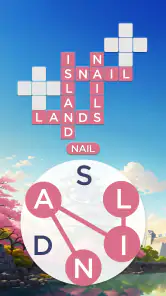
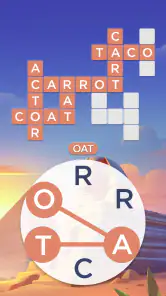
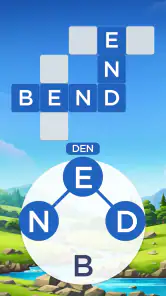
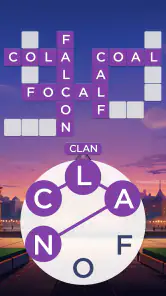
Analysis by Reviewed
I like word games best when they give me a clear little goal instead of asking me to plan a long session, and that is where Words of Wonders: Crossword works for me. I can look at the letter wheel, try combinations, and see how they fit into a crossword grid without needing to learn complicated rules first. The setting gives each batch of puzzles a sense of place, while the core activity stays familiar: spot a word, connect its letters, and work out what else the grid needs.
A satisfying first step into each puzzle
The early appeal is the quick feedback. A word either belongs in the grid or it does not, so I can make progress through small attempts rather than needing to solve everything at once. That makes the game easy to pick up during a short break, especially if I enjoy anagrams and crossword clues but do not always have time for a newspaper puzzle.
My useful habit is to check the letter set for short words before chasing a long one. Filling a few spaces can reveal the pattern of the remaining answers and make a jumble of letters feel more manageable. I also try rearranging the same letters in different ways instead of repeatedly tapping the most obvious word; the grid often gives a better clue than the letter wheel alone.
Reads About Words of Wonders: Crossword
Small goals that make a session easy to start
What works particularly well for me is that I do not need to set aside a whole block of time or remember a complicated objective. I can begin with one empty grid, test a few combinations, and decide whether I want to continue once I see how much of it has opened up. That makes the game a sensible choice for a quiet pause between errands, rather than something that demands my attention for a long stretch.
There is also a useful difference between finding a word and understanding where it belongs. A word may be familiar, but the crossing spaces can make its placement clearer or rule it out. When I feel stuck, I stop treating the wheel as a vocabulary test and look at the grid as a set of partial patterns. That shift often produces a better next move than staring at the letters and hoping a longer answer appears.
Discover the World Through Words
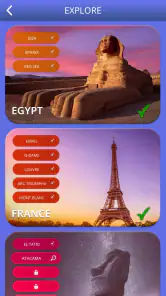
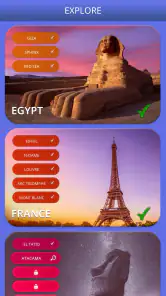
One of the first things that struck me about Words of Wonders: Crossword is its unique approach to word puzzles. This isn't just your average crossword game. With each level, you're taken on a journey to some of the most stunning wonders of the world. From the majestic Eiffel Tower to the ancient pyramids of Egypt, each new location brings its own set of challenges and words to uncover. It's like a virtual tour mixed with a mental workout!
Gameplay That Keeps You Hooked
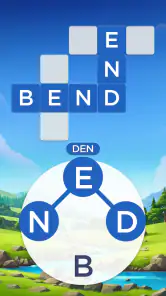
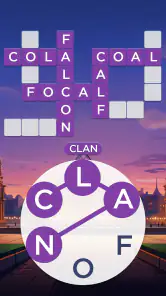
The gameplay is pretty straightforward, yet incredibly engaging. You're given a set of letters and your task is to connect them to form words that fit into the crossword grid. Sounds simple, right? Well, as you progress, the puzzles become more intricate and really push your cognitive limits. And let me tell you, the satisfaction of completing a tricky level is second to none!
More From Our News Desk

Clash of Clans Is Won Between the Battles

Android Auto Makes the Case for Quieter Car Software

MobiOffice: Transforming Mobile Productivity with Seamless Integration

EA SPORTS FC™ Mobile Soccer: Redefining Mobile Sports Gaming

How Microsoft OneDrive Became a Mobile Productivity Giant

How Google Translate Breaks Language Barriers Effortlessly
What I really appreciate about this game is the gradual increase in difficulty. It starts off easy to get you hooked, and gradually introduces more complex words and longer puzzles. This keeps things fresh and ensures you're always on your toes.
How I read progress and difficulty
For me, progress is easiest to judge by what has changed in the grid, not by how long I have played. A few filled spaces can expose the shape of an answer that looked impossible at first. That gives the puzzle a practical rhythm: attempt a word, use the result to narrow the possibilities, and then return to the answers that remain uncertain.
The rising challenge is welcome when I am alert, but it is not automatically better for every mood. When a puzzle asks me to keep turning the same letters over in my head, I sometimes put the phone down and return later rather than use a hint immediately. A short break can be more satisfying than forcing a solution, especially because the game is built around self-paced solving rather than a contest against another player.
Visuals, hints, and a useful trade-off
Visually, the app is a treat. The graphics are vibrant and beautifully designed, capturing the essence of each wonder you explore. It's not just about the words; it's about the whole experience. The interface is intuitive and user-friendly, making navigation a breeze. Whether you're a tech-savvy millennial or someone who's not too familiar with smartphones, you'll find it easy to get the hang of it.
Another cool feature is the hint system. Got stuck on a particularly tricky word? No worries! You can use hints to help you out without feeling like you're cheating. It's a nice touch that ensures the game remains enjoyable and not frustrating.
Choosing how much help to use
I treat hints as a way to keep a session moving, not as the default answer to every snag. If I am close to finishing a grid, using one can be a fair trade when I would otherwise abandon the puzzle; if I use help too quickly, though, I lose the pleasure of noticing a word myself. A practical approach is to pause, scan the empty spaces, and test overlooked letter orders before spending a hint.
That small choice shapes the challenge more than it might seem. Someone playing mainly to relax can lean on help when a level stalls, while a vocabulary-focused player may prefer to sit with the grid longer. The game suits both moods, but the sense of achievement is strongest when I use a hint only after making a genuine attempt.
Everyday play without turning it into a chore
A realistic way I use this sort of puzzle is to open it while waiting for a delayed appointment or sitting through a quiet part of a commute, solve a handful of spaces, and put it away when I reach my stop. The grid gives me a natural stopping point: I can leave a few blanks rather than feeling obliged to finish the whole session. At home, it also works as a low-key alternative to scrolling when I want something that asks for a little attention but does not require a setup or a long explanation.
For families, the simple letter-connecting rule makes it easy to take turns suggesting words, although I would still keep purchases in mind when a child is using the device. For solo play, the strongest fit is someone who enjoys spotting familiar words and testing possibilities at their own pace. If you mainly want a social contest, a timed challenge, or the richer clue-solving of a traditional crossword, I would choose a different kind of word game instead.
Where it fits among word games
Compared with a standard crossword, this game asks me to build answers from a shared set of letters rather than solve every entry from a written clue. That makes it more approachable when I want a quick puzzle, though it offers less of the clue-solving variety that crossword fans may prefer. Compared with a simple anagram game, the grid adds a useful second layer: each answer helps narrow down what can fit elsewhere.
It is a good match for casual players, families looking for an easy-to-understand word activity, and anyone who likes bite-sized puzzles with a travel-inspired backdrop. I would point a competitive word-game fan toward a more demanding option if they want head-to-head play or a strict test of specialist vocabulary. This one is at its best when the goal is a calm, self-paced session rather than a contest.
Progress that feels steady, with a limit
Completing grids gives me a clear sense of forward movement, and the changing locations help that progress feel less repetitive than solving an identical layout over and over. Still, the basic action remains connecting letters into words, so long sessions can begin to feel samey if I am not in the mood for that loop. I find it works better in short bursts than as an all-evening game.
For example, I might open it while waiting for an appointment, finish part of a puzzle, and return to it when I have another quiet moment. The small goal makes that routine easy to maintain without turning the game into a task. If I am tired or distracted, I can stop after a few answers; if I have more focus, I can keep working through the grid.
What keeps the progression appealing
The locations give the sequence of puzzles a visible sense of movement, while the changing grids provide the more immediate reward. I find that combination more effective than relying on a completion counter alone: one part gives me a broad reason to continue, and the other gives me a concrete problem to solve right now. It is a gentle form of motivation, not a reason to rush through every level.
The trade-off is that the scenery cannot completely change the underlying activity. If I have already spent a long time finding words from a wheel, a new backdrop may not be enough to make another grid feel fresh. I would recommend taking the game in small sessions and treating the next puzzle as an invitation rather than a daily obligation. That keeps its steady progression pleasant instead of making it feel like a checklist.
Who should give it a try
Fugo Games made this free word game for a broad audience: it is rated for Everyone, and the current version is 5.2.13, with Android support beginning at version 7.0. Its average rating is 4.9 from around 5.6 million ratings, and it has been installed over 100 million times. Those figures suggest broad appeal, though they cannot tell me whether a particular player will enjoy the repeated letter-and-grid format.
The game is free to start, with optional in-app purchases ranging from $0.99 to $99.99 per item. I would keep that in mind if I prefer games with no purchase prompts or if I am setting up a device for a child; the Everyone rating is about content suitability, not a promise that spending is impossible. The game was released on April 10, 2018, and its longevity is easy to understand: the rules are simple to grasp, and each completed grid offers another small target.
Who may prefer another kind of puzzle
I would skip this one if the part of word games I enjoy most is interpreting clever clues, learning obscure vocabulary, or competing directly with other people. Its letter wheel makes answers accessible, but that accessibility also means the main challenge comes from rearranging and fitting words rather than wrestling with detailed clues. Players who want a more demanding crossword experience may find that distinction important after the initial levels.
It is also not my first choice when I want a game that constantly changes its mechanics. The familiar loop is the point, and it is easy to understand, but it can become repetitive if I play for too long at once. I see it as a good companion for short, low-pressure breaks—not a replacement for every kind of word puzzle.
Final Thoughts
All in all, Words of Wonders: Crossword is a fantastic game that combines education, entertainment, and exploration in a seamless package. It's perfect for those moments when you want to unwind, yet keep your brain active. Whether you're on a long commute, waiting for an appointment, or just chilling at home, this app is a great companion.
So, if you're ready to embark on a global adventure from the comfort of your couch, give this game a try. It's free to download and offers in-app purchases for those who want to enhance their experience. Happy puzzling!
Words of Wonders: Crossword Frequently Asked Questions
Can I play Words of Wonders: Crossword on a tablet as well as a phone?
Words of Wonders: Crossword is available for Android and iOS devices, and its letter-connecting puzzle format is suited to playing on a compatible phone or tablet. Before downloading, check that your device meets the operating system requirement for its platform. The game’s main activity—forming words and completing crossword grids—works as a casual puzzle experience on either type of device.
Is Words of Wonders: Crossword free of charge?
Yes. Words of Wonders: Crossword is free to download, and you can try its letter-based puzzles without paying an upfront price. Optional in-app purchases are available, but buying them is not required to enjoy the central gameplay. If you share your device with children or other family members, reviewing purchase controls can help avoid accidental spending.
Can I play Words of Wonders: Crossword with family members?
The game’s crossword-style word puzzles can appeal to different ages and make for a casual activity to enjoy individually or discuss together. Players connect letters and look for words that fit a grid, with the challenge increasing over time. Its Everyone content rating also makes it broadly suitable, though younger players may benefit from an adult’s help with device and purchase settings.
Does Words of Wonders: Crossword focus more on puzzles or on a story?
Words of Wonders: Crossword focuses on solving word puzzles rather than following a long narrative. You connect letters to make words and complete crossword grids, with scenic settings inspired by wonders of the world adding atmosphere. If you prefer a straightforward game that lets you concentrate on finding words instead of keeping up with a complicated plot, this format may suit you.
Can I adjust the difficulty in Words of Wonders: Crossword?
The game’s puzzles become more challenging as you progress, which lets you begin with a gentler introduction and encounter tougher word searches later. If you are choosing a game for someone with a particular skill level, keep in mind that the challenge develops through play rather than being described as a separate difficulty setting. The core activity remains connecting letters to complete crossword grids.
Pros
- Engaging word puzzles boost vocabulary.
- Beautiful graphics enhance user experience.
- Regular updates with new challenges.
- Offline mode available for travel use.
- Variety of languages supported.
Cons
- Ads can be intrusive during gameplay.
- Some levels feel repetitively similar.
- In-app purchases can be pricey.
- Occasional glitches in offline mode.
- Limited hints without purchase.
- Category
- Word
- Version
- 5.2.13