Ludo King®
- 12.87K
- 4.2
- Installs
- 1.00B
- Price
- Free

Screenshots







Analysis by Reviewed
The real test for a casual board game is not whether it feels familiar on the first evening, but whether it still earns a place on your phone once the novelty wears off. Ludo King® has a clear advantage there: most people can understand the basic idea quickly, and a game can fill an awkward stretch of waiting without asking you to learn a complicated system. I find it most convincing as a convenient way to share a familiar pastime, rather than as a game that constantly reinvents itself.
A low-friction first week
Ludo is easy to explain around a table, and that carries over well to a phone. A new player can usually follow the dice, tokens and race toward home after seeing a turn or two. That makes the game handy when relatives have different levels of gaming experience: you do not have to persuade everyone to study a tutorial before they can take part.
As a board game from Gametion, it is free to download. Optional in-app purchases range from $0.49 to $369.09 per item, so I would pay attention to purchase prompts if a child will be using the device. The game is rated for Everyone and requires Android 7.0 or later, making it a practical option for people using compatible Android devices.
Reads About Ludo King®
For a first-week routine, I would keep expectations modest: try a match during a lunch break, while waiting for a ride, or when a family visit has a quiet moment. It is less suited to someone looking for a dependable test of strategy, because dice luck can overturn a good position. That swing is part of Ludo’s familiar appeal, but it can frustrate players who want outcomes to reflect planning above all else.
How the familiar board fits everyday play
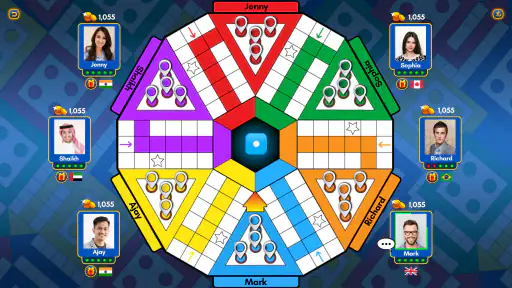
One of the best things about Ludo King® is how it manages to capture the essence of the original board game while adding a sprinkle of modern flair. Immediately upon launching the app, you’re greeted with a vibrant interface that’s both inviting and easy to navigate. The app supports multiple languages, which is a neat touch, allowing players from different regions to engage seamlessly. You can choose to play against the computer, challenge friends in a private game, or even go up against players from around the world in real-time multiplayer mode. It’s like having a board game café in your pocket!
Gameplay and familiar choices
The gameplay is straightforward and mirrors the traditional Ludo rules, which is great because nobody likes learning new rules for a classic game! You roll the dice and move your tokens around the board, aiming to get all four of your pieces to the home column before your opponents. The thrill of sending an opponent’s token back to the start is just as satisfying digitally as it is on a physical board.
Beyond the basic game, Ludo King® spices things up with a few interesting twists. There are various themes available, which are not just visually appealing but also add an extra layer of fun. From a classic look to more exotic themes, you can switch things up depending on your mood. The app also includes a leaderboard feature, so you can compete for bragging rights with friends and see where you stand in the global rankings.
More From Our News Desk

Weather by Xiaomi Review: Clear at a Glance, Less Clear Up Close

X Under Pressure: Can It Recover When Posting Goes Wrong?

Clash of Clans Is Won Between the Battles

Android Auto Makes the Case for Quieter Car Software

MobiOffice: Transforming Mobile Productivity with Seamless Integration

EA SPORTS FC™ Mobile Soccer: Redefining Mobile Sports Gaming
Those options answer a useful practical question: what if your usual group is not available? The computer gives you a solo way to play, while online matches let you find opponents beyond the people in the room. I would use the computer for a casual practice round, not as a substitute for friends; the social tension of a close finish is a big part of what makes this particular board game enjoyable.
Choosing a mode for the company
For a family or friend group, I’d decide who is joining and whether the goal is relaxed company or a more competitive match before choosing a play option. A private game makes sense when you want familiar faces around the board; online multiplayer is a better fit when nobody nearby is free. Playing against the computer offers a solo alternative, although it cannot replace the teasing and conversation that make a physical board game night feel personal.
One useful habit is to agree on how long everyone wants to play before starting. Ludo rounds can stretch when players are close to finishing, and a quick phone session may become less convenient if someone has to leave midway. If the group has different comfort levels with screens or online play, a real board and dice may be the simpler choice. The app’s variety helps with access, but it does not remove the social negotiation that makes a shared game enjoyable.
A realistic example is a family waiting together before dinner. One person can suggest a private match, and everyone can decide whether they have time for a full round before it begins. If someone is likely to be interrupted, it is better to choose another activity than to start a game they may have to abandon. For a quick, low-pressure gap, though, having the board on a phone avoids finding and setting up a physical box.
Social play, with a few caveats
In a world filled with apps vying for our attention, Ludo King® stands out for its simple yet engaging gameplay. It’s accessible to everyone, from young kids to grandparents, making it a perfect family game. What’s impressive is the app’s ability to foster a sense of community. You can chat with other players during a game, making it a social experience beyond just moving tokens around.
That social layer is also a matter of preference. Chat can make an online match feel less anonymous, but anyone who wants a quiet, no-interruption game may find it distracting. I’d treat the leaderboard as a light extra rather than the main reason to return: it gives competitive players something to check, but the basic appeal remains the turn-by-turn decisions and the people you play with.
When playing with people you know, it helps to agree on a simple approach to chat before the match. Some groups enjoy the extra conversation; others would rather focus on turns and keep the game moving. Online, I would not assume that strangers will provide the same friendly atmosphere as relatives or friends. If you want a calm solo distraction, the computer option is the more comfortable starting point.
What can keep it in the rotation?
Over time, the value depends on whether you have people to play with or enjoy dipping into familiar matches on your own. Themes can freshen the board’s appearance, and the computer option gives the game a use when friends are unavailable. Still, the core rules stay the same, so players who tire quickly of repeated dice rolls may not find enough variety to make it a lasting habit. Compared with other board-game apps, this is a straightforward digital Ludo option; if you want deeper strategy, a different kind of board game will suit you better.
There is little upkeep involved in the way I’d use it: keep the app available, choose a mode, and return when a game fits the moment. The bigger maintenance burden is social rather than technical—organizing a group and agreeing on a time. With over a billion installs, it is a widely used choice, and its 4.2 average from around 10 million ratings suggests plenty of players have tried it. Those figures are context, not a promise that every online match or session will suit you.
For month-to-month use, I’d keep it if it becomes the easy answer to “what can we play together?”—especially for relatives who already know Ludo and are not in the same room. I’d skip it if I wanted a fresh campaign, a game built around careful planning, or a quiet pastime with no social elements. Its main trade-off is clear: familiar rules make it welcoming, but also limit how surprising repeated play can feel.
One way to make the game feel less repetitive is to change the company or the setting, rather than expecting a new ruleset from each return. A family match, a private game with a friend, and a brief solo round can serve different moods even though the board remains familiar. Themes may help the screen feel fresh, but I would not count on appearance alone to create a lasting reason to play.
Keeping expectations and spending sensible
Moreover, the app is free to download, and while it offers in-app purchases, they’re not necessary to enjoy the game fully. The developers have done a commendable job of ensuring that the game remains fair and entertaining without pushing constant purchase prompts.
It is still sensible to treat purchase choices as a separate decision from whether the basic game suits you. The listed range runs from $0.49 to $369.09 per item, a wide span that makes checking each prompt worthwhile, particularly on a shared device. I would let a child know not to approve a purchase without an adult, and I would avoid buying anything simply because it appears during a casual session.
The maintenance burden is otherwise modest for this kind of use: the main effort is remembering to bring the group together and setting aside enough time for a round. If people often cancel or prefer not to play on a screen, a physical Ludo set may be the better household choice. If nobody is available, the computer provides a fallback, but it does not turn the app into a deep solo strategy game.
Who should keep it—and who can pass
I’d recommend it to people who already enjoy Ludo, families looking for a familiar shared game, and anyone who wants an uncomplicated option for small pockets of free time. Its broad audience and multiple ways to play make it easy to offer to a mixed group without asking everyone to adopt a new hobby. The game is less compelling for players who want long-term progression, extensive strategic decisions, or a fresh challenge every time they open an app.
Against a physical board, the phone version wins on convenience: no pieces to set out, and friends can play remotely. The physical version wins when the point is being together without screens, or when the group likes handling the dice and tokens. Against more strategic board-game apps, Ludo King is easier to pick up but offers less room for carefully planned play. Choosing between them comes down to whether you value familiarity and access or depth and variety.
A lasting place for a familiar game
All in all, if you’re looking for a game that combines nostalgia, strategy, and a dash of modern connectivity, Ludo King® is a must-have on your device. It brings the joy of a classic board game into the digital age, providing hours of fun for both solo players and groups alike. So go ahead, download it, and let the good times roll!
My more measured recommendation is to keep it if you can picture a real occasion for it: a family visit, a remote match with a friend, or a spare stretch of time when a familiar dice game sounds appealing. Its strongest lasting quality is not constant novelty, but how easily it brings people into a game they already understand. If that kind of convenience matters to you, it can earn its space; if you need regular new mechanics to stay interested, the initial familiarity may be its limit.
Ludo King® Frequently Asked Questions
Does Ludo King® have a tutorial or explain the rules to new players?
Ludo King® is based on the familiar Ludo board game, so players who already know the rules can get started easily. Its basic play revolves around rolling a die and moving tokens around the board. If you are new to Ludo, learning the turn-by-turn flow as you play can be approachable, and playing with someone familiar with the game may help.
Can I change the appearance of the board or tokens in Ludo King®?
Ludo King® offers themes and other game enhancements through optional in-app purchases, which can provide ways to customize the experience. The main appeal remains the traditional Ludo board and its dice-based turns, so customization is not essential to understanding or playing the game. Review purchase settings before letting children explore any optional items.
Does Ludo King® let me play against computer opponents?
Yes. Ludo King® offers offline play against computer opponents, which can be useful when you want a game without connecting to other people online. It also has local multiplayer for people sharing a device and online multiplayer for remote play. These options make it possible to choose a style that fits whether you are playing alone or with others.
Can several people play Ludo King® on one phone or tablet?
Ludo King® includes a local multiplayer option, so people together can play on the same device. This can suit a family gathering or a casual game with friends when everyone is nearby. Because the game follows familiar, turn-based Ludo rules, players can take turns using one phone or tablet rather than needing separate devices for local play.
Does Ludo King® offer more than one way to play with other people?
Ludo King® offers both local and online multiplayer. Local play is intended for people together, while online multiplayer lets players connect remotely. The game also supports cross-platform multiplayer, so it can be a practical choice for groups using Android and iOS devices. The available option depends on how your group wants to connect and play.
Pros
- Engaging multiplayer mode
- Cross-platform compatibility
- Offline gameplay available
- User-friendly interface
- Frequent updates and events
Cons
- Contains ads
- In-app purchases needed
- Occasional connectivity issues
- Limited game variations
- High battery consumption
- Category
- Board
- Version
- Varies with device