Piano Game: Classic Music Song
- 2.51K
- 4.0
- Installs
- 100.00M
- Price
- Free

Screenshots

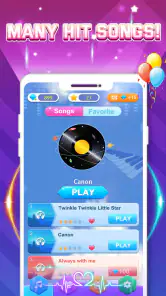
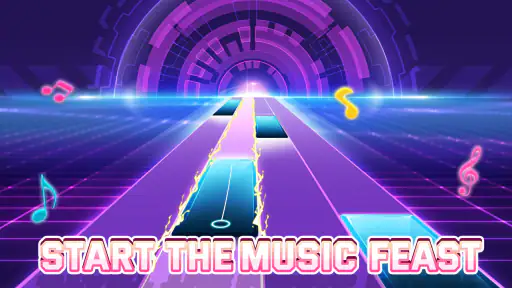


Analysis by Reviewed
Have you ever dreamt of playing the piano like a maestro, but the thought of reading sheet music gives you chills? Well, let me introduce you to the magical world of Piano Game: Classic Music Song. It's like having a piano in your pocket, minus the heavy lifting!
That pocket-sized appeal is also the first thing I would weigh against the way I actually use a music game. A few quick rounds can fit into a quiet break, while a longer session makes more sense when I can focus on the screen and its moving prompts. It is an approachable kind of music play, not a substitute for lessons or a way to practise piano technique.
What the screen asks of you
Before I settle into a session, I look at how much attention the interface demands. A tile game makes its instructions visible through the action itself: follow the prompts as they move and tap at the right moment. That is easier to grasp than an arrangement of menus and musical notation, especially if I only want to try a song without studying piano first. The straightforward concept is a strength, but it also means the screen is the main guide. I need to be able to see the moving targets clearly and keep my attention on them.
For someone who prefers clear, direct interactions, that can be more approachable than a traditional piano app with lessons, settings, and notation to work through. I would still take a moment to explore the opening screens at my own pace rather than assume that every control will be obvious immediately. If I am unsure where a choice leads, I can pause before starting another round instead of tapping quickly through menus. A simple game can feel welcoming without being equally easy for every person to use.
Getting Started with Your Musical Journey
Downloading Piano Game: Classic Music Song is a breeze. Available on both Android and iOS, you can easily find it on the app store and get ready to start your musical adventure. Once you launch the app, you're greeted with a clean, intuitive interface that even a non-techie like me can navigate without breaking a sweat.
It is a free music game from Dream Tiles Piano Game Studio, with optional in-app purchases priced from $0.99 to $3.99 per item. The game is rated for Everyone, and its current version is 3.1.8. Its 4.0 average from around 315,000 ratings and more than 100 million installs suggest it has found a broad audience, though popularity alone does not tell me whether its tap-based play will suit every player.
Gameplay and Features
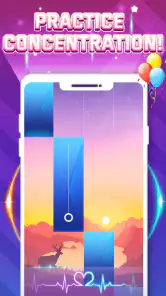
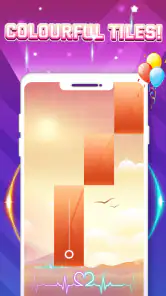
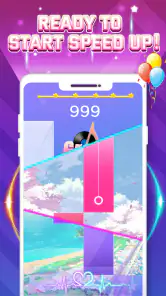
This app isn't just about tapping tiles; it's about immersing yourself in the world of classical music. From the moment you start, you're presented with a diverse selection of songs ranging from Bach to Mozart. The gameplay is straightforward – tap the black tiles as they slide down the screen, and voila! You're playing Beethoven's Fifth Symphony!
More From Our News Desk

Weather by Xiaomi Review: Clear at a Glance, Less Clear Up Close

X Under Pressure: Can It Recover When Posting Goes Wrong?

Clash of Clans Is Won Between the Battles

Android Auto Makes the Case for Quieter Car Software

MobiOffice: Transforming Mobile Productivity with Seamless Integration

EA SPORTS FC™ Mobile Soccer: Redefining Mobile Sports Gaming
One of the standout features is the variety of piano sounds. You can switch from a grand piano to a keyboard with just a tap. It’s like having a mini orchestra at your fingertips. Plus, the game regularly updates its song library, so there's always something new to learn and master.
For a more comfortable session, I would first try the game in a quiet moment and pay attention to whether the pace and screen movement feel manageable. If I am playing in a noisy place, relying on sound alone may be less practical; if I am tired or distracted, fast prompts can be harder to follow. Those are useful checks before deciding whether to make it part of a daily routine, rather than assuming one setting works for everyone.
Keeping the interaction comfortable
The main physical demand is repeated, timely tapping. I find it helpful to approach a new song as a test of whether its rhythm and pace suit me, rather than treating a miss as a reason to push harder. If I have limited dexterity, hand fatigue, or difficulty making quick, precise touches, I should expect the core action to be demanding. A larger device may help me see the tiles and place my finger more comfortably, but it cannot remove the need to tap accurately.
Sound and motion are part of the experience, so the best setting depends on the person and the moment. I would lower the volume if the music feels intrusive, and stop if the moving prompts become uncomfortable or tiring. Playing without focusing on the audio may be possible for a visual rhythm challenge, but I would not assume that this is a complete substitute for hearing the musical cues. People who are sensitive to rapid screen movement, or who need a slower and more adjustable interaction, may be better served by a calmer music activity.
Why You'll Love It
If you're anything like me, the thrill of mastering a challenging piece keeps you coming back for more. The app rewards persistence, as you unlock new songs and levels the more you play. Plus, the leaderboard feature adds a competitive edge, perfect for those who thrive on friendly rivalry.
Another thing I appreciate is the app's ability to adjust the difficulty level. Whether you're a beginner or a seasoned pianist, you can tailor the experience to suit your skill level. And let me tell you, nailing that tricky section of "Fur Elise" feels like winning a mini Grammy!
A practical way to use that range is to treat a short session as a reaction-and-focus break, then stop when the game starts feeling rushed instead of enjoyable. A leaderboard can make replaying a passage motivating, but it may also shift attention from the music to scores; I would use it when friendly competition sounds fun and ignore it when I want a calmer solo activity. If the goal is to learn real keyboard fingering or read notation, a lesson app or an actual instrument is the better tool.
Making a short session work
One small habit that makes sense to me is choosing a song before I have only a few seconds to spare. When I am waiting for a ride or taking a break, I can give the game my attention for a brief stretch, then put the phone away when the moment ends. That is more satisfying than opening it while juggling a conversation, a notification, or another task, because the moving tiles reward focus rather than background play.
For a longer session, I would pay attention to the balance between replaying a passage and simply enjoying the music. Repetition can make a challenging sequence feel manageable, but chasing a score for too long can turn a casual game into an irritating test of speed. I would take a break when my tapping becomes tense or my concentration fades. That is a useful way to keep the game as light entertainment instead of letting a leaderboard dictate when I stop.
A Few Notes to Consider
While the app is free to download, it does offer in-app purchases. This isn't a deal-breaker, as you can still enjoy a wide range of features without spending a dime. However, if you want to access premium songs or remove ads, you might consider dropping a few bucks.
Also, as much as I love playing on my phone, I found that a tablet offers a better experience. The larger screen makes it easier to hit the right tiles without accidentally hitting the wrong ones – something my fat fingers appreciate!
That screen-size trade-off matters beyond comfort: a tablet can give the moving tiles more room, while a phone is easier to carry and pull out for a brief round. If tapping accurately is difficult, the game’s central interaction may remain a barrier even with a larger display. I would try a short session before committing to repeated play, and avoid treating high scores as a measure of musical ability.
Cost, choice, and expectations
Because there are optional purchases, I would first see how the free experience feels before deciding whether an extra item is worth it. Small purchases can look easy to justify one at a time, so I would keep track of what I choose to buy rather than treating each one as automatically necessary. If I am mainly curious about the tap-based play, there is no reason to spend before I know that I enjoy the basic activity.
It also helps to separate the game’s musical theme from the goals of music study. Tapping along to a familiar melody can be entertaining, but it does not teach me how to position my hands on a piano, interpret written notes, or build a practice routine. For those goals I would choose a structured learning tool or a real keyboard; for a quick, game-like encounter with piano music, this format makes more sense.
Choosing the Right Kind of Music Game
Compared with rhythm games built around a band, dance track, or elaborate visual effects, this one puts the piano-song idea front and centre. That makes it a natural pick if familiar classical melodies are what draw you in. If you want to compose, practise scales, or follow a structured course, a piano-learning app will be more useful; if your priority is a broad catalogue of contemporary rhythm challenges, another music game may fit better.
For an everyday example, I can imagine opening it while waiting for a ride, playing a song or two, and putting the phone away when I need to pay attention to my surroundings. I would not use it while walking, crossing a street, or in any situation where watching the screen would distract me. A pair of headphones may help in a shared space, but I would keep the volume comfortable and remain aware of what is happening around me.
Where it fits into a day
The game suits small pockets of free time better than situations where I need to stay alert to people or traffic. If I am sitting in a waiting area, I can focus on the screen and stop when I am called. On public transport, I would choose a seat and keep the volume modest, rather than playing while moving through a busy platform. These choices are not special features of the game; they are practical ways to use a visual, attention-demanding activity safely.
It is also worth considering the people nearby. Music from a phone can be disruptive in a quiet room, while headphones may make it harder to notice what is happening around me. I would use the game in a place where a few minutes of focused screen time is appropriate, and leave it closed when I need to listen for instructions, talk with someone, or keep my eyes on my surroundings. That makes it a better fit for an intentional break than for multitasking.
Who It Suits—and Where It Can Frustrate
I would recommend giving it a try if you want a low-commitment way to interact with piano music, enjoy timing-based taps, and like the satisfaction of repeating a tricky sequence. The age rating is Everyone, but the fast visual demands can still make it a poor fit for someone who finds moving targets uncomfortable or precise tapping difficult. In that case, slower music activities or simply listening may be more enjoyable.
The game is free to start, so a sensible approach is to explore the basic experience before considering any purchase. Keep in mind that the optional items can add up if you repeatedly buy extras, and the game’s quick-tap format is not the same as learning an instrument. It works best when I want a small, self-contained challenge—not when I need a quiet accessibility-focused interface, formal musical guidance, or a screen-free break.
Deciding whether to try it
If I wanted to know whether this is right for me, I would start with a brief session on the device I plan to use most. I would check whether I can follow the tiles without straining, whether the pace feels enjoyable, and whether the music makes the challenge more engaging. Then I would try a different difficulty if I want the game to feel less demanding, rather than assuming that every song will suit my current mood or ability.
This is especially useful for anyone wondering whether the game works for a casual player or only for someone who already plays piano. Its appeal is the simple rhythm-game interaction, so piano experience is not the point of entry. But if my aim is to gain musical technique, I would treat it as a playful extra, not as instruction. Likewise, if I need large controls, reduced motion, or a slower pace to enjoy a game, I would be cautious: the central tile-tapping format may not meet those needs.
Final Thoughts
All in all, Piano Game: Classic Music Song is a delightful app that brings the joy of music to everyone, regardless of skill level. Whether you're a budding pianist or just looking for a fun way to pass the time, this app hits all the right notes. So why not give it a whirl and see if you can become the next virtuoso? Your inner Beethoven will thank you!
Piano Game: Classic Music Song Frequently Asked Questions
What kind of game is Piano Game: Classic Music Song, and what is its main appeal?
Piano Game: Classic Music Song is a music game built around tapping piano tiles in time with songs. Its appeal is the quick, rhythm-focused play: you follow the tiles as they appear and try to keep up with the melody. The store describes its music as spanning timeless classical melodies and pop beats, making it a casual option for players who enjoy musical challenges.
Does Piano Game: Classic Music Song include classical music as well as pop songs?
Yes. The game’s store summary highlights both classical melodies and pop beats, so its musical appeal is not limited to one style. The central activity is tapping the piano tiles in time with the selected song. If you enjoy rhythm games but prefer a particular genre, the range described may be a reason to explore the available music after installing.
Is Piano Game: Classic Music Song free to download, and what should I know about optional purchases?
Piano Game: Classic Music Song is free to download and play, so you can try its music-focused gameplay without an upfront purchase. It also offers optional in-app purchases priced from $0.99 to $3.99 per item. These may include extras such as songs, ad removal, or game currency, as described in the original FAQ. Check purchase choices carefully, especially if children may use the device.
What is Piano Game: Classic Music Song and how does it work?
Piano Game: Classic Music Song is an interactive mobile game designed to simulate playing the piano. Players tap on the black tiles that appear on the screen to play various classical music pieces. The game features songs from renowned composers and aims to improve hand-eye coordination and musical timing as players progress through different levels of difficulty.
Is Piano Game: Classic Music Song suitable for beginners or only for experienced players?
Piano Game: Classic Music Song is designed for both beginners and experienced players. The game starts with easy levels that are accessible to new players, gradually increasing in difficulty. This allows beginners to learn and improve their skills while providing a challenge for more experienced players looking to test their musical abilities.
Pros
- Variety of classic songs
- User-friendly interface
- Regular updates
- Offline mode available
- Educational and fun
Cons
- Contains ads
- In-app purchases costly
- Limited free features
- Occasional bugs
- Not for advanced players
- Category
- Music
- Version
- 3.1.8