Real Drum electronic drums set
- 21.03K
- 4.5
- Installs
- 100.00M
- Price
- Free

Screenshots


Analysis by Reviewed
I like the idea of learning a musical instrument in small, low-pressure moments, and a phone drum kit can make that feel approachable. Real Drum, made by Kolb Apps, is a free music game built around tapping out rhythms on a touchscreen. It has been around since 2012, and its broad audience suggests it has found a place with people who want to experiment with drumming without setting up a physical kit. I’d treat it as a convenient practice toy, not a replacement for lessons or the feel of real drums.
A sensible way to try it before spending
The first thing I’d do is approach this as a low-commitment experiment rather than a purchase decision. The game is free to download, and optional in-app purchases range from $1.50 to $18.99 per item. That gives you a chance to see whether tapping on a screen suits you before paying anything. I would not treat the presence of paid items as proof that they are needed to learn, or assume they unlock any particular feature without checking the purchase details in the app.
That distinction matters if you are introducing a child to rhythm or trying to decide whether drumming is worth pursuing. A free first session can answer the most useful early question: do you enjoy exploring beats this way? The Everyone age rating makes it broadly approachable, though I’d still keep spending decisions with an adult if a child is using the device. The current version is 11.10.20, but what matters more to me is whether the present experience feels comfortable on your screen and supports the kind of practice you want.
Reads About Real Drum electronic drums set
Choosing a realistic first goal
I would begin with one simple rhythm, not a full song or a flashy fill. Keep a steady pulse with one hand, then add a kick or snare accent only after the beat feels controlled. On a touchscreen, the available space is limited, so a pattern that looks easy on paper can become awkward when both hands are reaching across the same display. Slowing down is not a sign of failure; it gives you a clearer chance to notice whether the taps land evenly.
A useful everyday scenario is a short break at home or while waiting somewhere: open the kit, practise a basic pattern for a few minutes, and stop once your timing starts to slip. That is more practical than trying to turn every spare moment into a long session. If you are in a shared space, headphones can help keep the sound to yourself. I’d also rest the phone on a stable surface rather than holding it in one hand, because the device shifting under repeated taps makes accurate playing harder.
Getting into the Groove
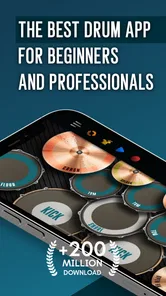
From the moment you launch the Real Drum electronic drums set, you’re greeted with an interface that’s as inviting as it is intuitive. You don’t have to be a drumming pro to navigate around, which is fantastic. The app lays out a complete drum kit on your screen and, using just your fingers, you can tap away to your heart’s content. It’s pretty cool how responsive it is. You tap, it plays. Simple as that!
Getting into the Groove
From the moment you launch the Real Drum electronic drums set, you’re greeted with an interface that’s as inviting as it is intuitive. You don’t have to be a drumming pro to navigate around, which is fantastic. The app lays out a complete drum kit on your screen and, using just your fingers, you can tap away to your heart’s content. It’s pretty cool how responsive it is. You tap, it plays. Simple as that!
More From Our News Desk

Android Auto Makes the Case for Quieter Car Software

MobiOffice: Transforming Mobile Productivity with Seamless Integration

EA SPORTS FC™ Mobile Soccer: Redefining Mobile Sports Gaming

How Microsoft OneDrive Became a Mobile Productivity Giant

How Google Translate Breaks Language Barriers Effortlessly

Why Google Sheets Is the Ultimate Mobile Productivity Tool
What the purchase details mean in practice
The game is free to download, with optional in-app purchases listed between $1.50 and $18.99 per item. That gives a new player room to try the basic experience before deciding whether to spend, rather than requiring an upfront purchase. I’d keep that distinction in mind: the free entry point is useful, but the presence of paid items means I wouldn’t assume every option is included at no cost. The game is rated for Everyone, and its current version is 11.10.20.
For a casual player, the important question is whether the free experience is enough to make tapping enjoyable. I’d start by exploring what is available without paying and only consider a purchase if a specific item would make a real difference to how you play. The listed price range tells me that purchases vary; it doesn’t tell me exactly what each one unlocks, so I wouldn’t buy based on a guess or assume an item is essential for learning.
Practice without turning it into pressure
A useful way to approach a touchscreen drum kit is to work on one small pattern at a time. Try keeping a steady pulse with one hand, then add a kick or snare accent once the beat feels comfortable. That kind of short exercise is less frustrating than trying to imitate a full song immediately, especially on a phone where your fingers share limited screen space.
The game is a good fit for someone curious about rhythm, a beginner who wants a low-stakes place to tap, or a drummer who wants a quick way to sketch an idea away from a kit. It is less suitable if your main goal is developing stick technique, learning how a real drum kit responds to different playing strengths, or getting detailed feedback on posture and sound. A touchscreen can help with timing and coordination, but it cannot reproduce the physical rebound and dynamics of acoustic or electronic pads.
Where it fits among music apps
Compared with rhythm games built around hitting prompts in time, this kind of virtual kit puts the emphasis on making a beat with drum sounds rather than following a score. Compared with a physical practice pad or electronic kit, it is much easier to carry and start, but offers less realistic touch. I’d choose it for quick experimentation and casual practice, and choose actual drum hardware or in-person instruction when technique and expressive control matter more.
A realistic use is filling a few minutes while waiting for a ride: open the kit, tap a simple pattern, and see whether you can keep it consistent rather than rushing. Headphones can make that more considerate in shared spaces, while a stable grip on the phone helps avoid accidental movement as you play. If the screen feels cramped, slow down and simplify the pattern instead of trying to compensate with faster taps; clean timing is more useful than a busy beat.
Features That Make You Tap
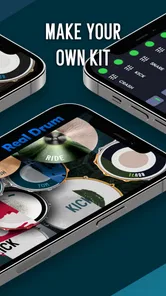
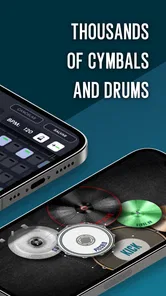
One of the things I love about this app is its versatility. You’ve got a variety of drum kits to choose from, and you can even customize your own. Feeling jazzy? There’s a kit for that. Want to unleash your inner rockstar? Yep, there’s a kit for that too. And for those of us who like to play around, the app allows you to import your own sounds. It’s like building your own musical playground.
Moreover, there’s a handy recording feature. So, if you’ve just come up with a beat that’s too good to forget, you can record it right there and then. Sharing your creations is a breeze, too. With just a few taps, you can let your friends in on your new beats or even upload them online.
Keeping the workflow practical
If you use the recording option to capture ideas, I’d treat each take as a quick sketch: record the rhythm while it is fresh, then listen back before deciding whether it is worth sharing. That small pause can reveal whether the groove stays steady or whether a fill throws the timing off. For anyone experimenting with imported sounds, it also makes sense to test a sound in a simple beat first, so it adds character without making the rhythm harder to follow.
Those creative options are appealing, but they also point to a trade-off: a phone is a compact place to build a kit, not necessarily the easiest place to manage a longer musical project. If you want to arrange full songs, edit detailed tracks, or collaborate through a more involved production workflow, a dedicated music-making app or computer setup may be a better fit. Here, the value is being able to try an idea quickly and keep the barrier to starting low.
The Learning Curve
Now, if you’re thinking, “I have no idea how to play the drums,” don’t sweat it. The app includes a bunch of tutorials that guide you through the basics, and before you know it, you’ll be playing along to your favorite tunes. It’s like having a drum teacher right in your pocket.
For those who are more advanced, there are plenty of challenges and lessons to keep you engaged. You can practice along with tracks and even slow them down if you’re having trouble keeping up. It’s a great way to improve your timing and rhythm.
Progress, fairness, and what to expect
There is no need to treat this as a contest or race through lessons. I’d use the tutorials as a starting point, then repeat a manageable pattern until the hands feel coordinated. Slowing a track down can make a difficult passage easier to hear and follow, though success in the app should not be confused with mastery on a full-size kit. The two forms of practice support different skills.
For someone wondering whether paying changes competitive fairness, I’d separate personal practice from competition: the appeal here is making and learning rhythms, not proving a score against other players. The purchase range is clear, but the exact contents and effects of individual paid items are not established here. I’d therefore avoid assuming purchases provide an advantage, remove limits, or are necessary to progress. A cautious first session can answer the practical question that matters most: do the available lessons and sounds keep you interested?
Jam Session Anytime, Anywhere
One of the standout features of Real Drum electronic drums set is its portability. Whether you’re on a bus, at the park, or chilling at home, you can have a jam session whenever the mood strikes. It’s a perfect way to kill time and hone your skills without needing a full drum kit.
Plus, the app doesn’t hog your battery life, which is a huge plus for those long jam sessions. So, you can keep drumming without worrying about your phone dying on you.
Who I’d recommend it to
With a 4.4 average from around 1.6 million ratings and more than 100 million installs, it clearly reaches well beyond a niche group of drummers. I’d recommend giving it a try if you want an accessible way to explore beats, practice simple coordination, or capture a rhythm idea when no kit is nearby. It is also a sensible option for a beginner who wants to find out whether tapping out patterns is enjoyable before investing time and money in physical equipment.
I’d skip it if you expect a phone screen to teach the feel of sticks, replace a teacher’s feedback, or act as a complete recording studio. The game runs on Android 7.0 or later, which makes it usable on a range of older devices, but the experience still depends on having a screen comfortable enough for tapping. In everyday use, a larger phone or tablet can make hand placement easier to see; a compact device may feel crowded when you try to play more than a basic pattern.
In conclusion, the Real Drum electronic drums set app is a fantastic tool for both budding drummers and seasoned pros. It’s engaging, fun, and packed with features that make playing the drums accessible to everyone. So, if you’ve ever wanted to bang out a rhythm without disturbing the neighbors, this app is your go-to. It’s more than just a game; it’s your own portable drum studio. Ready to rock?
My trust verdict
My recommendation comes with a clear boundary: I trust it as a convenient, playful way to try rhythms, not as a substitute for the physical and listening skills that come from a real kit. Its free starting point lowers the risk of trying it, while optional purchases make it worth checking what you are paying for before spending. With 21,000 written reviews and a long-running presence, it has attracted plenty of feedback from players, but popularity alone does not tell me whether its approach suits your hands or goals. I’d install it, try a short lesson and a simple recording, then decide whether the experience earns a place in your routine.
Making a short session count
One useful way to make the lessons stick is to pick a single target before opening the app: keeping an even pulse, coordinating a kick with a snare, or repeating a transition without speeding up. After a few attempts, record a take and listen for the point where the groove changes. That turns a casual tap session into a small piece of self-checking practice, without pretending that the app can assess posture or technique the way a teacher can.
If your main question is whether you need special equipment, I’d start with the phone or tablet you already have and see whether the screen is comfortable. Fingers are enough to explore the virtual kit, but a cramped display can make multi-part patterns frustrating. Someone who becomes serious about drumming will eventually benefit more from a practice pad, electronic kit, or lessons; this game is useful as a bridge to those choices, not a reason to postpone them indefinitely.
My trust verdict remains straightforward: the free entry point makes a trial easy, while the paid-item range calls for checking before spending. The game’s broad reach is encouraging, but the best test is still personal: whether its touch controls, lessons, and quick creative tools help you return to rhythm practice. If they do, it can earn a modest place in your routine; if you need realistic stick response or structured expert feedback, another route will serve you better.
Real Drum electronic drums set Frequently Asked Questions
Can I play Play Drums for Beginners with headphones, or do I need external equipment?
Play Drums for Beginners is a touch-screen music game, so you can tap the screen to play without a physical drum kit. Headphones can be useful if you prefer to hear the drum sounds privately, while external equipment is not needed to get started. The basic idea is to explore drumming directly on your device rather than set up a full instrument.
Is Play Drums for Beginners mainly a game or a structured music course?
Play Drums for Beginners is a music game, with the store summary describing it as a way to learn drums with lessons. That makes it suitable for casual practice and getting familiar with drumming through a screen, rather than something to approach as a formal music course. If you want to explore rhythms at your own pace, its game format offers an approachable starting point.
Do I need previous drumming or music experience to get started?
No previous drumming experience is necessary to try Play Drums for Beginners. Its beginner-focused purpose and lesson-oriented description make it approachable if you are simply curious about playing drums. You can use the touch-screen format to explore the basics and become more comfortable with rhythm before deciding whether you want to pursue drumming further.
Is Play Drums for Beginners free to download, and are there in-app purchases?
Play Drums for Beginners is free to download, so you can try the game without paying upfront. It also offers optional in-app purchases, with prices ranging from around $1.50 to $19 per item. You can begin with the free experience and decide for yourself whether any paid extras are worthwhile.
What is Play Drums for Beginners rated for, and what is its minimum OS requirement?
The game is rated Everyone, making it suitable for a broad audience. It requires Android 7.0 or later, so check your device’s operating system before downloading. Play Drums for Beginners is a music game by Kolb Apps, and its main appeal is letting players explore drumming through a touch-screen experience.
Pros
- Realistic drum sounds
- Customizable drum kits
- User-friendly interface
- High-quality audio output
- Free to download
Cons
- Ads can be intrusive
- Limited free features
- Needs internet connection
- Requires device with good specs
- May consume a lot of battery