YoWindow Weather and wallpaper
- 4.41K
- 4.7
- Installs
- 10.00M
- Price
- Free

Screenshots

Analysis by Reviewed
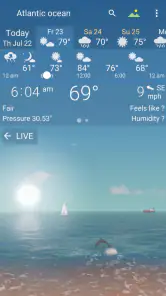
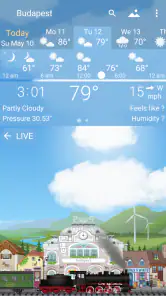
I like weather apps that answer a practical question quickly: should I bring a coat, change my route, or move an outdoor plan? YoWindow takes a more visual route. Instead of making a wall of figures the first thing you see, it presents changing scenery that reflects the conditions, while still offering forecasts and radar. That makes checking the weather feel less like reading a dashboard and more like glancing through a window.
A quick read of changing conditions
The animated landscape is more than decoration when I want an at-a-glance sense of the day. Seeing rain or snow represented in the scene can make a forecast easier to absorb than a string of icons, especially when I’m checking my phone between other tasks. I still look at the actual forecast before making a decision, but the visual layer gives me a pleasant first impression of what is happening.
It is also useful for planning around a changing day rather than just checking the current temperature. Before a walk, for example, I can look ahead and decide whether to leave earlier or pack for a shower. For anything where timing matters, I treat the display as a prompt to inspect the details, not a substitute for them.
Visual Delight
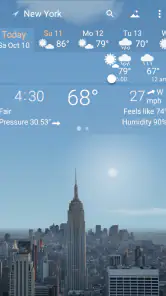
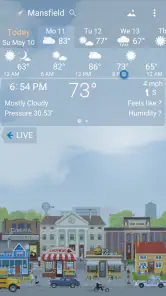
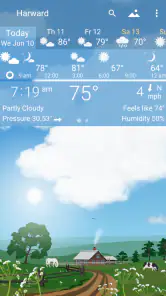
Okay, first things first, the visuals on this app are just stunning. Unlike other weather apps that bombard you with numbers and charts, YoWindow Weather and Wallpaper gives you a picturesque landscape that changes with the weather. It's like looking out of a virtual window. If it's raining outside, you'll see raindrops on your screen. If it's snowing, your phone turns into a winter wonderland. It’s not just an app; it's an experience.
How It Works
Now you might be wondering, how does it work? The app uses location data to provide accurate weather forecasts and changes the wallpaper accordingly. So, if you're in New York and it's sunny, expect a bright and cheery landscape. But if you're in Seattle and it's pouring, well, your screen will look just like that. The app updates in real-time, so you're always in the know.
For a realistic routine, I’d check the timeline over breakfast, then look again before leaving if the forecast suggests a shift. That gives me a simple way to compare the broad mood of the day with the details I need for commuting or errands. I would avoid relying on any single glance for a high-stakes outdoor plan; conditions can change, and a visual forecast is best used alongside the listed information.
That routine also helps answer a common practical question: do I need to open the app every time? Not necessarily. A widget can serve as the quick morning check, while the full view is more useful when I want to follow how the day develops. I’d keep the detailed check for moments when the decision has consequences, such as choosing when to set off, rather than repeatedly refreshing the screen for reassurance.
More From Our News Desk

Weather by Xiaomi Review: Clear at a Glance, Less Clear Up Close

X Under Pressure: Can It Recover When Posting Goes Wrong?

Clash of Clans Is Won Between the Battles

Android Auto Makes the Case for Quieter Car Software

MobiOffice: Transforming Mobile Productivity with Seamless Integration

EA SPORTS FC™ Mobile Soccer: Redefining Mobile Sports Gaming
Usability and Features
Despite its artistic appeal, YoWindow Weather and Wallpaper doesn’t skimp on functionality. You get detailed weather forecasts, including temperature, wind, and precipitation. Plus, you can customize the landscapes, so if you fancy a beach over a cityscape, the choice is yours. The app is intuitive and easy to navigate, making it suitable for anyone, tech-savvy or not.
The most useful customization is choosing a scene you enjoy looking at without confusing the scenery with the forecast itself. A beach setting may feel calming, but it is still a depiction of the weather at your location, not a promise of beach conditions. I’d try a couple of landscapes and keep the one whose changing sky and precipitation are easiest for me to read.
YoWindow is a free weather app from Weather View LLC, with optional in-app purchases priced from $0.99 to $9.99 per item. Its age rating is Everyone. That makes it easy to try without paying upfront, though I’d check which extras are included before buying anything. The app has a 4.7 average from around 485,000 ratings and has been installed over 10 million times, which suggests it has found a sizable audience for this visual approach.
Because the core app is free, I’d first spend a few ordinary days using the forecast and scene before deciding whether any paid extras matter to me. The purchase range is broad enough that I would read the in-app description carefully and make sure I understand what an item adds. I wouldn’t pay simply because a landscape looks appealing; the better test is whether an extra improves a part of the routine I actually use.
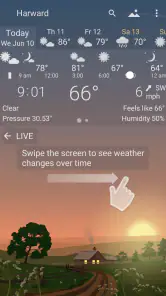
I’ve found the app especially handy for planning weekend getaways. The forecast accuracy is impressive, and being able to see how the weather will change throughout the day helps a ton. Just swipe through the timeline, and you'll know exactly when to hit the road or stay cozy indoors.
For a less leisurely example, imagine checking the forecast before a commute that includes a walk from the station. I’d use the scene to notice a likely shift in rain, then inspect the timeline and radar before deciding whether to leave earlier or take an umbrella. That is where the app’s different views work together: the landscape makes the change noticeable, while the more direct information helps me act on it.
Choosing it over a standard forecast screen
Compared with the usual weather app, which often leads with numbers, maps, or compact symbols, YoWindow’s strongest distinction is how it turns conditions into a scene. That is appealing if I want a calmer, more inviting check-in, and less compelling if I need dense data immediately. Its radar is a useful complement when I want a more direct view of weather movement; for a fast, information-first scan, a conventional forecast layout may suit me better.
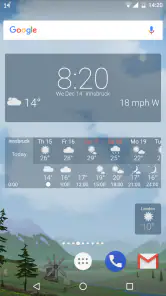
Widgets and live wallpaper can make the weather visible without opening the app, but they also mean the visual presentation becomes part of the phone’s everyday screen. I’d use a widget when I want a quick glance and keep the full app for checking the timeline or radar. If I prefer a completely static home screen, or I’m trying to minimize decorative elements, those options may not add much for me.
The main trade-off against a plain forecast app is not simply appearance; it is how much attention I want the interface to take. A compact numerical screen can be more efficient when I’m comparing temperatures or checking a specific detail in a hurry. YoWindow makes more sense when I value an easy visual overview and enjoy seeing the weather represented on my screen. I’d choose based on the way I check the forecast, not on which style looks more impressive in a screenshot.
Who will get the most from it
I’d recommend YoWindow to people who enjoy expressive interfaces, want weather information presented in a more human way, or like having a landscape on their home screen that changes with conditions. It can also be a nice fit for family members who find conventional forecast charts hard to scan. On the other hand, someone who needs specialist meteorological tools, highly dense data, or the fastest possible number-first layout may be happier with a more technical weather service.
It may also suit someone who checks weather casually throughout the day but does not want every glance to feel like reading a report. The scene can make a quick check more inviting, and a widget can keep that check brief. I’d skip it if my priority were specialist analysis, if I strongly prefer a minimalist home screen, or if I rarely use visual or wallpaper features and only want a bare forecast.
One practical tip is to use the timeline to plan ordinary decisions—when to take a walk, run errands, or leave for a drive—then check the detailed forecast or radar when the timing matters. That division keeps the scene useful without asking it to do more than a visual forecast can. If the view feels busy or distracting, switching to a different landscape or relying on a widget rather than the full display may make the app easier to live with.
Another useful habit is to distinguish between a quick impression and a decision-ready check. The scene is good for noticing a broad change, but when a narrow window matters, I’d read the forecast details and inspect radar rather than assume that the animation settles the question. That small distinction keeps the attractive presentation from becoming a source of overconfidence.
Where it fits today
YoWindow has been available since July 30, 2014, and its core appeal remains easy to understand: it pairs weather information with a changing landscape, plus radar, widgets, and live wallpaper. I wouldn’t infer a particular feature change from its age alone, but the combination gives existing users several ways to check conditions, from opening the app to glancing at the home screen.
The trade-off is that a visual presentation can’t replace every kind of weather tool. If I’m deciding whether to postpone a long drive or an exposed outdoor activity, I want to inspect the forecast details and radar rather than base the decision on the scenery. I’d also consider whether live wallpaper and widgets suit my phone habits; they are optional ways to bring the forecast forward, not essential parts of using the app.
For someone already using YoWindow, the clearest benefit is having the same visual approach available across the app, widgets, and wallpaper. A new user can start with the basic forecast and decide later whether the extra presentation options are worth exploring. I’d keep an eye on how well the timeline, radar, and chosen landscape work for my local routine, since those are the pieces that determine whether the app is genuinely helpful day to day.
The app’s release date tells me how long it has been around, but it does not tell me which features have changed over time. I would judge its current usefulness by trying the available views on my own phone and checking whether the forecast, radar, and widget fit the places and routines I care about. For existing users, that is a more practical measure than assuming that longevity alone means the app has evolved in a particular direction.
What I’d watch in continued use is whether the visual layer stays helpful rather than becoming something I stop noticing. If I regularly use the timeline or radar, the app earns its place beyond the wallpaper; if I only enjoy the scenery but still open another service for every decision, it may be better as a pleasant extra than my main weather tool. Either outcome is reasonable, and the free starting point makes that personal test straightforward.
Final Thoughts
In a world where apps often prioritize function over form, YoWindow Weather and Wallpaper strikes a perfect balance. It's both beautiful and useful, turning something as mundane as checking the weather into a delightful experience. Whether you're a weather enthusiast or just someone who appreciates a good-looking app, I'd say give it a try. Who knew checking the weather could be so much fun?
YoWindow Weather and wallpaper Frequently Asked Questions
Can I use YoWindow Weather without setting it as my wallpaper?
Yes. YoWindow is a weather app, and its live wallpaper is an additional way to bring its changing landscape presentation to your device’s screen. You can open the app to check the weather without making the wallpaper part of your setup. Its weather widgets also provide another way to view conditions, so you can choose the format that best fits your routine.
Does YoWindow Weather offer weather forecasts as well as current conditions?
Yes. YoWindow combines current weather information with forecasts, so it can help with both a quick check of conditions and planning ahead. Its landscape presentation changes with the weather and time of day, making the information feel more visual than a simple list. Radar, widgets, and live wallpaper round out the app’s mix of weather features.
What devices and operating systems can I use YoWindow Weather and Wallpaper on?
YoWindow Weather and Wallpaper is available for Android and iOS devices, so you can check forecasts on a phone or tablet using either platform. Its combination of weather information, animated landscapes, widgets, and live wallpaper makes it useful both as an app you open for a quick update and as a visual addition to your device’s screen.
Is YoWindow Weather suitable for children and families?
YoWindow Weather and Wallpaper is rated Everyone, making it suitable for a broad audience, including families looking for a straightforward weather app. Its landscape-based presentation gives weather information a friendly, visual feel, while the forecast tools help users check conditions. As with any app, adults can review its available settings and in-app purchase options before letting children use it.
What is YoWindow Weather and Wallpaper?
YoWindow Weather and Wallpaper is a unique weather application that provides users with real-time weather updates while also serving as a visually appealing live wallpaper. The app displays weather conditions in a picturesque landscape view that changes according to the actual weather and time of day at your location. It's available for Android and iOS devices, offering a fresh and interactive way to stay informed about the weather.
Pros
- Beautiful live weather wallpapers.
- Accurate weather forecasts.
- Customizable weather widgets.
- User-friendly interface.
- Supports multiple locations.
Cons
- Limited free version features.
- Battery consumption can be high.
- Ads in free version.
- Occasional slow updates.
- Requires internet connection.
- Category
- Weather
- Version
- Varies with device











