

YoWindow Weather
- 1.13K
- 4.5
- Installs
- 100.00K
- Price
- $5.99

Screenshots
Analysis by Reviewed
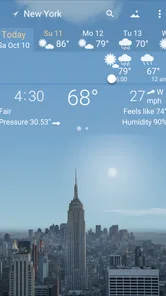
I like weather apps that help me make a decision without turning a quick check into a chore, and YoWindow Weather takes an unusually visual route. Instead of opening on a wall of figures, I’m met by a landscape that reflects the conditions and time of day. That makes checking the weather feel more like looking outside for a moment, while the forecast remains there for the practical questions that follow.
A routine that makes the scenery useful
I find the best way to use a visual weather app is to make it part of a small, repeatable decision: check the scene, then check the forecast before choosing what to wear or whether to take an umbrella. On a morning when I’m deciding between walking and taking the bus, the landscape gives me an immediate impression of the conditions, while the forecast helps me think ahead. The picture is a helpful entry point, not a substitute for reading the details.
That distinction matters if you’re planning around a changeable day. I would use the app to get a quick feel for the weather, then look at the relevant forecast before committing to a longer trip or an outdoor plan. A beautiful scene can make a glance more pleasant, but practical choices still depend on the information you consult, not on the illustration alone.
The Concept of YoWindow Weather
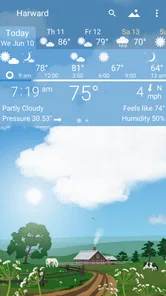
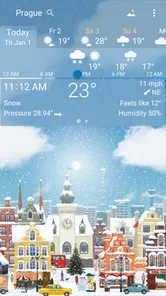
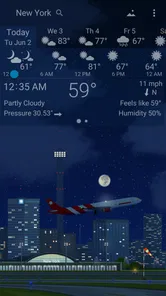
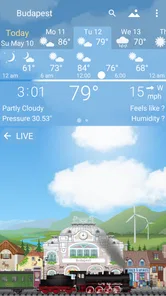
Imagine opening your app and not just seeing the temperature or a rain icon, but instead, you're greeted with a beautiful landscape that changes in real-time according to the weather outside. That’s the magic of YoWindow Weather. This app doesn't just tell you the weather; it shows you. The design is intuitive and engaging, offering a refreshing break from the usual weather app interfaces we’re all used to.
Features You'll Love
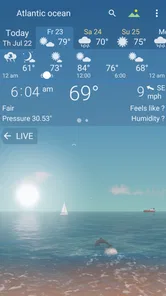
The app offers a unique approach by providing a visually immersive experience. It features a live landscape that dynamically changes to reflect the current weather and time of day. From sunny meadows to stormy skies, it’s all there. And guess what? You can even customize the landscapes to match your mood or preference.
YoWindow Weather also packs in all the standard features you'd expect from a weather app. Detailed forecasts, weather warnings, and a neat calendar view are all here. But what truly sets it apart is the way it presents this information. It’s not just about what you read; it’s about what you see.
For me, the useful habit is to treat the calendar view and the changing scene as two different tools. The scene makes a quick check inviting; the calendar helps me consider how conditions fit into plans across the day. Before leaving for work, for example, I can glance at the landscape and then use the forecast to decide whether a later walk is sensible. That is more useful than repeatedly reopening the app just to admire the animation.
More From Our News Desk

 Gmail
GmailGmail in a Busy Inbox: Who Benefits Most?
From first account to crowded workday, Gmail earns its place through dependable search and flexible sorting—but its best fit depends on how much inbox maintenance you can tolerate.

 Prime Video
Switching to Prime Video: What Changes in Your Viewing Routine
Prime Video can make a compelling second home for streaming, but switching means learning a different catalog, rental layer, and route from browsing to playback.

 Universal TV Remote Control
Universal TV Remote Control Works Best as a Reliable Backup
A phone remote earns its place through quick setup and reliable habits. Here is how to get more from Universal TV Remote Control—and where its limits show.

 Weather - By Xiaomi
Weather by Xiaomi Review: Clear at a Glance, Less Clear Up Close
Xiaomi’s weather app makes everyday forecasts quick to scan, but its calm surface can leave useful details and recovery paths harder to find than they should be.

 X
XX Under Pressure: Can It Recover When Posting Goes Wrong?
A resilience-focused review of X, examining setup, mistaken posts, interruptions, weak connections, and the gaps that matter when recovery needs to be dependable.

 Clash of Clans
Clash of Clans Is Won Between the Battles
Its raids are quick; its community is a long-term project of coordination, teaching, rivalry, and shared responsibility—with all the friction that entails.
Latest News



Settings are worth a little attention because the visual presentation is personal by design. I’d choose a landscape I can read at a glance rather than one that looks attractive but distracts me, and I’d keep the app’s practical information easy to reach. If I use it as a wallpaper, I’d also consider whether animated scenery is something I actually want to see throughout the day. The trade-off is straightforward: the visual layer makes weather more engaging, but users who want the most compact, numbers-first screen may prefer a conventional forecast app.
Using YoWindow Weather
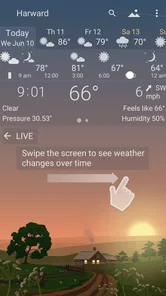
The app is surprisingly easy to navigate. You swipe through the different screens to access various features. Want to see the forecast for the next few days? Just swipe, and it's there. And the best part? The app is incredibly light on your device’s resources, ensuring it runs smoothly without any hiccups.
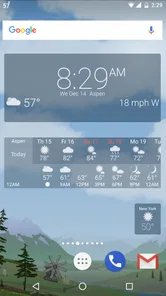
Another nifty feature is the ability to set the app as a live wallpaper. Yes, you can have this stunning, animated weather landscape right on your home screen. It’s a real treat for those who love to personalize their phones.
A faster pattern is to make one deliberate pass through the screens instead of swiping back and forth without a question in mind: first get the current impression, then check the days ahead, and use the calendar when your plans need a wider view. That routine keeps the scenery enjoyable while making the forecast the focus when a decision matters. The wallpaper is best treated as a glanceable visual touch, not the only way to plan for rain or changing conditions.
YoWindow Weather is a weather app from RepkaSoft, released on April 15, 2014. It has a 4.5 average from around 22,000 ratings, and more than 100,000 installs. It costs $9.99 and is rated for Everyone. I’d weigh that price against how often I enjoy the distinctive presentation: if I only need a quick temperature and a basic forecast, a simpler alternative may suit me better. If I value the landscape enough to make weather checks feel more pleasant, the purchase has a clearer purpose.
Making it fit a real day
For a commute, I’d use the landscape as a quick orientation, then check the forecast before choosing between a jacket, an umbrella, or a change in travel plans. That division of labor is useful because a scene communicates mood quickly, while a forecast is what I need for timing. If I’m leaving soon, I don’t need to explore every screen; if I’m planning an evening walk, the extra look ahead earns its place.
The same approach helps with errands that can move around. I might check the calendar view before deciding whether to do an outdoor task earlier or later, then return to the forecast rather than relying on a single glance. This is a small but worthwhile habit: decide what question I’m answering before I open the app. It reduces aimless browsing and makes the visual design feel like a useful entry point instead of decoration.
It also suits people who enjoy a little atmosphere in their daily routine. I can imagine keeping the landscape visible on a home screen because it makes a familiar check more pleasant, then opening the app when I need details. But if I rarely look at a phone’s home screen or prefer not to use animated wallpaper, that part of the appeal may not matter. The core value should still be the way the app helps me view conditions and forecasts.
Settings and habits that pay off
I’d spend the first session choosing a landscape that stays legible at a glance, then learn the swipe path to the forecast and calendar. There’s no need to customize everything. A restrained setup is often more useful than repeatedly changing the scenery, especially if I want the app to become part of a fast morning routine. The point is to make the screen recognizable enough that I can orient myself without stopping to interpret it.
For wallpaper use, I’d make a separate choice from the one I make inside the app: do I want weather scenery to be a persistent visual feature, or do I only enjoy it when I deliberately open the forecast? Keeping those preferences distinct avoids feeling that an attractive effect has taken over the phone. If I find myself ignoring the wallpaper, I’d simply return to using the app as a focused weather check.
One practical trade-off is that visual clarity and information density are not the same thing. A landscape can make the current conditions easy to absorb, but it is not automatically the fastest format for comparing several details. When I need a concise answer, I’d go straight to the forecast screen; when I want a broader sense of the day, I’d use the calendar as well. That is a more dependable workflow than expecting one view to do every job.
Where the visual approach has limits
The presentation is also the main trade-off. A changing landscape can make a routine check feel lively, but it may be less efficient than a plain list when I’m in a hurry or comparing forecast details. People who want a very stripped-back screen, or who rarely look beyond current conditions, may not get enough from the extra visual character to justify paying for it. I’d also avoid treating an attractive scene as a guarantee about what conditions will be like later; I check the forecast itself when timing matters.
For an everyday example, if I have errands in the morning and a walk planned later, I can use the first glance to orient myself, then check the forecast and calendar before deciding when to go. The app’s visual style suits someone who enjoys that small ritual and wants a weather check to feel less like scanning a spreadsheet. Someone who prefers fast, dense data or wants a purely functional free option should compare other weather apps before buying.
Compared with a typical numbers-first weather app, YoWindow makes the current scene more inviting, but the familiar list-based approach can be quicker for scanning values and comparing periods. I’d choose between them based on the task, not on which design looks more impressive. A person who mainly needs a compact answer may be happier with a simpler alternative; someone who enjoys a visual overview may find this app easier to return to consistently.
One question worth asking before paying is whether the visual style will become part of a habit or just a novelty. I’d give myself a few ordinary checks: a rushed morning, a plan later in the day, and a moment when I want the wallpaper on screen. If the landscape makes those checks more pleasant without slowing me down, the price has a clearer rationale. If I keep bypassing the visual view, a basic weather app may be the better fit.
Another useful boundary is confidence. The changing scene is a representation, so I wouldn’t use it alone to judge whether a specific trip is safe or whether conditions will hold at a particular hour. I’d consult the forecast and any relevant warning before making a consequential plan. That doesn’t make the scenery pointless; it simply puts it in the right role: a readable first impression, followed by information suited to the decision.
The app is best for people who like weather presented with character, want a forecast they can revisit through a visual interface, and may enjoy a changing wallpaper. It is less suited to users who want a free, ultra-compact screen, dislike animated scenery, or compare many forecast details at once. I’d also recommend thinking about how often weather actually affects your plans: if you check it only occasionally, the distinctive presentation may not earn enough use to justify a paid download.
Why You Should Try It
If you're someone who appreciates a blend of functionality and aesthetics, YoWindow Weather is worth checking out. It brings weather data to life in a way that’s not only useful but also delightful to look at. The app does an excellent job of making sure you’re informed about the weather while also keeping you engaged with its beautiful visuals.
So, if you’re tired of the mundane and are looking for an app that adds a splash of color to your daily weather check, give it a shot. It’s more than just an app; it’s an experience. You might find yourself checking the weather more often, just to see what beautiful scenery awaits you.
My verdict is that the app is strongest when I use its scenery as a friendly front door to a real forecast, rather than expecting the visuals to answer every planning question by themselves. It’s a distinctive choice for people who like a calmer, more atmospheric way to check conditions, and less compelling for anyone who wants dense figures at speed. If that difference matches how you use a weather app, YoWindow Weather is easy to understand and enjoyable to return to.
YoWindow Weather Frequently Asked Questions
Can YoWindow Weather show the weather in a visual way instead of relying only on numbers?
Yes. YoWindow Weather presents conditions through a landscape that depicts the weather, sky, and season, giving the forecast a visual setting rather than making you rely only on figures. It is designed to make the general feel of the weather easy to grasp, while still letting you explore the forecast timeline when you want more detail.
What kind of app is YoWindow Weather, and who makes it?
YoWindow Weather is a weather app developed by RepkaSoft. Its central idea is to pair weather information with landscapes that change to depict conditions, the sky, and the season. If you prefer a more visual way to check the weather rather than opening an app that presents information as text alone, this approach is a key part of its appeal.
Is YoWindow Weather suitable for a quick glance, or does it take time to explore?
YoWindow Weather is designed to make weather information visually easy to check: its landscape changes to depict the weather, sky, and season, so you can get a sense of conditions at a glance. If you want more context, you can also swipe through the timeline to view future conditions. That combination suits both quick checks and a more engaging look at the forecast.
Who develops YoWindow Weather, and is it intended for all ages?
YoWindow Weather is developed by RepkaSoft and is categorized as a weather app. Its content rating is Everyone, so it is intended for a broad audience rather than a specific age group. The app’s visual presentation makes weather the focus, pairing forecasts with landscapes that reflect the sky and season.
What is YoWindow Weather, and how does it work?
YoWindow Weather is an intuitive weather app that provides real-time weather updates by simulating the weather conditions on your smartphone screen. It displays a picturesque landscape that reflects the current weather, time of day, and season, offering a unique, visual way to check the weather. Users can swipe through the timeline to see future weather conditions, making it both informative and engaging.
Pros
- User-friendly interface with intuitive controls.
- Highly accurate weather forecasts.
- Customizable weather widgets.
- Beautiful graphics and animations.
- Includes weather alerts and notifications.
Cons
- Limited free features in the basic version.
- Occasional ads interrupt user experience.
- Requires internet for real-time updates.
- Battery usage can be high with animations.
- Some features may not work offline.












