YouCut - Video Editor & Maker
- 130.46K
- 4.8
- Installs
- 100.00M
- Price
- Free

Screenshots



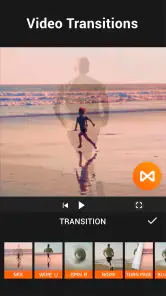


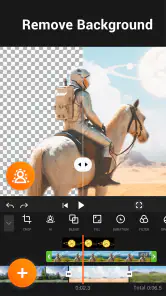

Analysis by Reviewed
When I choose a mobile video editor, I want more than a long effects menu: I want a clear route from a handful of clips to a video I’m comfortable sharing. YouCut - Video Editor & Maker is aimed at that everyday job. Its appeal is less about replacing a desktop production setup and more about keeping basic editing close to the footage, on the phone where I recorded it.
A sensible starting point for phone edits
I see YouCut as a practical mobile editor for turning clips already on my phone into a finished, shareable video. It comes from InShot Video Editor and sits in the video editing category, with a free starting point and optional in-app purchases ranging from $2.99 to $49.99 per item. It has a 4.8 average from around 8.2 million ratings, and more than 100 million installs, which suggests it has found a broad audience—but popularity alone would not make it the right fit for every project.
For a typical day, imagine I have a few short clips from a family outing and want to combine them before sharing. I can trim out the shaky start, join the usable moments, add music or a filter, and make a simple sequence without moving to a desktop editor. That is where a phone-first tool feels especially useful: I can work while the event is still fresh, rather than saving a small cleanup task for later.
The Latest on YouCut - Video Editor & Maker
That quick workflow is also useful for a small business owner preparing a short product clip, or a student assembling footage for a class project. I would keep the goal modest: a clean sequence with a clear beginning and end, rather than a heavily layered production. The less time I spend browsing effects, the more attention I can give to whether the shots actually tell the story.
Getting Started with YouCut
When I first downloaded YouCut, I was pleasantly surprised by its user-friendly interface. It's not often you find an app that manages to be both simple for beginners and robust enough for those who have a bit more experience. The onboarding process was as smooth as butter, guiding me through the basic features without overwhelming me. I felt like a pro video editor in no time!
Choosing it over a desktop or a basic editor
Compared with the built-in editor on a phone, YouCut makes more sense when I need to combine several clips, adjust their order, or shape a short montage with music and effects. For a single trim or a quick crop, the built-in tool is often the faster choice and avoids opening a separate editing project. At the other end, desktop software is a better fit when I need precise control across many layers, fine audio work, or a long project that is easier to manage on a larger screen.
That middle ground is the reason I would recommend it to someone who regularly makes short social videos but does not want to learn a complex editing suite. If editing is a serious hobby and I expect to adjust individual audio tracks, build complicated titles, or revisit a large timeline repeatedly, I would choose a more advanced editor instead. YouCut is most convincing when the final video is short enough to plan and review comfortably on a phone.
More From Our News Desk

Weather by Xiaomi Review: Clear at a Glance, Less Clear Up Close

X Under Pressure: Can It Recover When Posting Goes Wrong?

Clash of Clans Is Won Between the Battles

Android Auto Makes the Case for Quieter Car Software

MobiOffice: Transforming Mobile Productivity with Seamless Integration

EA SPORTS FC™ Mobile Soccer: Redefining Mobile Sports Gaming
Key Features That Caught My Eye
One of the standout features of YouCut is its ad-free experience. Yes, you heard that right! No annoying pop-ups or intrusive ads interrupting your creative flow. This is a massive plus in my book, as it allows me to focus solely on crafting the perfect video.
Another feature worth mentioning is the app's ability to support various video formats. Whether you're shooting in 4K or just a simple HD, YouCut has got you covered. Plus, the app offers a plethora of editing tools like trimming, cutting, and merging videos, alongside some pretty cool effects and filters to make your videos pop.
For a more deliberate edit, I would start by choosing the clips that matter rather than importing every take. A simple sequence is easier to refine when each shot has a reason to be there. I also try to make the opening clip do useful work: a clear first image gives the viewer a reason to keep watching, while a slow lead-in can make even a good set of moments feel meandering.
Small workflow choices that make a difference
For a cleaner result, I would decide on the final shape of the video before adding text or arranging shots. A vertical edit for a phone feed and a wider edit for a landscape screen call for different framing, and changing the canvas late can leave important subjects awkwardly placed. I also find it helpful to trim each clip before joining them; that makes it easier to judge pacing and prevents a strong moment from being buried between long, unnecessary starts and endings.
Music can change the feel of a short montage, but it also competes with speech. If a clip contains someone talking, I would listen back after adding a soundtrack and keep the balance comfortable rather than letting the music drown out the moment. Filters and effects are best treated as finishing touches: using the same restrained look across a sequence often feels more intentional than applying a different effect to every shot.
One practical trade-off is that a phone’s small screen makes close inspection harder. I can judge the order and overall mood while editing, but I would not rely on a tiny preview to catch every framing or text-placement issue. Before sharing, I check the exported video on the screen where it is likely to be watched, especially if captions or details near the edges matter.
Why I Keep Coming Back
What really keeps me hooked on YouCut is its versatility and ease of use. I can easily adjust the video speed, add music, and even incorporate text overlays to personalize each video to my liking. The app also offers a variety of aspect ratios, which means I can prep my videos for Instagram, YouTube, or any other platform with just a few taps.
Sharing my creations is a breeze too. Once I've finished editing, I can export my videos in high quality without any watermarks, which is a huge win for someone who loves sharing their work online. The whole process feels seamless, from editing to sharing, making it a joy to use every time.
For a recurring task, such as making a monthly recap, I would settle on a consistent aspect ratio and visual style before starting each new edit. That reduces small decisions and makes separate videos feel related. I would still review every sequence independently; consistency is helpful, but it should not force a portrait shot into a layout that makes the subject hard to see.
Trust, choices, and sensible limits
When I choose an editor, I think about the material I am handling as much as the effects. Personal clips can include faces, voices, or private moments, so I review the permissions and privacy choices shown on my device and in the app before importing anything sensitive. Those controls can vary by operating system and app version; I would not assume that an editing feature by itself tells me how media is handled. YouCut is rated for Everyone, and its current version is 1.693.1212, with Android 8.0 listed as the minimum system requirement.
For a privacy-conscious workflow, I would select only the footage needed for the edit and avoid treating a camera roll full of unrelated family videos as a convenient project folder. If I am working with a sensitive recording, I would pause to check the choices presented by my device before granting access, and I would think carefully before sharing the finished file. These are useful habits with any editor; they keep my decisions tied to the particular footage rather than assuming an app’s category tells me everything about its handling.
The free price makes it easy to try, but optional purchases mean I would check what is included before paying, especially if I only need a one-off edit. YouCut is a good match for casual creators, family clips, quick social posts, and anyone who prefers editing on a phone. I would look elsewhere for a project that needs detailed multi-track control, precise audio mixing, or a larger-screen workflow; a more advanced editor may be worth the extra learning time for those jobs. Likewise, if I only need to shorten one clip, the built-in editor on my phone may be quicker.
A useful habit is to watch the complete export once before sharing, not just the preview while editing. That final check can catch a cut that feels abrupt, a title that sits too close to the edge, or music that masks a spoken line. I would also keep an untouched copy of important source footage, so experimenting with trims and effects does not become the only version I have. These small steps make a simple editor more dependable without turning a quick task into a complicated production.
People often wonder whether a free editor is enough for regular use. I would begin without paying and see whether the tools I actually rely on suit my routine; optional purchases are worth considering only when a specific included extra matters to me. The app is free to download, and its Everyone content rating makes it broadly accessible, but that does not mean every editing choice or every clip is appropriate for every audience. I would still check the destination platform and the people featured in the video before posting.
Who will get the most from it
I would point a first-time editor toward YouCut if the goal is to assemble a few phone clips, make straightforward trims, add a soundtrack or visual touch, and export a finished piece without learning a desktop timeline. It is also handy when I want to make a quick version for a particular screen shape rather than sending footage to a computer just to change its framing. The advantage is convenience, not unlimited creative control.
I would skip it for long-form work where precise edits across many layers are central, or when reliable, detailed audio adjustments are the main requirement. A more capable desktop editor gives that kind of project room to grow, while a phone’s built-in editor may be all I need for a one-clip correction. Choosing the smaller tool for the smaller job is often the least frustrating option.
Final Thoughts
In a world where video content is king, having a reliable video editing app like YouCut - Video Editor & Maker can make all the difference. It's perfect for anyone looking to enhance their video editing skills without diving into complicated software. Whether you're a novice or a seasoned editor, this app offers something for everyone. So, if you're ready to transform your videos into something extraordinary, give YouCut a try. You won't be disappointed!
My recommendation is more specific: I would choose it for short, practical edits where speed and an approachable phone workflow matter more than deep control. The large audience and strong average rating offer useful context, but they cannot tell me whether its style suits my own projects. I would try a small, low-stakes edit first, check the available choices on my device, and decide from that experience whether it deserves a place in my regular editing routine.
YouCut - Video Editor & Maker Frequently Asked Questions
Can YouCut export videos in different resolutions or formats?
YouCut is described as a video editor for making and editing videos, and its features include trimming, merging, music, filters, effects, and slideshow creation. The app description also mentions support for different formats and resolutions, which may help when preparing projects for varied needs. If output settings matter for your project, check the options available in the app before settling on an editing workflow.
Can I use YouCut to create videos for social media?
YouCut can help you assemble and edit video content on a mobile device, with tools for trimming and merging clips and adding music, filters, or effects. Those features can be useful when preparing a video to share, though the best result depends on your footage and the style you want. Consider the project you have in mind and explore the editing options that suit it.
Can YouCut edit videos without an internet connection?
YouCut is a mobile video-editing app, but whether every feature works offline can depend on the task and the resources involved. Core editing actions such as trimming and merging are part of its toolset, while music, effects, or other options may have their own requirements. If you plan to edit while away from an internet connection, check the app’s behavior on your device before relying on it.
Can I control the speed of a video in YouCut?
YouCut’s listed editing features include the ability to adjust video speed, alongside trimming, cutting, merging, and splitting clips. Speed adjustments can help change the pacing of footage and shape the feel of a project. The precise controls and available choices are best explored inside the editor, where you can see how they apply to your clips and the result you want.
Can I edit videos and photos together in YouCut?
YouCut is presented as a video editor that can also create slideshows, making it useful for projects that combine pictures and video clips. You can trim and merge footage, add music, and apply filters or effects as you put a video together. If your project is mainly a collection of photos, the slideshow feature may be a helpful place to start.
Pros
- Easy-to-use interface for beginners
- Wide range of editing tools available
- No watermark on exported videos
- Supports 4K video editing
- Regular updates with new features
Cons
- Contains ads in free version
- Some features require in-app purchases
- Limited music library
- Occasional app crashes
- No cloud storage integration
- Category
- Video Players & Editors
- Version
- 1.693.1212













