Photo Editor - Lumii
- 23.39K
- 4.8
- Installs
- 50.00M
- Price
- Free

Screenshots



Analysis by Reviewed
I judge a photo editor not just by how many tools it offers, but by how easy it is to find the right one when I’m editing on a small screen. Photo Editor - Lumii is a photography app from InShot Video Editor, and its appeal is the mix of quick changes and more expressive effects. I’d consider it when I want to make a picture feel finished without moving to a desktop editor, though it is not automatically the best fit for every editing habit.
Finding the tools without getting lost
For everyday edits, Lumii’s layout makes a practical first impression: the familiar adjustments are approachable, while options such as curves give me room to go further. That matters if I’m helping someone who is new to editing; they can start with simple changes rather than needing to understand a complicated workflow first. The app is free to download, rated for Everyone, and has an average rating of 4.8 from around 982,000 ratings, so it has clearly reached a large audience. Those figures don’t tell me whether its interface will suit every person, but they do make it a widely used option to try.
Controls, comfort, and different ways of working
On a phone, small controls and busy screens can make editing tiring, particularly for anyone who has difficulty with precise taps or visual clutter. I’d approach Lumii one change at a time: choose a tool, make a modest adjustment, and check the whole image before stacking on another effect. That slower rhythm helps avoid losing track of what changed. Its adjustable filter intensity is useful here because I can soften a look rather than accept an all-or-nothing result. Still, photo editing involves visual judgement and repeated touch input, so someone who needs large controls, spoken guidance, or very minimal screens may find a simpler editor more comfortable.
When Lumii fits into a real day
I can see myself using it after taking a quick café photo: correct the brightness, bring the colors closer to what I remember, then save a restrained preset if I want the same treatment for other pictures. Presets are more than a novelty; they can reduce repeated work across a small batch, although I’d still check each image because the same settings may not suit different lighting. For a social post, text or a playful glitch effect can add personality. For careful product photos or a natural family album, I’d use those effects sparingly and favor basic corrections.
Where it sits among photo editors
Lumii is aimed at people who want both straightforward adjustments and a creative toolbox in one mobile app. Compared with a basic phone gallery editor, it gives me more room for layered looks, double exposure, and text treatments. Compared with a desktop-focused editing workflow, it is easier to pick up for a quick phone edit, but a small display and touch controls are less suited to precise, repeatable work across many files. The app has more than 50 million installs and supports Android 7.0 or later; its current version is 2.002.185. In-app purchases range from $2.99 to $27.99 per item, so I’d try the free experience first and decide whether any paid option is worthwhile for my own routine.
Making a quick edit more dependable
One practical habit I’d use is to keep an untouched original and treat the edited image as a separate result. That gives me room to try a stronger look without feeling committed to it, especially when I’m testing a filter or combining effects. I’d also judge the picture at its intended size: a text overlay that looks clear while zoomed in may be difficult to read in a small social preview. For a photo I plan to reuse in several places, I’d make a clean corrected version first and add decorative text or a glitch treatment only to a copy meant for that specific post.
Choosing a workflow that matches the photo
A useful distinction is whether I’m trying to fix a picture or give it a recognizable style. Lumii can serve both purposes, but I wouldn’t approach them in the same order. For a dim indoor shot, I’d begin with brightness and color, then pause before adding a filter; an effect cannot recover detail that the original image never captured. For a graphic post, I might instead start with a mood in mind and use the filter, text, or double exposure to build toward it. Thinking about the goal first keeps the number of options from turning a simple edit into aimless tapping.
More From Our News Desk

Weather by Xiaomi Review: Clear at a Glance, Less Clear Up Close

X Under Pressure: Can It Recover When Posting Goes Wrong?

Clash of Clans Is Won Between the Battles

Android Auto Makes the Case for Quieter Car Software

MobiOffice: Transforming Mobile Productivity with Seamless Integration

EA SPORTS FC™ Mobile Soccer: Redefining Mobile Sports Gaming
So, I recently stumbled upon the Photo Editor - Lumii, and let me tell you, it’s like finding a treasure chest in the app store! When it comes to editing photos, this app truly packs a punch. If you’re someone who loves adding a personal touch to your photos, you might want to check this out.
A Playground for Creativity
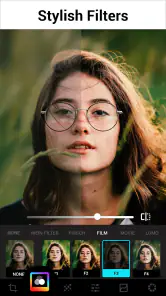
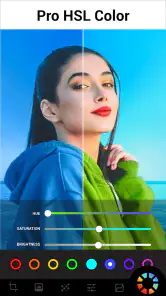
First off, let's dive into what makes Lumii a standout. It boasts a wide array of editing tools that range from basic adjustments like brightness, contrast, and saturation to more advanced features like curves and color splash. What I found particularly exciting was the ability to play with filters and effects. The app offers a massive library of filters that can dramatically change the vibe of your photos with just a tap.
Ease of Use
One of the things I appreciate most about Lumii is its user-friendly interface. It's designed in such a way that even those who are not tech-savvy can navigate it with ease. The tools are intuitively laid out, making it a breeze to transform your photos from blah to wow. Plus, the app is pretty lightweight, so it doesn't hog your phone’s resources.
Customization at Your Fingertips
Now, I’m someone who loves having options, and Lumii doesn't disappoint in this department. You can tweak filters to your heart’s content, adjust the intensity, and even layer multiple effects to create something truly unique. There’s also a fantastic feature that allows you to save your own presets, which is a real time-saver if you have a particular style you like to stick to.
Special Features
Let’s talk about the special features because this is where Lumii really shines. It includes a cool double exposure effect that lets you blend two images together, creating stunning visuals. The glitch effect is another fun feature that can add a retro or futuristic look to your photos. And if you're into text overlays, Lumii offers a variety of fonts and styles to choose from, making it easy to add a personal message or a catchy quote to your images.
Working with text and layered looks
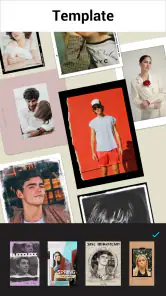
When I add text, I think about contrast before choosing a style. A busy or brightly colored background can swallow decorative lettering, so I’d place the words over a calmer part of the picture or choose a simpler treatment. The same restraint helps with double exposure: I’d look for a clear subject in each image and decide which one should remain dominant. If both pictures compete equally, the result can feel muddy rather than intentional. These are small choices, but they make the creative tools more useful for invitations, casual announcements, and personal posts than simply applying an effect at random.
Final Thoughts
In conclusion, Photo Editor - Lumii is a fantastic app for anyone looking to enhance their photos. Whether you're a casual user or a photo enthusiast, this app provides all the tools you need to unleash your creativity. Its combination of simplicity and powerful editing options makes it a must-have for anyone serious about photo editing on their phone. So go ahead, give it a try and let your photos do the talking!
Who will get the most out of it
I think Lumii makes the most sense for someone who edits a handful of pictures on a phone and enjoys trying different looks, but doesn’t want every adjustment to feel technical. A beginner can begin with brightness and contrast, then explore color splash or curves when ready. Someone who makes casual posts, invitations, or image-led messages may also appreciate having text and effects close at hand. If your main goal is accurate, consistent editing across a large photo library, though, a workflow designed for detailed batch work will probably be more comfortable.
A few practical ways to keep edits under control
My best advice is to treat the dramatic effects as finishing touches, not starting points. I’d first correct exposure and color, then test a filter at low intensity; that makes it easier to see whether the underlying photo is working before the style takes over. For double exposure, choosing images with clearly different visual roles can make the blend easier to read. With text overlays, I’d keep the wording brief and check that it remains legible against the image. These small choices help the app’s creative options serve the photo instead of competing with it.
What to expect before choosing it
The app’s large filter selection and layered effects invite experimentation, but that freedom can also make it easy to over-edit. I would not choose it as my first option for work that depends on tightly controlled color accuracy or a highly repeatable professional process. Nor would I recommend it without reservation to someone who finds touch-based editing uncomfortable. The interface may feel approachable, but visual controls and repeated taps are still part of the experience; a simpler editor or a larger-screen workflow could be a better match for those needs.
When another editor makes more sense
If I only need to crop or make a quick brightness correction, the phone’s built-in photo tools may be faster because there is less to explore. If I’m preparing a large set of images that must look consistent, I’d favor software built around a more controlled, repeatable workflow rather than relying on a phone-first creative editor. Lumii occupies a useful middle ground: it offers more expression than a basic gallery editor, while keeping the process closer to a quick mobile session than a desktop project. That middle ground is its strength, but it also means it is not the obvious choice for every photo task.
Questions I’d settle before making it a habit
Would I need to pay to try it? No: it is free to download, and I’d begin with the free experience before deciding whether an in-app purchase is useful. Can I use it for a quick post rather than a serious editing session? That is one of its natural use cases, especially when a simple correction and a restrained effect are enough. Is it suitable for every user? I wouldn’t assume so; someone who depends on larger touch targets, spoken instructions, or very low visual complexity should first see whether the interface feels comfortable on their own device. And for a natural-looking edit, I’d start with basic corrections and keep filters subtle rather than treating every photo as a canvas for multiple effects.
An inclusive, realistic verdict
Lumii is a flexible choice for casual mobile editing, especially when I want to move from a basic correction to a distinctive effect without switching apps. It has been available since September 30, 2018, and its version 2.002.185 is part of a product with more than 23,000 written reviews. I’d recommend giving it a try if you enjoy shaping photos by eye and are comfortable working on a phone. If readability, precise touch control, or a quiet editing screen matters most to you, test the interface at your own pace before building it into your routine. The useful question is not whether it has plenty to explore, but whether those choices make editing easier and more enjoyable for you.
Photo Editor - Lumii Frequently Asked Questions
Can I edit photos directly from my phone’s gallery with Photo Editor - Lumii?
Photo Editor - Lumii is designed for editing pictures on mobile devices, so it can fit naturally into a phone-based photo workflow. You can choose a picture to work on and use the app’s editing tools to adjust or enhance it. Before downloading, consider whether you want a dedicated editor for quick, creative changes rather than a full desktop editing setup.
Does Photo Editor - Lumii offer tools for changing or removing a photo background?
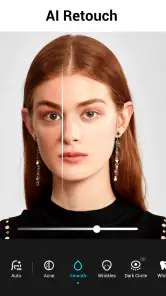
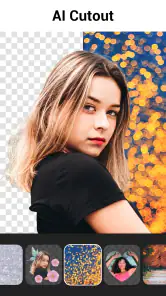
Yes. The app’s feature summary highlights background removal alongside AI photo editing, retouching, and photo enhancement. These options can be useful when you want to make a subject stand out or give a picture a different look. The app also includes filters and effects, so you can combine background-focused edits with other creative adjustments.
What is Photo Editor - Lumii, and who develops it?
Photo Editor - Lumii is a photography app for editing and enhancing pictures on mobile devices. It is developed by InShot Video Editor and is designed to make creative edits accessible, whether you want to make a quick adjustment or experiment with filters and effects. Its age rating is Everyone, so it is presented as suitable for a broad audience.
What features does Photo Editor - Lumii offer?
Photo Editor - Lumii is packed with a wide array of features that cater to both beginners and advanced users. It offers basic editing tools like crop, rotate, and adjust brightness, as well as advanced features such as color mixing, double exposure, and blending modes. Additionally, users can enjoy a collection of filters and effects to enhance their photos creatively. Its store summary also highlights AI photo editing, background removal, retouching, and photo enhancement.
Is Photo Editor - Lumii free to use?
Yes, Photo Editor - Lumii is free to download and use. However, it does offer in-app purchases for those who want to unlock premium features and remove ads. The free version provides a robust set of tools, but the paid version expands the app's capabilities significantly, making it a worthwhile investment for avid photo editors. In-app purchases range from $2.99 to $27.99 per item, so check the options in the app before buying.
Pros
- Intuitive user interface for easy navigation.
- Wide range of filters and effects.
- Supports high-resolution image editing.
- Regular updates with new features.
- Quick and responsive editing tools.
Cons
- Contains ads in the free version.
- Limited features without premium upgrade.
- Occasional performance lags.
- Requires internet for some features.
- No RAW image support.
- Category
- Photography
- Version
- 2.002.185












