Video Maker
- 42.19K
- 4.8
- Installs
- 100.00M
- Price
- Free
Screenshots

Analysis by Reviewed
I like a mobile editor best when it helps me finish a clip without turning a small idea into a long technical project. Video Maker is aimed at that kind of quick, approachable creation: a short video assembled from phone footage, music, text, and visual effects. It sits in the video-editing category, comes from InShot Video Editor, and is free to install, with optional in-app purchases for people who want to explore paid extras.
Where it fits in a mobile editing routine
This is a practical choice for social posts, family moments, and casual travel recaps rather than a replacement for a desktop editing suite. The interface and template-led approach are useful when I already know the feeling I want but do not want to build every cut from scratch. Someone making a polished commercial, a long documentary, or a project that depends on complex color work may be better served by a more specialized editor.
A realistic use is turning a handful of clips from a weekend walk into a short recap: choose the strongest moments, trim away the waiting around, add a music bed, then use a brief caption to orient viewers. I would keep the edit focused rather than piling on stickers and transitions. On a small screen, restraint often makes a video feel more deliberate, and it also makes the story easier to follow.
Small workflow choices that improve the result
One useful habit is to decide the destination before editing. A vertical social clip and a wider video do not frame scenes the same way, so I would check the composition early and avoid leaving important faces or text near the edges. I also recommend watching the whole edit once with sound on and once with it muted: that quick check catches both audio that overwhelms speech and captions that are doing too much work.
Music can make a montage feel cohesive, but it can also flatten a personal moment if it competes with natural sound. For a clip with conversation or a voice-over, I would keep the soundtrack secondary and listen back before exporting. If the video is meant to be watched silently, short, readable captions matter more than decorative text. These small decisions are more valuable than adding another effect.
Who should choose it, and who may want another tool
I would recommend this style of editor to beginners, occasional creators, and anyone who wants a finished social video without learning a complicated timeline. The free entry point makes it easy to try, while purchases range from $2.99 to $39.99 per item, so I would check what an upgrade actually unlocks before paying. It is rated for Everyone, though that age label is not a substitute for a parent checking whether a child is ready to publish videos or use optional purchases.
Compared with a basic phone gallery editor, Video Maker gives more room to combine clips, music, text, and effects in one place. Compared with a full desktop editor, it trades fine-grained control for convenience and a touch-first workflow. That is a sensible trade for a quick recap, but less appealing if you need detailed audio mixing, precise color matching, or a large, carefully organized project.
More From Our News Desk

Weather by Xiaomi Review: Clear at a Glance, Less Clear Up Close

X Under Pressure: Can It Recover When Posting Goes Wrong?

Clash of Clans Is Won Between the Battles

Android Auto Makes the Case for Quieter Car Software

MobiOffice: Transforming Mobile Productivity with Seamless Integration

EA SPORTS FC™ Mobile Soccer: Redefining Mobile Sports Gaming
As an app in a crowded field, it has reached over 100 million installs and an average rating of 4.8 from around 3 million ratings, with about 42,000 written reviews. Those figures suggest a broad audience, but they do not tell me whether its style suits a particular project. I would judge it by trying a small edit first, especially if I rely on a feature that may be part of a paid tier.
Version 1.601.190 is the current version, and the app was released on December 18, 2017. That gives existing users a useful point of reference, but a version number by itself does not reveal which tools changed or how the editing experience has evolved. I would treat the current release as the practical basis for deciding whether it fits, rather than assuming a specific new feature from the numbering alone.
Getting Started with Video Magic
Once you’ve downloaded Video Maker, you’re greeted with a user-friendly interface that’s as inviting as a warm cup of coffee on a chilly morning. The layout is clean, intuitive, and easy to navigate, which means you're not going to spend ages trying to figure out where everything is. It’s all about diving straight into the action.
The app offers a variety of templates that are perfect for those who want to create something quickly. From birthday montages to travel vlogs, you’re covered. You just pick a template, add your clips, and voila! You’ve got a video ready to share with the world.
Features That Stand Out
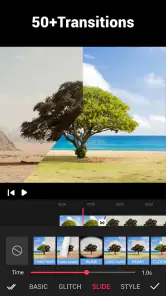
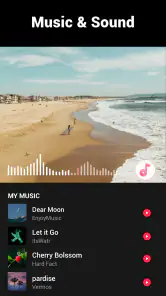
Now, let’s talk about what makes Video Maker shine. One of my favorite features has to be the music library. It’s packed with tunes that fit any mood or theme you’re going for. Plus, the transition effects are smooth and professional-looking. You can adjust them with a simple drag-and-drop action, which I find super handy.
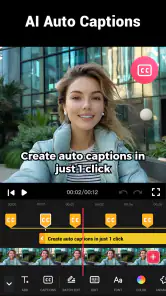
And let's not forget the text and sticker options. Adding captions and fun stickers can really bring your videos to life. It’s those little details that make your content pop and keep your audience engaged. The app also allows for easy sharing across social media platforms, so your masterpiece can reach as many eyes as possible.
The Editing Experience
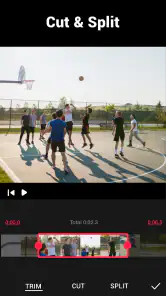
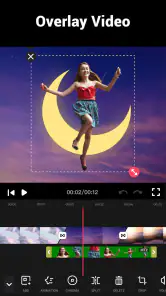
Editing on Video Maker is like having your own little studio right in your pocket. The timeline feature is straightforward, allowing you to trim and split clips with precision. I love how you can layer audio tracks and even record voice-overs directly in the app. This is perfect for when you want to add a personal touch to your creations.
Another neat aspect is the ability to export in different resolutions. Whether you’re aiming for a quick social media post or a high-definition project, the app has you sorted. It’s all about giving you the flexibility to tailor your videos to your specific needs.
Final Thoughts
In a nutshell, Video Maker is a gem for anyone looking to dabble in video creation without the steep learning curve. It’s packed with features, yet remains accessible to users of all skill levels. I’d say it’s definitely worth checking out if you’re looking to up your video game. So, go ahead, give it a whirl, and unleash your inner Spielberg!
Making a short edit feel considered
For a birthday montage, I would first sort the clips into a simple beginning, middle, and ending instead of letting the template dictate every beat. A brief opening caption can establish the occasion, while a quieter final shot gives the video a natural finish. Templates are a useful shortcut, but treating them as a starting structure rather than a finished creative decision helps the result feel personal.
One trade-off with templates is that they can make different projects feel alike if I use the same pacing and transitions each time. I would preview the whole sequence and remove any effect that distracts from the moment. Likewise, before sharing, I would check the soundtrack against the footage and make sure text stays readable on a phone screen. Those checks take little effort and can prevent a lively edit from feeling cluttered.
What to expect as your needs change
The app supports devices running Android 8.0 or later. If you are switching from a simple editor, the timeline and layered audio offer a useful step up; if you later need more involved control, moving a project to desktop software may make sense. I would also keep an untouched copy of original clips until I am satisfied with the exported video, especially for family events or footage I cannot easily record again.
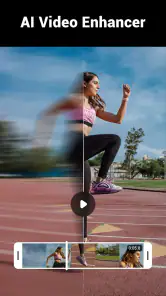
AI features, effects, and slow motion are part of the app’s broader editing focus, but I would choose tools based on the actual clip rather than adding them just because they are available. Slow motion, for example, works best when the source moment has movement worth emphasizing; it cannot make an uneventful shot more compelling by itself. As the app continues to evolve, I would watch for changes that improve control and clarity, while judging each release by how it affects my own everyday workflow.
A practical first project and a useful stopping point
For a quick everyday test, I would make a short recap from a few clips recorded during a family lunch or a walk around town. I would begin by choosing one clear moment to open on, then arrange the remaining footage so it has a simple sense of progression. Trimming each clip before adding music keeps the first pass manageable; once the sequence works without decoration, I can decide whether a title, a transition, or a soundtrack genuinely improves it.
This order is helpful because edits made late in the process can create extra work. If I add a long music track before deciding which footage belongs, I may spend time adjusting audio around clips that I later remove. I would get the visual sequence close first, then add sound and check the beginning and ending carefully. A clean ending matters: a sudden cut after the last useful image can make an otherwise tidy montage feel unfinished.
Choosing a format and preserving flexibility
When I know where I plan to share a video, I can make framing decisions before I spend time polishing it. For a vertical post, I would keep the main subject near the center and check that captions do not cover faces or important action. If I am unsure of the destination, I would avoid placing essential details close to the edges, since cropping can change how a shot reads. This simple planning is particularly useful when a montage mixes clips recorded in different orientations.
I would also keep the original footage until I have watched the finished export from beginning to end. That gives me a way back if a crop feels awkward, a caption is hard to read, or a trimmed moment turns out to matter. The export is the version I can share, but the source clips are what let me revise the story later. For one-off events, that small bit of file discipline is worth the extra space and attention.
How it compares when the project gets more demanding
Against a phone’s built-in editor, this app is more appealing when I want several ingredients in one finished piece: a sequence of clips, a music bed, text, and visual touches. The gallery editor may still be the faster choice for a single trim or a simple crop, especially when I do not need a designed sequence. Video Maker makes more sense when I want those separate decisions to come together as one short video rather than just clean up one clip.
Against more advanced mobile or desktop tools, the balance shifts. A project with many scenes, exact timing requirements, or repeated revisions benefits from a more detailed workspace and stronger control over the edit. I would not choose this as my main tool for a production where precise audio balancing or consistent color across many shots is central. Its advantage is a quicker path to a shareable result, not the deepest control in the category.
Questions worth settling before you commit
Can a beginner make something worthwhile without paying? I think so: the free entry point is enough to test whether the workflow suits your needs. Before buying anything, I would identify the specific tool I want and check whether it is included in a paid option, rather than treating an upgrade as a general promise of a better edit. Optional purchases span a broad range, so a small first project is a sensible way to decide whether the app earns a place in your routine.
Is it suitable for a child to use? The Everyone age rating makes it broadly accessible, but I would still have a parent guide the first projects, especially around posting videos and making purchases. Does the current version mean the app has recently changed in a particular way? Not on its own: the version number is useful for identifying the build, but I would look at the actual tools available on my device and judge updates by whether they improve tasks I regularly do.
Will it replace a professional editor? For a short social clip or a family montage, it may be all the editing power I need. For a long, carefully structured project or work that depends on advanced control, I would choose a more specialized tool instead. Being clear about the scale of the job before starting avoids expecting a pocket editor to behave like a full production setup.
What I would watch in future use
For existing users, the practical question is not simply whether a version number rises, but whether day-to-day editing becomes easier: can I make a clean cut, keep text legible, balance music with speech, and finish a project without unnecessary detours? Those are the changes I would notice first. I would also pay attention to whether the tools I rely on remain straightforward to find, because a feature-rich editor is only useful when it supports a quick, repeatable workflow.
My recommendation is to approach Video Maker as a convenient, approachable editor for focused short videos. Try one small project, make the story work before dressing it up, and check any paid option against a concrete need. If you enjoy shaping phone footage into a compact post, it is an easy app to consider; if your work calls for exacting control or a complex production process, a more advanced editor is the better fit.
Video Maker Frequently Asked Questions
Can I use Video Maker to edit clips for social media?
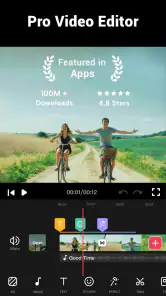
Video Maker is presented as a pro video editor for Instagram, so it may suit people preparing clips to share on social platforms. Its described tools include editing with music, AI features, effects, and slow motion. You can shape a video around the style you want, then decide whether the available editing options meet your needs before downloading.
Can I add music, effects, or slow motion to a video?
Yes, Video Maker is described as an editor for working with music, effects, and slow-motion video. These options can help change the mood and pacing of a clip, whether you are putting together a short social post or a personal video. The app also includes AI-related editing features, giving you several kinds of creative tools to explore.
Is Video Maker available for both Android and iOS?
Video Maker is designed for Android and iOS users, but compatibility depends on the operating system version available on your device. Before downloading, check that your device meets the app’s minimum requirement. That quick check can help you avoid installation problems and ensure you are choosing a version suited to your phone or tablet.
What devices and operating systems can I use with Video Maker?
Before downloading, check that your device meets the app’s compatibility requirements. Video Maker is an app in the Video Players & Editors category, developed by InShot Video Editor, and its minimum operating system requirement is 8.0. It is designed for Android and iOS users, so confirm that the version available for your device is compatible with your operating system.
Who makes Video Maker, and is it widely used?
Video Maker is developed by InShot Video Editor and is available as a video-editing app. It has an average rating of 4.8 from around 3 million ratings, with roughly 42,000 written reviews and over 100 million installs. Those figures suggest that many people use it for creating and editing videos, although your own experience may depend on the features you need.
Pros
- Easy-to-use interface for beginners.
- Wide range of editing tools available.
- Supports multiple video formats.
- Fast rendering and exporting speed.
- High-quality video output.
Cons
- Limited free version features.
- Occasional app crashes reported.
- Ads in free version can be intrusive.
- Lacks advanced editing options.
- No 4K video support in free version.
- Category
- Video Players & Editors
- Version
- 1.601.190













