Video Editor&Maker - VideoCook
- 13.64K
- 4.8
- Installs
- 100.00M
- Price
- Free

Screenshots


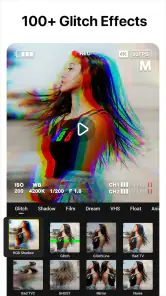
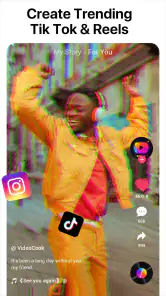
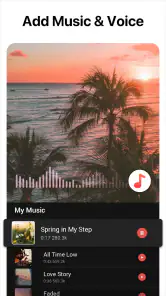
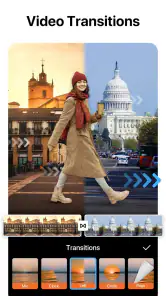
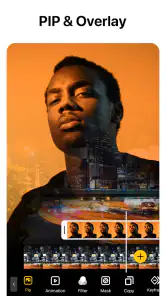

Analysis by Reviewed
Have you ever found yourself in need of a quick and easy way to edit videos on your phone? Let me tell you, the Video Editor&Maker - VideoCook app is here to save the day. I recently downloaded it to give it a spin, and I was pleasantly surprised by its capabilities. Whether you're a budding content creator or just someone who wants to spice up your home videos, this app has got you covered.
Who will get the most from it?
I see VideoCook working best for people who want to turn phone clips into something shareable without learning a full desktop editing workflow. It suits a family slideshow, a short recap of a day out, or a quick social post where a few trims, a music bed, and a visual effect are enough. If you regularly need layered timelines, precise audio mixing, or detailed color correction, I’d choose a more advanced editor instead; VideoCook’s appeal is convenience, not a promise of professional control.
A useful habit is to decide the shape of the video before opening the editor: pick the clips that tell one small story, then trim around that idea rather than adding every shot you captured. For a weekend outing, I might choose a few clear moments, arrange them in sequence, add a restrained effect, and use music only if it supports the mood. That keeps a fast edit from becoming a pile of filters and transitions competing for attention.
Getting Started with VideoCook
First things first, let's talk about the interface. It's super user-friendly, which is a huge plus for someone like me who doesn't want to spend hours figuring out how to use a new app. The layout is intuitive, making it easy to navigate through the various features. You can dive right into editing without a steep learning curve. I mean, who has time for that?
Features That Shine
Now, onto the features. Video Editor&Maker - VideoCook offers a wide array of tools that allow you to trim, cut, and merge clips seamlessly. One feature I absolutely love is the ability to add music to your videos. The app provides a library of tracks, or you can import your own tunes, which is pretty rad. It definitely adds a professional touch to your videos.
Another standout feature is the special effects and filters. You can easily enhance the visuals with just a few taps. From vintage aesthetics to modern vibes, there's something for everyone. Plus, you can adjust the speed of your video clips, which is perfect for creating those dramatic slow-motion shots or fast-paced action sequences. It's all about bringing your creative vision to life!
When quick editing is the point
In my experience, effects work best as accents rather than a treatment on every shot. I’d try one look across the whole piece first, then keep the strongest moments clean so faces, food, or scenery still feel natural. Slow motion is most useful when the original movement has a clear detail worth noticing; applying it to every clip can make a short video drag. These small choices matter more than stacking tools, especially when the goal is a polished result made in a few minutes.
More From Our News Desk

Weather by Xiaomi Review: Clear at a Glance, Less Clear Up Close

X Under Pressure: Can It Recover When Posting Goes Wrong?

Clash of Clans Is Won Between the Battles

Android Auto Makes the Case for Quieter Car Software

MobiOffice: Transforming Mobile Productivity with Seamless Integration

EA SPORTS FC™ Mobile Soccer: Redefining Mobile Sports Gaming
For a practical everyday workflow, imagine filming a friend’s birthday: trim the pauses, keep a couple of candid moments, arrange the clips so the event makes sense, then test music at a low enough level that conversation remains understandable. Before sharing, watch the whole edit once without stopping. That final pass catches abrupt cuts and a soundtrack that overwhelms the footage—issues that are easy to miss while moving between tools.
Making a repeatable editing routine
What helps a phone editor earn regular use is a routine that removes little decisions. I’d start by choosing the opening and closing moments, then work through the middle instead of endlessly rearranging clips. For a short recap, a clear first image gives the viewer a reason to stay, while an ending that feels intentional is more satisfying than simply stopping on the last file in the camera roll. VideoCook’s straightforward approach makes that sort of small, repeatable process a better fit than elaborate planning.
There is also a useful trade-off between editing in one sitting and returning later. A quick project can be finished while the event is still fresh in my mind, but if I’m tempted to keep trying different looks, stepping away and watching it again later can reveal what actually needs work. I would make a rough cut first and add music or effects only after the sequence makes sense. That order protects the story from being shaped around a filter or soundtrack.
Sharing Your Creations
After editing your masterpiece, sharing it is a breeze. The app supports direct uploads to social media platforms like Instagram, Facebook, and YouTube. It's a one-stop shop for getting your content out into the world. This feature is particularly handy for influencers and content creators looking to streamline their workflow.
One thing I noticed is that the app compresses videos efficiently, which means you get to maintain quality without eating up too much storage space. That's always a win in my book!
Choosing the right destination
Direct sharing is convenient when I already know where a video is going, but it is not automatically the best finish for every project. If I want to keep a personal copy, send a clip privately, or reuse it in another editing app, saving and checking the finished video first gives me more control over where it goes. I’d also watch for framing and sound after export: a clip that looks fine while editing can feel different once viewed as a complete piece on a phone.
For creators who post regularly, the time saved by a simple edit-and-share path can matter more than having every advanced control. But if the same video needs several versions, careful branding, or a precise format for different destinations, I would favor an editor that makes those changes easier to manage. VideoCook is more convincing for completing a straightforward post than for running a detailed publishing workflow.
Where it fits among alternatives
Compared with a basic gallery editor, VideoCook gives me more room to combine clips, music, speed changes, and stylized looks in one place. Against a feature-heavy mobile editor, though, it is the lighter choice: I would not pick it for a project that depends on meticulous track-by-track adjustments or a repeatable, highly controlled visual style. Its value is that I can finish a casual video without turning the task into a hobby in itself.
If you are deciding whether it is worth keeping installed, ask how often you make short videos rather than how many effects you might try once. Someone who shares family moments or occasional social clips may return to the simple workflow; someone who edits rarely can probably use a built-in editor when the need comes up. The novelty of trying filters fades, but trimming, combining clips, and adding a fitting soundtrack remain useful jobs.
When another editor makes more sense
The usual alternatives divide into two groups: the editor already on the phone, which is handy for a quick trim, and more elaborate mobile tools that give a project greater control. I’d reach for VideoCook when I want several basic steps together without first learning a complex workspace. I’d stay with a gallery editor if all I need is to shorten one clip, and choose a more capable timeline editor when exact timing, multiple audio layers, or consistent treatment across a series matters.
That distinction is especially useful for someone starting a channel or a recurring social series. A quick, polished individual clip may be all they need at first, but as a format becomes more consistent, the ability to reuse precise settings and fine-tune each layer can become important. VideoCook’s broad creative tools are approachable, yet I would not mistake that accessibility for the depth needed to manage every part of a production.
Living with the app over time
VideoCook is a free video-editing app from InShot Inc. It has a 4.8 average from around 1.2 million ratings and has passed 100 million installs, a level of adoption that makes it a familiar option in its category. It is rated for Everyone, while optional in-app purchases range from $0.49 to $159.99 per item. I’d treat the free version as a way to judge whether the workflow suits me before considering any paid extras, rather than assuming I need them to make a simple edit.
For ongoing use, the main maintenance is editorial rather than technical: be selective with clips, keep a consistent look, and avoid adding effects just because they are available. A large menu of creative choices can slow down a quick task if I keep auditioning alternatives. I’d also review the finished file before deleting source footage, especially when the video matters; an export that looks right on a small screen deserves a final check before I rely on it elsewhere.
What can wear thin
The same effects that make a first session playful can become a source of fatigue if every edit starts with browsing the full menu. I find it more useful to set a simple limit: one visual treatment, a small number of speed changes, and music only when it adds something. That keeps the footage in charge and the editing session short. For a person who enjoys experimenting with every available look, this restraint may feel limiting; for someone trying to finish a family recap before the moment passes, it is a practical way to avoid turning a small task into an evening-long project.
Another potential friction point is expectation. An easy interface can make editing feel simple, but it cannot replace decisions about pacing, sound, and which moments to leave out. Nor would I count on an uncomplicated editor to solve a project that needs exact, repeated adjustments. If I were making a polished piece for work or a longer video with complex sound, I would plan to use a more controlled tool from the start rather than hoping a fast mobile workflow would stretch to fit.
The Final Verdict
In conclusion, if you're on the hunt for a reliable and easy-to-use video editing app, give Video Editor&Maker - VideoCook a shot. It's packed with features that cater to both beginners and seasoned editors. The app strikes a great balance between functionality and simplicity, making it accessible to everyone.
I genuinely enjoyed using it and found it to be a valuable addition to my app arsenal. So go ahead, download it, and let your creativity run wild. Who knows, you might just become the next big thing in the video world with a little help from VideoCook!
A lasting place on my phone
My recommendation is narrower than “everyone should install it”: I’d keep it if I make casual videos often enough to appreciate a quick, approachable editor. The current version is 2.6.0 and it requires Android 8.0 or later, so compatibility is worth checking before planning a workflow around it. For a person who needs a fast edit now and then, it is an appealing option; for someone who wants detailed production controls or rarely makes videos, another tool may earn that space more easily.
In everyday terms, I’d judge its lasting value by whether it removes enough friction from a real habit. If I often turn small moments into short videos, being able to trim, arrange, adjust speed, add music, and share without switching tools is useful beyond the initial novelty. If weeks go by without editing, the range of effects alone is unlikely to make me return. The strongest reason to keep it is a recurring need for approachable edits, not the promise of endless creative possibilities.
Before committing to a workflow
A sensible first test is to make one video that resembles what you expect to create regularly, rather than judging the app by a few taps through its effects. Try a short sequence with a beginning and ending, add only the sound or visual treatment you genuinely want, and check the completed result. That gives a clearer answer to practical questions: does the editing process feel quick enough, does the finished clip suit your intended use, and do you prefer this to the editor already on your phone?
I’d also keep original clips until I’m satisfied with the finished version, particularly when the footage cannot be recreated. This is a low-effort safeguard, not a criticism of the app: editing is easier when the source remains available if I later want a different cut. For a casual post, that extra care can be as simple as reviewing the full video before treating the edit as finished.
My recommendation after the novelty
VideoCook’s best long-term role is as a handy middle ground: more involved than a single-clip trim, less demanding than a production-focused editor. It is a good candidate for people who make occasional short videos and value getting to a shareable result without much setup. It is less compelling for someone who rarely edits, or for a creator whose work depends on intricate control and repeatable fine adjustments.
I’d give it a place on my phone when the habit is already there or likely to become one, then let actual use—not the size of the effects menu—decide whether it stays. That is where its lasting appeal lies: a familiar set of editing jobs made approachable, with enough creative room for personal clips while leaving serious production work to tools built for deeper control.
Video Editor&Maker - VideoCook Frequently Asked Questions
Is Video Editor&Maker - VideoCook suitable for making short social-media videos?
VideoCook is a video-editing app for assembling clips and creating photo slideshows, with music, AI filters, slow motion, and a broad selection of effects. These tools can help you give a short video a particular look or pace before sharing it. The app is free to download, while some paid options are available through in-app purchases.
Can I use VideoCook to add music and visual effects to a video?
Yes. VideoCook is presented as an AI video editor with music, AI filters, and more than 100 effects. These options let you add a soundtrack and change the look of your footage as part of an edit. The published feature description also highlights slow motion and slideshow creation, so the app can be used for more than simply trimming clips.
Does Video Editor&Maker - VideoCook work on my device?
Video Editor&Maker - VideoCook is available for Android, with Android 8.0 or later required. It is a video-editing app from InShot Inc., so check your device’s operating-system version before downloading. Its Everyone age rating makes it suitable for a broad audience, though the editing experience and available storage can vary depending on the device and the videos you choose to work with.
What are the main features of Video Editor&Maker - VideoCook?
Video Editor&Maker - VideoCook offers a wide array of features designed to enhance your video editing experience. Users can trim, cut, merge, and apply various effects to their videos. With its user-friendly interface, even beginners can easily navigate through its options. Additionally, it provides advanced tools like multi-layer editing, green-screen effects, and a vast library of music and sound effects to enrich your videos.
Is Video Editor&Maker - VideoCook free to use?
Video Editor&Maker - VideoCook offers a free version with basic editing tools and features. However, to access advanced features such as premium effects, additional music tracks, and ad-free experience, users may need to opt for in-app purchases or subscribe to a premium plan. This allows flexibility for both casual users and professional editors. In-app purchases are available, with prices ranging from $0.49 to $159.99 per item.
Pros
- User-friendly interface for easy editing.
- Wide variety of filters and effects.
- Supports 4K video editing.
- Includes music library for video soundtracks.
- Fast rendering and exporting capabilities.
Cons
- Contains in-app ads which can be intrusive.
- Limited features in free version.
- Occasional crashes on older devices.
- Requires internet connection for some features.
- Some features require in-app purchases.
- Category
- Video Players & Editors
- Version
- 2.6.0













