X Icon Changer - Change Icons
- 12.60K
- 4.3
- Installs
- 10.00M
- Price
- Free

Screenshots

Analysis by Reviewed
I find icon customization most satisfying when I start with a specific problem: maybe my home screen feels cluttered, or a set of app icons clashes with the wallpaper I want to use. X Icon Changer is aimed at that small but personal job. It’s a free personalization app from ASTER PLAY, and its appeal is straightforward: choose a replacement image for an app shortcut and make the screen feel more like your own.
Starting with a home-screen idea
Before changing anything, I’d decide what I want the finished screen to do. A single custom icon can make a frequently used app easier to spot, while a coordinated set can give a page a calmer, more deliberate look. X Icon Changer suits people who enjoy adjusting those details without rebuilding their entire phone setup. If you’re happy with the standard icons and rarely look at your home screen, though, it may not add much to your day.
The app has an average rating of 4.3 from around 636,000 ratings, and more than 10 million installs. Those figures suggest plenty of Android users have tried it, but the useful question is whether its shortcut-based approach matches your expectations. It’s designed for changing the way icons appear on the home screen, not for replacing the apps themselves.
From choosing an image to seeing the result
Ever stared at your phone's home screen and thought, "Meh, it could use a bit more pizzazz"? Well, that's where X Icon Changer swoops in like a superhero for your smartphone's aesthetics. I recently gave this app a whirl, and let me tell you, it's a game-changer for anyone who's tired of the same old app icons staring back at them. Let’s dive into the world of icon customization and see what makes this app tick.
Unleashing Your Creativity
First things first, X Icon Changer is all about letting you express yourself. Gone are the days of generic icons that just don’t match your vibe. With this app, you can swap out those basic graphics for something that truly speaks to you. The interface is smooth as butter, making it super easy to navigate and find or create the perfect icon. Whether you’re into minimalism, vibrant colors, or quirky designs, there’s something here for everyone.
How It Works
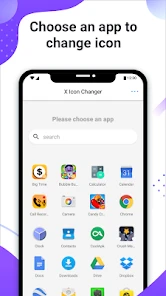
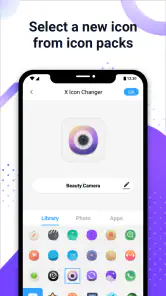
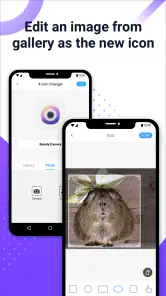
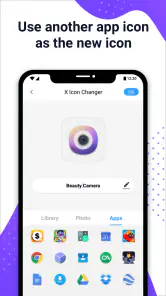
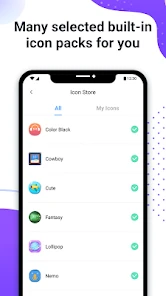
You might be wondering, "How does this magic happen?" Well, it's quite straightforward. After downloading the app, you can either choose from a gallery of pre-made icons or import your own images from your gallery. The app guides you through the process with clear instructions, so even if you're not tech-savvy, you'll feel like a pro in no time.
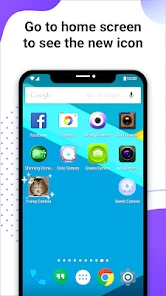
Once you've picked your preferred icon, you simply select the app you want to change, and voila! Your home screen looks fresh and new, all set to impress your friends. Plus, if you’re someone who loves to switch things up regularly, the app makes it easy to change icons as often as you like without any hassle.
You May Like

Clash of Clans Is Won Between the Battles

Android Auto Makes the Case for Quieter Car Software

MobiOffice: Transforming Mobile Productivity with Seamless Integration

EA SPORTS FC™ Mobile Soccer: Redefining Mobile Sports Gaming

How Microsoft OneDrive Became a Mobile Productivity Giant

How Google Translate Breaks Language Barriers Effortlessly
A practical workflow for everyday use
In practice, I’d handle a theme in a small batch rather than trying to redesign every screen at once. I’d pick a few apps I use constantly, choose images with similar colors or visual weight, then place the resulting shortcuts together and check how they look against the wallpaper. This makes mismatches obvious early and avoids spending time making a large set that doesn’t feel cohesive.
For example, if I’m changing my wallpaper for a new season, I can use the app to give the most visible shortcuts a matching style while leaving less-used apps alone. That’s a useful middle ground: I get a noticeable refresh without turning a quick bit of personalization into a long project. Imported photos can work well, but simple, high-contrast images are usually easier to recognize at a glance than detailed pictures cropped into a small icon.
Where the shortcut handoff matters
The important distinction is that the custom graphic is a shortcut, while the original app remains installed and available. That separation is helpful if I want to experiment: I can keep the original app intact and change or remove the custom shortcut later. It also means I should check the home screen after each change rather than assume the original icon has been replaced everywhere on the device.
This approach is different from changing an entire icon pack through a compatible launcher. A launcher can be a better fit if I want a broad, consistent redesign with less one-by-one work, while X Icon Changer makes more sense when I want selected icons to look different without committing to a full launcher change. The trade-off is that individual shortcut customization takes attention, especially if I’m aiming for a uniform look across many apps.
Performance and Experience
Let's talk about performance because nobody wants an app that drains their battery faster than you can say "customization." Fortunately, X Icon Changer runs smoothly in the background and doesn’t hog your phone's resources. I noticed no lag or slowdown while using other apps, which is a huge win in my book.
Another neat feature is the app’s ability to create shortcut icons without affecting the original app icon. So, if you ever feel nostalgic for the classic look, you can switch back without losing your customized masterpiece. It’s like having your cake and eating it too.
Small frictions to expect
The main compromise is the extra step between selecting artwork and having a tidy screen: you still need to choose each target app, make the shortcut, and arrange the result where it belongs. If you’re hoping for one tap to transform every icon into a complete theme, a launcher or a system-level icon option may suit you better. And if your phone’s home-screen setup doesn’t handle custom shortcuts the way you want, the experience may be less seamless than the preview suggests.
It’s also worth thinking about legibility before appearance. A photograph can look lovely in the image picker but become hard to identify once it’s a small icon. I’d favor a clear symbol, a bold crop, or a simple image for apps I open often, and reserve decorative choices for shortcuts I don’t need to find instantly. That small bit of planning makes the finished screen more usable, not just prettier.
Making a theme easier to live with
A practical way to avoid confusion is to customize only one group of shortcuts at a time. I’d start with the apps on my main screen, keep their positions familiar, and change the artwork rather than moving everything around as well. That gives me a clear comparison: if I can still reach the right app without pausing, the new design is doing its job. If I keep mistaking two similar images, I’d change one before adding more.
There’s also a useful distinction between a theme that looks good in a screenshot and one that works during a busy day. A row of matching pastel images may look tidy, but distinct shapes or colors can make essential shortcuts quicker to spot. For a travel day, for instance, I might use especially recognizable artwork for the map, booking, and messaging apps I expect to open repeatedly, while giving less urgent shortcuts the more decorative treatment.
What happens when you change direction
Because the custom image belongs to a shortcut rather than changing the original app itself, I’d treat a redesign as reversible experimentation. I can try a style on a few shortcuts, live with it, and decide whether to keep it without changing the underlying apps. If I later switch wallpapers or lose interest in the theme, I can remove or replace the custom shortcuts and return to the originals on the home screen.
That flexibility is useful, but it does leave a small housekeeping task. If I make several versions while experimenting, I need to be deliberate about which shortcuts stay on the screen so I don’t end up with duplicates or a layout that is harder to navigate. I’d finish each small batch by checking the actual home screen, opening the shortcuts I changed, and removing any test version I no longer want.
Who will get the most from it
I’d recommend it to someone who enjoys personalizing Android but wants to keep the existing apps and home-screen habits. It can also be handy for making a few important shortcuts stand out, or for building a themed page gradually rather than switching launchers. The app is rated for Everyone, and it runs on Android 5.0 or later, which makes it accessible to a broad range of Android devices.
I’d skip it if I’m looking for a complete launcher replacement, automatic changes across the whole device, or a permanent alteration to the original app icons. Those are different jobs. The current version is 4.5.2, and optional in-app purchases are listed at $1.99 per item; the core app is free, so I can try the basic workflow before deciding whether any paid item is worthwhile.
Who might prefer another approach
If I wanted every compatible icon to follow one design system, I’d look at a launcher that supports icon packs rather than create a shortcut for each app. That route is usually more sensible for someone preparing a full-device makeover, especially when consistency matters more than choosing a different image for every individual app. It also avoids turning a large collection of icons into a repetitive project.
On the other hand, people who only want to distinguish a handful of shortcuts may find a launcher change excessive. X Icon Changer is better suited to selective editing: a custom image for a few everyday apps, a themed folder page, or a visual cue for a shortcut that otherwise blends into the background. The right choice depends less on how elaborate the theme is and more on whether you want to customize a few destinations or the whole home-screen system.
Final Thoughts
In a world where personalization is key, X Icon Changer offers a fantastic way to make your device truly yours. The blend of functionality and creativity makes it a must-have tool for anyone looking to revamp their smartphone experience. It's user-friendly, doesn't bog down your system, and adds a splash of personality to your digital life.
So, if you're itching to give your phone a fresh new look, why not give X Icon Changer a try? It's a fun, easy, and effective way to spice up your home screen, and who doesn't want a bit of extra flair in their life?
A sensible way to decide
I’d judge the app by one simple test: after customizing a few shortcuts, does my home screen become easier or more enjoyable to use? If the answer is yes, the one-at-a-time workflow is a fair exchange for the extra control. If I find myself spending more time maintaining a theme than using the phone, I’d stop at a small set or switch to a launcher-based approach instead.
That makes this a focused tool rather than a complete personalization system. It gives me room to experiment with images and keep the original apps untouched, but it doesn’t remove the need to arrange shortcuts thoughtfully. For Android users who want a modest, reversible refresh, that balance is appealing; for anyone seeking a system-wide makeover with minimal setup, another option will likely feel more natural.
X Icon Changer - Change Icons Frequently Asked Questions
Can I use X Icon Changer to make my home screen match a particular style or theme?
Yes. X Icon Changer is intended for personalizing app icons, so it can help give your home screen a more coordinated look. You can use images from your gallery or choose from pre-designed icon options, then create shortcuts with the appearance you want. The result is useful for matching colors, artwork, or a general visual style across your device.
Does X Icon Changer add watermarks to customized icons?
The app’s summary highlights icon customization without watermarks, which is helpful if you want a clean-looking result. You can choose an image or an icon design and use it for a shortcut without the customization being marked by a watermark. As with any icon change, the finished appearance depends on the image you select and how it fits the icon shape.
What Android version do I need to run X Icon Changer?
X Icon Changer supports Android 5.0 and later, so it can run on a range of Android devices that meet that requirement. Compatibility and the way shortcuts appear may still vary with a device’s operating system version and manufacturer customizations. If your phone runs an older version, check its Android version before downloading; newer devices should also be considered individually.
Who developed X Icon Changer, and what kind of app is it?
X Icon Changer is a Personalization app developed by ASTER PLAY. Its purpose is to help you customize app icons and create shortcuts with a different appearance, making it a practical option for users who want to adjust their home screen. The app is available as a free download, with in-app purchases for users who choose paid extras.
Does X Icon Changer replace an app’s original icon or create a shortcut?
X Icon Changer is described as an app icon changer and shortcut creator, so customization works through creating a shortcut with a chosen appearance rather than changing the original app itself. The original app remains available on your device. This distinction is useful to know if you want to personalize your home screen while keeping the apps themselves unchanged.
Pros
- Easy to use interface for quick icon changes.
- Wide variety of icons to choose from.
- Supports custom icon creation.
- No need for rooting your phone.
- Enhances phone customization options.
Cons
- Some icons may not fit system themes.
- Occasional ads during use.
- Limited free icon options.
- May slow down older devices.
- No dynamic icons support.

- Category
- Personalization
- Version
- 4.5.2











