WiZ Connected
- 2.44K
- 4.4
- Installs
- 1.00M
- Price
- Free

Screenshots

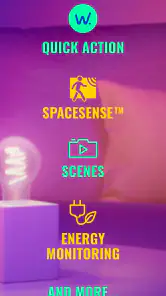
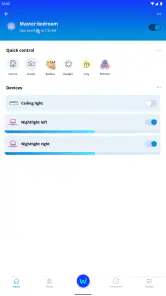
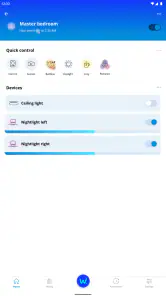
Analysis by Reviewed
Smart lighting is easy to enjoy for a week; the real question is whether it remains useful after the novelty wears off. I find WiZ Connected most appealing when it turns small, repeated tasks into habits: setting a comfortable light before bed, adjusting a room without getting up, or making a regular evening routine easier. It is a free House & Home app from Signify Netherlands B.V., and it gives WiZ lighting a practical control point rather than asking you to treat every bulb adjustment as a new project.
What the first week gets right
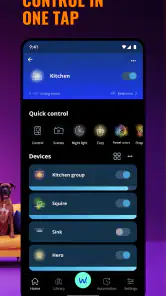
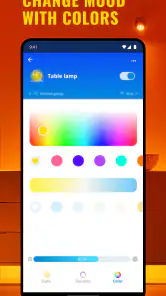
My first impression is that the appeal is immediate. Once the lights are connected, brightness and color adjustments make it easy to try different looks without changing bulbs or adding separate controls. Scenes give you a quick way to switch the atmosphere for a particular moment, while schedules can take care of a routine you otherwise repeat by hand. The important difference is that the app is not only a remote control: its value grows when you decide which settings you want to reuse.
That distinction matters during setup. I would start with one frequently used room, connect its lights, and test a few ordinary situations before trying to configure the whole home. A bright setting for reading, a softer one for winding down, and a simple schedule are enough to show whether this style of control fits your day. If you create too many scenes straight away, choosing among them can become more work than reaching for a switch.
Making scenes useful rather than decorative
It is tempting to build a scene for every mood, but I get more lasting value from a small set tied to real activities. Think of the room’s usual jobs: relaxing, working, cooking, or hosting. If one lighting setup works well for more than one occasion, I would reuse it instead of creating a near-duplicate with a slightly different name. That keeps the app easier to navigate when I want a quick change, not a design session.
A useful test is whether a scene saves a decision at a busy moment. For example, before guests arrive, I can choose a setting that makes the room feel livelier; afterward, I can return to a familiar evening look without adjusting each light individually. The colors and brightness are the fun part, but repeatability is what makes a scene worth keeping. If a setting looks striking once and feels awkward every other time, I would delete it rather than let it clutter the choices I actually use.
A realistic everyday routine
Picture coming home with shopping in both hands. A voice command through Amazon Alexa or Google Assistant can be more convenient than unlocking a phone and navigating to a control. Later, when it is time to settle in, a saved scene can give the room a softer feel; a schedule can handle a regular change when you know you will want the same result on most evenings. These are modest conveniences, but they are the kinds I notice repeatedly because they fit into things I already do.
I would still keep a manual control within easy reach. A phone-based system is not automatically quicker when the phone is elsewhere, the app needs attention, or someone in the home prefers a familiar switch. Voice control helps in the right moment, but it is not a universal replacement for direct control. I see the strongest arrangement as layered: use the app for setup and occasional adjustments, voice when your hands are occupied, and a physical option for simple everyday access.
More From Our News Desk

Weather by Xiaomi Review: Clear at a Glance, Less Clear Up Close

X Under Pressure: Can It Recover When Posting Goes Wrong?

Clash of Clans Is Won Between the Battles

Android Auto Makes the Case for Quieter Car Software

MobiOffice: Transforming Mobile Productivity with Seamless Integration

EA SPORTS FC™ Mobile Soccer: Redefining Mobile Sports Gaming
When the app earns a place month after month
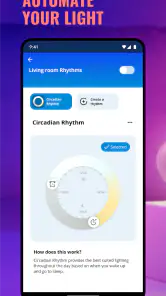
The longer-term question is whether schedules and scenes reduce friction instead of creating a maintenance project. Schedules make most sense for patterns that stay fairly stable, such as a regular time to change the lighting. If your day varies, a rigid routine can feel like one more thing to correct. I would begin with a schedule only where I can predict the desired behavior, then check after a few days whether it still matches how the room is being used.
This is also where WiZ Connected differs from relying only on ordinary bulbs and switches. A standard setup is simpler and has fewer settings to maintain, but it cannot offer the same quick changes in brightness, color, scenes, or app-based scheduling. Compared with other smart-light controls, the useful question is less about how many options an app can display and more about whether its controls suit the lights you have chosen. If you already use a different lighting ecosystem, it may be easier to stay with its controls than to split your home between systems just to gain another app.
For a household with several people, I would pay attention to whether the controls make sense to everyone who uses the room. A scene with a clear purpose is easier to share as a habit than a collection of personal experiments. I would also avoid making everyday lighting depend on a complicated chain of actions. The best routine is usually the one another person can understand without needing a tour of the app.
Maintenance without turning lighting into a hobby
Smart lighting has a small but real upkeep cost: devices need to remain connected, routines sometimes need a rethink when your schedule changes, and scenes can become untidy if you keep adding options. I would treat the app like a household tool and review its setup when a room’s purpose changes, not constantly. If a schedule stops matching your routine, changing or removing it is more sensible than working around it every day.
Wi-Fi is part of the setup, so a reliable home network matters. If a light is not responding, I would first check whether the issue affects one light or the whole setup, then confirm that the home connection is working before rebuilding scenes or changing everything at once. Making one adjustment at a time helps identify the actual problem and avoids turning a minor hiccup into a full reset of a setup that was otherwise working.
There is also a practical trade-off in choosing app-controlled lighting: convenience depends on having compatible WiZ lights, so the app alone does not turn existing ordinary bulbs into smart ones. I would decide room by room rather than replacing everything immediately. Start where adjustable lighting would make a noticeable difference, live with that arrangement, and expand only if you find yourself reaching for the controls regularly.
Who will enjoy it, and who may not
I think WiZ Connected is a good fit for someone who wants to change the feel of a room, automate a few predictable lighting habits, or control lights by voice without building a complicated smart-home project. It is particularly appealing if you enjoy experimenting at first but are willing to keep only the settings that prove useful. The app is free, and its average rating is 4.4 from around 46,000 ratings, which suggests it has attracted a substantial audience, though any rating is only one part of deciding whether its approach suits your home.
I would skip it if you want a completely hands-off setup, dislike using a phone for household controls, or have no interest in scenes, schedules, brightness changes, or colors. It may also be the wrong choice if you already have a lighting system you like and do not want another set of controls to maintain. Someone who simply wants dependable on-and-off lighting may be happier with ordinary bulbs and switches; smart features are worthwhile only when you will use them often enough to justify the extra setup.
Cost, support expectations, and choosing carefully
The app is free to download, though it includes in-app purchases listed from $0.99 to $3.99 per item. I would keep that in mind when exploring the app, but I would not assume that every useful lighting control requires a purchase. The practical decision is to check what you actually need before spending, rather than treating optional purchases as a reason to buy or avoid the lighting system as a whole.
It is rated for Everyone and has been available since October 5, 2022. The current version is 1.29.1, and it requires Android 9 or later. Those details are useful if you are checking an older device before getting started. The app has more than one million installs and around 2,400 written reviews; that gives a sense of its reach, but I would still judge it by whether the WiZ controls and routines match the way your household uses light.
Living with WiZ Connected
First things first, setting up the WiZ Connected app is a breeze. I’m not exactly a tech wizard, but the app guided me through each step like a pro. From downloading the app to syncing my lights, everything was pretty straightforward. You’ll need to have your Wi-Fi up and running, but once that’s sorted, it’s smooth sailing.
Features to Light Up Your Life
Once you've got everything set up, it’s time to dive into the fun stuff. The app offers a variety of features that let you control every aspect of your lighting. Want to set the mood for a cozy night in? Or maybe you need bright, focused lighting to get some work done? With WiZ Connected, you’ve got a ton of options at your fingertips.
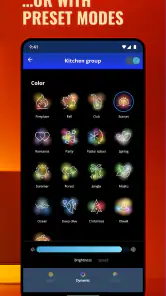
The app lets you adjust brightness, change colors, and even set schedules for your lights. You can also create different scenes for different occasions. I tried out the “Party” scene during a small gathering, and it definitely added a fun vibe to the evening.
Smart Integrations
One of the coolest things about the app is its integration with smart home systems. If you’re using Amazon Alexa or Google Assistant, you can control your lights with just your voice. It’s like living in the future! I found it super convenient when my hands were full or when I was just too comfy on the couch to reach for my phone.
User Experience
The user interface is clean and intuitive, making it easy to navigate through all the options. I appreciate how the developers have kept things simple yet functional. Even if you’re new to smart home tech, you’ll find it easy to get the hang of things.
Final Thoughts
So, would I recommend the WiZ Connected app? Absolutely! It’s user-friendly, packed with features, and makes managing your smart lighting a breeze. Whether you’re a tech enthusiast or just someone looking to add a little convenience to your life, this app is worth checking out.
There you have it, folks! My take on the WiZ Connected app. Ready to light up your space with a touch of a button? Go ahead and give it a try. You might just find yourself wondering how you ever lived without it.
WiZ Connected Frequently Asked Questions
What is WiZ Connected used for?
WiZ Connected is an app for managing the WiZ smart light system. It gives users a way to control compatible lighting from a mobile device, making it useful for people who want their home lighting managed through an app. It is listed in the House & Home category, and its main focus is controlling WiZ lights rather than serving as a general smart-home control app.
Who develops WiZ Connected?
WiZ Connected is developed by Signify Netherlands B.V. It is intended for use with the WiZ smart light system, so it is most relevant to households that use or are considering compatible WiZ lighting. If you are choosing an app before buying or setting up lights, it is worth checking that the lighting products you plan to use belong to the WiZ system.
What devices and operating systems can run WiZ Connected?
WiZ Connected is a mobile app for managing the WiZ smart light system. Before downloading, check that your phone or tablet meets the app’s operating-system requirements; it supports Android devices running version 9 or later. The app is free to download and is intended for a general audience, so it can be a straightforward option for households looking to control compatible WiZ lighting from a mobile device.
Is WiZ Connected free to download, and are there any in-app purchases?
WiZ Connected is free to download, which lets you try the app without paying an upfront app fee. It also offers in-app purchases priced from $0.99 to $3.99 per item. Those purchases are separate from the download, so review any purchase prompt before confirming it. The app is published by Signify Netherlands B.V. and is designed for use with the WiZ smart light system.
What is WiZ Connected and how does it work?
WiZ Connected is a smart lighting app that allows users to control their WiZ smart lights remotely via their smartphone or tablet. The app connects to the lights through Wi-Fi, enabling users to adjust brightness, change colors, and set schedules from anywhere. It requires a Wi-Fi network and compatible WiZ lights to function properly.
Pros
- Easy setup and installation process.
- Wide compatibility with various smart home systems.
- Energy-efficient lighting solutions.
- Intuitive user interface for app control.
- Customizable lighting scenes to suit mood.
Cons
- Requires stable internet connection.
- Limited offline functionality.
- Initial cost may be high for some users.
- Some features locked behind premium plans.
- Occasional connectivity issues reported.
- Category
- House & Home
- Version
- 1.29.1









