WeMoms Pregnancy Baby Tracker
- 410.00
- 4.6
- Installs
- 1.00M
- Price
- Free

Screenshots





Analysis by Reviewed
When I judge a pregnancy tracker, I care less about how many screens it offers than whether it helps me make sense of a busy, uncertain day without becoming another chore. WeMoms Pregnancy Baby Tracker brings together pregnancy progress, baby-growth visuals and peer support, so it is most appealing if you want practical context as well as company. I’d treat it as a companion for everyday questions, not a replacement for advice from a midwife or doctor.
How it fits into a real pregnancy routine
So, you’ve got a little one on the way, and suddenly your phone is filled with baby-related searches and suggestions. Enter the app, designed to be your best friend during one of the most exciting journeys of your life. You know, the kind of friend who’s always there with advice, tips, and a comforting word when things get a bit overwhelming.
Community support when you want another perspective
First off, the community aspect of this app is absolutely stellar. It’s like having a group of moms-to-be in your pocket, ready to share experiences and lend support. The app’s design makes it super easy to connect with others who are at the same stage of pregnancy as you are. You can swap stories, share tips, and even vent about those pregnancy cravings that hit at the most inconvenient times. Trust me, it's a game-changer.
The social side is also where I’d use a little judgement. Other parents can offer empathy and ideas, but their experiences aren’t a diagnosis and won’t necessarily match yours. For a useful routine, I’d save personal health concerns for a qualified professional, then use the community for the everyday things that feel better shared: comparing how people organise appointments, asking how they handled a tiring week, or simply finding someone who understands the waiting.
Daily guidance and a sense of progress
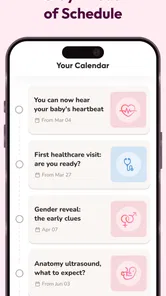
Another feature worth mentioning is the daily tips and information. Every day, you get a nugget of wisdom about what’s happening inside your belly. It’s fascinating to learn about the development milestones your baby is hitting, and it makes the waiting game a bit more exciting. Plus, it’s tailored to your specific due date, so everything you read is relevant and timely.
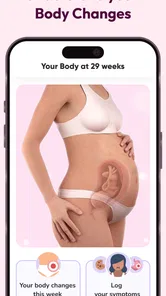
The 3D growth view gives that information a visual anchor, which can make a week-by-week journey feel less abstract. I’d use it as a quick moment of connection rather than a precise medical reference: development descriptions help explain broad milestones, while individual pregnancies vary. If you like reading a short update over breakfast or during a commute, this format can be easier to stick with than a long article or a stack of saved browser pages.
Easy to dip into, with a few sensible limits
Let’s talk user-friendliness for a second. The app’s interface is clean and intuitive, which means you won’t spend ages trying to figure out how to navigate through it. Whether you’re a tech whiz or someone who generally avoids apps, you’ll find this one easy to handle. The icons are clear, the text is readable, and everything is where you’d expect it to be.
More From Our News Desk

 Remini - AI Photo Enhancer
Remini Is Our App of the Week for Bringing Old Photos Back to Life
A quick AI restoration tool earns its place by making faded portraits and soft, older photos feel vivid again—provided you know where its polish ends.

 PayPal - Pay, Send, Save
PayPal Reviewed: Who Benefits from Its Reach, and Who Should Skip It
PayPal is most useful when its reach and familiar checkout solve a real payment problem. These reader-by-reader recommendations show where it earns a place—and where friction wins.

 Millionaire 2026 Quiz & Trivia
 Makes Every Answer Count
A familiar quiz-show format succeeds or falters on tiny design decisions: how clearly the game guides a first answer, handles hesitation, and invites one more round.

 Decor Life - Home Design Game
Decor Life Turns Short Breaks Into Bite-Sized Decorating Jobs
A room-by-room decorating game built for quick sessions gains from modern phone habits, but its gentle pace still depends on patience, repetition, and a steady stream of design jobs.

 Sniper 3D:Gun Shooting Games
Sniper 3D’s Quick-Shot Appeal Faces the Upgrade Treadmill
The appeal is immediate: line up a target, steady your aim, and fire. The harder question is whether Sniper 3D can keep players returning after the first rush.

 Blockudoku®: Block Puzzle Game
Blockudoku vs. the Puzzle Pack: A Quick Puzzle With a Repetitive Edge
Blockudoku turns a clean grid into a quiet test of foresight. Against match-three polish and head-to-head simplicity, its lasting appeal is also its biggest limitation.
Latest News



For speed, I’d expect a tracker built around brief check-ins and bite-sized reading to suit quick visits, rather than sessions that demand a lot of setup. In a realistic day, you might open it while waiting for an appointment, glance at the current growth update, then check a community conversation later when you have more time. If you mainly want a private, no-distraction record, though, a simple notes app or a dedicated offline journal may feel calmer than a community-centred experience.
Pregnancy apps can become cluttered if you try to record every feeling and read every discussion. My practical tip is to choose one small habit—such as checking the weekly development information—and keep symptom notes focused on details you may want to raise at an appointment. That makes the tracker more useful without turning pregnancy into a stream of notifications or a comparison exercise. I’d also avoid treating similar symptoms in other users as proof that yours are harmless.
Personal tracking, visuals and everyday trade-offs
Now, let’s get personal. One thing I absolutely love about this app is the ability to track my own progress and symptoms. Being able to log how you’re feeling each day and seeing how it lines up with other moms is incredibly reassuring. It’s like having a diary that talks back to you, telling you that everything you’re experiencing is perfectly normal.
That reassurance is a real strength, but it has a boundary: a community can make common experiences feel less isolating, yet it cannot confirm that a symptom is normal for you. I’d use personal tracking to spot patterns and help explain them clearly at a medical visit, not as a reason to delay one. If you prefer keeping sensitive reflections entirely private, or dislike comparing your experience with other people’s posts, you may get more value from a basic personal journal.
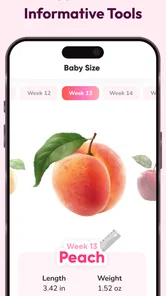
And can we talk about the visuals for a second? The development tracker with those cute illustrations of the baby’s growth stages is simply adorable. It’s those little touches that make you feel even more connected to the tiny human growing inside you.
One useful way to make the visuals work harder is to share the weekly update with a partner or family member who wants to follow along. It gives you an easy conversation starter without requiring them to install another tracker or learn a whole system. The trade-off is that illustrations are there to make growth easier to picture; they shouldn’t be read as a literal portrait of your baby.
Who it suits, and what to expect from the app
WeMoms is a free parenting app from developer WeMoms, with a 4.6 average from around 27,000 ratings and over a million installs. Its Teen age rating makes it available to a broad audience, though the pregnancy-focused discussions are naturally most relevant to expectant parents. The app has been around since January 2015, and version 4.70.02 requires Android 9 or later. Optional in-app purchases range from $2.99 to $99.99 per item, so I’d check the purchase details before paying for anything; the core appeal is the combination of tracking and community, not a need to buy extras.
For someone who wants both a week-by-week lens and peer conversation in one place, that mix is more convenient than switching between a standalone calendar and separate parent forums. On the other hand, a clinical reference app may be a better fit if your priority is evidence-led medical explanations, while a plain calendar can be enough if all you need is appointment reminders. I’d also think twice if social feeds make you anxious or if you want a tracker with no community element.
When a community tracker is the right choice
I’d especially recommend this kind of combined tracker to someone who has plenty of questions but doesn’t necessarily want to search the open web every time one comes up. The advantage is not that every answer will be right; it’s that pregnancy-stage context and other people’s everyday experiences sit close together. That can help you frame a question more clearly before deciding whether it belongs in a conversation with a clinician.
It may be less useful if you’re already happy with a pregnancy book and a private calendar, or if you find other people’s stories stressful. A busy community can expose you to experiences that don’t resemble your own, and reading too much can turn reassurance-seeking into a habit. I’d set a simple boundary: use discussions for companionship and practical ideas, then step away when you notice they’re making you compare symptoms or worry more.
Making the app useful without making it a chore
A low-effort routine is likely to work better than trying to use every part of a pregnancy app. For example, check the growth update once when your week changes, and use personal notes only for observations you actually want to remember. If something needs a follow-up, write down when it happened and what you want to ask at your next appointment. That turns a quick check-in into a useful prompt without asking you to maintain a detailed diary every day.
For a partner who wants to feel included, the visual update can be a small shared ritual: show it over breakfast or mention the new milestone during a call. That’s a more natural use than expecting the app to coordinate the whole family’s calendar. If you’re preparing for a medical visit, keep the distinction clear between your own notes, general information in the app and professional advice; they serve different purposes.
One practical trade-off is that a community experience depends on what other people choose to post and how much time you want to spend reading. A tracker’s personal progress information can still be useful when you don’t want to participate socially, but the social side is a central part of the appeal. If you know you’ll never open a discussion feed, compare whether a simpler pregnancy calendar would give you what you need with less noise.
A measured performance verdict
In a sea of pregnancy apps, the combination here stands out. It’s not just an app; it’s a community, a guide, and a source of comfort during this whirlwind journey. If you’re looking for something to help you navigate through the ups and downs of pregnancy, this app is a fantastic choice.
My overall view is that its best performance is practical rather than technical: quick access to relevant progress information and a place to seek peer understanding. I can’t promise identical speed or stability on every device, but its straightforward, short-session use is a sensible match for checking in throughout the day. If an app does stall or a discussion fails to load, I’d try reopening it and return to a trusted medical contact for any time-sensitive health concern rather than relying on a community thread.
On an older or more constrained phone, I’d keep expectations modest rather than assume that a visual tracker and social content will feel equally smooth on every device. The Android requirement is version 9 or later, so it’s worth checking compatibility before planning to make the app part of your routine. As with any app, closing it and reopening it is a reasonable first step if a screen stops responding; for urgent health questions, the right recovery is contacting a medical professional, not waiting for an app to work again.
For someone choosing between this and separate tools, the deciding question is whether the community adds genuine value. A calendar and a saved medical resource can be more focused, and a private journal gives more control over personal notes. This app makes more sense when you want those pregnancy updates alongside the possibility of shared experience, and are comfortable choosing carefully what advice to take from other users.
Download it, give it a whirl, and watch as it becomes an integral part of your pregnancy experience. Happy tracking, mamas!
WeMoms Pregnancy Baby Tracker Frequently Asked Questions
Who develops WeMoms Pregnancy Baby Tracker, and what is it designed to do?
WeMoms Pregnancy Baby Tracker is a parenting app developed by WeMoms. Its central purpose is to help users follow pregnancy and baby growth while connecting with a community for support. The app’s focus brings tracking and peer conversation together, so it may appeal to people who want both pregnancy-related information and a place to discuss their experiences.
What is WeMoms Pregnancy Baby Tracker’s rating and how widely is it used?
WeMoms Pregnancy Baby Tracker has an average rating of 4.6 from around 27,000 ratings, with about 410 written reviews and over 1 million installs. These figures offer a general sense of its reception and reach, but individual experiences can differ. Reading recent user feedback can help you decide whether its community and tracking approach match what you want from a pregnancy app.
What age group is WeMoms Pregnancy Baby Tracker intended for?
WeMoms Pregnancy Baby Tracker has a Teen content rating, so it is intended for a teen audience and older. Its focus is parenting, pregnancy, and baby growth, with a community for sharing questions and experiences. If you are downloading it for a younger user, consider whether the app’s pregnancy and parenting discussions are appropriate for them.
What features does WeMoms Pregnancy Baby Tracker offer?
WeMoms Pregnancy Baby Tracker is a comprehensive app designed for expecting and new mothers. It offers a wide range of features including weekly pregnancy tips, a baby size tracker, and a community forum where moms can connect and share experiences. Additionally, it provides expert advice on pregnancy nutrition, health tips, and postpartum care. The app also includes a contraction timer and kick counter to assist in monitoring your pregnancy journey.
Is WeMoms Pregnancy Baby Tracker free to use?
Yes, WeMoms Pregnancy Baby Tracker is free to download and use. However, it offers in-app purchases for additional features and content. Users can enjoy basic functionalities at no cost, but premium features such as expert consultations and personalized content may require payment. This freemium model allows users to explore the app before deciding on any purchases.
Pros
- User-friendly interface for easy navigation
- Includes a supportive community for moms
- Personalized daily tips and advice
- Detailed tracking of baby's development
- Offers health and nutrition guides
Cons
- Requires an account to access all features
- Some advice may be too generic
- Limited offline functionality
- Contains ads in the free version
- Occasional bugs and app crashes