Voice Recorder Pro
- 6.53K
- 4.7
- Installs
- 100.00M
- Price
- Free

Screenshots
Analysis by Reviewed
I often think of a voice recorder as a small household tool: useful when someone needs to capture a reminder, a class note, or a thought before it disappears. Voice Recorder Pro is made by Splend Apps, and its straightforward approach suits a shared phone better than a recorder that expects everyone to learn a complicated workflow. I’d still treat each recording as personal, though; a shared device doesn’t mean every file should be shared.
Sharing a phone without mixing up recordings
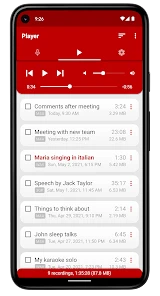
In a realistic home scenario, one person might record a cooking idea while another captures a reminder for an appointment. The key is to make a simple habit of naming files clearly and checking the playback before handing the phone to someone else. That small step makes later searches less confusing and helps prevent an important note from blending into a pile of vague recordings.
Voice Recorder Pro is free to install, with in-app purchases listed at $1.99 per item. I’d begin with the free version and see whether its everyday recording and playback routine fits the household before spending anything. If more than one person uses the same device, agree on where recordings belong and who is responsible for moving or deleting them. That’s a practical boundary, not a feature I’d assume the app handles for you.
Setting expectations before pressing record
Because this is a recording tool rather than a shared task manager, coordination depends on people. A student can tell a parent when a lesson recording is ready, or a family member can label a voice reminder with its purpose. For anything that another person needs to act on, I’d also send a short message explaining what the recording contains instead of expecting them to open every file.
One useful trade-off is that a dedicated recorder can keep the task focused: open it, capture the sound, then return to whatever you were doing. The built-in recorder on a phone may be enough for someone who only records occasionally, while a note-taking app may be better if typed text and audio need to live together. I’d choose this app when the main need is making and keeping voice recordings, not organizing a whole household’s projects.
The app is rated for Everyone, which makes its age context broad, but that should not be confused with guidance about recording other people. I’d explain to younger users when it’s appropriate to record and ask permission where needed. On a shared device, it’s also sensible to avoid leaving private conversations or sensitive details where another user might casually find them.
Getting Started with Voice Recorder Pro
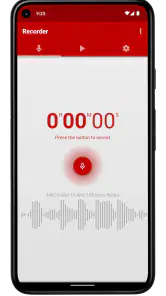
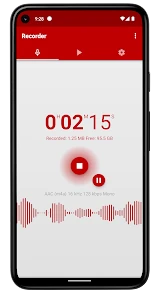
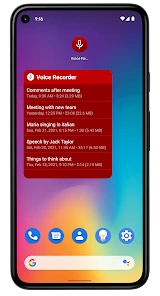
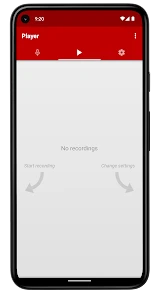
The first thing that struck me about Voice Recorder Pro is how easy it is to get started. I mean, within minutes of downloading the app, I was already recording. The interface is super intuitive, which is a breath of fresh air in the world of overly complicated apps. You're greeted with a clean and simple layout that doesn’t bombard you with unnecessary features.
You May Like

Clash of Clans Is Won Between the Battles

Android Auto Makes the Case for Quieter Car Software

MobiOffice: Transforming Mobile Productivity with Seamless Integration

EA SPORTS FC™ Mobile Soccer: Redefining Mobile Sports Gaming

How Microsoft OneDrive Became a Mobile Productivity Giant

How Google Translate Breaks Language Barriers Effortlessly
Features That Stand Out
What really makes this app shine is its array of features that cater to both basic and advanced needs. For starters, the audio quality is top-notch. I’ve used it in a variety of settings, from quiet rooms to bustling streets, and the recordings have always come out crystal clear.
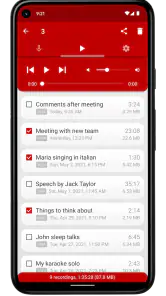
One of my favorite features is the ability to edit recordings right within the app. You can trim, cut, and even enhance audio without having to export it to another program. It’s like having a mini studio in your pocket!
Another handy feature is the cloud integration. With just a few taps, I can upload my recordings to Google Drive or Dropbox, ensuring that I never lose an important file. Plus, sharing recordings is a breeze—whether it's via email or social media, you can do it all directly from the app.
Why It’s a Must-Have
If you’re anything like me and value reliability and efficiency, then this app is a must-have. The developers have clearly put a lot of thought into making it user-friendly and functional. I also appreciate the regular updates that keep improving the app’s performance and adding new features. It's clear that the team is committed to providing a stellar user experience.
In a world where there are countless apps vying for our attention, finding one that does exactly what it promises without fluff is refreshing. Whether you're recording interviews, lectures, or personal notes, Voice Recorder Pro delivers every time.
For a better result, I’d place the phone steadily and close to the speaker, then make a brief test recording in a noisy room before relying on a long lecture or interview. A recorder can capture what its microphone hears, but it won’t turn distant speech or competing household noise into a clean studio track. After recording, trimming the beginning and end can make a clip easier to replay or share without changing how you captured it.
The app is a strong fit for students who want an audio backup for class, people who dictate reminders, and anyone who needs to preserve spoken ideas without opening a larger editing suite. It is less suitable if you need automatic transcripts, collaborative project organization, or professional multitrack production; those jobs call for a different kind of tool. Its current version is 3.36 and it runs on Android 6.0 or later, so I’d check the device’s Android version before planning to use it on an older phone.
Splend Apps’ recorder has been available since October 21, 2014, and its broad audience is reflected in a 4.7 average from around 1.3 million ratings, alongside over 100 million installs. Those figures suggest it is a familiar option, but they don’t replace trying it in the room where you’ll actually record. A quiet test at home can tell you more about placement and playback volume than popularity alone.
So, if you're on the hunt for a reliable voice recording app that won't let you down, give Voice Recorder Pro a try. It's a tool that I now find indispensable in my daily life, and I'm sure you'll feel the same way once you give it a whirl.
My household verdict
I’d recommend it for a household that wants a simple way to capture separate voice notes, provided everyone agrees on basic naming and privacy habits. It isn’t a substitute for clear communication or a shared filing system, and families needing transcription or tightly organized collaboration should look elsewhere. For straightforward recording on a compatible Android phone, though, it offers a practical starting point without asking everyone to learn a complicated setup.
Voice Recorder Pro Frequently Asked Questions
Who develops Voice Recorder Pro, and what is the app designed to do?
Voice Recorder Pro is developed by Splend Apps and belongs to the Music & Audio category. Its purpose is straightforward: it provides a way to record voice audio on a mobile device, with an emphasis on ease of use and high audio quality. It may be worth considering if you want a dedicated recording app rather than a broader music or audio production tool.
How much storage space should I leave for recordings?
The space recordings use depends on how long you record and the audio settings you choose. Longer sessions naturally create larger files, so it is sensible to keep an eye on available device storage if you plan to capture extended conversations, lectures, or other audio. Leaving room on your device can also make it easier to keep recordings available for later listening.
Is Voice Recorder Pro free to download, and are there in-app purchases?
Voice Recorder Pro is free to download, so you can try its voice-recording tools without an upfront purchase. In-app purchases are available at $1.99 per item. The app is made by Splend Apps and is rated for Everyone, making it suitable for a broad audience. If you prefer to avoid optional purchases, check the purchase prompts while using the app.
What devices and operating systems can run Voice Recorder Pro?
Voice Recorder Pro is available for Android devices running Android 6.0 or later. Before downloading, check your device’s operating system version to make sure it meets that requirement. The app is listed in the Music & Audio category and is intended for recording and managing voice audio, so it may suit users looking for a straightforward recorder rather than a general-purpose audio editor.
What features does Voice Recorder Pro offer for audio recording?
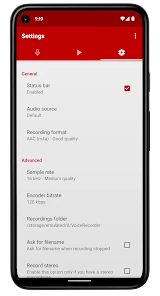
Voice Recorder Pro offers a wide array of features to enhance audio recording. Users can enjoy high-quality audio recording and playback, the ability to trim and edit recordings, add effects, and share files easily. The app supports multiple audio formats and provides cloud integration, making it easy to manage and store recordings securely. Additionally, users can set recording parameters and use advanced tools like noise reduction and silence skipping to improve audio quality.
Pros
- High-quality audio recording
- User-friendly interface
- Supports multiple audio formats
- Easy editing features
- Great customer support
Cons
- Contains ads
- No cloud backup
- Limited free features
- Requires in-app purchases
- Occasional bugs

- Category
- Music & Audio
- Version
- 3.36