viagogo Tickets
- 265.00
- 4.2
- Installs
- 1.00M
- Price
- Free

Screenshots
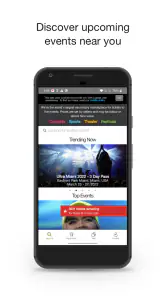
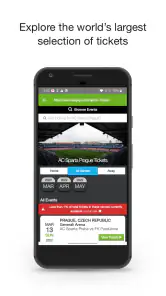
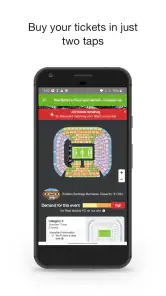
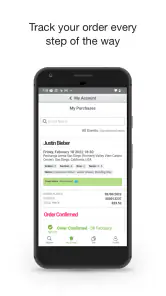
Analysis by Reviewed
I find ticket apps most useful when they help me turn a vague plan into a practical choice without making me rush. viagogo Tickets is an events app from Viagogo, and its mobile format is handy when I want to look for a show or game away from a computer. Whether it suits someone with different access needs depends on the device, the task, and the setting—not on the mere fact that tickets are available in an app.
Who benefits from a marketplace approach
I would consider this app if I already have an event in mind, want to compare possible listings on my phone, or am coordinating plans with people who are not all in the same place. It is less compelling if my main need is venue advice, broad recommendations, or a purchase path tied directly to one organizer. For an important event, I would treat it as one place to explore rather than the only place to check.
A useful habit is to decide what makes an option acceptable before searching: the date, the number of seats, any seating constraints, and the group’s spending limit. That gives me a simple filter for judging listings and makes it easier to stop browsing once a workable choice appears. It also helps when another person is assisting with the search, because we can agree on the criteria before looking at options together.
Finding an event without losing your place
When I’m searching for tickets on a phone, I try to keep the task small: identify the event, check the date, and compare only options that fit the plan. That approach makes it easier to pause and return without turning a quick search into a pressured decision. Next, I’d look at how the setting and the way someone interacts with a device can change what “convenient” really means.
Readability and navigation in everyday use
The main task is easy to understand: look for an event, compare available options, and continue toward a purchase. That focused purpose is helpful if I already know the artist, team, or event I want. It is less demanding than browsing a broad entertainment service that mixes ticketing with unrelated content.
The app has a 4.2 average from around 12,000 ratings, and it has been installed over a million times. Those figures suggest a substantial audience, though they do not tell me whether a particular screen will work well for an individual user. I would treat them as context, not as a substitute for checking the app on the device and with the settings that person actually uses.
Search-led ticketing has a practical advantage: a person who knows the event can get to relevant choices without navigating a long chain of categories. But event names, locations, and dates can be easy to confuse, particularly when an event has several performances or a venue hosts similar listings. I recommend checking the full event details before moving forward, rather than relying on a familiar name or a thumbnail alone.
More From Our News Desk

Weather by Xiaomi Review: Clear at a Glance, Less Clear Up Close

X Under Pressure: Can It Recover When Posting Goes Wrong?

Clash of Clans Is Won Between the Battles

Android Auto Makes the Case for Quieter Car Software

MobiOffice: Transforming Mobile Productivity with Seamless Integration

EA SPORTS FC™ Mobile Soccer: Redefining Mobile Sports Gaming
For a clearer comparison, I would decide on the essentials first: which date works, how many seats are needed, and what parts of the venue are acceptable. Then I would compare the options that meet those needs. This is more manageable than scanning every listing at once, and it helps prevent an appealing price or seat label from distracting me from the actual plan.
The app is free to install and is rated for Everyone. That makes it straightforward to try, but a free app does not mean that tickets are free; ticket purchases are a separate decision. I would approach the checkout as a purchase, carefully reviewing the total and ticket details shown there before committing. That habit matters in any ticket marketplace, especially when the event is popular and I feel pressure to decide quickly.
Motor and sensory considerations
For someone who prefers brief, purposeful interactions, searching for a known event on a phone can be easier than handling several browser tabs or keeping paper notes. It also suits a person who wants to revisit ticket choices while coordinating with friends. I would still avoid making a rushed purchase one-handed while walking or travelling: ticket details and seat choices deserve focused attention, and a moving environment increases the chance of tapping the wrong option.
People who use larger text, screen magnification, voice control, or a screen reader should test the specific steps they need before relying on the app for an urgent purchase. I cannot assume that every label, control, or changing screen will be equally easy to interpret with every assistive setup. A sensible low-pressure test is to open the app, search for an event, inspect a listing, and see whether the important information can be reached comfortably without completing a transaction.
Sensory conditions matter too. A bright venue lobby, a noisy commute, or a crowded queue is not an ideal place to compare several ticket options. If someone is sensitive to distraction or needs extra time to process choices, I would suggest doing the research somewhere quieter and saving the final decision for when they can concentrate. The app can put event discovery in reach, but it cannot make a busy setting calm.
One useful workflow is to make the decision criteria outside the app before browsing: note the event date, acceptable seating area, and the maximum amount the group has agreed to spend. Then use those criteria to narrow the choice instead of repeatedly switching between listings and chat messages. This is especially helpful for people who find multi-step decisions tiring, because it reduces the amount they must keep in working memory.
When and where mobile access helps
A realistic example is a friend group deciding on a concert after work. One person can search while others confirm which night they can attend; once the date is settled, the group can compare suitable options rather than debating every possible performance. I find this mobile-first approach handy when plans come together informally and nobody has a laptop open. The trade-off is that a phone screen is not always the best place for several people to inspect detailed choices together.
For a person planning around mobility, fatigue, or a need to avoid last-minute changes, the app can be part of the research process, but I would not treat a ticket listing alone as a complete access plan. The buyer should check venue-specific information through the relevant venue or event source, particularly for accessible seating, entrances, companion arrangements, and travel routes. Those details can be decisive, and they should not be inferred from a general ticket listing.
The same caution applies to a person arranging tickets for someone else. Before buying, confirm that the event, date, and seating choice suit the person who will attend, not just the person holding the phone. If a group has different needs, it is better to agree on those requirements first and then search than to assume that nearby seats or a particular section will work for everyone.
Compared with going directly to a venue or an event’s official ticket seller, a marketplace app can be convenient for browsing a wide range of events in one place. The direct seller may be the better starting point when someone wants venue-specific guidance or a clearly defined official purchase route. I would compare both when the event is important, when seat location matters greatly, or when I need details that only the venue can confirm.
Where the experience asks for extra care
Ticket buying is inherently time-sensitive, and that can make any mobile interface feel less comfortable. A person who needs extra time to read or compare options may feel pushed to decide before they are ready. My advice is to separate browsing from buying: explore ahead of time, identify acceptable choices, and only proceed when there is enough time to review the transaction calmly.
There is also a difference between finding an event and understanding whether attending it will be practical. The app’s central role is ticket discovery and purchase, not a complete guide to a venue’s sensory environment, step-free access, transport, or personal support arrangements. Someone who needs those details should verify them with the venue or organizer before spending money. That extra step is not a flaw unique to this app; it is an important boundary of ticket marketplaces generally.
For people who have difficulty using small touch targets or making precise taps, I would recommend avoiding checkout while distracted and checking the selected event and seats carefully before confirming. If a person depends on another person to complete a purchase, they should agree on the exact event and acceptable options in advance. That simple handoff reduces the risk of a well-meaning helper choosing a different date or section.
The app’s current version is 106.5.1, and it requires iOS or Android version 10 or later. That operating-system requirement is worth checking before planning around the app, particularly for someone using an older phone that they keep because it works with their assistive setup. The app is free, but the practical cost of a ticket and any purchase terms should be assessed separately at checkout.
Because the app is focused on ticket access, it is not the right choice for someone who only wants general event recommendations, venue accessibility advice, or a guaranteed official source for every listing. In those cases, an organizer’s own site, a venue’s information channel, or a general event calendar may answer the question more directly. I would use viagogo Tickets as one discovery and buying option, not as the sole source for every detail about attending.
A more inclusive way to decide whether it fits
My overall view is that viagogo Tickets can make event searching more convenient for people who are comfortable using a phone and who know what they are looking for. It is particularly useful for comparing possibilities during informal planning, and its event-focused approach keeps the task clear. The developer is Viagogo, and the app’s long-running presence in the events category makes it a familiar option for many ticket seekers.
Its inclusive value is conditional rather than automatic. A person’s experience will depend on their device, vision, dexterity, attention, reading preferences, and the clarity of the event information they need. I would test the search and listing stages with any accessibility tools already in use, before relying on the app for a time-critical purchase. If the important controls or details are difficult to reach, the venue or another purchasing route may be a better fit.
My most practical recommendation is to use the app for discovery, then pause before checkout. Confirm the event and date, compare the seating choice against the group’s real needs, and seek venue-specific answers for access questions. That two-stage approach preserves the convenience of mobile browsing while reducing the chance that speed or uncertainty will drive the decision.
For me, the app works best as a convenient ticket-search tool, not as a complete guide to an accessible night out. If you value browsing events on your phone and are willing to verify the details that matter to you, it is worth considering. If you need detailed access assurances, extra time, or a direct relationship with the venue, start with the organizer or box office and use the app only if it supports the plan.
Choosing a calmer route from search to decision
A useful middle ground is to browse in the app but make the final comparison on a larger screen if a phone makes the choices hard to inspect. This is not a reason to avoid mobile search; it is a way to match the tool to the task. I would use the phone to locate a relevant event, then take a pause to compare the details with anyone attending before returning to checkout.
People often ask whether they need to know the exact event before opening a ticket app. In my view, this one is most straightforward when they do: a specific artist, team, or event gives the search a clear target. If someone is still deciding what to do, an event calendar or local listings may be a more comfortable first step, followed by viagogo Tickets once there is a particular option to investigate.
Another practical question is whether a listing tells me enough to plan the whole outing. I would not rely on it for that. Tickets address entry to an event, while travel, venue layout, sensory conditions, and access arrangements may require separate confirmation. A quick check with the venue can prevent a ticket choice from solving only the first part of the plan.
For a group purchase, I would also settle who is responsible for the final review. One person can search, but another attendee may be better placed to check a seating or access requirement. Agreeing on that division before checkout makes the process less stressful and reduces the chance that the person tapping through is expected to guess what others need.
Overall, I would recommend trying the app to people who want a phone-based way to explore ticket options and are comfortable verifying the details that matter. I would steer someone toward a venue or organizer first when official guidance, seating certainty, or accessibility arrangements are central to the decision. That distinction is the key to using a marketplace sensibly: let it help with discovery, and use the most direct source for questions that need a precise answer.
viagogo Tickets Frequently Asked Questions
What is viagogo Tickets, and what can I use it for?
viagogo is an online ticket marketplace where people can buy and sell tickets for live events, including concerts, sports, theater, and festivals. The app lets you search for events, compare available listings, and manage order information. Ticket availability and prices are set by sellers, so listings can differ from the event’s original price and may change as demand shifts.
Are tickets bought through viagogo guaranteed to be valid?
viagogo offers buyer-protection policies for eligible orders, but a marketplace purchase is not the same as buying directly from an event organizer. Read the order details and the applicable guarantee before paying, and check the venue’s rules on resale tickets, names, and entry requirements. If a ticket has a problem, contact viagogo support promptly and keep your order confirmation and related messages.
How much do viagogo tickets cost, and are there extra fees?
Ticket prices are set by individual sellers and can be higher or lower than the original face value, particularly when an event is popular or nearly sold out. Service, delivery, or other charges may also apply, and taxes or currency conversion can affect the final amount. Review the complete price shown during checkout before confirming your purchase, rather than relying only on the listing price.
When will I receive my tickets, and how do I access them?
Delivery depends on the event, ticket type, seller, and chosen delivery method. Some tickets may be available quickly as mobile or downloadable tickets, while others are delivered closer to the event date. Your order page should show the latest delivery information and instructions. Check it regularly, make sure you can access the ticket on your device, and follow any venue-specific entry requirements.
Can I cancel or resell a ticket after buying it on viagogo?
Ticket purchases are generally treated as final, so you should not assume that you can cancel an order simply because your plans change. Resale options may be available for some tickets, but eligibility, timing, and local rules can vary. Before purchasing, review the order’s terms and viagogo’s current policies; if an event is postponed or canceled, follow the instructions provided for that specific order.
Pros
- Browse tickets for concerts
- sports
- theater
- and other live events.
- Search by event
- artist
- team
- or venue to find relevant listings.
- Interactive seating maps can help compare available sections.
- Saved events and alerts make it easier to track upcoming shows.
- Digital tickets can be accessed in the app for many events.
Cons
- Prices may be higher than face value
- with fees added at checkout.
- Ticket availability and prices can change quickly.
- Some listings may not show exact seat details before purchase.
- Refunds and cancellations depend on the event and applicable policy.
- Resale tickets may be delivered close to the event date.
- Category
- Events
- Version
- 106.5.1