Upgrade
- 3.56K
- 4.5
- Installs
- 1.00M
- Price
- Free

Screenshots
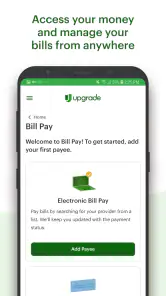
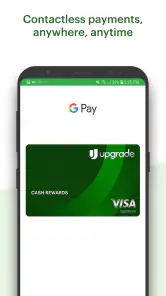
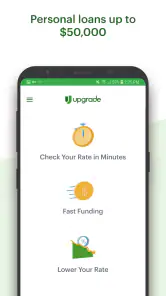
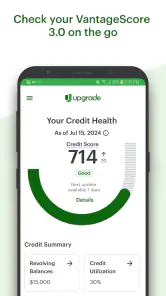
Analysis by Reviewed
When I look at a finance app, I separate the cost of trying the app from the cost of using any financial product it presents. Upgrade is free to download, so exploring it does not require an app purchase. That is useful, but it should not be mistaken for a promise that borrowing, using a card, or opening an account will be free. I’d read the terms for each product before deciding, and compare the actual costs and obligations with other options.
Free to download, not a free financial commitment
The no-cost download lowers the barrier to seeing what Upgrade offers. It does not tell me whether a loan, card, or checking account is worthwhile for a particular person. I would treat the app as an entry point for reviewing options, then look at the terms attached to each one before applying or signing up. The distinction matters: an app can be free while the products it helps you explore involve costs, eligibility requirements, and ongoing responsibilities.
That also means the right question is not simply whether Upgrade costs anything to install. It is whether a specific offer fits your circumstances better than the alternatives. Before committing, consider the total cost, payment schedule, and what you would do if your income or expenses changed. If an offer is not clear to you, pause and seek the full terms rather than relying on a quick summary.
What the app can help you weigh
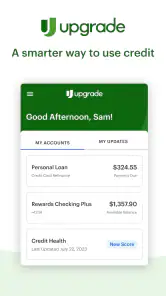
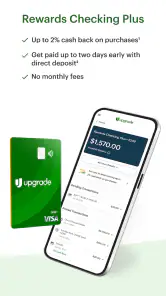
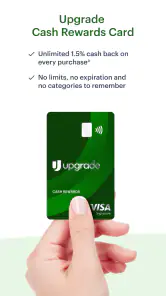
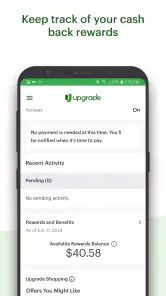
Upgrade, from Upgrade, Inc., brings personal loans, cards, and rewards checking into one finance app. That combination is useful if you are already comparing more than one kind of financial product and would rather begin in a single place. It is less compelling if you only want a simple spending tracker or a budgeting tool: this is oriented toward financial products, not just recording purchases.
When comparing a loan or card, I’d write down the details that affect the total cost and fit—such as the terms offered to you, payment obligations, and any applicable fees—then compare them with alternatives from your bank or another provider. The app can make browsing convenient, but convenience is not proof that an offer is right for your budget. For a decision you may carry for months or years, read the actual terms instead of relying on a quick impression in the app.
A practical way to use it
Imagine you are considering borrowing to cover a necessary expense. You could use Upgrade to explore a loan option, then pause before accepting anything: check the payment against your regular take-home income, consider what happens if an unexpected bill arrives, and compare the terms with another lender. That small routine is more useful than treating an application as a commitment. If the payment would leave too little room for essentials, looking at lower-cost alternatives or delaying a nonurgent purchase may be wiser.
The app may also suit someone who wants to consider a card and a checking account alongside borrowing rather than juggling several starting points. Still, keeping products together does not automatically make them a better deal. I would compare each one on its own merits and avoid signing up for an account or card simply because it appears beside another option.
More From Our News Desk

Weather by Xiaomi Review: Clear at a Glance, Less Clear Up Close

X Under Pressure: Can It Recover When Posting Goes Wrong?

Clash of Clans Is Won Between the Battles

Android Auto Makes the Case for Quieter Car Software

MobiOffice: Transforming Mobile Productivity with Seamless Integration

EA SPORTS FC™ Mobile Soccer: Redefining Mobile Sports Gaming
Make comparisons before you apply
A useful approach is to decide what you need before opening the app. If the goal is to cover a one-time expense, focus on borrowing terms and a payment you can maintain; if you are looking for a card or checking account, compare those separately rather than treating them as an add-on to a loan search. This prevents a broad menu of products from turning into a reason to take on something you did not originally need.
I would also keep a simple note outside the app with the options I am considering. Record the provider, the terms that matter, the expected payment or ongoing obligations, and any question you still need answered. This is a small but practical safeguard when comparing offers across different providers: it reduces the chance that a persuasive first impression will outweigh the details that determine the real fit.
One common follow-up is whether using the app means accepting an offer. I would not treat browsing or starting an application as the same thing as agreeing to a product. Read each screen carefully, understand what action you are taking, and stop if the next step is unclear. With financial decisions, a deliberate pause is better than tapping through on autopilot.
Getting Started with Upgrade
First things first, downloading and setting up Upgrade was a breeze. It’s available on both Android and iOS, so no worries about compatibility issues. After a quick installation, I was greeted with a clean, intuitive interface that made navigation a piece of cake. I’m no tech wizard, but I felt right at home exploring the app’s features.
What to expect from a finance-focused app
For me, the most helpful way to approach the app is as a place to explore financial products, not as a personal finance command center. That distinction affects what I would expect after installing it. Someone who wants to categorize every purchase, set a household budget, or see a complete picture of spending may be better served by a dedicated budgeting tool or the tools already offered by their bank. Upgrade’s appeal is the chance to look across its financial product areas from one starting point.
It is also worth considering how you like to make decisions. If you prefer to start with a shortlist of loans, cards, or checking accounts and then compare them directly, a single app can make the first pass more convenient. If you prefer to deal only with providers you already know, going straight to your bank or lender may feel more comfortable and give you a clearer route to account-specific information.
Features that Stand Out
What really caught my attention was the app's ability to seamlessly integrate with my calendar and email. Seriously, it’s like having a personal assistant who never sleeps. I could sync events, set reminders, and even organize my tasks in a way that made sense to me. Plus, the customization options are out of this world!
The app also offers a nifty feature that lets you categorize tasks with tags and colors. It’s like painting your day with productivity! For someone like me who loves a bit of color coding, this was a dream come true.
Those organizing tools and the calendar-and-email workflow described here do not match the app’s finance focus, so I would not rely on them to manage financial tasks. A more useful habit is to keep a short comparison note outside the app while reviewing options: record the offer, its terms, the payment you could manage, and the date you want to revisit the decision. That makes it easier to compare providers without confusing browsing with approval or commitment.
Everyday decisions need room for a second look
Picture a routine situation: a necessary expense arrives just before payday, and you want to understand whether borrowing is manageable. I would use Upgrade to examine an available loan option, then put the phone down long enough to check the payment against rent, utilities, food, and other regular costs. Next, I would compare the terms with another provider and ask whether a smaller expense adjustment or a delayed purchase could solve the problem without borrowing.
That workflow is not about assuming the app will make the decision for you. It is about using a convenient starting point while keeping the decision grounded in your own budget. A payment that looks manageable in isolation can feel very different when recurring bills land in the same week. If the numbers leave no margin for an unexpected cost, that is a reason to reconsider, not a reason to hope the month goes perfectly.
The User Experience
Now, let’s talk about user experience. The developers have clearly put a lot of thought into making Upgrade user-friendly. The app runs smoothly without any noticeable lags or crashes, which is a huge plus. Navigating through the app is intuitive, and I didn’t find myself getting lost in a maze of unnecessary menus.
What’s more, the app has this cool feature where it gives you gentle nudges to keep you on track. It’s like having a friendly reminder that doesn’t nag but just gently pushes you to achieve your goals. I found this especially helpful on days when I was feeling a bit sluggish.
Even when an interface feels straightforward, I would still slow down around steps that ask for personal or financial details. Read prompts closely, check that you understand whether you are exploring an option or moving toward an application, and do not enter information just to see what happens. That careful approach is particularly useful when an app covers several types of financial products, because the purpose of one flow may differ from another.
Who is likely to get value from it?
I see the strongest fit for someone who is actively considering more than one of Upgrade’s product areas and wants a convenient place to begin. It may help you organize an initial comparison between a personal loan, a card, and rewards checking, provided you evaluate each separately and verify the terms before acting. The app’s free download makes it easier to explore, but the value comes from having a clear reason to look—not from collecting financial products for their own sake.
It is a weaker fit for someone who mainly wants a spending diary, automated household budget, or a general tool for tracking bills. Those needs call for a product designed around day-to-day money management rather than one focused on financial offerings. It may also be the wrong choice if you already have a trusted provider and would rather handle every step through that provider’s own channels.
Another practical question is whether it can replace a bank’s own app. I would not assume that. For the complete details and management of an existing product, a provider’s official materials are the sensible place to go. Upgrade can be a starting point for exploring its offerings, while a provider’s own service is the more natural destination for account-specific tasks and definitive terms.
Availability and fit
The app is free, is rated for Everyone, and has an average rating of 4.5 from around 29,000 ratings, with more than 1 million installs. It has been available since March 21, 2019, and version 1.29.2 requires Android 12 or later. Those figures offer a sense of its reach, but they cannot tell you whether a particular loan, card, or checking product suits your circumstances.
If you use an older Android phone, check compatibility before planning around the app; someone who cannot install it can compare products directly through financial providers instead. I’d also choose a provider’s own official materials when I need complete terms or want to manage an existing account. Upgrade is most useful as a convenient starting point for exploring its financial offerings, rather than a replacement for careful comparison or personal budgeting.
Compared with the usual alternatives, the key trade-off is focus. A bank app is often the direct place to review or manage a relationship you already have, while a budgeting app is typically chosen for tracking and organizing everyday spending. Upgrade sits in a different lane: it brings several financial product types together for exploration. That convenience can save you from beginning every search from scratch, but it does not remove the work of comparing terms, and it should not be mistaken for independent financial advice.
For Android users, the minimum operating system is an important practical check before downloading. If your device does not meet that requirement, there is little point in planning a workflow around the app; you can still compare offers through providers’ own channels. On iOS, the app is also available, so people using Apple devices can consider it without needing an Android phone.
Final Thoughts
All in all, Upgrade is a fantastic tool for anyone looking to boost their productivity without feeling overwhelmed. It’s packed with features yet somehow manages to keep things simple and straightforward. I’ve been using it for a while now, and I can honestly say it’s become an essential part of my daily routine.
If you’re in the market for an app that can help streamline your tasks and keep you organized, I’d definitely recommend giving Upgrade a try. Who knows, it might just be the productivity boost you’ve been looking for!
As a finance app, the better recommendation is narrower: give it a look if you want to explore personal loans, cards, and rewards checking in one place, and judge each offer by its terms. Skip it if your main need is task planning, or if you prefer to keep financial decisions directly with your current bank. My buy-or-skip verdict is simple: trying a free app may be worthwhile, but committing to a financial product deserves a separate, careful decision.
Upgrade Frequently Asked Questions
Can I use Upgrade to manage money directly from my phone?
Upgrade is a finance app developed by Upgrade, Inc. Its focus is on financial products and services rather than cleaning memory or optimizing a phone’s battery. The app’s summary highlights personal loans, cards, and rewards checking, making it relevant to people who want to explore Upgrade’s financial offerings from a mobile device.
Does Upgrade provide personal loans, cards, and rewards checking?
Yes. Upgrade’s mobile app is centered on financial offerings, including personal loans, cards, and rewards checking. It can be a convenient place to explore those products on a phone, but the right choice depends on your own financial needs and the terms that apply to a specific product. Review those terms carefully before applying or making a decision.
Is Upgrade a phone cleaner or performance booster?
No. Upgrade is a finance app, not a tool for cleaning memory, extending battery life, or speeding up a smartphone. Its focus is on financial products and services, with a summary that highlights personal loans, cards, and rewards checking. If you are looking for a device-optimization utility, Upgrade is not designed for that purpose.
Who develops Upgrade, and what is it intended to help with?
Upgrade is a finance app developed by Upgrade, Inc. Its focus is on financial products and services rather than cleaning memory or optimizing a phone’s battery. The app’s summary highlights personal loans, cards, and rewards checking, making it relevant to people who want to explore Upgrade’s financial offerings from a mobile device.
What is Upgrade and how does it enhance my mobile experience?
Upgrade is a mobile application designed to optimize and enhance your smartphone's performance. It offers various features such as memory cleaning, battery optimization, and app management tools, ensuring your device runs smoothly and efficiently. By using Upgrade, users can experience faster app loading times, extended battery life, and overall improved device performance, making it an essential app for Android and iOS users.
Pros
- User-friendly interface for easy navigation.
- Comprehensive range of features offered.
- Seamless integration with other apps.
- Regular updates with new functionalities.
- Highly customizable settings for user preferences.
Cons
- Requires a stable internet connection.
- Some features are locked behind a paywall.
- Occasional bugs affecting performance.
- Limited support for older devices.
- High battery consumption on prolonged use.
- Category
- Finance
- Version
- 1.29.2