Venmo
- 340.13K
- 4.1
- Installs
- 50.00M
- Price
- Free

Screenshots

Analysis by Reviewed
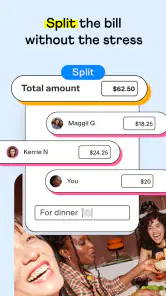
When a group has finished dinner and one person has covered the bill, sorting out everyone’s share can take longer than the meal itself. I like how Venmo gives friends a simple way to settle that kind of everyday expense without chasing down cash. Its social feel makes payments less formal, but I still treat every send as a real money transfer and take a moment to check the details.
When quick payments matter
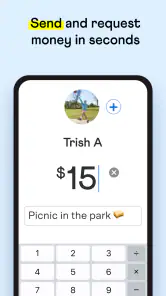
For a familiar group that already uses the same payment app, the useful speed is not just tapping send; it is avoiding the round of messages about who owes what. After dinner, one person can cover the bill and the rest can settle their shares without trying to find exact change. I find this most practical for recurring, informal expenses, such as shared takeout or a group gift. It is less suited to paying someone who does not use Venmo, since the convenience depends on both sides being able to use it.
In everyday use, I would still pause before confirming a payment: check the recipient and amount, especially when several contacts have similar names. A quick transfer can be awkward to correct if you send money to the wrong person. For larger or more formal payments, I would rather confirm the details with the recipient first than treat a social payment app like a replacement for a bank’s usual account-to-account tools.
The Social Aspect of Payments
One of the coolest features of Venmo is its social feed. Imagine scrolling through transactions like you're checking out a social media app. You can see who your friends are paying, and even add a little note or emoji to your payment to add some fun. It's surprisingly entertaining to see what quirky notes people attach to their payments, and it adds a personal touch to what would otherwise be a mundane transaction.
That social layer is also a reason to think about what you write. I keep payment notes simple and avoid putting sensitive details in a message that is meant to be casual. If I am paying a friend back for something personal, I would choose wording that does not disclose more than necessary. The feed can make routine transfers feel less stiff, but the social feel should not make anyone forget that the app is handling real money.
User-Friendly Interface
When it comes to usability, this app nails it. The interface is super intuitive. Whether you're tech-savvy or not, navigating through the app is a breeze. Setting up an account is straightforward, and linking your bank account or card is simple and secure. Within minutes, you're ready to start sending and receiving money.
For shared costs, I find it helps to settle the amount before opening the app: agree on each person’s share, then send the payment with a brief note that will make sense later. That small habit makes a payment history more useful than a string of vague labels. Compared with handing over cash, this is easier when nobody has the right bills; compared with a bank transfer, the friend-focused flow feels more natural for casual back-and-forth. A bank’s own tools may still be a better fit when the payment is formal or the other person prefers not to use a social app.
More From Our News Desk

Weather by Xiaomi Review: Clear at a Glance, Less Clear Up Close

X Under Pressure: Can It Recover When Posting Goes Wrong?

Clash of Clans Is Won Between the Battles

Android Auto Makes the Case for Quieter Car Software

MobiOffice: Transforming Mobile Productivity with Seamless Integration

EA SPORTS FC™ Mobile Soccer: Redefining Mobile Sports Gaming
Security You Can Trust
Now, I know what you're thinking - is it safe? With all the data breaches we hear about, it's a valid concern. Rest assured, Venmo has got you covered with encryption and various security measures. Plus, you can set up a PIN or fingerprint scan for added peace of mind. Just remember to keep your app updated to benefit from the latest security enhancements.
My practical advice is to make checking the recipient part of the routine, not an afterthought, and to use the added device check if it is available on your phone. Those steps help with accidental access and mistaken sends, but they do not remove the need to handle your account carefully. I would not use a payment note as a place for account details, and I would take a moment to review the amount before tapping through when I am distracted or in a hurry.
Convenience at Its Best
One of the things I love about this app is the convenience it offers. Whether you're splitting the rent with a roommate or paying your share of a group gift, it's all just a few taps away. There's no need to worry about carrying cash or finding exact change. You can even use it to make purchases at select merchants, adding even more flexibility to its use.
It works best for people whose friends, roommates, or family already use it and who want a straightforward way to settle everyday shared costs. If you mainly need a private, formal way to pay businesses, or regularly deal with people who do not use Venmo, another payment method may be more convenient. I would also avoid assuming that every merchant accepts it; the option is limited to select places, so I would check before relying on it at checkout.
Performance and device fit
Venmo is a finance app from developer Venmo, and its long-running presence makes it a familiar option for many people. It was released on May 17, 2010, and the current version is 10.78.1. The app is free, rated for Everyone, and requires iOS 8.0 or later. Its 4.1 average comes from around 871,000 ratings, with roughly 340,000 written reviews and more than 50 million installs.
I would not judge its speed by the number of social updates on screen: what matters for a payment is whether I can find the right person, check the amount, and complete the steps without confusion. Busy moments—like settling up after a group meal while everyone is waiting—are exactly when I would slow down enough to verify the details. I can’t promise identical performance on every device or connection, so keeping the app current and allowing a moment for a screen to respond is more sensible than tapping repeatedly if something seems delayed.
On an older phone, the minimum operating-system requirement is worth checking before installing. If a device cannot run the required version, Venmo is not the right choice for it. For a compatible phone, I would treat it as a focused payment tool rather than assume it needs to stay open constantly; use it when a payment is needed, review the confirmation, and return to it if a transfer’s status is unclear rather than sending a duplicate.
Who I would recommend it to
My recommendation is strongest for people who regularly split informal costs with a circle that already uses the app. It is handy for the friend who buys tickets for everyone, the roommate collecting a shared expense, or the person who wants to pay back a small amount without coordinating cash. If your payments are mostly business purchases, require a more traditional banking workflow, or involve people who do not want a social payment app, I would choose an alternative that suits those needs instead. Venmo’s best quality is its ease among people who already meet it halfway; that is also the key limit to keep in mind.
One trade-off worth considering is how a payment app fits into a group’s habits. If most of your friends already use Venmo, asking everyone to adopt a different service just to settle one dinner may create more friction than it removes. If your circle is split across several apps, however, agreeing on one shared method before a trip or recurring expense can save confusion. I would not assume a payment can be routed between unrelated services; choose a method everyone can actually use.
Making a group payment less awkward
For a practical example, imagine a friend buys tickets for a small group and pays upfront. Before sending anything, I would confirm the amount owed directly with that friend, then use a concise note that identifies the event without exposing private details. That gives both people a useful record while avoiding a long explanation in the payment message. If plans change or the amount is disputed, a quick conversation is still clearer than relying on an emoji or an ambiguous note.
The same approach helps with shared household costs. Rather than sending several vague payments over the month, roommates can agree on what each transfer covers and use consistent, plain wording. This is not bookkeeping software, so I would still keep any important household budget or agreement somewhere more organized. Venmo is useful for settling the amount; it does not replace deciding how the expense should be divided.
Choosing between Venmo, cash, and bank tools
Cash remains a straightforward fallback when someone does not want an app or when a group needs to settle a small amount face to face. Its drawback is that people need the right bills and change. Venmo removes that particular inconvenience when both people are comfortable using it, while a bank’s own transfer tools may feel more appropriate for formal payments or someone who prefers to keep transactions inside their regular financial service.
I would choose based on the relationship and purpose, not just the number of taps. A casual repayment between friends is where Venmo feels at home. A payment to a business should depend on whether that merchant accepts it, and a significant or time-sensitive obligation deserves a method whose confirmation and process both parties understand. The friendlier interface is a convenience, not a reason to skip normal care with money.
What to check before relying on it
Before a first payment, I would make sure the recipient is the intended person and confirm the amount outside the app if there is any doubt. This is especially useful when names are similar or a group is splitting a bill unevenly. For repeated payments, a consistent note can help people recognize what a transfer relates to later, but I would leave out sensitive information and avoid treating the note as a formal receipt.
If a screen appears to pause, I would resist tapping send again straight away. First, look for a clear indication of the payment’s status and check with the recipient if necessary. Sending a duplicate to compensate for uncertainty can create a bigger problem than waiting a moment. That is a small but worthwhile habit for any money app, particularly in a noisy setting where it is easy to miss a confirmation.
Where its convenience has limits
The app is not an ideal choice for someone who wants every payment to feel private and purely transactional. The social presentation may be enjoyable to some users and unnecessary to others, so I would be deliberate about what I share in payment notes and consider whether the overall style suits me. Someone who prefers a conventional bank interface may find that their existing tools are a more comfortable fit, even if settling up with friends takes an extra step.
It also depends on access to a compatible device and on the other person being able and willing to use the service. That makes it less dependable as a universal payment option than cash or a method both parties already use. I would keep another way to pay available when traveling with a mixed group or dealing with someone new, rather than assume the app will work for every situation.
My final take
For informal payments among friends and family, I find Venmo most appealing when it reduces coordination rather than merely replacing one tap with another. Its social character can make shared expenses feel relaxed, and its familiar payment flow is useful for repeat situations such as meals, gifts, or household costs. The trade-off is that users need to be thoughtful about recipient details, notes, and whether the other person is actually part of the same payment routine.
I would recommend it to someone who regularly settles small shared costs with people who already use it. I would steer a person toward a bank tool, cash, or another mutually accepted option when formality, privacy, broad acceptance, or a different workflow matters more. Used with that distinction in mind, it is a practical finance app rather than a universal answer to every kind of payment.
Venmo Frequently Asked Questions
Can I use Venmo without linking a bank account or card?
Venmo is designed for mobile payments between users, and its existing setup description says you need to link a bank account or credit card to your account to make transfers. That connection also affects how you fund payments and move money. Before downloading, consider whether you are comfortable connecting a payment method and reviewing the details of each transaction in the app.
Does Venmo include social features, and can I control what I share?
Venmo combines payments with social features: users can share payment stories on a feed, comment, and like posts. That may make transactions feel more conversational, but it is worth considering your privacy preferences before using those features. Be thoughtful about the personal information you share, and review the app’s available settings and terms so you understand how your activity is presented.
Can Venmo replace a traditional bank account?
Venmo is a finance app centered on paying and getting paid, rather than a description of a complete banking service. Its payment features can be useful for transferring money between users, but the app should not be assumed to replace all the services you use through a bank. Consider your needs and review Venmo’s terms before relying on it for financial tasks.
Is Venmo only for sending money to friends?
Venmo is primarily intended for peer-to-peer transactions, and users can transfer money to one another through the mobile app. It also has Venmo for Business profiles that allow small businesses to accept payments, with separate fees and terms for business transactions. If you plan to use it commercially, check those terms and make sure the profile type fits your situation.
What should I check before sending money with Venmo?
Before confirming a payment, check that the recipient is the person you intend to pay and review the payment details shown in the app. The payment method you choose can affect fees, and money transfers deserve the same care as other financial transactions. Use the app’s security options, be cautious with personal information, and send money only to contacts you trust.
Pros
- User-friendly interface
- Quick money transfers
- Strong security measures
- Wide acceptance
- Social media integration
Cons
- Limited international use
- Transaction fees apply
- Privacy concerns
- Customer service issues
- Occasional app glitches
- Category
- Finance
- Version
- 10.78.1