Investing.com: Stock Market
- 11.14K
- 4.6
- Installs
- 50.00M
- Price
- Free

Screenshots


Analysis by Reviewed
I find Investing.com: Stock Market most useful as a broad market-watching and research companion, rather than as a place to make every investment decision. It puts prices, charts, news and event tracking close together, which can save time when I want to understand what is moving. The trade-off is that this breadth can feel busy, and market information is not the same thing as personalized financial advice.
A practical way to follow a watchlist
For a simple daily routine, I’d choose a manageable set of stocks or other markets to follow, check their charts, then use relevant headlines and calendar events to add context. That sequence is more useful than scrolling through every available instrument. A sharp price move on its own rarely explains what is happening; pairing it with news or a scheduled economic release can help me form better questions before I act.
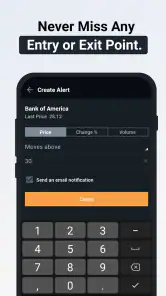
Alerts are best treated as prompts to review, not automatic buy-or-sell instructions. I’d set them only for levels or events that would genuinely change what I want to investigate. Too many notifications can recreate the very distraction the feature is meant to avoid, especially if I follow several markets. Keeping the list focused makes it easier to distinguish a meaningful change from routine movement.
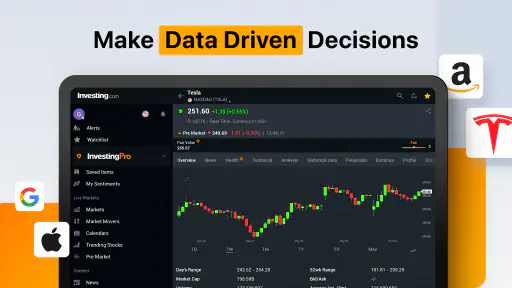
It also helps to decide what I need from a chart before opening it. A longer view can put a sudden daily dip in perspective, while a short view is more relevant when I’m checking a near-term move. Neither view tells the full story, and a chart pattern should not replace checking the underlying company or broader conditions. That small pause keeps quick mobile research from turning into overconfidence.
Where it fits among finance apps
Compared with a brokerage app, this is better suited to checking a wider range of markets and reading around price movements; a brokerage is usually the more direct choice when I need to manage an account or place trades. Compared with a minimalist quote tracker, Investing.com offers more context through news, charts and its calendar, but that extra breadth asks me to be selective. If I want only a quiet glance at a handful of prices, a simpler tool may feel calmer.
A realistic use for me would be checking a watchlist during a lunch break after an alert arrives, then looking at the chart and calendar before deciding whether the move deserves more research later. I would not make a rushed trade from a notification or headline. The app can help organize that first pass, but personal goals, risk tolerance and independent research still matter.
Make the information easier to act on
I’d use the app as a two-stage research tool: first to spot a change, then to decide whether it deserves time away from the phone. When something catches my attention, I can note the instrument and the reason it stood out, then revisit it later with a longer chart view and related headlines. This simple separation helps prevent the constant checking that can make every small fluctuation feel urgent.
More From Our News Desk

Weather by Xiaomi Review: Clear at a Glance, Less Clear Up Close

X Under Pressure: Can It Recover When Posting Goes Wrong?

Clash of Clans Is Won Between the Battles

Android Auto Makes the Case for Quieter Car Software

MobiOffice: Transforming Mobile Productivity with Seamless Integration

EA SPORTS FC™ Mobile Soccer: Redefining Mobile Sports Gaming
For someone learning how markets connect, the combination of prices and an economic calendar can be especially useful. If several assets move around the same time, I’d check whether a scheduled event might provide context before assuming that one company-specific story explains everything. The calendar is a prompt to investigate, not proof of cause; it’s important to keep that distinction clear.
There’s also a useful trade-off in following several asset types from one place. It can help me notice that a story is broader than a single stock, but it can also encourage shallow browsing across markets I don’t understand well. I’d keep the watchlist tied to questions I can explain in plain language. If I can’t say why an instrument is there, it is probably adding noise rather than insight.
Who benefits—and who may prefer another tool
I’d recommend this to people who enjoy following markets, want news and reference information alongside prices, and are comfortable building their own routine. It can also suit an investor who already has a brokerage account but wants a separate place to monitor developments without treating every headline as a trading signal. Its value is strongest when the user is curious and selective, not when they expect the app to make decisions for them.
By contrast, someone who wants a step-by-step introduction to investing may be better served by a structured learning resource, while someone focused on orders, holdings and account management should begin with a brokerage platform. And if all you need is a handful of quotes with as little on-screen activity as possible, a stripped-down tracker may be less tiring. The right choice depends on whether you want breadth or simplicity.
I’d also be cautious about using any market feed as a substitute for checking whether a source, instrument or event is relevant to my own situation. A headline can be accurate and still leave out the detail that matters to a particular decision. The app works better as a starting point for questions than as a final authority.
Your One-Stop Financial Hub
First things first, the Investing.com: Stock Market app isn’t just for stock market aficionados. It’s for everyone who wants to get a piece of the financial cake. From stocks, bonds, commodities, to cryptocurrencies, this app covers it all. I felt like a kid in a candy store exploring all the available options!
The user interface is sleek and intuitive, making it easy to navigate through the plethora of features. Whether you’re tracking your favorite stocks or reading up on the latest market news, everything is just a few taps away.
Real-Time Data at Your Fingertips
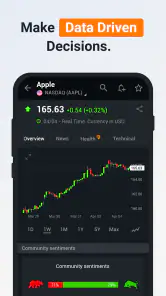
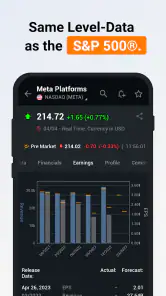
One of the standout features of this app is its real-time data feed. No more waiting around for updates. As someone who likes to keep a close eye on market fluctuations, I found the live updates incredibly helpful. It’s like having a personal stock market ticker in your pocket.
Moreover, the app offers detailed charts and financial analysis tools that cater to both beginners and seasoned investors. I particularly enjoyed using the interactive charts to visualize market trends.
On a phone, a chart is most useful when I give it a specific job: comparing the current move with a broader trend, or checking whether a quick change is large enough to investigate. I wouldn’t try to build a complete investment case from a small screen. If a decision depends on several assumptions, I’d use the app to gather leads and then take the time to examine them more carefully.
Stay Informed with Comprehensive News Coverage
In the world of investing, information is power. The app’s comprehensive news section ensures you’re always in the loop. It aggregates financial news from a variety of reliable sources, allowing you to stay ahead of the curve. I’ve found myself spending countless hours reading through insightful articles and expert analyses.
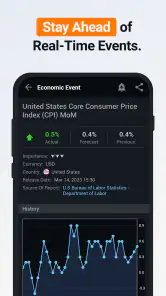
Additionally, the economic calendar is a neat feature that helps you keep track of important financial events around the world. It’s like having a personal assistant reminding you of key dates that could impact your investments.
One practical habit is to check the calendar before interpreting a sudden move, rather than opening it only after the market has already surprised me. That doesn’t mean every listed event will affect the markets I follow, but it gives me a reason to ask whether timing matters. I find this more disciplined than reacting to a dramatic headline without first considering what else was happening.
Customizable Alerts and Notifications
Let’s talk about alerts. The app allows you to set up customizable notifications for specific stocks, economic events, or even articles. This feature is a lifesaver for those of us who like to stay on top of things without having to check the app constantly. I’ve set up alerts for my preferred stocks and it’s been a great way to keep tabs on my portfolio.
There is a learning curve in deciding which of the many screens deserve a place in a regular routine. I’d start with a small watchlist and add markets only when I have a clear reason to follow them. That makes the app’s range feel like a useful reference shelf rather than an endless feed. Beginners may appreciate having prices, news and charts together, but anyone new to investing should take time to understand the instruments before drawing conclusions from a quick glance.
For alerts, I’d begin with just the notifications I would actually respond to. A price alert can prompt a closer look, while a news or event alert can tell me when it may be worth checking the context. If I receive alerts for every minor movement, I’m likely to start ignoring them—or checking the app more often than I intended. Adjusting the list after a few days is a sensible way to keep it useful.
Who will get the most from it
This finance app is a good fit for curious readers who follow more than one type of market, want a compact way to check developing stories, or use event dates to plan further research. It is less suitable for someone seeking a guided investing course, a personalized portfolio recommendation, or a very simple screen with only a few quotes. I’d also favor a dedicated brokerage for account-specific tasks rather than expecting a market-information app to replace it.
The app is free to download, with optional in-app purchases ranging from $0.99 to $533.55 per item, so I’d check the purchase details carefully before choosing anything paid. It is developed by INVESTING.com and is rated for Everyone. Its average rating is 4.6 from around 927,000 ratings, and it has been installed over 50 million times. Those figures suggest broad use, but they don’t guarantee that its layout or level of detail will suit every investor.
If you’re wondering whether it costs anything to start using, the download is free; optional in-app purchases are available. I’d look closely at what a paid option includes before committing, and I wouldn’t assume it is necessary just to begin following markets. For a new user, starting with the free experience and a narrow watchlist is a low-pressure way to see whether the app’s depth matches your needs.
A useful tool, with sensible limits
Version 6.43 requires Android 7.0 or later, and the app has been available since September 12, 2013. For me, the important question is less how long it has existed and more whether its information helps me make a calmer, better-informed next step. It can make market monitoring more convenient, but it cannot remove uncertainty, and a fast update is not a reason to act without checking context.
That distinction answers a common question about what this app is for: I see it primarily as a market-information and research companion, not a replacement for a broker or a personal financial adviser. I can use it to follow prices, read coverage and keep track of events, but decisions still require judgment about my own circumstances. Anyone who expects a notification to tell them exactly when to buy or sell is likely to be disappointed.
My overall view is that its breadth is both the reason to try it and the main thing to manage. I’d keep the watchlist intentional, use alerts sparingly, and treat news and charts as complementary clues rather than complete answers. With that approach, it can make a daily market check more organized without turning every change into a reason to act.
In conclusion, if you’re looking for a comprehensive, user-friendly app to manage your investments and stay informed about the financial world, look no further. The Investing.com: Stock Market app is a powerhouse tool that brings the stock market to your fingertips. Whether you’re a novice investor or a seasoned pro, this app has something to offer you. So, why not give it a try and see how it can transform your investing experience?
Investing.com: Stock Market Frequently Asked Questions
What does Investing.com: Stock Market help me do each day?
Investing.com: Stock Market is a finance app for following market information and financial news in one place. Its store summary emphasizes real-time market insights, and the app’s tools can help users keep track of financial topics they care about. It may be useful as a regular reference for people who want to follow markets, though decisions still require personal research and judgment.
Who develops Investing.com: Stock Market, and is it widely used?
The app is developed by INVESTING.com and has a broad audience among people interested in finance and markets. It has more than 50 million installs and an average rating of 4.6 from around 927,000 ratings. Those figures suggest many users have tried it, but individual experiences can differ, so it is worth considering whether its market information and tools suit the way you prefer to follow finance.
Is Investing.com: Stock Market suitable for beginners, or is it mainly for experienced investors?
Investing.com: Stock Market can be useful to people at different experience levels. Its financial news and market information can help newcomers become familiar with financial topics, while its charts and analysis tools may also appeal to users who already follow markets closely. As with any finance app, information and tools can support research, but they do not replace careful judgment when making investment decisions.
What features does Investing.com: Stock Market offer to users?
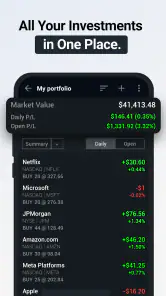
Investing.com: Stock Market provides a comprehensive suite of tools for financial tracking and analysis. Users have access to real-time data on stocks, indices, commodities, and currencies. The app also offers advanced charting options, financial news, and the ability to create a personalized portfolio. This makes it an invaluable resource for both new and experienced investors looking to stay informed and make educated decisions.
Is Investing.com: Stock Market free to use, or are there any associated costs?
The core functionalities of Investing.com: Stock Market are free to use, which includes access to live quotes, charts, and news. However, the app does offer premium subscriptions that provide an ad-free experience and additional features like advanced tools and analytics. Users should review these options to determine if the paid version meets their professional needs. In-app purchases range from about one dollar to around $534 per item, so check the purchase details before confirming anything.
Pros
- Comprehensive financial data access
- Real-time stock market updates
- Customizable watchlists
- Global financial news coverage
- User-friendly interface
Cons
- Ads can be intrusive at times
- Premium features require subscription
- Occasional app crashes
- Limited free features
- Delayed notifications occasionally
- Category
- Finance
- Version
- 6.43