Wise: International Transfers
- 18.60K
- 4.8
- Installs
- 50.00M
- Price
- Free

Screenshots



Analysis by Reviewed
I usually think about international transfers only when something needs fixing: a bill is due in another country, a relative needs help, or a purchase has to be paid in a different currency. That is when a clear view of the exchange and the fee matters most. Wise: International Transfers is a finance app from Wise Payments Ltd. built around making those cross-border payments easier to understand. I find its strongest idea is not just sending money, but showing the costs and rate before I commit.
Seeing the exchange before you send
Many people start with their bank because the account is already there, or reach for a payment service they use for everyday purchases. Wise is most useful when the transfer itself crosses currencies: it gives the exchange rate and fee a visible place in the process, so I can judge the total rather than focus only on the amount leaving my account. That transparency is a practical advantage, though it does not make every transfer identical or remove the need to check the details.
How the transfer feels in practice
First things first, setting up Wise: International Transfers is a breeze. You just download it from your app store, and within minutes, you’re ready to go. The interface is clean and intuitive, which is a breath of fresh air in the world of finance apps. No more getting lost in a sea of buttons and menus!
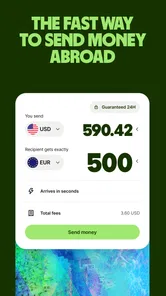
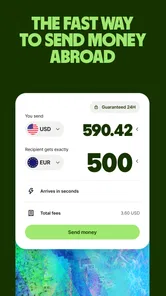
When it comes to sending money, Wise stands out with its transparency. The app shows you the real exchange rate upfront, with a detailed breakdown of any fees involved. What you see is what you get, and there are no surprises. I found this incredibly reassuring, especially when dealing with large sums.
The process itself is straightforward. You choose the currency you want to send, enter the recipient’s details, and voilà! Your money is on its way. The app even gives you an estimated arrival time, which, in my experience, was pretty spot-on. It’s like having a personal banker in your pocket!
My most useful habit is to pause at the quote rather than tap through on autopilot. I check the recipient and currency, look at the fee and the estimated arrival, then compare the amount the other person should receive with what they actually need. For rent or a time-sensitive bill, that final check is more valuable than simply moving quickly. If anything in the recipient’s details looks unfamiliar, I would rather stop and verify it than assume a transfer can be easily undone.
That quote is also a useful planning tool before the money is ready to send. I can work backward from the amount a recipient needs and see what the transfer would involve, rather than promise a net amount based on a rough mental conversion. I still treat the displayed figures as a snapshot for that transaction, not a standing offer to use later. If I return to the payment at another time, I look at the current quote again.
More From Our News Desk

Weather by Xiaomi Review: Clear at a Glance, Less Clear Up Close

X Under Pressure: Can It Recover When Posting Goes Wrong?

Clash of Clans Is Won Between the Battles

Android Auto Makes the Case for Quieter Car Software

MobiOffice: Transforming Mobile Productivity with Seamless Integration

EA SPORTS FC™ Mobile Soccer: Redefining Mobile Sports Gaming
For a first transfer, I would also prepare the recipient’s information before opening the sending flow. It is easier to compare names and account details carefully when I am not rushing to meet a deadline. Saving a recipient, where appropriate, can make a later payment less repetitive, but it also makes checking the destination especially important: a familiar entry should not replace a fresh review of who is receiving the money.
A practical fit for recurring needs
Imagine you are helping family abroad and want to send a set amount after payday. You can use the app’s breakdown to see how the exchange affects the recipient’s amount before you confirm, then keep an eye on the transfer’s progress afterward. For a freelancer paying an overseas supplier, the same clarity can help with planning: check the quote when preparing the payment, and avoid treating an estimated arrival time as a guarantee when a deadline is tight.
It can be particularly handy when the recipient thinks in the destination currency. Instead of telling them only how much you will send from your side, I would agree on the amount they need to receive, then use the quote to see whether the payment lines up. This avoids a common misunderstanding: sender and recipient may both say “the same amount” while talking about different currencies. The app helps make that distinction visible before I commit.
A realistic example is a monthly contribution toward a relative’s household costs. I would check the transfer shortly before sending, confirm the destination currency and recipient details, and make sure the expected arrival fits the bill’s due date. Once it is sent, tracking gives me something concrete to check before asking the recipient whether the money has appeared. That is more useful than relying on a vague “it should be there soon,” though I would still leave a buffer for a payment that cannot be late.
That makes Wise a better fit for people who make international payments often enough to care about the details, but it can also help someone handling an occasional transfer who wants to understand the cost. It is less compelling if nearly all your money stays in one country and your existing bank already handles your needs simply. I would also choose a familiar local payment method when speed, convenience, or a recipient’s preferred way to receive money matters more than comparing an international exchange.
Compared with making a transfer through a traditional bank, Wise puts the rate and fee in front of you as part of the sending flow, which makes comparison easier. A bank may still be the more convenient choice if you want everything managed through an existing account or need a service tied to that bank. Other payment apps can be handy for everyday transactions, but I would check whether they support the particular currency and destination before relying on them. The best option depends on the route, urgency, and what the recipient can use.
When I compare options, I focus on the amount the recipient should receive, the fee shown for the transfer, and whether the timing is suitable—not just on a headline exchange rate. A familiar bank might be simpler if I already manage the payment there, while a general-purpose wallet may be better for a small local payment between people who both use it. Wise makes the strongest case when the cross-border currency conversion is the part I want to inspect closely. The convenience of one app does not automatically make it the best choice for every payment.
There is also a practical difference between paying a person and paying an organization. Before sending money for a purchase or invoice, I would follow the recipient’s own instructions and confirm that the payment method is accepted. A smooth transfer flow cannot resolve a mismatch between what a seller expects and what I send. For recurring bills, I would keep the due date and the recipient’s required amount in view each time, rather than assuming the previous payment’s timing or conversion will carry over unchanged.
Tracking, checks, and trade-offs
One of the features I appreciate most about Wise is its tracking capability. Once you’ve sent your money, you can track its progress in real-time. It’s a bit like sending a package and being able to see exactly where it is at any moment. This feature gives you peace of mind, knowing your money isn’t lost in transit.
Tracking is useful, but it does not remove the need to plan around the stated estimate. I would avoid initiating a transfer at the last moment if a late payment would cause trouble; leave room for the recipient’s own bank or circumstances to affect when funds are available. A second good habit is to review each quote separately instead of assuming a previous transfer tells you what the next one will cost. Currency, amount, and timing can change what you see, so the current on-screen breakdown should guide the decision.
And let's not forget about security. Wise uses top-notch encryption to keep your data safe, which is something I’m always on the lookout for when dealing with financial information. It’s comforting to know that while you’re making international transactions, your details are locked up tighter than Fort Knox.
As with any finance app, I would still take care with account access and recipient information. The app’s convenience is no reason to rush through a payment or share sensitive details casually. Its main trade-off is that a clear quote and transfer tracking are helpful, but they cannot make every route equally straightforward or guarantee that an urgent payment arrives exactly when hoped. I see it as a tool for making a considered transfer, not a substitute for checking that the transaction suits the situation.
One point worth keeping in mind is that transparency and certainty are not the same thing. A quote helps me understand the payment I am about to make, while an estimated arrival time helps me plan; neither means I should ignore the real-world deadline or the recipient’s own requirements. For an emergency where a delay would create serious trouble, I would first ask the recipient which method they can access most reliably, then choose based on that answer rather than on an attractive exchange rate alone.
I would also avoid treating the app as a budgeting shortcut. Its clear transfer breakdown can help me plan a particular payment, but I still need to account for the household bill, invoice, or family commitment that prompted it. If the recipient’s need changes, I would revisit the amount instead of sending the old figure out of habit. This is a small discipline, but it prevents a well-presented quote from making an outdated plan feel automatically correct.
For someone making a one-off transfer, the main friction is the attention the payment deserves: entering recipient details, checking the destination, and reviewing the quote takes care. That is appropriate for a financial transaction, but it may feel less convenient than tapping a familiar local wallet. If I only need to split lunch with someone nearby, Wise is not the tool I would reach for. Its value shows up when the currency boundary matters enough to justify those checks.
Who is likely to get the most from it?
In a world where international financial transactions can often be a headache, Wise is a game-changer. It’s user-friendly, transparent, and secure, making it a must-have for anyone who regularly sends money overseas. Whether you’re paying bills, supporting family, or handling business transactions, Wise makes the process feel seamless and stress-free.
I would recommend it most to people who routinely need to send money across currencies and want to understand what a payment means for both sides. That includes someone supporting family, a freelancer settling an overseas invoice, or a person managing a bill in another country. It can also suit an occasional sender who is willing to slow down and compare the quote. Someone who never makes cross-border payments, or who values keeping all financial activity inside an existing bank above seeing a separate transfer breakdown, may have little reason to add it to their routine.
The app is free, rated for Everyone, and has a 4.7 average from around 1.6 million ratings; it has also passed 10 million installs. Those figures suggest it is widely used, but I would still decide based on the transfer I need to make and the quote shown in the app. Wise has been available since March 24, 2014, and version 9.4.2 supports Android 7.0 and later, making it an option for many Android users with older devices.
Its audience is not limited to frequent senders, but frequency changes the value. If I transfer abroad regularly, checking exchange details becomes part of a repeatable routine, and the visibility can help me make more deliberate choices. If I send money only once, I would still consider it when the quote is clear and the recipient can receive the payment as needed, but I would not assume that a high overall rating settles whether the particular route is right for me. The route and the recipient’s practical needs matter more than popularity.
People who expect every transaction to work like a domestic instant payment should be more cautious. International transfers involve more than the sender’s tap: the chosen currency, route, timing, and recipient’s ability to receive the funds all shape whether the option is suitable. I would not use an estimated arrival as the sole basis for a critical deadline, and I would ask the recipient about their preferred method if they are unfamiliar with receiving a transfer this way.
So, if you’re looking for a reliable way to handle international transfers without the usual hassle, give Wise a try. You might find it’s just what you’ve been searching for. It’s a digital age solution for a digital age problem, and in my opinion, it does a stellar job at it.
My recommendation is to judge it by one real transfer rather than by a feature checklist. Enter the destination and amount, inspect the fee and expected recipient amount, and decide whether the timing and method suit the person on the other end. If that clarity helps you make a better-informed payment, Wise has earned a place in your toolkit. If a bank or local service better matches the recipient’s needs, choosing that instead is sensible, not a failure of the app.
Wise: International Transfers Frequently Asked Questions
Is Wise free to download, and what should I consider before making a transfer?
Wise is free to download, but a transfer may involve a fee. Before confirming a payment, review the cost and other transfer details shown in the app so you understand what you are agreeing to. This distinction is useful to keep in mind: installing the finance app does not mean every service within it is free.
Who makes Wise, and what kind of app is it?
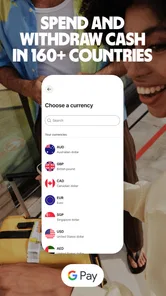
Wise is a finance app developed by Wise Payments Ltd. Its purpose is to help people send, receive, and spend money worldwide, with international transfers at the center of its offering. The app is free to download and is intended for everyone. If you are looking for a mobile way to manage international money movements, Wise is designed for that kind of use.
Can I use Wise on my phone, and what does the app offer?
Wise is a finance app for sending, receiving, and spending money worldwide. Its focus is international transfers, with features designed to help you manage a payment from your phone. The app is free to download and is intended for everyone. It is developed by Wise Payments Ltd., and its broad purpose is simple: send, receive, spend worldwide.
What is Wise and how does it work?
Wise, formerly known as TransferWise, is a financial technology company that provides international money transfer services. The app allows users to send money abroad at the real exchange rate with a small, upfront fee. Wise uses a peer-to-peer system to match currency transfers with other users, avoiding the high fees typically charged by traditional banks.
How safe is it to use Wise for international transfers?
Safety is a top priority for Wise. The company is regulated by financial authorities across the globe, including the Financial Conduct Authority (FCA) in the UK. Wise employs advanced security measures, such as two-factor authentication and encryption protocols, to protect users' data and transactions, ensuring a secure transfer process.
Pros
- Low transfer fees compared to banks.
- Fast international money transfers.
- User-friendly interface design.
- Supports multiple currencies.
- Offers real-time exchange rate updates.
Cons
- Requires verification for large transfers.
- Limited customer service options.
- No cash pickup available.
- Dependent on internet access.
- May charge for currency conversion.











