DANA Indonesia Digital Wallet
- 3.34K
- 4.6
- Installs
- 100.00M
- Price
- Free

Screenshots
Analysis by Reviewed
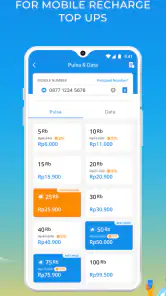
My most useful test of a digital wallet is not whether it looks tidy on a home screen; it is whether I can get from “I need to pay” to a completed transaction without fumbling for cash or switching between several services. DANA Indonesia Digital Wallet is built for that kind of everyday cashless routine. I’d consider it when paying by QR, handling common bills, or topping up mobile credit is part of life in Indonesia, and I want those tasks together in one finance app.
Starting with a practical routine
Picture a regular day: I’m out, need to pay a merchant, and later remember that a bill or phone balance needs attention. A wallet is useful here when it reduces small interruptions, not just when it replaces notes and coins. DANA’s mix of QR payments, transfers, bill payments, and mobile-credit top-ups gives it several jobs in that routine. I would still check that the shop accepts it before relying on a scan, and keep another payment option available for places that do not.
That distinction matters if you are choosing between a wallet and your bank’s own app. A bank app may be the better home base if you mainly monitor accounts or make payments directly from one bank. DANA makes more sense if you want a separate wallet for everyday transactions and merchant QR payments. I see the two as potentially complementary rather than automatic replacements: one can handle routine spending, while the other remains useful for account management or when a merchant does not take the wallet.
The Latest on DANA Indonesia Digital Wallet
A day-to-day payment, step by step
Imagine stopping at a shop on the way home, then remembering that your phone needs credit. I’d first check whether the shop accepts DANA, scan its code, and take a moment to confirm the amount and recipient before approving the purchase. Later, I could use the wallet for a top-up or bill payment rather than starting a separate search for another service. The benefit is not that every task becomes effortless; it is that familiar payment jobs can sit in one place.
That workflow is most useful when I already know what I need to pay and can take a few seconds to review the details. If a queue is moving quickly, I would rather step aside briefly to confirm a transaction than approve the wrong amount under pressure. For a bill or top-up, I’d check the destination information just as carefully. These are small habits, but they make a wallet easier to use with confidence.
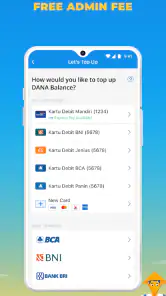
There is also a practical reason not to add every possible funding source at once. If I connect only the accounts I actually use, choosing how to pay stays clearer and it is easier to recognize which source I selected. I would set up the wallet around ordinary needs first, then adjust only if a real routine calls for another option. That keeps a useful tool from becoming a crowded menu.
Why DANA is Worth Downloading
First off, let’s talk about what makes DANA stand out from the crowd. If you’re someone who’s always on the go, this app is a lifesaver. It’s an e-wallet that lets you do pretty much everything related to payments without needing to carry cash around. From paying your bills, transferring money, to topping up your mobile credit, DANA has got you covered. The app’s interface is super user-friendly, which is a huge plus. You don’t need to be tech-savvy to navigate through it.
More From Our News Desk

Android Auto Makes the Case for Quieter Car Software

MobiOffice: Transforming Mobile Productivity with Seamless Integration

EA SPORTS FC™ Mobile Soccer: Redefining Mobile Sports Gaming

How Microsoft OneDrive Became a Mobile Productivity Giant

How Google Translate Breaks Language Barriers Effortlessly

Why Google Sheets Is the Ultimate Mobile Productivity Tool
Following the payment from start to finish
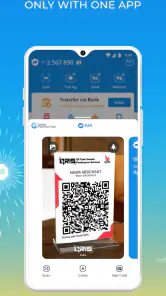
For a QR purchase, the practical flow is simple in concept: open the wallet, scan the merchant’s code, review the payment, and finish the transaction. I’d pause at the review step rather than rushing through it; checking the amount and recipient is a useful habit with any digital payment. For a transfer or top-up, I’d likewise confirm the destination details before proceeding. Those small checks are more valuable than shaving a few seconds off a payment, especially when several transactions are happening in a busy day.
The handoff between DANA and a merchant is where convenience meets reality. The merchant must accept the wallet, and the code needs to be readable and tied to the intended payment. If something looks wrong, I would stop and ask the cashier rather than repeatedly scanning or assuming the first attempt failed. That is a general, sensible payment precaution—not a reason to distrust the app. A wallet is only as seamless as the people and checkout process on the other side.
Features That Make Life Easier
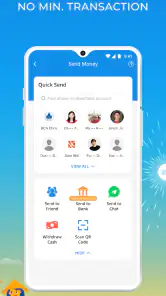
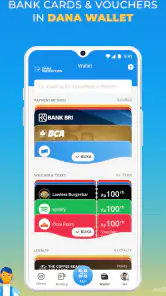
One of the coolest features of DANA is its QR code payment system. You can pay at various merchants just by scanning a QR code, which is not only fast but also kind of fun! Plus, it supports all major banks in Indonesia, so transferring money is a breeze. Another feature I love is the ability to link multiple bank accounts. This makes managing your finances much smoother. And, if you’re into online shopping, there are often promotions and discounts you can snag using DANA, which is a sweet deal.
Linking more than one bank account can be handy, but I would treat it as a choice to manage carefully, not a reason to connect every account I own. Keeping only the funding sources I actually use can make it easier to recognize where a payment is coming from and reduce clutter when choosing how to pay. Promotions can also be a nice extra, but I would compare the final checkout amount and terms with the usual payment method instead of changing spending plans just to chase a discount.
Choosing the right tool for the payment
Compared with using cash, a wallet can make small purchases and phone top-ups easier to handle without carrying exact change. Compared with a bank app, its appeal is having wallet-style spending and QR payments alongside other everyday transactions. But those advantages depend on the situation: cash works without opening an app, and a bank app may be simpler when I am already managing money within one bank. I would not switch methods just because one sounds more modern; I’d choose the option the merchant accepts and the one that makes the payment easiest to verify.
DANA is a stronger fit for someone who regularly encounters QR payments, pays bills or tops up mobile credit, and wants those errands close together. It is less compelling for someone who rarely pays by QR, prefers not to use a separate wallet, or mostly needs to check bank accounts. In those cases, a bank’s own app or a familiar card-and-cash routine may involve less setup and fewer decisions. The useful question is not whether the wallet can replace everything, but whether it removes enough small hassles from your particular week.
Security and sensible habits
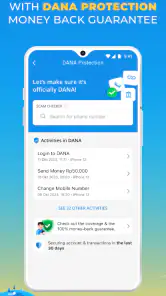
Security is a big deal when it comes to digital wallets, and DANA doesn’t take it lightly. They’ve implemented a multi-layer security system to ensure your money and personal info are safe. I felt pretty secure using it, knowing they have my back.
Even with security measures in place, I’d use the same care I would with a bank card: keep access details private, check payment information before confirming, and avoid letting a hurried checkout dictate what I approve. A wallet can make payment easier, but convenience does not remove the need to notice the recipient and amount. If you are setting it up for someone who is unfamiliar with digital payments, walk through a small, ordinary transaction together first so they understand the confirmation step.
I’d also avoid treating a promotion as a reason to spend more than planned. Check the amount due and the offer’s terms at checkout, then compare that total with the payment method you would normally use. That simple pause helps keep a discount in its proper place: a possible benefit on a purchase you already intended to make, not a prompt to add something unnecessary.
Where the routine can stumble
However, no app is perfect, right? While DANA is great, there are a few things you might want to keep in mind. Sometimes, the app can be a little slow, especially during peak hours when everyone’s trying to make transactions. It’s not a deal-breaker, but it can be a bit annoying if you’re in a rush. Also, while they’re adding more merchants all the time, there are still some places that don’t accept DANA yet.
That makes it a weaker choice as your only way to pay. If a payment is urgent, a slow app or an unsupported checkout can leave you waiting, so carrying a bank card or some cash as a fallback is sensible. It may also be the wrong fit if you prefer to keep financial activity inside a single bank relationship, or if you rarely use QR payments and have no need for the other wallet tasks. Before depending on it for a specific bill or purchase, check the available option in the app and at the point of payment rather than assuming every merchant or service works the same way.
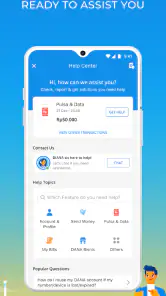
If a payment seems to pause or the checkout is unclear, I would avoid immediately trying again. First check whether the merchant received a confirmation and whether the transaction appears in the wallet, then ask the cashier what they can see. That pause can help prevent confusion about whether a payment went through. If the issue is simply that the merchant does not accept the wallet, switching to a card or cash is often the least stressful solution.
Who is likely to get the most from it?
DANA is most appealing to people in Indonesia who make frequent small payments, top up mobile credit, or want to keep common transactions accessible from one wallet. It can also suit someone who transfers money and shops online often enough to value having those activities close together. The app is free, is rated for Everyone, and is developed by PT Espay Debit Indonesia Koe. Its 4.6 average from around 9.1 million ratings and more than 100 million installs suggest that many people have tried it, though popularity cannot tell you whether it matches your own habits.
The current version is 2.106.0 and it runs on Android 5.1 or later. DANA was released on May 7, 2019, and has accumulated around 3,300 written reviews. Those details are useful when checking basic compatibility and context, but I would still judge it by the tasks I actually need it for: whether my regular merchants accept it, whether the payment flow feels clear, and whether I am comfortable using a wallet alongside my usual bank options.
My take after weighing the trade-offs
All in all, if you’re in Indonesia and looking for a reliable digital wallet, DANA is definitely worth checking out. It’s convenient, secure, and offers some great features that make handling your money a whole lot easier. So, why not give it a try and see how it fits into your daily routine?
I’d start with one or two recurring needs rather than moving every payment into the app at once. Try a familiar QR checkout or a small top-up, pay attention to the confirmation screen, and see whether the merchants and funding choices fit your routine. If that works smoothly, it can earn a regular place in your payment mix. If not, keeping your bank app or another accepted method as the default is a perfectly reasonable choice. My recommendation is practical rather than absolute: DANA Indonesia Digital Wallet is worth trying when its supported payment flow matches the way you already spend.
DANA Indonesia Digital Wallet Frequently Asked Questions
What is the app’s name in the app store, and how can I identify it?
The app is listed as DANA Digital Wallet. To make sure you have the intended finance app, check that the developer is PT Espay Debit Indonesia Koe and download it through the official app store for your device. Confirming the name and developer before installation is a simple way to avoid choosing a different app with a similar name.
Is DANA designed for cashless and card-less transactions?
Yes. DANA is presented as a digital wallet for cashless and card-less transactions, so its main purpose is to let users manage payments through a mobile app. Whether it is useful for your routine depends on where you shop and which payment methods those merchants accept. Consider the places you expect to pay before relying on it as your main wallet.
Does DANA support online as well as in-person payments?
DANA is intended for cashless and card-less transactions and may be used when paying participating merchants. For an online purchase, check the payment options shown at checkout to see whether DANA is offered. For an in-person purchase, ask the merchant or look for DANA as an accepted payment method. Acceptance depends on the merchant, so keep another way to pay available.
Can DANA be useful for managing routine financial tasks?
DANA is a finance app centered on a digital wallet, and it is described as supporting payments and services such as bills and mobile credit. Having these tasks in an app may suit users who prefer handling transactions on a phone. Before using any feature, review its details and the information displayed for the transaction, and make sure the app’s options fit your needs.
Is DANA the right choice if I do not want a payment app?
DANA’s main focus is digital wallet payments, including cashless and card-less transactions. If you are looking for an app primarily for entertainment, shopping discovery, or another non-payment purpose, its central features may not be what you want. It is worth considering your main reason for downloading before installing, especially because using a wallet involves managing account access and payment decisions.
Pros
- User-friendly interface for easy navigation.
- Quick and secure transactions.
- Supports multiple payment methods.
- No hidden fees or charges.
- Offers rewards and promotions.
Cons
- Limited to Indonesian market.
- Requires stable internet connection.
- Occasional app glitches.
- Limited customer support hours.
- No option for international transactions.
- Category
- Finance
- Version
- 2.106.0