Trust: Crypto & Bitcoin Wallet
- 20.66K
- 4.5
- Installs
- 50.00M
- Price
- Free

Screenshots


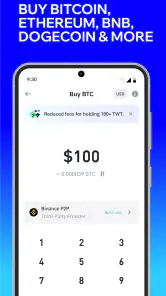
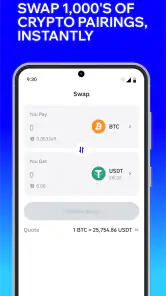
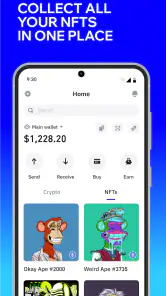
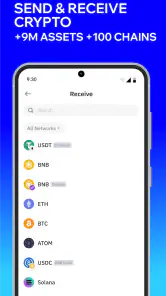
Analysis by Reviewed
I’d approach Trust Wallet as a tool for managing crypto, not as a shortcut to making money. It is a free finance app from DApps Platform, Inc., and its appeal is the ability to keep wallet activity and access to crypto services together on a phone. That convenience comes with a real responsibility: with a self-custody wallet, you need to protect the recovery phrase yourself and take care with every transaction.
What the free price means in practice
The app is free to download, so trying its basic wallet experience does not require an upfront purchase. That makes it easier to explore than a paid wallet app, but free access should not be confused with free crypto transactions or free services reached through the wallet. Network fees and the terms of any third-party service can still affect what you pay. I would check the final transaction details before approving anything, rather than treating the app’s download price as the full cost of using crypto.
Trust Wallet has a 4.5 average from around 2.5 million ratings, and it has been installed over 50 million times. Those figures suggest that many people have tried it, but popularity is not a substitute for understanding how self-custody works. The app is rated for Everyone, though crypto transactions themselves still call for careful judgement and adult-level attention to financial risk.
Getting Started with Trust Wallet
First things first, setting up Trust: Crypto & Bitcoin Wallet is a breeze. All you need is your smartphone, and you're pretty much good to go. Download it from the App Store or Google Play, and you’re in! The app doesn't ask for any personal information, which is fantastic if you're keen on keeping things private. You'll only need to secure your wallet with a passcode and a recovery phrase. Remember, don’t lose that recovery phrase; it’s your lifeline back into your wallet!
Features That Stand Out
Now, what makes this app stand out from the rest? For starters, it supports a wide array of cryptocurrencies. Whether you’re into Bitcoin, Ethereum, or any of the countless altcoins out there, Trust Wallet has got your back. Plus, it allows you to explore decentralized apps (dApps) directly within the app. Imagine being able to trade, play games, or even invest in NFTs all from one place. It’s like having a Swiss Army knife for the crypto world!
Another cool feature is the in-app browser. Not only does it make accessing dApps seamless, but it also keeps your browsing secure. No more jumping between apps or worrying about compatibility issues. It's all integrated nicely, which makes life a whole lot easier.
Keeping a transaction deliberate
A useful way to think about a mobile wallet is as a tool for specific jobs, not a place to tap through every crypto prompt that appears. If I planned to swap one asset for another, I would first decide what outcome I wanted, then compare the displayed amount, network, and fee before confirming. A quick price movement or a polished screen is not a reason to rush. The final confirmation is the moment to catch a mismatch, not a box to clear automatically.
More From Our News Desk

Weather by Xiaomi Review: Clear at a Glance, Less Clear Up Close

X Under Pressure: Can It Recover When Posting Goes Wrong?

Clash of Clans Is Won Between the Battles

Android Auto Makes the Case for Quieter Car Software

MobiOffice: Transforming Mobile Productivity with Seamless Integration

EA SPORTS FC™ Mobile Soccer: Redefining Mobile Sports Gaming
That approach also helps answer a practical question: is this suitable for everyday spending? I would use it for occasional, intentional crypto actions rather than treating it like a bank card for routine purchases. Crypto transfers depend on the asset and network involved, and a mistake may be difficult to undo. For ordinary bills and day-to-day spending, a conventional payment app is usually the simpler choice; this wallet is for people who specifically need crypto access.
How I’d use it day to day
For a practical routine, I’d use the wallet to keep a small amount available for a planned crypto transaction while storing the recovery phrase separately from the phone. Before sending funds, I’d confirm the asset and destination carefully, then review the network and fee shown at confirmation. A familiar token name alone is not enough to identify the right asset: networks matter, and a transfer sent on the wrong one may not arrive as intended.
I’d also separate browsing from approving. Opening a dApp is not the same as agreeing to a transaction, so I’d pause at each wallet prompt and check what it asks permission to do. If a site requests an approval that seems broader than the action I came for, I’d stop rather than click through just to finish quickly. This small habit matters more than having a long list of supported coins.
A realistic phone-wallet routine
Imagine I want to move a modest amount to a dApp I already intend to use. Before opening it, I’d make sure I’m on the right device, that the phone is locked when unattended, and that I can access my recovery phrase without keeping a copy in a photo or message. I’d then check the asset and network in the wallet, open the site, and read each request as a separate decision. If the requested action doesn’t match what I meant to do, I’d leave without approving it.
Afterward, I’d check the transaction status in the wallet rather than assuming that tapping confirm means the other service has completed its part. This is not a promise that every transaction will be smooth; it is a way to avoid confusing a submitted action with a completed one. The extra pause can feel fussy, but it is a sensible trade-off when you are responsible for your own access.
Where the convenience has limits
Compared with keeping crypto on an exchange, a self-custody wallet puts more control in your hands, but it also leaves more of the recovery burden with you. An exchange may feel simpler for someone who wants an account-based login and familiar customer support; Trust Wallet is a better fit if you specifically want to manage wallet access yourself. Neither choice removes market risk, and I would not use a phone wallet as the only place for funds I cannot afford to lose.
The all-in-one design is useful, but it can also make the app feel busy if you only want to hold one asset and rarely transact. Browsing dApps and handling multiple assets require attention, and a convenient interface cannot guarantee that a token, site, or transaction is safe. I’d keep the app updated, use a device lock, avoid sharing the recovery phrase, and treat unexpected messages asking for it as a warning sign. The current version is 8.75.4, and it supports devices running Android 9 or later.
How it compares with other crypto choices
The main comparison is not simply one wallet against another; it is self-custody versus an account run by an exchange. With an exchange account, sign-in and account recovery may feel more familiar, while the exchange controls access to the assets held there. A self-custody wallet shifts that responsibility to you. I’d choose the latter only if I’m prepared to protect the recovery phrase and check transactions myself, rather than assuming an app can reverse a mistake.
There is also a difference between a wallet and a portfolio tracker. A tracker can be a better fit if I only want to see how my holdings are doing and have no reason to send, swap, or connect to dApps. Trust Wallet makes more sense when I need to act on crypto from my phone. That broader role is useful, but it means there are more decisions to make and more reasons to slow down before approving anything.
Who is likely to get value from it?
I think Trust Wallet is most useful for someone who already understands the basics of crypto and wants one mobile place to manage assets and reach dApps. It can also suit a curious beginner willing to learn the difference between a recovery phrase, a network, and a transaction approval before moving meaningful funds. If you want to buy, sell, swap, or explore earning options, the app brings those activities into a wallet experience, but I’d compare the displayed terms and costs before confirming any action.
I’d skip it if you want a hands-off account where someone else handles recovery, or if you are likely to approve prompts without reading them. For a person who only needs to check a portfolio, a simpler tracking tool may be less work; for someone who values direct control and dApp access, the extra care may be worthwhile. The app’s 21,000 reviews add another perspective, but I would still judge it by whether its self-custody approach matches your habits.
Questions I’d settle before moving meaningful funds
Can I get back in if I lose my phone? The recovery phrase is central to restoring access, so I would make sure I can retrieve it securely before relying on the wallet. I would not leave the only copy on the same phone, share it with anyone, or enter it in response to an unsolicited request. If I’m not confident I can keep it safe, I’d wait before transferring funds.
Does a free download mean every action is free? No: the app costs nothing to download, but a crypto transaction may involve a network fee, and services accessed through the wallet may have their own terms. I’d inspect the amount and fee shown at the point of confirmation and avoid proceeding if I don’t understand the total. The same caution applies to swaps or other in-app actions: review the terms on screen rather than assuming the wallet’s free price settles the cost.
Should I keep all my crypto on a phone? I wouldn’t. A phone is convenient for actions on the go, but convenience alone is not a reason to make it the sole home for funds that would seriously hurt to lose. I’d match the amount available on a mobile wallet to what I’m prepared to manage carefully, and choose a different setup if my priorities are long-term storage or account-based recovery.
Security and Ease of Use
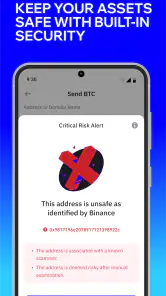
Security is a big deal when it comes to digital money. Trust Wallet excels here with its client-side security model, meaning your private keys are stored locally on your device. You’re pretty much the only one with access to your funds. That’s a huge relief, especially given the number of horror stories about crypto thefts.
Moreover, the user interface is friendly and intuitive. Even if you’re new to the crypto scene, navigating through the app feels straightforward. It’s like they’ve managed to simplify the complexities of crypto transactions, making them understandable for regular folks like us.
My verdict on the value
All in all, Trust: Crypto & Bitcoin Wallet is a solid choice for anyone looking to manage their cryptocurrencies securely and efficiently. It’s packed with features that not only safeguard your assets but also enhance your crypto experience. Whether you’re a seasoned trader or just starting, this app has something for everyone.
In a world where digital currency is becoming the norm, having a reliable wallet like Trust Wallet is essential. It’s not just about storing your coins; it’s about accessing a world of opportunities at your fingertips. So, why not give it a try and see how it can transform your crypto journey? Trust me, you won't regret it!
Trust: Crypto & Bitcoin Wallet Frequently Asked Questions
Can beginners use Trust: Crypto & Bitcoin Wallet?
Trust: Crypto & Bitcoin Wallet is designed for managing crypto through a mobile app, and its wallet functions can be useful for both beginners and experienced users. Newcomers should take time to understand how self-custody works before adding assets: keeping the recovery phrase private and secure is essential. Start by exploring the app carefully and review transaction details before confirming an action.
What can I do with Trust: Crypto & Bitcoin Wallet?
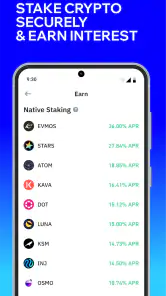
Trust Wallet is a multi-chain self-custody wallet for buying, selling, swapping, and earning with crypto. It brings several kinds of crypto activity together in one app, while leaving users responsible for their wallet and the decisions they make. Available options can depend on the asset and network, so review the details displayed in the app before proceeding.
Is Trust: Crypto & Bitcoin Wallet free to download?
Trust: Crypto & Bitcoin Wallet is free to download and is a finance app for everyone. Its core role is to provide a self-custody wallet for managing crypto assets, with features for buying, selling, swapping, and earning. Before using any transaction feature, review the terms and costs shown in the app, since activity involving crypto may involve charges from providers or networks.
What should I know about self-custody before using Trust Wallet?
Trust Wallet is a self-custody wallet, so control of the wallet depends on keeping your recovery phrase private and safe. Anyone who obtains that phrase may be able to access the associated wallet. Write it down and store it somewhere secure rather than sharing it or entering it in response to unexpected messages. Take time to understand this responsibility before transferring funds.
What is Trust: Crypto & Bitcoin Wallet?
Trust: Crypto & Bitcoin Wallet is a mobile application designed for the storage and management of cryptocurrencies. It offers a secure and user-friendly interface for users to store various cryptocurrencies such as Bitcoin, Ethereum, and others. The app also allows for seamless transactions and exchanges between different crypto assets, making it a versatile tool for both beginners and experienced crypto enthusiasts.
Pros
- User-friendly interface for all levels.
- Supports a wide range of cryptocurrencies.
- Robust security features ensure safety.
- Real-time transaction alerts.
- Integrated with decentralized exchanges.
Cons
- Limited customer support options.
- Occasional syncing issues.
- No fiat currency conversion.
- High transaction fees.
- Requires internet access for use.
- Category
- Finance
- Version
- 8.75.4