PayPal - Pay, Send, Save
- 429.14K
- 4.2
- Installs
- 100.00M
- Price
- Free

Screenshots


Analysis by Reviewed
For a first-time user, PayPal - Pay, Send, Save makes the most sense when you choose one clear job for it: pay a friend, receive money, or check out at a shop. I’d avoid treating the first visit as a tour of every option. This finance app is made by PayPal Mobile, has an average rating of 4.2 from around 3.6 million ratings, and is free for everyone. Its current version is 8.97.0, and it supports Android 7.0 and later.
What to expect from a money app
PayPal is most useful when you want one account to connect online purchases with person-to-person payments. I wouldn’t treat it as a replacement for every banking task: it is a handy payment layer, not automatically the best place for every financial need. With more than 100 million installs, it is familiar to many people you may need to pay, but the other person still needs a practical way to receive the money.
Compared with paying a friend directly through a bank, PayPal can be more convenient when you already have their contact details and both of you use the service. Compared with entering card details at each shop, it can reduce repetitive checkout steps. The trade-off is that you are relying on a separate account and its settings, so I’d check the available funding and payment choices before confirming anything important.
That distinction matters if you’re deciding whether to install it just for a particular payment. The app is worthwhile when the person or shop already accepts it and you expect to use it again; it may be unnecessary if your bank’s transfer tools already handle your usual payments smoothly. I’d think of it as an extra route for money, not a reason to abandon the methods that already work for you.
Getting Started with PayPal
First things first, setting up PayPal - Pay, Send, Save is a breeze. Even if you’re not the most tech-savvy person, the app holds your hand through the process. All you need is an email address, and you’re halfway there. They do ask for some personal details, but hey, it’s all for securing your account.
Set up carefully before sending
For a smoother first session, use an email address you can access and take a moment to review the account details you enter. I’d also enable two-factor authentication if it is offered in your account settings, then make sure you can still access the chosen verification method. That small preparation matters more than browsing every screen: it can prevent a login snag at the exact moment you need to pay.
Before sending money, confirm the recipient’s email address or phone number character by character. A contact detail that looks almost right can still point to the wrong person, and a quick check is easier than sorting out a mistaken transfer later. For an online purchase, pause at the final confirmation screen and verify the amount and selected payment method rather than tapping through on autopilot.
More From Our News Desk

Weather by Xiaomi Review: Clear at a Glance, Less Clear Up Close

X Under Pressure: Can It Recover When Posting Goes Wrong?

Clash of Clans Is Won Between the Battles

Android Auto Makes the Case for Quieter Car Software

MobiOffice: Transforming Mobile Productivity with Seamless Integration

EA SPORTS FC™ Mobile Soccer: Redefining Mobile Sports Gaming
I’d also make sure your sign-in details are private and that you can reach the email address or verification method connected to the account. This is especially useful before a trip or a busy shopping day, when discovering a login problem at checkout is much more stressful than checking access at home. Security settings are not a substitute for careful payment review, but they make it easier to use the account with confidence.
Make the first action a small one
A good first success is a modest payment to someone you know, or a routine online checkout where PayPal is already offered. That gives you a chance to see how the confirmation and transaction record appear before relying on the app for anything urgent. If you’re splitting a meal, for example, agree on the amount first, check the recipient carefully, and send only after both details match your understanding.
People often wonder whether they can use it without giving out bank details to a friend. The practical answer is that you can send using the other person’s email or phone number, while the account still needs its own payment setup for the transaction. If a payment option or recipient detail is unclear, stop and review it rather than assuming every transfer works the same way.
A useful first test is one where there is no rush and both people can confirm what they expect. For instance, after a shared lunch, I’d agree on the exact amount in person, select the intended contact, and check the confirmation before sending. Then I’d open the transaction record afterward. That final check teaches you where to look when you later need to verify a payment, rather than relying only on a notification.
Features that Stand Out
Once you’re set up, the array of features at your fingertips is impressive. You can send money to friends or family with just their email or phone number. No more awkwardly asking for bank details! And receiving funds is just as easy. Every time I get paid, a little notification pops up, and it’s like getting a digital pat on the back.
The app also doubles as a payment method for online shopping. Connecting your PayPal account to your favorite shopping sites means you can check out faster without fumbling for your card. And let’s not forget the security aspect—PayPal is like a digital bodyguard for your transactions.
One practical habit is to read the checkout screen as if you were paying by card: check the total, the seller, and the payment source shown before approving. A familiar PayPal button can make a purchase feel nearly automatic, but that convenience is precisely when it is easiest to overlook a changed total or an unexpected selection. I use the confirmation as a deliberate pause, not just the last button in a fast checkout.
Everyday uses—and where I’d choose differently
One realistic use is buying a household item online after work: I can choose PayPal at checkout, review the payment details, and avoid searching for my card. For a shared expense, it can also be a straightforward way to collect or send an agreed amount when everyone is comfortable using the service. These are small conveniences, not a reason to route every payment through one app.
I would compare it with a bank’s own transfer option before moving larger sums or making a payment where timing and fees matter. The best choice depends on the options shown for that transaction and the needs of both people. If a friend prefers a direct bank transfer, or a shop’s normal card checkout is simpler, I wouldn’t insist on PayPal just for consistency.
For a household purchase, another useful workflow is to keep the order confirmation from the shop separate from the payment record in the app. They answer different questions: one helps you identify what you bought, while the other helps you check the payment activity. If you later need to revisit a purchase, having both records makes it easier to match the amount and date without guessing from memory.
There is also a social trade-off to consider. Sending money is only convenient if the recipient can identify and access the account tied to the contact detail you used. If someone is new to the service, I’d agree on the address or number they actually use before initiating anything, rather than assuming that a familiar name in a contact list is enough. For a person who wants no extra account, a direct bank transfer may be less friction overall.
Saving and Budgeting
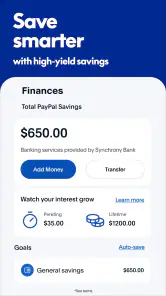
One of the coolest features I’ve found is the saving option. You can set aside money for a rainy day or a specific goal. It’s a subtle nudge to be more financially responsible. Plus, PayPal offers deals and discounts with certain retailers, so you might save a few bucks here and there without even trying.
My practical tip is to give a savings goal a clear purpose, such as a planned purchase, and check it alongside your regular budget instead of treating the app as a complete budgeting system. A place to set money aside can help with motivation, but it doesn’t replace deciding what you can afford. I’d also treat retailer deals as an occasional bonus: compare the final price and terms with other ways of buying before calling something a saving.
If you use the savings option, I’d make the goal specific enough to guide a decision—something you intend to buy or a reserve you want to build—then review it when you plan your spending. That is more actionable than moving money aside without knowing what it is for. It also keeps the feature in its proper role: a helpful prompt, rather than a substitute for a broader view of your finances.
User Experience
The interface is sleek and intuitive. It doesn’t bombard you with unnecessary information or ads. Everything is where you’d expect it to be, making navigation a smooth experience. And if you ever hit a snag, their customer support is just a tap away. I had a minor issue once, and it was resolved quicker than I expected, which was a pleasant surprise.
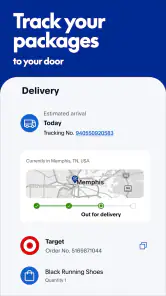
One point that can confuse a new user is the difference between receiving a payment notification and having finished whatever you intended to do with that money. I’d open the transaction details and check the status before making plans around a payment. Notifications are useful prompts, but the transaction record is the better place to confirm what happened.
The app’s reach is a strength, but it can also mean the experience depends on the other person, the shop, and the payment method involved. If a recipient cannot be found, don’t send to a similarly named account as a guess. If checkout offers several ways to pay, compare them calmly; convenience is valuable, but the right choice is the one whose details you understand.
For a first-time user, the sensible response to a payment that seems delayed or unclear is to inspect its record before trying again. Repeating an action too quickly can make it harder to tell which attempt actually went through. I’d check the status and recipient first, then decide whether anything else is needed. That small pause is more helpful than treating every uncertainty as a reason to start over.
Now, I know what you’re thinking: What about security? Well, PayPal has you covered. With multiple layers of encryption and the option for two-factor authentication, your money is as safe as it gets. It’s like having a vault with a digital lock.
Who will get the most from it
I’d recommend it to someone who shops online regularly, needs an easy way to pay friends, or wants one familiar account for both kinds of transactions. It is less compelling if you prefer keeping payments entirely within your bank, rarely buy online, or don’t want to manage another account and its sign-in security. For those users, a bank transfer or direct card payment may be the cleaner fit.
If you share costs with friends who already use the app, it can simplify the handoff after a meal, a group purchase, or another agreed expense. If your circle uses different services, though, introducing another account may add more coordination than it saves. I’d choose the method the people involved can all use confidently, especially when the payment is time-sensitive.
It is also a sensible option for someone who wants to keep online checkout from becoming a repeated search for card details, provided the payment choices are clear at the final step. On the other hand, if you are trying to track every part of a household budget in one place, I would not rely on a payment app alone. Keep your usual budgeting method and use PayPal for the transactions it handles conveniently.
If you’re deciding whether to install it, my suggestion is to begin with a single low-stakes purchase or payment, then review the record and your account settings. You don’t need to make it your default for everything on day one. Used selectively, it can make common digital payments feel less fiddly; used without checking recipients, amounts, or payment choices, it can create avoidable confusion.
Final Thoughts
All in all, PayPal - Pay, Send, Save has become an integral part of my financial life. Whether it’s splitting a bill with friends, paying for a spontaneous online purchase, or saving for that dream vacation, it’s all doable with a few taps. The app is reliable, secure, and incredibly user-friendly. If you haven’t tried it yet, I’d say give it a shot. It might just become your new favorite app.
PayPal - Pay, Send, Save Frequently Asked Questions
Can I use PayPal for both personal and business payments?
The PayPal app is designed for sending and receiving money, shopping, and handling payments, so it may be useful for different kinds of transactions. Its features include sending invoices and receiving payments for businesses, alongside transfers between friends and family. The options available to you depend on how you use PayPal and the transaction involved, so check the details before sending or accepting a payment.
What information should I consider before creating or using a PayPal account in the app?
Before using the app, consider which PayPal features you expect to need, such as sending money, receiving payments, shopping, or managing your balance. You can use some features without linking a bank account, while others may be more convenient with one connected. Take time to review the transaction details and any terms displayed in the app before confirming a payment.
Is the PayPal app free to download, and what devices can run it?
The PayPal app is free to download and is listed for everyone. It is a finance app developed by PayPal Mobile, with version 8.97.0 requiring Android 7.0 or later. Before downloading, check that your device meets the operating-system requirement and that the app is available for your device through its official app store.
What are the main features of the PayPal app?
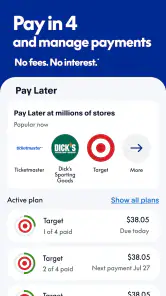
The PayPal app offers a range of features including secure online payments, easy money transfers to friends and family, and the ability to send invoices and receive payments for businesses. Users can also manage their PayPal balance, link their bank accounts, and track their transaction history, all from their mobile device. The app’s summary also highlights shopping and Pay in 4, where available.
Is it safe to use PayPal for online transactions?
Yes, PayPal is considered a safe platform for online transactions. It uses advanced security measures such as encryption and fraud detection to protect user information. Additionally, PayPal does not share your financial details with sellers, adding an extra layer of privacy and security when shopping online. As with any financial app, protect your login details and review account activity regularly.
Pros
- Widely accepted for online payments
- Strong security features
- Instant money transfers
- User-friendly interface
- Supports multiple currencies
Cons
- High fees for currency conversion
- Account freezes can occur
- Limited customer support
- Occasional app crashes
- Not all countries supported
- Category
- Finance
- Version
- 8.97.0