ToonArt: Cartoon Picture App
- 9.65K
- 4.7
- Installs
- 10.00M
- Price
- Free

Screenshots
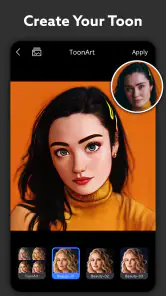
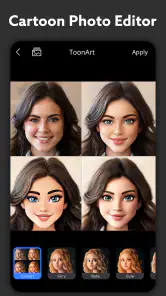
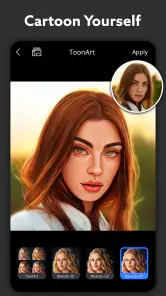
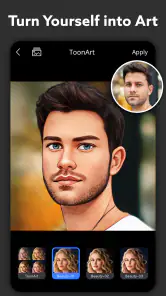
Analysis by Reviewed
I reach for ToonArt when a regular selfie feels a little too ordinary and I want a playful portrait without learning a complicated editing workflow. It is a photography app from Lyrebird Studio, built around turning photos into illustrated versions of their subjects. The appeal is immediate: choose an image, try a visual treatment, and see whether the result feels like you. ToonArt: Cartoon Picture App is best understood as a quick creative tool, not a replacement for a detailed photo editor.
Quick results, with a little room for trial and error
For a casual edit, the speed expectation is simple: pick a photo and let the app process it. The original review describes results appearing within seconds, which suits a quick profile-picture experiment or a joke to send to a friend. I would still treat that as an expectation for ordinary images, not a promise that every photo or effect will finish at the same pace. A busy image or a style that changes more of the picture can make the process feel less instant.
To get a more useful first result, I’d start with a clear, well-lit face and keep the background uncomplicated. That gives the transformation less visual clutter to contend with and makes it easier to judge whether the style actually captures your expression. Save the original photo separately before experimenting; it gives you a clean fallback and lets you compare the edited version without losing the image you started with.
Choosing the right photos for different occasions
Not every photo that looks good in your camera roll is equally suited to a cartoon treatment. A close portrait with visible facial features is a sensible starting point, while a tiny face in a wide landscape may not give the effect much to work with. I’d also avoid beginning with a shot where strong shadows hide part of the face: if the first result feels off, it can be hard to tell whether the style or the source image is responsible.
For a family or friend group, think about the intended crop before editing. A portrait that works as a square avatar may cut off someone at the edge, while a full-frame effect may leave faces too small to read clearly. I’d keep the uncropped original and make a separate crop for the intended destination, rather than sacrificing the group composition just to make the main face larger.
Where the app fits into a real photo routine
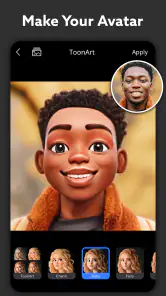
Imagine taking a quick selfie before meeting friends, then wanting a more distinctive group-chat image on the way there. ToonArt makes sense for that small, spontaneous task: test a cartoon look, choose the one that still resembles you, and use the result as a fun avatar. It can also work for a lighthearted birthday greeting or a playful image for a personal post. I would not choose it when the goal is a polished business headshot or a faithful portrait, since the point is stylization rather than natural retouching.
Compared with a general-purpose photo editor, the advantage is focus: ToonArt is aimed at illustrated transformations rather than giving you a broad set of adjustments for every kind of image. That can make it more approachable when you have one specific idea. The trade-off is that someone who wants careful layer work, precise masking, or a restrained correction to lighting may be better served by a conventional editor. For a cartoon portrait, though, starting with a dedicated tool is often less fiddly than trying to build the effect by hand.
More From Our News Desk

Weather by Xiaomi Review: Clear at a Glance, Less Clear Up Close

X Under Pressure: Can It Recover When Posting Goes Wrong?

Clash of Clans Is Won Between the Battles

Android Auto Makes the Case for Quieter Car Software

MobiOffice: Transforming Mobile Productivity with Seamless Integration

EA SPORTS FC™ Mobile Soccer: Redefining Mobile Sports Gaming
A practical workflow for a more dependable result
I’d treat each edit as a small comparison rather than expect the first treatment to be the keeper. Pick one photo with a clear expression, test a few visual approaches, and compare how well each preserves the details you care about—especially the shape of the face and the mood of the expression. If none feels right, switch to a different source image before spending time adjusting the same one repeatedly.
There is a useful trade-off between a recognizable likeness and a more dramatic illustration. A stronger transformation can make an avatar feel distinctive, but it may also smooth away the small details that make the person look like themselves. For a personal profile, I’d choose the result that remains recognizable at a small size; for a joke or greeting, a more exaggerated look may be the point. Keeping the original nearby makes that choice easier to judge.
Transforming Selfies into Art
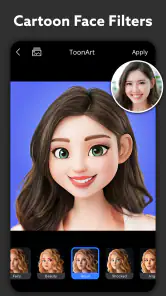
When I first downloaded ToonArt, I was super excited to dive into its features. The interface is user-friendly, which is a huge plus for those of us who want instant results without a steep learning curve. Just snap a selfie or choose a photo from your gallery, and let the app work its magic. Within seconds, voilà! You have a cartoon version of yourself that you can’t help but share on social media.
Features That Stand Out
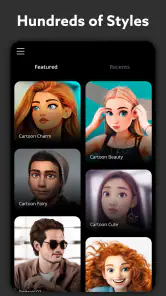
What I love about ToonArt is the variety of styles it offers. Whether you’re into classic cartoon looks, modern vector art, or even manga-inspired designs, this app has got you covered. It’s not just about converting photos; it’s about creating a unique piece of art that reflects your personality.
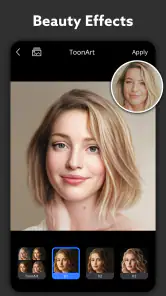
The app doesn’t stop at just faces. It also allows you to apply cartoon effects to the entire photo, bringing life and color to your background. Plus, the editing tools are incredibly intuitive. Adjusting the brightness, contrast, and saturation is a breeze, and you can even add filters to enhance the overall vibe of your cartoon masterpiece.
When a batch of pictures needs extra care
When I’m choosing between several shots, I’d test the same strong candidate across a few styles before moving on to another photo. That makes it easier to tell whether a disappointing result comes from the image or from the particular treatment. If a group picture is the goal, I’d also check that the effect works across the whole frame; a face-focused look can be less convincing when the people are small or the background is crowded. A close crop may help, but it changes the composition, so I’d keep both versions if I might want to share the original framing too.
For a set of pictures intended for one occasion, consistency matters as much as the individual result. I’d use the same source-photo criteria and compare the treatments before editing every image. That small bit of planning can prevent a collection where one portrait looks soft and playful while another feels sharply stylized. It also avoids spending time on photos that do not suit the effect in the first place.
The app is free to download, while in-app purchases range from $2.00 to $54.99 per item. I’d explore the available free options before paying, especially if I only want an occasional avatar. ToonArt has a 4.7 average from around 810,000 ratings, and more than 10 million installs. It is rated for Everyone, so it can suit casual family creativity, though I’d still help younger users make thoughtful choices about which personal photos they share.
Costs, sharing choices, and who will enjoy it
The free download makes it easy to try the core idea before deciding whether the app belongs in your regular routine. Since optional purchases span a broad range, I would look closely at what an item unlocks and whether I will use it more than once. Someone who only wants a one-off birthday image may have little reason to spend, while a person who regularly makes illustrated avatars may value having more creative choices. The right call depends on how often you actually edit, not on the appeal of a single preview.
ToonArt is a good fit for people who want a quick, playful change to a portrait and do not mind choosing among stylized results. It is less suitable for photographers who need exact, repeatable control, or for anyone whose main goal is to correct color and lighting while keeping a natural appearance. If you are preparing an image for a professional profile, a standard editor or an unedited portrait is usually the safer choice. For informal chats and personal posts, the cartoon approach is more purposeful.
Why You Should Try It
One of the standout aspects of ToonArt is its attention to detail. The app captures the nuances of your facial features and expressions, making each cartoon unique and personal. It’s perfect for those who want to add a creative twist to their photos without spending hours editing.
Moreover, the app is constantly updated with new filters and styles, keeping things fresh and exciting. It’s like having a new toy to play with every few weeks. And the best part? It’s free to download, with some in-app purchases available if you want to unlock premium features.
Reliability and device expectations
For occasional edits, the straightforward photo-in, cartoon-out flow is a practical fit. With repeated use, I’d pay attention to how comfortably the app handles a batch of photos on your own device rather than assuming every session will feel identical. If a result takes longer than expected, I’d avoid repeatedly tapping the same control; give the current attempt time to finish, then try a simpler image or reopen the app if it has stopped responding. That is a sensible recovery approach, not a guarantee that every interruption can be restored.
The current version is 2.0.3.2 and it supports Android 7.0 or later. Older or heavily loaded devices may make image processing feel less smooth than newer hardware, so I’d test one photo before planning a large editing session. If your phone has limited free space or you prefer to conserve battery, keep the session short and choose only the images you actually want to transform. I would skip ToonArt if you need predictable, detailed control over every part of an image, or if you mainly want subtle natural-looking edits.
Performance in everyday use
For a quick portrait, the app’s focused workflow is more important than having a long list of editing controls. I would start with one image, wait for the result, and decide whether the style suits the photo before opening several more. This keeps a casual session manageable and gives you a better sense of how your own phone handles the processing. If the device begins to feel sluggish, pausing between edits is more sensible than pushing through a large batch.
Reliability is also about avoiding preventable frustration. I’d keep a copy of any photo I especially like before experimenting, and I would not assume an unfinished transformation has been saved. If an edit stalls, returning to a simpler picture is a practical next step; repeatedly triggering the same action may only make it harder to tell what is happening. For occasional creative use, that cautious approach is enough. For time-sensitive work where every image must be delivered consistently, I’d use a workflow designed for more precise control.
Final Thoughts
In a world where photo editing apps are a dime a dozen, ToonArt: Cartoon Picture App truly stands out. It’s fun, easy to use, and delivers consistently impressive results. Whether you’re looking to spruce up your social media profile or simply have a laugh with friends, this app is worth a try.
So, next time you’re in the mood to unleash your inner cartoon character, give ToonArt a go. Who knows? You might just discover a whole new creative side of yourself.
ToonArt: Cartoon Picture App Frequently Asked Questions
Who develops ToonArt, and what is it designed for?
ToonArt is a photography app developed by Lyrebird Studio. Its focus is transforming pictures into cartoon-inspired images, with options described as cartoon photo editing, a face cartoon camera, and 3D toon effects. If you are looking for a playful way to give a photo a different visual style, its purpose is easy to understand before you install it.
Is ToonArt suitable for children and general audiences?
ToonArt has an Everyone content rating, making it suitable for a broad audience. Its cartoon-photo editing focus is intended for creative image transformations, such as giving portraits a toon-inspired appearance. As with any photo app, it is sensible to consider which pictures you choose to edit and share, especially when children or other people appear in them.
What kinds of photos work best with ToonArt?
ToonArt is designed to turn photos into cartoon-style images, so a clear picture with the subject easy to see is a good place to start. You can use it for portraits and experiment with its cartoon, face-camera, and 3D toon effects. The result depends on the image and the style you choose, so trying a few options can help you find a look you like.
What is ToonArt: Cartoon Picture App, and how does it work?
ToonArt: Cartoon Picture App is a creative mobile application designed to transform your photos into artistic cartoon-like images. By utilizing advanced AI technology, the app analyzes your photo and applies various filters and effects to give it a unique cartoonish appearance. Users can choose from a wide range of styles and customize their images with different tools to achieve the desired effect.
Is ToonArt: Cartoon Picture App free to use, or does it have in-app purchases?
ToonArt: Cartoon Picture App is free to download and offers both free and premium features. The basic version includes a limited selection of filters and tools. For access to the full range of features, including exclusive styles and effects, users can make in-app purchases, which range from $2.00 to $54.99 per item. Checking the available options in the app can help you decide whether the free tools are enough for your editing needs.
Pros
- Easy to use with intuitive controls
- High-quality cartoon filters
- Variety of customization options
- Fast processing and rendering
- No watermark on saved images
Cons
- Limited free features
- Occasional app crashes
- In-app ads can be intrusive
- Subscription required for full access
- Limited export formats
- Category
- Photography
- Version
- 2.0.3.2












