Ghibli Style Cartoon - ToonApp
- 12.15K
- 4.6
- Installs
- 100.00M
- Price
- Free

Screenshots
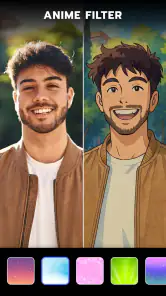
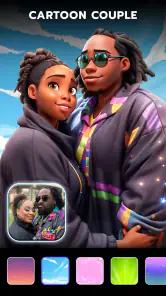
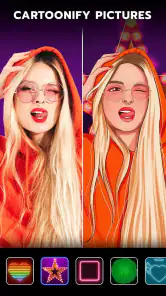
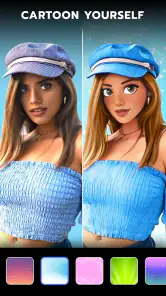
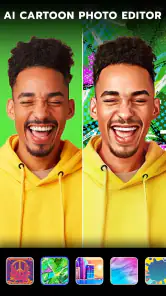
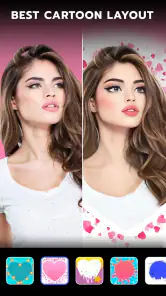
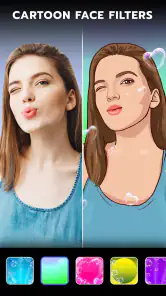
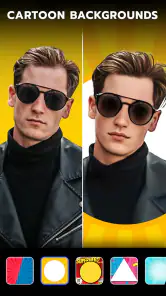
Analysis by Reviewed
I treat ToonApp as a quick way to give a portrait or snapshot a more illustrated feel, rather than as a full photo-editing studio. That distinction matters: the fun is in trying a bold cartoon treatment and seeing whether it suits the picture, not in precisely rebuilding every detail by hand. Ghibli Style Cartoon - ToonApp is a free photography app from Lyrebird Studio, and its appeal is easiest to understand if you enjoy playful edits that are ready to share.
There is a practical question behind any free editor: what can I try without paying, and when might spending money make sense? The app is free to install, with in-app purchases listed from $2.00 to $69.99 per item. That gives you a no-cost way to explore it, while paid items may matter if you want more from the app; I would check the purchase options shown in the app before deciding, rather than assuming a particular feature requires payment. The range is wide enough that I’d treat any purchase as optional and only pay when I know the available tools fit my routine.
What the free starting point is good for
The strongest value here is immediate experimentation. If you have a photo you already like, a cartoon treatment can make it feel fresh without requiring a long editing session or much experience. I’d start with a clear, well-lit portrait and compare the result with the original before adding other effects. That small check helps you tell whether the transformation is improving the image or simply making it busier.
A realistic use is making a more playful profile picture or turning a photo from a casual day out into something you can share with friends. I wouldn’t expect the same control I get from a conventional editor that lets me adjust every selection and tone. ToonApp is more appealing when I want a quick visual change; a traditional photo app is usually the better choice when natural-looking color, careful retouching, or precise composition matters more.
Unleashing Your Inner Artist
When I first opened Ghibli Style Cartoon - ToonApp, I was greeted with a user-friendly interface that made it easy to navigate. The app offers a variety of cartoon styles, but what really caught my eye was the Ghibli Style. Inspired by Studio Ghibli’s unique animation style, this feature lets you convert your photos into whimsical cartoons that look like they jumped straight out of a Hayao Miyazaki film.
Features That Stand Out
The app doesn’t just stop at Ghibli Style. It offers several other cartoon effects and tools that let you tweak and enhance your images to your heart’s content. Whether you want to add a splash of color, adjust the brightness, or play around with the contrast, ToonApp has got you covered. The editing tools are intuitive and perfect for both beginners and seasoned photo editors.
One of the coolest features I found was the background changer. Imagine turning your mundane living room backdrop into a mystical forest or a bustling cityscape. It’s like having a mini photo studio in your pocket! The app also boasts a wide selection of stickers and filters, which add an extra layer of fun to your creations.
More From Our News Desk

Weather by Xiaomi Review: Clear at a Glance, Less Clear Up Close

X Under Pressure: Can It Recover When Posting Goes Wrong?

Clash of Clans Is Won Between the Battles

Android Auto Makes the Case for Quieter Car Software

MobiOffice: Transforming Mobile Productivity with Seamless Integration

EA SPORTS FC™ Mobile Soccer: Redefining Mobile Sports Gaming
Choosing a photo that gives the effect room to work
For a cartoon conversion, I’d pick a picture where the person is large enough in the frame for facial details to remain visible. A distant full-body shot may still be fun, but the face has less room to carry the transformation. If I’m choosing between several photos, I look for a straightforward pose and even light, then try the same image in more than one style. That makes it easier to judge whether I like the app’s interpretation or simply like the source photo.
There’s also a useful distinction between a portrait made for a profile and an image meant as a scene. A close crop can make a face the focus, while a wider shot gives a background treatment more space to contribute. I wouldn’t expect every photo to work equally well for both purposes. When a result feels crowded, I’d change the crop or choose a less complicated source rather than piling on additional decorations.
A Few Bumps on the Road
Of course, no app is perfect, and ToonApp has its quirks. While the cartoon effects are generally impressive, some might find the processing time a tad slow, especially when dealing with high-resolution images. Additionally, the app does have ads, which can be a bit distracting if you’re in the zone, creating your masterpiece. However, there’s an option to go ad-free with a premium subscription if you find the ads too intrusive.
For a smoother result, I’d choose an image with the subject clearly separated from the background before trying a scene change. Busy hair, patterned clothing, and clutter behind a person can make an edit feel less convincing, so a plain wall or open space is often a better starting point. I also like to save the untouched photo and treat the cartoon version as a separate creative copy; it makes it easy to compare and keep the original for more serious uses.
Practical ways to use the background and extra effects
A background change works best when it supports the subject instead of competing with it. For a photo taken indoors, for example, I’d try a new setting only if the person’s outline is easy to distinguish from what is behind them. If edges look awkward, that is a cue to return to the original background or choose another photo, not necessarily a sign that more filters will fix it. This is one reason I treat the scene-changing option as a playful extra rather than a dependable replacement for careful compositing in a dedicated editor.
Stickers and filters can be useful when I’m making something for a casual chat or a personal post, but I’d use them sparingly on a portrait that already has a strong cartoon treatment. One main effect usually gives the image a clearer point of view. I’d also keep separate versions if I want to try several directions: that way, a more heavily decorated experiment does not become the only version I have to work with.
Who is likely to enjoy it?
This is a good fit for someone who wants a light, visual change without learning a complicated editing workflow: casual creators, people refreshing a social profile, or anyone making a fun image for a message or a small personal project. The app is rated for Everyone, and its reach is substantial, with over 100 million installs and an average rating of 4.6 from around 2.5 million ratings. It was released on December 22, 2020, and version 3.1.23 supports Android 7.0 and newer.
The clearest everyday scenario is a quick edit after meeting friends: I might have a good portrait from lunch, want something more distinctive than the original, and have only a few minutes before sending it in a group chat. ToonApp suits that casual goal better than opening a full editing workflow. For a small personal project, such as making a playful image to accompany a message, its styles and decorative tools can also help me find a mood without needing to draw anything myself.
I’d be more cautious if the photo is for work, a formal account, or anything where the person needs to look exactly like themselves. Cartoon treatments are interpretive, and a striking result can be less useful than a restrained edit. I’d also think twice before choosing it for a batch of portraits that need to match: applying a similar effect does not necessarily give me the control or consistency I’d want across a set. In those cases, a conventional editor with more precise adjustments is the safer choice.
How it fits beside other photo apps
Compared with a general-purpose photo editor, ToonApp is the more focused choice when the goal is a noticeable illustrated transformation. A traditional editor is better for correcting exposure, tuning colors carefully, or making small changes that preserve a natural photograph. Compared with drawing software, ToonApp asks less of me creatively because the effect does the transformation, but that convenience also means less control over individual lines, facial features, and details. I’d choose based on the result I need, not on which app has the longest list of tools.
That trade-off becomes clearer when I’m making something I plan to reuse. For one cheerful avatar or a one-off message image, speed and a distinctive look matter more than fine adjustments. For a set of images that should share the same tone, a more controllable workflow is worth the extra effort. ToonApp earns its place as a quick creative option, but it is not a substitute for every kind of photography editing.
When the trade-offs matter
On an ordinary afternoon, I might take a quick picture of a friend at a café, choose a clean portrait from the gallery, and test a cartoon effect before sharing it in a chat. If the first result feels too strong, I’d try another style or stop there instead of stacking edits just because they are available. A busy setting or dim photo may be less forgiving, and a large image can take longer to process, so I’d keep a smaller, clearer source image handy when speed matters.
The same restraint applies to paid options. Because the app is free to try and purchases vary in price, I’d first work out whether I keep returning to its particular cartoon look. If I only want one novelty image, paying may not add much value; if I enjoy making these edits regularly, it could be worth reviewing the in-app purchase choices for the tools I actually use. I wouldn’t buy simply to remove a moment of friction without checking what the purchase includes.
Questions I’d settle before making it part of a routine
Would I use it for a photo that needs to remain realistic? Probably not: a cartoon effect changes the character of the image, so I’d keep an ordinary editor for subtle fixes. Is it useful without paying? The app is free to install, so I’d begin by testing the available experience and decide about purchases only after seeing what I personally want to use. The listed purchase range is broad, which makes checking the in-app options more sensible than assuming one price covers every extra.
Will every portrait look equally good? I wouldn’t count on it. Clear light, a distinct subject, and a relatively simple background give the effect a better starting point, while a cluttered scene or a face that is small in the frame may make the result less satisfying. And is it the right pick for someone who wants precise edits? Not in my view. Its strength is quick stylization, while detailed retouching and repeatable adjustments are better handled elsewhere.
Final Thoughts
In a world where every app claims to be the best, Ghibli Style Cartoon - ToonApp stands out by offering something truly unique. It’s not just about editing photos; it’s about transforming them into art pieces that you’ll cherish and want to share with your friends. Whether you’re a fan of Studio Ghibli or just someone who loves to experiment with their photos, this app is definitely worth a try.
So, if you’re ready to add a touch of magic to your photo gallery, why not give ToonApp a whirl? Who knows, you might discover a hidden talent for creating stunning cartoon art!
My buy-or-skip take
I’d try it if the idea of turning familiar photos into cheerful illustrations sounds enjoyable, especially because the app is free to start with. I’d skip the purchase until I had tested the look on a few different pictures and knew I wanted to make this kind of edit often. For quick, expressive transformations it has a clear purpose; for exact control or natural edits, I’d reach for a conventional photo editor instead.
Ghibli Style Cartoon - ToonApp Frequently Asked Questions
Can I use ToonApp to make cartoon versions of my own photos?
Yes. ToonApp is a photography app for turning photos into cartoon-inspired images, and its short description highlights a Ghibli-style cartoon effect. You can choose a photo and experiment with the app’s transformation tools to see how the result suits your image. The look will depend on the photo and the effect you select, so trying a picture you already have is a practical way to explore its style.
Is Ghibli Style Cartoon - ToonApp suitable for children?
The app is rated Everyone, which means it is marked as suitable for a broad audience. It is a photo-editing app focused on cartoon-style transformations, so families may find its creative purpose easy to understand. As with any app that offers optional purchases, parents may want to review purchase settings and discuss them with younger users before letting them explore the app.
Who develops Ghibli Style Cartoon - ToonApp, and how popular is it?
Ghibli Style Cartoon - ToonApp is a photography app developed by Lyrebird Studio. It has an average rating of 4.6 from around 2.5 million ratings, with about 12,000 written reviews and over 100 million installs. Those figures suggest that many people use it to turn photos into cartoon-inspired images, though the best way to judge its style is to try it with a photo of your own.
Will ToonApp run on my phone or tablet?
ToonApp is available for Android and iOS devices, and the Android version requires Android 7.0 or later. It is listed as suitable for Everyone, so it may appeal to a broad audience. Before downloading, check that your device runs a compatible operating system and has enough room for an app and the photos you plan to edit. The same device requirements do not necessarily apply across both platforms.
What is Ghibli Style Cartoon - ToonApp used for?
Ghibli Style Cartoon - ToonApp is an innovative app designed to transform your photos into stunning cartoon-style images reminiscent of the iconic Studio Ghibli animation. Users can easily apply artistic filters and effects to their photos to give them a unique, whimsical look that captures the essence of Ghibli's animation style. This app is perfect for art enthusiasts and those who love to experiment with photo transformations.
Pros
- Easy-to-use interface
- High-quality cartoon effects
- Variety of editing tools
- Fast processing time
- Regular updates and improvements
Cons
- Limited free features
- In-app purchases required
- Occasional ads
- Requires internet connection
- Lacks advanced editing features
- Category
- Photography
- Version
- 3.1.23












