FaceLab Face Editor App, Aging
- 8.30K
- 4.0
- Installs
- 50.00M
- Price
- Free

Screenshots
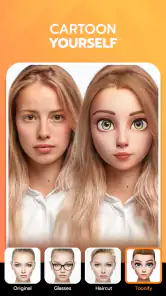
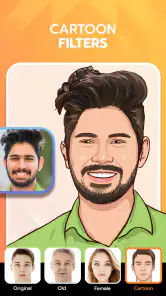
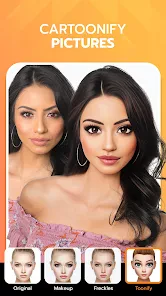
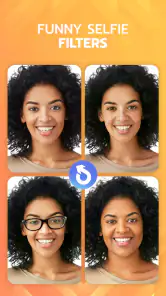
Analysis by Reviewed
I usually reach for a face-editing app when I have one decent selfie and a specific bit of curiosity: would a different hairstyle suit me, or how might age change my features? FaceLab Face Editor App is built for that kind of quick visual experiment. It turns a familiar portrait into a playful “what if,” rather than a careful retouching project, and that distinction matters when deciding whether it fits your needs.
Start with a photo that can do the work
For the clearest result, I’d begin with a straightforward, well-lit, front-facing selfie, with the face unobstructed. That gives a face-based effect a better starting point than a group shot, dramatic side angle, or picture with hair covering the eyes. If the first preview looks odd, I’d try another photo before judging the effect: the source image can shape the result as much as the filter does.
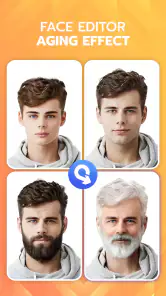
In everyday use, the workflow is simple in spirit: choose a portrait, try an effect, inspect the change, then decide whether the image is worth keeping or sharing. I find it more useful to treat the aging view as entertainment and a conversation starter than as a prediction of how I will actually look. A generated face can suggest a mood or broad change, but it cannot account for the many things that shape someone’s appearance over time.
The Magic of Transformation
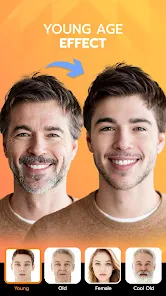
First off, let me tell you about the incredible transformation capabilities of this app. You know those days when you’re just lying on your couch, wondering what you’d look like in 30 years or with a completely different hairstyle? That’s where the FaceLab Face Editor App steps in. It lets you age yourself with just a few taps. I tried making myself look older, and oh boy, it was both terrifying and fascinating! The aging feature is pretty realistic, and it’s fun to see a glimpse of your future self.
All About the Features
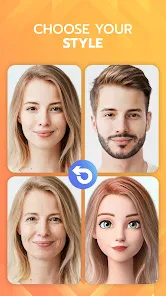
The app is not just about aging, though. It’s packed with a ton of other features that let you edit your face in all sorts of ways. Want to add a beard or try on some virtual makeup? You got it. And the best part? It doesn’t require you to be a tech wizard. The user interface is super friendly. Even if you’re someone who gets lost in apps easily, you’ll find your way around FaceLab without a hitch.
Another cool thing is the hairstyle changer. I’ve always wondered if I could pull off a pixie cut, and now I know! Plus, there’s a feature to swap your face with celebrities. It’s like having a personal glam squad at your fingertips.
One portrait, several sensible tests
I get more useful comparisons when I keep the source photo consistent. If I’m testing an older look and a hairstyle, I use the same clear selfie for both where possible, then compare each result with the original rather than relying on memory. That makes it easier to separate what the effect changed from what a new pose or different lighting would have changed anyway. For a playful experiment, a little inconsistency is harmless; for judging a look, it can mislead.
More From Our News Desk

Weather by Xiaomi Review: Clear at a Glance, Less Clear Up Close

X Under Pressure: Can It Recover When Posting Goes Wrong?

Clash of Clans Is Won Between the Battles

Android Auto Makes the Case for Quieter Car Software

MobiOffice: Transforming Mobile Productivity with Seamless Integration

EA SPORTS FC™ Mobile Soccer: Redefining Mobile Sports Gaming
I also avoid using a photo with a strong expression when I want to judge a subtle transformation. A wide grin, raised eyebrows, or a head tilt can make an age effect feel more dramatic, or can make a hairstyle preview harder to assess. A relaxed expression gives me a more useful baseline. This is not a guarantee that every effect will fit neatly, but it is a low-effort way to make the comparison less noisy.
Make the result useful, not just funny
If I’m considering a real haircut, I use a hairstyle preview as a prompt for questions, not a final answer. I’d save the image and show it to a stylist alongside reference photos, while being clear that a face filter cannot reproduce how a cut will sit with my hair texture, density, or daily styling habits. For a quick joke with friends, that caveat matters less; for a costly or hard-to-reverse change, it matters a lot.
There is also a practical handoff between the app and the rest of my photo routine. I’d keep an unedited copy of the original, compare the altered version beside it, and share only the result I actually want people to see. That small pause helps avoid treating a playful filter as a faithful portrait. If I’m posting a face edit publicly, I also consider whether everyone pictured is comfortable with it, especially when the joke depends on making someone look dramatically different.
A quick share is not the same as a finished photo
For a casual post, the appeal is that the transformation can become the whole point of the image. If I want a polished profile picture, though, I would treat FaceLab as one step in a broader process rather than assume its output is ready for every use. I’d look at the result at the size people will actually see it, check that the face still looks like the person, and decide whether the effect suits the context. A funny aging portrait can work in a private chat but feel out of place on a professional page.
When sharing, I’d also think about whether the image needs a little explanation. Friends may immediately recognize a joke, while a wider audience might read an altered portrait as a genuine photo or an endorsement of a look. A short caption can make the playful intent clear. That is especially useful when the image includes someone else: getting their okay before passing it around is better than discovering later that they did not enjoy the transformation.
Why You Might Want to Try It
So, why should you give this app a shot? Well, besides the entertainment factor, it’s a great way to experiment with your look without any real-world commitment. Thinking about a new haircut or color? Test it out on FaceLab first. Or maybe you just want a good laugh with friends by swapping faces and sharing the results. Trust me, it’s a blast at parties.
Also, for those who love sharing on social media, the app makes it super easy to post your creations directly to platforms like Instagram or Facebook. Your friends will definitely want to know what app you’re using!
Who gets the most from it
I’d recommend it most to someone who enjoys quick, low-stakes visual play: a person curious about an aging effect, a group of friends looking for a silly image to pass around, or someone who wants a rough visual prompt before discussing a hairstyle with a professional. It can also be a nice fit for people who are comfortable judging an edit as an imaginative possibility rather than a reliable preview. The best results come when curiosity is the goal, not certainty.
I’d skip it if I needed careful beauty retouching, a realistic consultation tool, or consistent edits across a batch of portraits. Someone who wants to fine-tune individual details may prefer a manual photo editor, where adjustments can be made deliberately instead of accepting a face transformation as a whole. And if face-altering effects make you uncomfortable, there is no reason to force the experience: the app’s central appeal is precisely that kind of playful change.
Where the quick workflow can fall short
Compared with a general-purpose photo editor, FaceLab is the more playful choice when the goal is a fast face transformation; a conventional editor is usually better when I want precise control over lighting, color, cropping, or small corrections. It is also not my pick for deciding whether a real haircut will suit me with certainty. The useful trade-off is speed and amusement over detailed, dependable editing.
For a realistic weekday scenario, I might take a selfie before meeting a friend, test an older-age effect during a short break, and send the result as a joke. If the face alignment or expression makes the edit look strange, I’d switch to another portrait rather than keep adjusting expectations around one awkward source image. That is a simple, non-obvious tip: take two or three different selfies first, then use the one with the clearest, most neutral face.
What to check before you commit to a result
A practical question is whether the app is worth installing if I only want one transformation. I’d say yes if the curiosity is strong and I’m happy to treat the output as a quick experiment, but I would not install it expecting a full photo-editing workspace. It is free to install, while some in-app purchases cost between two and just under sixty dollars per item, so I’d pay attention to what is being offered before tapping through a purchase. If I only want to test the basic idea, I’d first see what I can do without buying anything.
Another question is whether a result can settle a real-world decision. For hair, my answer is no: it can help me explain a direction I like, but it cannot show exactly how my own hair will behave after a cut or how much styling a look needs. For an aging effect, I would be even more cautious about treating it as a forecast. I use it as a visual novelty, not a statement about health, identity, or the future.
Finally, if one effect looks wrong, I would not assume that every photo will look the same. Face angle, lighting, expression, and anything obscuring the face can all affect how convincing a transformation feels. Trying a different source portrait is often a better next move than repeatedly sharing an awkward result. If the new attempt still does not work for what I need, that is a sign to switch tools rather than spend more time trying to make a playful editor behave like a precision retouching app.
FaceLab is a free photography app from Lyrebird Studio, with a 4.0 average from around 775,000 ratings and over 50 million installs. It is rated for Everyone, and version 4.5.66 is listed for Android 7.0 and newer. The app includes in-app purchases, so I’d check the purchase screen carefully before choosing anything; free to install does not mean every option is free. If you only need precise retouching, prefer manual edits, or do not enjoy face-altering filters, a standard photo editor is likely a better fit.
The Final Verdict
In a nutshell, the FaceLab Face Editor App is a fun, user-friendly tool for anyone who loves playing with their appearance. Whether you’re aging yourself, trying out new looks, or just having fun with friends, this app delivers on its promise of transforming your selfies into something extraordinary. So go ahead, give it a try, and let your creativity run wild!
FaceLab Face Editor App, Aging Frequently Asked Questions
Does FaceLab offer more than an aging filter?
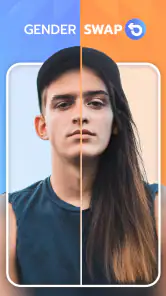
Yes. FaceLab is a photography app built around playful face editing, with features that include aging effects, gender swaps, face-shape changes, and hairstyle tools. That range may appeal if you want to experiment with different looks rather than use a single aging filter. The available options can vary depending on what you choose to use in the app.
What should I know about FaceLab’s cost before downloading it?
FaceLab is free to download, but it offers in-app purchases ranging from $2 to $59.99 per item. Paid options provide access to additional tools or effects, so review the purchase details in the app before confirming anything. You can try the free experience first and decide whether it includes the editing options you want.
What devices and operating systems can run FaceLab?
FaceLab is a photography app for mobile devices, and it requires Android 7.0 or later. Before downloading, check your device’s software version and available storage so the app can install and run as expected. FaceLab is also available for iOS users, so check the relevant app store for compatibility with your particular Apple device.
What is FaceLab and what does it do?
FaceLab is a versatile face editing application that allows users to transform their selfies with various filters and effects. The app specializes in aging features, enabling users to visualize their older selves with advanced AI technology. Besides aging, FaceLab offers tools for retouching, beautifying, and applying fun effects to photos, making it a popular choice for both casual and professional photo editing.
Is FaceLab free to use, or does it require a subscription?
FaceLab is free to download, with in-app purchases ranging from $2 to $59.99 per item. Users can access additional tools and a more extensive range of filters through paid options, so check the purchase details shown in the app before proceeding. This gives you a chance to decide whether the free experience meets your needs before paying for extra features.
Pros
- User-friendly interface for easy navigation.
- Wide range of filters and effects.
- High-quality aging simulations.
- Fast processing and editing speed.
- Regular updates with new features.
Cons
- Limited free features available.
- Some filters require premium subscription.
- Occasional ads during use.
- App may crash on older devices.
- Privacy concerns with photo uploads.
- Category
- Photography
- Version
- 4.5.66












