ToonApp AI+ Viral Photo Maker
- 2.73K
- 4.4
- Installs
- 100.00K
- Price
- Free

Screenshots
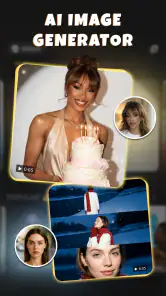
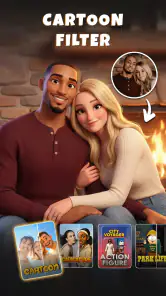
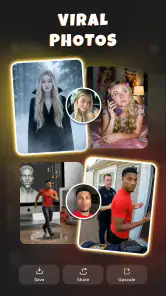
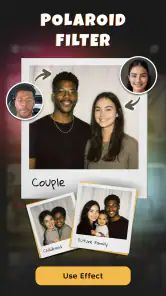
Analysis by Reviewed
I approached ToonApp AI+ Viral Photo Maker as a photography app for quick, playful transformations rather than as a complete photo-editing studio. Its focus is clearly visual experimentation: AI-generated video, a stadium-camera-style filter, an AI dance effect, and a superhero treatment. That combination makes it appealing when I want something entertaining to share without spending a long time building an edit manually.
The app comes from Lyrebird Studio and is free to install, with optional purchases ranging from $7.99 to $69.99 per item. It is rated for Everyone, which fits the lighthearted nature of the effects, although parents should still treat any app that handles personal photos and videos as something worth checking together before use. The current version is 1.0.30, and it runs on Android 9 or later.
What makes this app interesting is not simply the promise of turning a picture into something cartoon-like. The more useful question is whether its automated effects give me enough control to produce something I actually want to keep, and whether the process feels comfortable when I am working with personal images. My experience is that it is strongest as a fast idea generator: choose a suitable image, try a themed effect, review the result, and decide whether it is good enough to share.
How the creative workflow feels in everyday use
The main appeal is speed. Instead of adjusting masks, layers, motion paths, or color settings by hand, I can start with a photo and let the app apply a recognizable visual concept. That makes the experience approachable for someone who does not usually edit photos. The stadium camera effect, for example, is aimed at creating a sense of spectacle, while the dance and superhero options push the result toward short-form entertainment.
I would use it when a normal portrait feels too ordinary for a message or social post. A friend’s birthday photo could become a playful superhero clip, or a group image could be tested with a movement-focused effect before being shared in a chat. The important point is to think of the source image as part of the edit. A clear subject, visible face, and uncluttered background generally give an AI effect more to work with than a dark group shot taken from a distance.
One practical habit improved my results: I kept the original photo untouched and treated every generated version as a separate experiment. AI effects can produce attractive results, but they can also make faces, hands, clothing, or background details look unusual. Keeping the source available means I can try another effect without losing the image I actually wanted to preserve.
The app is also better suited to short creative sessions than to careful professional retouching. If I need precise skin corrections, exact cropping, layered text, controlled lighting, or a consistent brand style, I would reach for a conventional editor. ToonApp’s value is the shortcut from an ordinary image to a themed result, not detailed control over every pixel.
More From Our News Desk

Weather by Xiaomi Review: Clear at a Glance, Less Clear Up Close

X Under Pressure: Can It Recover When Posting Goes Wrong?

Clash of Clans Is Won Between the Battles

Android Auto Makes the Case for Quieter Car Software

MobiOffice: Transforming Mobile Productivity with Seamless Integration

EA SPORTS FC™ Mobile Soccer: Redefining Mobile Sports Gaming
Choosing the right source before applying an effect
A non-obvious trade-off is that the most dramatic effect is not always the best one for the photo. A busy background may compete with a superhero transformation, while a full-body dance concept can feel awkward if the original framing cuts off the subject. I found it more useful to match the effect to the composition than to select the most exciting label first.
For a portrait, I would begin with a face that is reasonably well lit and turned toward the camera. For a motion-oriented result, I would choose a photo with enough space around the person. For a group image, I would expect less predictable results than with one clear subject. These are simple choices, but they save time because the app cannot fully compensate for a source image that does not fit the intended transformation.
Another useful workflow is to make a small selection before opening the editor. I would pick two or three candidate photos, test the same effect on each, and compare the results rather than repeatedly forcing one weak image to work. This turns the app into a quick visual test bench instead of a place where I keep hoping a poor source will suddenly become convincing.
Where it sits beside ordinary photo editors
Compared with a standard filter app, this one is more theme-driven. Traditional filters usually preserve the structure of the image and change its tone, contrast, or color. ToonApp’s advertised effects aim for a more noticeable transformation, which is why the results can feel more suitable for jokes, reactions, invitations, or short social clips than for a quiet family album.
Compared with a full AI image editor, it appears more approachable because the creative direction is already packaged into recognizable effects. That reduces the learning curve, but it also limits the kind of result I can request. Someone who wants to describe a very specific scene, control individual objects, or maintain a precise visual identity may find a prompt-based or layer-based tool more appropriate.
Compared with manual video editing, the advantage is convenience. I do not need to understand timelines or keyframes to try a dance-oriented result. The compromise is that automated output may not match the timing or style I imagined. If the exact rhythm, transitions, or framing matters, manual editing remains the safer choice.
Trust starts with visible choices
Because this app works with photos and videos, I pay attention to the moments when I choose an image, start a transformation, and decide whether to share the result. Those are the points where user control matters most. I prefer to select content deliberately rather than grant broad access and forget what I have made available.
I also treat the preview as a decision point, not an automatic publishing step. A generated image can look harmless in the editor but reveal a private location, another person’s face, or a detail in the background that I would not want to distribute. Before sharing anything, I would inspect the full frame and consider whether everyone shown has agreed to the transformation.
The app’s Everyone rating describes its general content suitability, not the privacy context of every photo a person might import. A child’s image, an identity document, a work badge, or a personal video deserves more caution than a generic selfie. I would avoid using sensitive material simply because an effect looks fun.
Permissions, accounts, and personal control
When I install a photography app, I look for clear, understandable choices around access to media and any account-related steps. I do not want to hand over more of my library than is necessary for the task. A focused selection from the device is preferable to treating the entire camera roll as available by default.
I would also review any permission prompt in plain language before accepting it. If a request does not make sense for the effect I am trying to use, I would pause rather than approve it automatically. This is especially important for a casual app: the lower the stakes of the edit, the less reason I have to rush through a permission screen.
Account control matters in a different way. If the app presents sign-in, subscription, or purchase choices, I would read each screen carefully and make sure I understand whether I am starting a one-time purchase or entering a recurring arrangement. The listed in-app purchase range is wide enough that I would never tap through a payment screen without checking the exact option shown at that moment.
For a shared device, I would be even more careful. Generated images can remain visible in recent projects, the device gallery, or the app’s own workflow. I would review where my finished files appear and remove anything I no longer want stored locally. That is not a criticism unique to this app; it is a sensible habit whenever personal media moves through an editing tool.
Data-sensitive moments deserve extra attention
The most sensitive moment is not necessarily the final share. It begins when I select the original. A photo may contain more information than the subject: a street sign, a school uniform, a house number, a reflection, or another person standing behind the main figure. An AI effect can make the result more entertaining without removing those details.
For a casual experiment, I would use a copy with unnecessary background information cropped away. Cropping first has two benefits: it gives the effect a clearer subject and reduces the amount of surrounding context I am asking the workflow to handle. I would not use a passport image, medical photograph, confidential workplace image, or private family video merely to test a filter.
Sharing is another point where I keep control. I would save the result, inspect it, and then choose the destination myself instead of assuming that a generated image should go directly to a social platform. If the result includes friends, I would ask whether they are comfortable with the transformation. A funny edit is only funny if the people involved are treated fairly.
I would also be cautious with viral-style effects. Their purpose is to attract attention, and that can make it easy to post first and think later. My rule is simple: if I would hesitate to send the original image to a particular audience, I would not send the transformed version there either. The effect changes the appearance, not the underlying privacy of the moment.
Free entry, paid choices, and value
The free installation makes it easy to explore the app before deciding whether it belongs in my regular toolkit. That is useful for an effects-based product because the real question is visual quality: do the available transformations suit my photos, and do I like the amount of automation?
Optional purchases are part of the experience, so I would judge value by frequency of use rather than by the excitement of one successful result. If I only want a single birthday edit, paying for a large collection may not make sense. If I regularly create playful clips for messages or social posts, a purchase could be easier to justify, provided the exact terms are clear when presented.
I would not assume that every effect will be equally useful. A themed transformation can be memorable once and feel repetitive later. Before spending money, I would try the free portion with several different source images and ask myself whether the results solve a recurring need or simply provide a brief novelty.
One overlooked cost is time. Automated editing saves manual work, but reviewing weak outputs, correcting an unsuitable crop, and retrying a source image can still take longer than expected. My most efficient approach is to prepare the image first, choose an effect that matches its framing, and stop when the result is good enough rather than chasing a perfect AI-generated version.
Who will enjoy it, and who should skip it
I think it is a good fit for casual creators who want quick visual changes, people making playful messages, and users who enjoy trying themed AI effects without learning a complex editor. It is also approachable for someone who wants a low-pressure way to experiment with short video ideas.
I would be more hesitant to recommend it to a photographer who needs accurate retouching, a business that requires consistent output, or a creator who needs detailed control over animation and sound. Those users may be better served by a conventional photo editor, a dedicated video editor, or a more configurable AI platform.
Privacy-conscious users should not automatically reject it, but they should be deliberate. I would use ordinary, non-sensitive images first, read each permission and purchase screen, and keep sharing under my control. If that level of attention feels inconvenient for a simple filter, a local editing tool with a workflow I already understand may be a better match.
Its audience size suggests that the concept has found interest: the app has a 4.4 average from around 6.4 thousand ratings, with over 100 thousand installs and roughly 2.7 thousand written reviews. Those figures make it look established enough to explore, but they do not replace my own test of the effects or my own judgment about handling personal media.
My cautious verdict after testing the concept
My overall impression is positive when I treat the app as a fast, playful effects tool rather than a serious editing suite. The stadium, dance, and superhero directions give it a distinct personality, and the automated approach makes experimentation less intimidating. I can see myself using it for a quick reaction clip, a novelty portrait, or a themed message when manual editing would be unnecessary work.
The limitations are equally clear. Results depend heavily on the original image, creative control is narrower than in a full editor, and paid choices deserve careful attention before purchase. The presence of AI also makes review essential: I would inspect faces, hands, backgrounds, and any unintended details before sharing.
My recommendation is to start with a non-sensitive photo, test the free experience, and keep every permission, purchase, and sharing decision intentional. For that kind of use, ToonApp AI+ Viral Photo Maker is an enjoyable photography app with a clear purpose. I would recommend it to friends who want quick, expressive transformations, while steering professionals and privacy-sensitive workflows toward tools that offer more control from the beginning.
ToonApp AI+ Viral Photo Maker Frequently Asked Questions
What devices and operating systems can run ToonApp AI+ Viral Photo Maker?
ToonApp AI+ Viral Photo Maker is a photography app for Android, with Android 9 or later required. Before downloading, check your device’s Android version and make sure it meets that requirement. The app is free to download, and its current version is 1.0.30. Keeping your device’s software up to date can also help with compatibility and general performance.
What is ToonApp AI+ Viral Photo Maker used for?
ToonApp AI+ Viral Photo Maker is a photo-editing app focused on transforming ordinary pictures into cartoon, anime, sketch, avatar, and other stylized images. It is designed for quick social-media content, profile pictures, creative portraits, and viral-style edits. The app combines automated AI effects with additional editing tools, so users can experiment without needing professional photo-editing experience. Its store summary also highlights an AI video generator, stadium cam filter, AI dance filter, and superhero effect.
Is ToonApp AI+ Viral Photo Maker free to download and use?
The app can generally be downloaded for free, but free access may be limited to selected filters, tools, export options, or a certain number of AI generations. Premium effects and advanced features may require a subscription or one-time purchase, depending on the version and platform. In-app purchases range from $7.99 to $69.99 per item. Before confirming a trial or payment, check the in-app pricing, renewal terms, and cancellation instructions shown in the store listing.
Does ToonApp AI+ Viral Photo Maker require an internet connection?
An internet connection is commonly needed for AI-powered processing because photos may be uploaded to remote servers for transformation. Basic parts of the interface may open offline, but generating new cartoon or avatar effects, loading advertisements, and accessing online templates can require mobile data or Wi-Fi. For privacy and performance, use a stable connection and avoid uploading sensitive images unless you understand the app’s data practices.
Can I use the edited images commercially or for social media?
You can usually save and share your creations on platforms such as Instagram, TikTok, Facebook, or messaging apps, making the app useful for personal posts and profile images. Commercial use is more complicated: the rights may depend on the original photo, the selected effect, the app’s license terms, and any third-party assets included in the design. Review the current terms before using generated images in advertising, branding, or paid projects.
Pros
- Turns ordinary photos into cartoon-style portraits quickly.
- Offers multiple artistic filters beyond basic cartoon effects.
- Simple interface makes editing accessible for beginners.
- Useful for creating eye-catching social media profile pictures.
- Supports creative experimentation with AI-powered photo effects.
Cons
- Many premium styles and tools require a subscription.
- AI results can vary depending on lighting and photo quality.
- Some effects may look repetitive after extended use.
- Exported images may include branding on limited plans.
- Processing can be slower when applying complex AI effects.
- Category
- Photography
- Version
- 1.0.30












