Themes
- 989.00
- 4.1
- Installs
- 50.00M
- Price
- Free

Screenshots
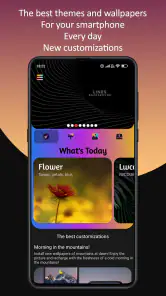
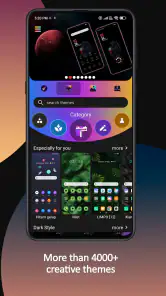
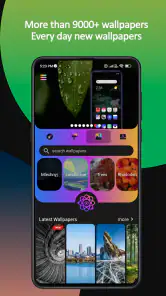

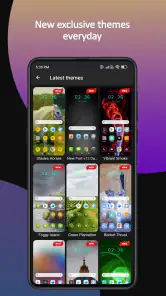
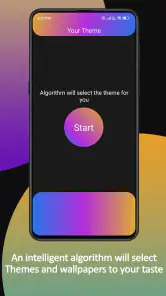


Analysis by Reviewed
I approach a customization app with a practical question: will I enjoy the new look after the first few minutes, when I’m using my phone to find a message or check an appointment? Themes is most useful when I treat it as a place to explore visual ideas, then choose carefully rather than changing everything on impulse. Its appeal is the chance to make a familiar device feel more like mine, but comfort and readability still matter more than a dramatic preview.
Choosing a look without getting lost in the catalogue
The range makes browsing part of the experience, which is enjoyable if I already have a general direction in mind. Before opening the app, I might decide whether I want a calmer screen, a particular color family, or a more expressive style. That small bit of planning gives me a way to compare options instead of tapping through designs at random.
I would also separate “looks good” from “works for my routine.” A detailed wallpaper may suit a lock screen that I glance at briefly, yet feel distracting behind a home screen full of labels. Trying the same design against the screen I use most often is a more useful test than judging it as an isolated picture. If it makes familiar icons harder to spot, I would keep browsing.
A low-pressure way to try changes
One sensible approach is to make a single change, use the phone normally for a while, and only then decide whether to adjust another part of its appearance. This makes it easier to tell what improved the experience and what did not. It also gives me an easy stopping point: if a new look feels comfortable, I do not need to keep customizing just because more choices are available.
That gradual workflow is particularly helpful for anyone who depends on a familiar home-screen arrangement. A visual refresh does not have to become a full reorganization. I would preserve the layout I know, test a design in everyday conditions, and return to the previous look if the new one makes routine tasks feel less straightforward.
First Impressions and Features
The moment I downloaded Themes, I was greeted with a user-friendly interface that made navigating through the options incredibly easy. The app offers a plethora of themes that can cater to almost any taste or preference. Whether you’re into minimalistic designs, vibrant colors, or even something a bit more quirky, there’s something for everyone.
One of the standout features is the app's ability to customize not just wallpapers but also icons and widgets. This means you can create a cohesive look throughout your phone, which I found incredibly satisfying. Plus, the app regularly updates its collection, so there's always something new to try out.
More From Our News Desk

Weather by Xiaomi Review: Clear at a Glance, Less Clear Up Close

X Under Pressure: Can It Recover When Posting Goes Wrong?

Clash of Clans Is Won Between the Battles

Android Auto Makes the Case for Quieter Car Software

MobiOffice: Transforming Mobile Productivity with Seamless Integration

EA SPORTS FC™ Mobile Soccer: Redefining Mobile Sports Gaming
What the Range Means in Everyday Use
The scale of the collection is useful if, like me, you prefer choosing a look by mood rather than committing to one style for months. The app is free, and its audience is broad: it is rated for Everyone and has an average rating of 4.1 from around 632,000 ratings, with over 50 million installs. The Gosa Design makes a personalization app that is easy to approach, but I would still treat the catalogue as a place to browse and experiment rather than assume every item will suit my phone or taste.
For a practical routine, I would use a wallpaper as the starting point, then check whether the colors work with the icons I use most. A dramatic background can look striking in a preview yet make everyday labels harder to pick out. I find it more useful to judge a design on the home screen I actually use, with familiar apps in place, than to choose only by its thumbnail.
Ease of Use
Now, for someone who isn’t exactly tech-savvy, I found the app surprisingly easy to use. Installing a new theme is as simple as a few taps, and voila, your phone looks brand new! The app also offers a preview feature, allowing you to see how a theme will look before fully committing to it. This is a huge plus for someone as indecisive as me.
Another aspect that I absolutely loved is the app's lightweight nature. It doesn’t bog down my phone’s performance, which is a common issue with similar apps. This meant I could enjoy a fresh look without worrying about lag or crashes.
Readability and Navigation
For me, a theme is successful only if it remains comfortable after the novelty wears off. I check whether the background competes with app names and whether the overall contrast feels clear in the places I look every day. The preview helps me make that call before changing my setup, though the final result can depend on how a chosen design sits alongside the phone’s existing interface.
If you rely on a familiar layout, changing appearance does not have to mean reorganizing everything at once. I would try one visual change, spend a little time with it, and then decide whether to adjust anything else. That gradual approach is less tiring than making several changes together and trying to remember which one made the screen harder to scan.
Motor, Sensory, and Situational Considerations
Personalization can help a phone feel more inviting, but it is not a substitute for the accessibility settings built into the device. If small details, bright colors, or busy patterns are uncomfortable, I would favor a calmer design and use the phone’s own display options for adjustments. Someone who needs a very specific, consistent visual setup may be better served by a small collection of carefully chosen wallpapers than by changing themes often.
In a realistic everyday situation, I might switch to a less visually busy look before using my phone in a bright room or while quickly checking messages between tasks. I would make that choice at home, where I can preview it without rushing, rather than browse through designs when I need to act quickly. This is also where the app’s large selection can be a trade-off: variety is enjoyable, but too much browsing can turn a quick refresh into a long decision.
Personal Experience
After playing around with different themes, I settled on a sleek, dark mode theme with neon accents. It completely transformed my phone’s aesthetic and made it feel like I had a new device altogether. Friends even started asking me if I got a new phone!
It’s incredible how much a simple change in appearance can affect how you feel about using your device. I found myself more motivated to check my phone, organize my apps, and even use it for longer periods without getting bored.
Where It Fits Among Alternatives
Compared with choosing a single image from a standard wallpaper picker, this app is more appealing when I want to explore coordinated looks rather than just replace the background. On the other hand, the phone’s built-in personalization tools are often the simpler choice if I only want a quick wallpaper change or need the fewest steps. I would choose Themes for browsing and visual experimentation, and keep the built-in options for straightforward, practical adjustments.
The app is on version 8.0 and supports Android 6.0 or later. That makes it relevant to people using a range of Android devices, though I would still preview each design on my own screen instead of assuming the same look will suit every setup. The collection is best for people who enjoy making their device feel personal; anyone who values an unchanged, highly familiar interface may find little reason to add another customization step.
Making the app work for different routines
For someone who enjoys frequent visual changes, the catalogue can turn a quiet moment into a small creative project: browse, preview, compare, and settle on a look that fits the season or current mood. I would keep a mental note of what I liked about a design—its color balance, simplicity, or coordinated feel—so the next search has a clearer purpose. That is more useful than trying to remember every item I passed while browsing.
It also suits people who want a themed appearance without building one element at a time. A coordinated combination can save the effort of finding a wallpaper, icons, and widgets that happen to work together. The trade-off is that personal taste and device presentation are not identical for everyone, so I would check the finished home screen rather than assume that a set that looks unified in its preview will be equally clear in daily use.
When simpler is the better choice
I would not recommend making this the center of a phone setup if you are already happy with the default appearance or want the fewest possible steps between unlocking and finding an app. In that case, the built-in wallpaper picker is likely enough. A dedicated customization app makes more sense when browsing is part of the fun, or when a coordinated visual change is worth spending a little time on.
It may also be a poor fit if you need a highly controlled, stable presentation and find frequent visual changes tiring. You can still browse for one calm design and stop there, but you do not need a large catalogue to solve a practical accessibility need. For screen comfort, the phone’s own settings remain the more direct place to make adjustments that must be consistent across different apps and situations.
Small checks that prevent a frustrating switch
Before applying a new look, I would think about the places where I rely on quick recognition: the first row of apps, frequently used shortcuts, and any widgets I check at a glance. Then I would preview the design with those everyday elements in mind. This simple check can reveal a mismatch that a polished sample image may not show, particularly when a busy background sits behind labels.
If I am changing the look before heading out, I would avoid turning the process into a last-minute experiment. A design that needs extra adjustment is easier to assess when I have time to undo the change or choose another option. For a commute, work break, or quick errand, a known and readable screen is usually more valuable than a fresh look that I have not yet used in context.
Final Thoughts
All in all, I'm genuinely impressed with what Themes has to offer. It’s more than just an app; it’s a tool that allows you to express your personality through your device. Whether you’re looking to refresh your phone’s look or just want to try something new, this app is definitely worth checking out.
So, if you’re tired of your phone’s same old appearance, give Themes a shot. Trust me; it might just be the makeover your phone needs!
My inclusive verdict is positive, with a practical caveat: judge a design by how readable and comfortable it is during ordinary use, not just by how polished it looks in a preview. I’d recommend giving it a try if changing your phone’s appearance sounds fun, while keeping a simpler built-in option in mind if consistency matters more than variety.
Themes Frequently Asked Questions
Is Themes free to download, and is the collection available without a purchase?
Themes is free to download and use, with a large collection of themes and wallpapers available for browsing. The app’s store description highlights more than three thousand themes and nine thousand wallpapers. You can explore the available designs and choose options that suit your preferred look without paying to download the app.
What should I check before installing Themes on my phone?
Themes supports Android devices running version 6.0 or later, so it can work on many older phones that meet that requirement. Before downloading, check the Android version installed on your device. If your phone runs an earlier version, it will not meet the app’s stated minimum requirement. The app’s current version is 8.0.
Who is Themes designed for, and what can I browse before downloading?
Themes is a personalization app for people who want to change the look of their phone. Its collection includes more than three thousand themes and nine thousand wallpapers, giving you a broad range of styles to browse. The app is free and has an Everyone content rating, so it is aimed at a general audience.
Does Themes work on older Android phones?
Themes supports Android devices running version 6.0 or later, so it can work on many older phones that meet that requirement. Before downloading, check the Android version installed on your device. If your phone runs an earlier version, it will not meet the app’s stated minimum requirement. The app’s current version is 8.0.
What is the main functionality of the Themes app?
The Themes app primarily allows users to customize the appearance of their smartphone's interface. This includes changing wallpapers, icons, widgets, and even the overall layout of the home screen. By offering a wide range of themes, users can personalize their device to reflect their style and preferences, making their phone usage experience more enjoyable and visually appealing.
Pros
- Wide range of customizable themes.
- User-friendly interface for easy navigation.
- Frequent updates with new themes.
- High-quality graphics and designs.
- Compatible with most devices.
Cons
- Some themes require in-app purchases.
- Occasional bugs in theme downloads.
- Limited free theme options available.
- Ads can be intrusive at times.
- May consume significant battery.
- Category
- Personalization
- Version
- 8.0











