TeamViewer QuickSupport
- 4.43K
- 4.4
- Installs
- 50.00M
- Price
- Free

Screenshots

Analysis by Reviewed
When a family member is stuck on a phone setting, explaining every tap over a call can take longer than fixing it together. I find TeamViewer QuickSupport most useful in exactly that kind of moment: it gives someone a way to assist remotely while the device owner stays involved and approves the connection.
Deciding whether remote help is worth setting up
I’d install a remote-support app when the same person regularly needs help, or when a problem is hard to describe without seeing the screen. It is less compelling for a one-off question that can be answered with a short message. The benefit is not that every fix becomes automatic; it is that both people can look at the same problem instead of trying to reconstruct it from memory.
That distinction matters for the person receiving support, too. QuickSupport is most comfortable when the device owner understands who is connecting and remains part of the conversation. If someone is uneasy about screen sharing, a call, a screenshot, or written instructions may be the better choice. I would rather spend an extra minute explaining the options than make remote access feel like a requirement.
Getting Started with Ease
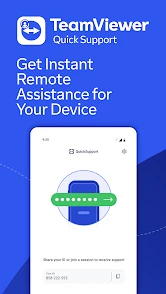
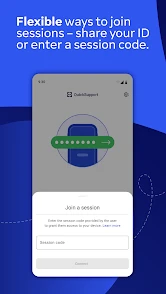
First things first, let’s talk about how easy it is to get started with TeamViewer QuickSupport. You just download it from your app store, and voila, you’re halfway there. The app doesn’t demand any complex setup rituals, which is a huge relief. All you need is a stable internet connection, and you’re good to go. No tech jargon or convoluted instructions – just plain and simple guidance. What’s more, the app interface is super user-friendly, so you won’t find yourself scratching your head trying to figure out what to do next.
A practical support routine
The smoothest sessions start with a little preparation. I’d ask the person who needs help to open QuickSupport before the call, keep the phone unlocked, and describe the problem in one sentence. Then the helper can focus on the screen rather than spending the first few minutes finding the right setting. For a confusing notification or a feature that moved after an update, this is often easier than sending screenshots back and forth.
For example, imagine your parent can no longer find a setting they use every day. You can talk them through opening the app, connect after they approve the request, and point out the relevant screen directly. That’s less stressful than asking them to remember a sequence of taps, and they can watch what changes. I’d still explain each action before making it; remote help works best as a shared troubleshooting session, not as silent control.
Make a session calmer before it starts
A useful habit is to agree on a simple opening script before anyone taps through the connection: who is calling, what the issue is, and what the helper intends to inspect. This is especially helpful for a less confident user who may otherwise mistake a permission prompt for an error. It also gives them a natural moment to decline if the request is unexpected. The person holding the phone should stay in the conversation and ask for an explanation whenever an action is unclear.
More From Our News Desk

Weather by Xiaomi Review: Clear at a Glance, Less Clear Up Close

X Under Pressure: Can It Recover When Posting Goes Wrong?

Clash of Clans Is Won Between the Battles

Android Auto Makes the Case for Quieter Car Software

MobiOffice: Transforming Mobile Productivity with Seamless Integration

EA SPORTS FC™ Mobile Soccer: Redefining Mobile Sports Gaming
For recurring support, I’d keep a short note outside the app with the device owner’s preferred contact method, the symptom they usually report, and anything already tried. That is not a QuickSupport feature; it is a small organizational habit that prevents the helper from asking the same questions repeatedly. Avoid writing down passwords or private account details. The goal is to make troubleshooting clearer, not to create a record of sensitive information.
Seamless Remote Control
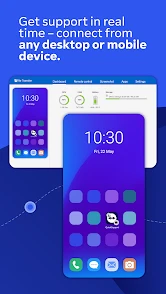
What really makes this app shine is its remote control capabilities. Imagine this: your device is acting up, but instead of enduring a long-winded phone call with tech support, someone can simply take control and fix the issue in real time. It’s like magic, but real! This feature is a lifesaver, especially for those not so tech-savvy folks who might struggle with troubleshooting. Plus, it’s not just about fixing problems. You can also use it for demonstrations or guiding someone through a new app or feature. It’s versatile and incredibly handy.
There is an important distinction, though: QuickSupport is designed for receiving assistance, not for turning your phone into a permanent unattended support target. The person holding the device needs to start the session and accept access. That makes the workflow reassuring for occasional help, but less suitable for a business that expects to manage phones without their users present.
Use the connection to teach, not just fix
When a helper performs every action without explanation, the immediate problem may disappear but the device owner can be left just as dependent as before. I prefer to ask the owner to watch the route to a setting and, where practical, repeat the important steps themselves. For something like locating a notification control, the helper can point out the menu path while the owner learns where it lives. That turns a support call into a small lesson the person can use next time.
There is a trade-off: teaching takes longer than simply taking over. If a device is needed urgently, a helper may reasonably prioritize restoring access first and explain afterward. But for repeated questions, a few spoken cues during the session can reduce future calls. QuickSupport works best as a shared view of the issue, rather than a reason to stop the device owner from learning their own phone.
Security at Its Core
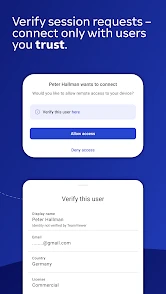
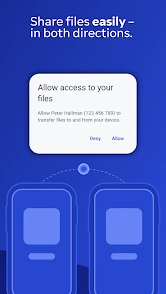
Now, I know what you’re thinking. Letting someone take control of your device sounds a bit risky, right? But rest assured, TeamViewer QuickSupport takes security seriously. Every session is encrypted, and you have to grant permission before anyone can access your device. You’re in control of who gets to see what, and when. It’s like having a bouncer at the door of your digital world, making sure only the right people get in.
Even with those safeguards, I treat screen access as sensitive. Close private chats, banking pages, or anything else you don’t want visible before connecting, and end the session when the task is done. Only accept a request from someone you know or from a support channel you contacted yourself. A remote helper may be able to see personal information on screen, so approval should never be automatic just because a caller sounds convincing.
Settings and habits that save time
There is no need to hunt for clever shortcuts: a repeatable routine is the useful shortcut here. Keep the app available for the person who may need help, agree on who will initiate the session, and have both people ready to describe the issue. If the same family member helps regularly, a brief note with the device model and the steps that led to the problem can prevent repeating the same questions each time.
Before relying on a remote session, check that both devices have a dependable internet connection and enough battery for a conversation and troubleshooting. On Android, the exact control experience can depend on the device and its system support, so a helper may sometimes guide by viewing the screen rather than being able to tap every control. If that happens, switch to clear verbal directions instead of assuming the connection has failed.
Small checks that prevent wasted calls
Before a scheduled session, I’d check that the person needing help can open the app and that the helper is ready to respond. If the phone is nearly out of battery or the connection keeps dropping, postpone a non-urgent task rather than turning a simple setting change into a frustrating call. A stable conversation matters because remote troubleshooting often involves waiting for menus to open and confirming what appears on screen.
It is also worth agreeing on a stopping point. If the helper cannot interact with a particular control, they can switch to describing the next tap while the owner does it. If the screen is unreadable, the phone cannot stay online, or the issue points to a physical fault, stop repeating the same attempt and choose another route. Recognizing when remote support has reached its limit is part of using it well.
Compatibility and Convenience
Whether you’re on Android or iOS, TeamViewer QuickSupport has you covered. The app runs smoothly across platforms, ensuring that you can get help no matter what device you’re using. It’s perfect for personal use or even small businesses that need a reliable and efficient way to provide tech support.
TeamViewer, the developer, is known here for a focused support tool rather than a general remote-work setup. The app is free and is rated for Everyone; its place in the productivity category makes sense because its job is to help people resolve device issues, not to organize projects or files. It has an average rating of 4.4 from around 154,000 ratings, with more than 50 million installs, so it is a familiar option for people who need this kind of help.
Compared with a phone call, a video call, or sending screenshots, direct remote assistance can make a hard-to-explain problem much easier to diagnose. Those alternatives are still better when you only need to show one picture, discuss private information, or avoid granting screen access. I wouldn’t install a remote-support app just to solve a one-time, simple question; for recurring help across different locations, though, keeping this one ready can save both people time.
Choosing between QuickSupport and simpler alternatives
A phone call is usually the lightest option when the owner can describe the issue and follow familiar instructions. Screenshots work well when the problem is a single message or setting, and they let the owner decide exactly what to share. A video call can show the physical phone and the person using it, which may be more useful when the difficulty is not limited to what appears on the display. QuickSupport earns its place when those methods create too much back-and-forth and seeing the screen directly would clarify the next step.
For a small team, the same distinction helps avoid choosing a tool that is heavier than the job. A colleague who needs occasional guidance may benefit from a support session; a team responsible for routinely administering many devices should look at managed-device tools instead. I would not treat remote assistance as a substitute for device-management policies, nor would I install it simply because a video call already solves the problem comfortably.
Where it fits—and where it doesn’t
The app is a strong fit for relatives helping relatives, a small team guiding a colleague through a device issue, or anyone who struggles to describe what is visible on their screen. It is less useful when the problem is a broken display, a device that cannot connect to the internet, or an issue that requires hands-on repair. Remote access can clarify a setting or demonstrate a workflow, but it cannot replace physical service when the hardware is at fault.
It also isn’t the best choice for routine administration of a large fleet of phones. QuickSupport is built around a person requesting help and approving a session, while managed-device tools are intended for broader, ongoing administration. Knowing that difference helps set expectations: this is a practical bridge between two people, not a full device-management system.
Limits to keep in mind on real devices
Remote help depends on both people being able to participate at the same time. It is not a way to rescue a phone that is switched off, cannot reach the internet, or cannot be operated enough to begin the session. And even when a connection is established, the helper may not be able to control every screen in the same way on every Android device. For a setting that requires physical confirmation or access to a control the helper cannot operate, the owner may still need to make the final taps.
That makes the app less suitable for urgent problems where waiting for another person is impractical, or for tasks involving private content that the owner would rather keep off-screen. I also wouldn’t use remote access to troubleshoot a suspected hardware failure as though it could repair one. It can help distinguish a confusing software setting from a visible symptom, but a damaged display, failing buttons, or other physical trouble calls for hands-on help.
A useful tool when help is occasional
The current version is 15.72.19, and the app supports devices running Android 5.1 or later. I’d check compatibility before asking someone to install it, especially if their phone is older. The most helpful question to settle in advance is simple: can the person who needs help open the app, accept the request, and stay connected long enough to work through the issue? If yes, a short test session with someone trusted can make the real call less awkward.
One practical question is whether the person receiving help has to understand the technical side of the session. In my view, they do not need to know how remote-support software works, but they should be comfortable opening the app, recognizing the helper, and deciding whether to approve access. A trusted person can guide those steps by phone. If the owner cannot confidently identify the request or feels pressured to accept it, pause and use a less intrusive way to explain the issue.
Another question is whether QuickSupport will let the helper fix every problem without the owner doing anything. I would not count on that. Depending on the device and the screen involved, the helper may need to guide the owner verbally or ask them to confirm an action themselves. That is not necessarily a failed session; it is a useful boundary to understand before promising a hands-off fix.
In conclusion, TeamViewer QuickSupport is one of those apps that you might not think you need until you actually try it. With its easy setup, robust security, and seamless remote control, it’s a must-have for anyone who wants to make tech troubles a thing of the past. So, next time you’re scratching your head over a pesky tech issue, remember there’s an app for that!
TeamViewer QuickSupport Frequently Asked Questions
Can TeamViewer QuickSupport fix problems automatically?
No. QuickSupport is a way to receive remote assistance, not an automatic repair tool that diagnoses and fixes every issue on its own. You use it when a trusted technician or support representative is helping you, and they can guide you through the problem during a session. It is most useful when you need another person to see what is happening on your device.
Can I use TeamViewer QuickSupport without someone helping me?
QuickSupport is primarily intended for receiving help from another person, so it is most useful when a technician, IT team, or trusted support representative is available. Installing the app by itself does not provide a human diagnosis or resolve a device issue automatically. If you are downloading it to troubleshoot something, make sure you know who will assist you and how you will contact them.
Is TeamViewer QuickSupport suitable for older Android devices?
TeamViewer QuickSupport requires Android 5.1 or later, so check your device’s operating system before downloading. If your phone or tablet meets that requirement, it may be able to run the app, although performance can depend on the device and the kind of support session. The app is designed to help you receive remote assistance rather than serve as a general-purpose remote-control tool.
Can I use QuickSupport to get help with a phone or tablet?
Yes. TeamViewer QuickSupport is intended to help users receive remote assistance on a mobile device, which can be useful when a technician needs to understand an issue directly from your screen. The app’s purpose is support rather than everyday device control. Before starting a session, make sure the person assisting you is someone you trust and follow their instructions to connect.
What should I check before installing TeamViewer QuickSupport?
TeamViewer QuickSupport is a productivity app from TeamViewer for getting remote assistance with your device. Before downloading, check that your device runs Android 5.1 or later, as that is the stated minimum operating system requirement. The app is free and is rated Everyone, so it is presented for a broad audience. It is intended to help you receive support, rather than act as a general-purpose remote-control tool.
Pros
- Easy remote access setup
- Supports multiple platforms
- Real-time screen sharing
- Secure connection protocols
- Intuitive user interface
Cons
- Requires stable internet
- Limited features on free version
- May lag on slow networks
- Dependent on host app
- Occasional connectivity issues
- Category
- Productivity
- Version
- 15.72.19