Square Invoices: Invoice Maker
- 3.90K
- 4.7
- Installs
- 1.00M
- Price
- Free

Screenshots
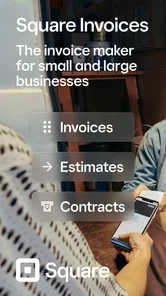



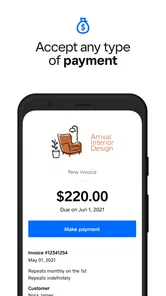

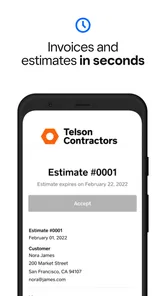

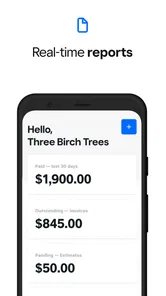

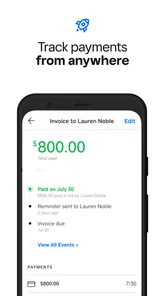

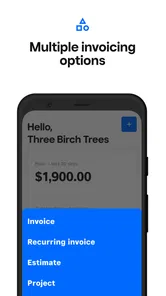

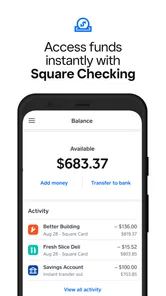

Analysis by Reviewed
I found Square Invoices: Invoice Maker most useful as a focused business companion rather than a complete accounting system. It is built for the practical parts of getting paid: preparing an invoice, sending an estimate, keeping an eye on expenses, and following payments without turning every small job into a paperwork session. In my experience, that narrow purpose is also its biggest strength. It gives a freelancer or small operator a clearer routine, while a larger company may quickly want broader financial controls.
The app comes from Block, Inc. and sits in the business category. It is free to install, rated for Everyone, and has reached more than a million installs with a 4.7 average from roughly twenty thousand ratings. Those figures suggest that it has found a real audience among people who need straightforward invoicing on a phone, although popularity alone does not tell me whether it will fit your workflow. The current version is 7.22.1, and it runs on Android 9 or later.
What it feels like to use for everyday billing
My first impression is that Square Invoices is aimed at reducing the gap between finishing work and asking for payment. That matters when you are leaving a customer’s site, wrapping up a design task, or confirming a recurring service. Instead of waiting until you are back at a desk, the phone becomes the place where you turn the job into a documented request.
The main appeal is not elaborate customization. It is the ability to keep estimates, invoices, expenses, and payment follow-up close together. For a sole trader, that combination can be more useful than a visually impressive invoice template with no connection to the rest of the job. I would especially consider it for cleaners, repair workers, tutors, photographers, consultants, and other independent professionals who need a repeatable way to bill clients.
A realistic example is a self-employed electrician finishing a small installation in the afternoon. Before leaving, they can review the work, prepare the amount due, and keep the expense side of the job in the same business routine. Later, they can check whether the payment has moved forward instead of relying on a memory, a paper notebook, or a collection of scattered messages. That does not remove the need for good bookkeeping, but it can prevent a finished job from disappearing into an inbox.
I also like the distinction between an estimate and an invoice. They serve different moments: one helps a customer understand a proposed job, while the other records what is actually being requested after the work or agreement is settled. Keeping those stages separate is a small operational habit, but it can prevent awkward conversations when the final amount differs from the original expectation.
Where the workflow earns its place
The strongest use case is a business with relatively direct transactions. If you normally quote a customer, complete a defined piece of work, record a few related costs, and request payment, the app’s structure makes sense. It is less intimidating than opening a full accounting package when all you need is a clean billing process.
More From Our News Desk

Weather by Xiaomi Review: Clear at a Glance, Less Clear Up Close

X Under Pressure: Can It Recover When Posting Goes Wrong?

Clash of Clans Is Won Between the Battles

Android Auto Makes the Case for Quieter Car Software

MobiOffice: Transforming Mobile Productivity with Seamless Integration

EA SPORTS FC™ Mobile Soccer: Redefining Mobile Sports Gaming
Tracking expenses alongside invoices can also improve the conversation with a customer. If a job includes materials, travel, or another cost that needs to be passed on, recording it while the details are fresh is safer than reconstructing everything at the end of the month. My practical tip is to enter the expense immediately after the purchase and attach it mentally to the job before moving on. A mobile workflow is most valuable when it captures information at the moment it happens.
Another useful habit is to treat estimates as a planning checkpoint, not merely a document to send. Before accepting a job, I would use the estimate to review the description, quantities, and expected total. That gives the customer a chance to spot a misunderstanding before work begins. It also gives the business owner a reference point when preparing the final invoice.
The app is free, which lowers the barrier to trying it. However, in-app purchases are listed at twenty dollars per item, so I would look carefully at any paid option shown during use before confirming it. The free installation should not be confused with every possible business action being free. That is particularly important for a new operator who is comparing the app with a spreadsheet or a basic document template.
Trust comes from visible choices, not assumptions
For a billing app, trust is more than a polished interface. I would want to know what I am about to send, which customer details are included, and whether I am taking an action that creates a financial record. The safest approach is to review each invoice or estimate before sending it, especially when working quickly from a phone.
I would also keep business and personal information deliberately separate. Use a consistent customer naming style, check the recipient before sending, and avoid putting unnecessary private notes into fields that may appear on a customer-facing document. These are simple controls, but they matter more than decorative design when invoices contain contact details, service descriptions, or amounts.
Account access deserves the same care. I recommend using a strong, unique password for the account connected to your billing activity and enabling any security options that the account visibly offers. I would not share login details with a client or leave the account open on a shared device. If several people help with administration, decide in advance who may create, edit, or send documents rather than treating access casually.
That advice is not a claim about hidden permissions or internal data handling. It is a user-side discipline: only grant access you are comfortable granting, read the prompts presented by the app, and pause when an action involves customer or payment information. The app can make invoicing more convenient, but convenience should not replace a quick privacy check.
Moments that need extra attention
Fast mobile entry has a trade-off. It helps when you are busy, but a small mistake in a customer name, amount, description, or due detail can make a professional invoice look careless. I would never send the first draft without reading it as if I were the customer. Check the service wording, the total, and the intended recipient separately.
Expenses are another area where speed can create confusion. A purchase may relate to one job, several jobs, or the business generally. If you record it without deciding which category it belongs to, later review becomes harder. My preferred routine is to add a short internal note while the receipt is still in front of me, then reconcile the entry with the original receipt during a weekly review.
Payment tracking is helpful, but it should not become the only record of the business. I would still keep a regular backup or export routine wherever the account provides one, and I would reconcile the app’s information with bank activity and tax records. An invoicing tool can organize the request for payment; it does not automatically replace professional accounting advice or the obligations that apply to your business.
There is also a human side to follow-up. A customer who has not paid may have missed the message, misunderstood the due date, or need a corrected invoice. Before sending a reminder, I would open the relevant record, confirm that the amount and description are correct, and use a polite message that makes the next step clear. The app can support the process, but judgment still belongs to the person running the business.
How it compares with familiar alternatives
The usual alternative for a very small business is a spreadsheet or a word processor. Those tools are flexible and may be enough if you send only a few invoices each month. They also make it easy to create your own layout. The weakness is that you must design the workflow yourself: one file for estimates, another for expenses, a manual status column for payments, and a separate method for finding customer history.
Square Invoices is more appealing when consistency matters more than unlimited formatting. It gives the billing process a defined home, which can reduce duplicated work. The trade-off is that you accept the app’s way of organizing the task instead of building every field and calculation yourself. Someone who enjoys maintaining a detailed spreadsheet may find the app restrictive, while someone who keeps forgetting to update a spreadsheet may find the structure reassuring.
Compared with a full accounting platform, this app feels more approachable and less likely to overwhelm a one-person business at the beginning. A larger system may be the better choice when you need advanced reporting, complex inventory, payroll, multiple layers of approval, or deep tax workflows. I would not choose a focused invoicing tool as the sole foundation for a growing company whose financial operations already require several specialized roles.
It also differs from simply accepting a payment and moving on. A payment tool may solve the immediate transaction, but an invoice workflow helps preserve the reason for the charge and the relationship between an estimate, an expense, and the final request. That recordkeeping perspective is where the app makes more sense than an improvised message asking someone to send money.
Who should use it, and who should be cautious
I would recommend trying it if you are self-employed, run a small service business, or need to issue professional estimates and invoices without sitting at a computer. It is especially suitable for people who want to check business activity while moving between jobs. The mobile format is practical when your workday happens away from a desk.
I would be more cautious if your business has complicated billing rules. Multiple tax treatments, large teams, subscription logic, purchase orders, inventory movements, or detailed project accounting may push you toward a broader system. The app can still be useful for a simple part of that operation, but I would not assume it covers every administrative need just because it handles invoices and expenses.
I would also pause if you are looking for a completely free, no-strings-attached replacement for every business tool. The app itself is free, yet the presence of twenty-dollar in-app items means you should inspect the available choices and terms before buying anything. For a new freelancer, comparing the total cost of the workflow—not just the installation cost—is the sensible approach.
A careful routine makes the app more reliable
My recommended setup is deliberately simple. First, create a small naming convention for customers and jobs. Second, prepare estimates with enough detail that the customer can understand what is included. Third, turn completed work into an invoice only after checking what changed. Fourth, record expenses promptly. Finally, review outstanding payments on a fixed day each week.
This routine addresses a weakness common to mobile business apps: they make individual actions easy, but they cannot decide whether your records are complete. A weekly review catches duplicate entries, forgotten expenses, and invoices that were drafted but never sent. It also gives you a calmer moment to check account activity and privacy choices instead of making every decision in the middle of a busy appointment.
I would keep notifications and account prompts under review as well. If the app asks for access or presents a new choice, read the wording and decide whether it is necessary for the task you want to perform. Do not approve something merely because you are trying to get through setup quickly. In a business context, a few seconds of attention can prevent an unwanted disclosure or an incorrect customer action.
My verdict after looking at the whole workflow
Square Invoices works best when you want a practical bridge between doing the work and managing the paperwork afterward. Its combination of estimates, invoices, expense tracking, and payment follow-up is more useful than a basic invoice template, particularly for a mobile, service-based business. I appreciate that it supports a repeatable process without asking a small operator to begin with the complexity of enterprise accounting.
My reservations are equally straightforward. Mobile convenience increases the need to proofread, expense tracking still depends on consistent habits, and the free entry point should be considered alongside the listed in-app purchase option. I would also avoid treating it as a replacement for a complete accounting system when the business has advanced reporting, tax, inventory, or team requirements.
Overall, I see it as a sensible starting point for an independent professional who wants more order than a spreadsheet but less weight than a full finance suite. Use it as a focused invoicing workspace, keep control of what you send and record, and review the account regularly. For that audience, it is worth trying; for a complex operation, I would use it only if its focused workflow genuinely matches the business rather than expecting it to solve every financial task.
Square Invoices: Invoice Maker Frequently Asked Questions
Can I use Square Invoices: Invoice Maker to prepare estimates before starting a job?
Yes. Square Invoices is designed to help manage estimates as well as invoices, bills, expenses, and payments. You can use it to put a proposed job or service into a clear estimate for a customer, then keep related billing tasks in the same business app. Its usefulness will depend on whether the available estimate workflow fits how you describe work and follow up with customers.
Is Square Invoices: Invoice Maker suitable for a very small business or a freelancer?
It can suit freelancers, independent contractors, service providers, and small businesses that want to handle everyday billing from a mobile device. The app brings invoicing and estimates together with tools for tracking expenses and payments, which may be convenient when you do not need a complex desktop workflow. Consider whether its features match the way you currently organize customer details and business records.
Can I use Square Invoices: Invoice Maker on both Android and iOS?
Square Invoices: Invoice Maker is available for Android and iOS, so you can use it on a compatible phone or tablet. It is a business app from Block, Inc., and its minimum operating system requirement is version 9. Check that your device meets the requirement and that the app is available for your region before downloading.
Is Square Invoices: Invoice Maker free to download, and are there in-app purchases?
The app is free to download, which makes it easy to try its invoicing workflow before relying on it for regular business billing. It also offers in-app purchases listed at $20.00 per item, so review any purchase details shown in the app before confirming. Payment processing may have separate fees, as explained below, depending on your account and the payment options used.
What is Square Invoices: Invoice Maker, and who is it designed for?
Square Invoices: Invoice Maker is a mobile invoicing tool designed for freelancers, independent contractors, small businesses, and service providers. After setting up a business profile, you can create professional invoices, add products or services, include taxes and discounts, and send invoices to customers. It is especially useful for people who want to manage billing from a phone instead of relying on desktop accounting software.
Pros
- Create and send professional invoices directly from your phone.
- Useful templates help speed up recurring billing tasks.
- Supports digital payments through Square’s payment ecosystem.
- Tracks invoice status
- payments
- and outstanding balances in one place.
- Suitable for freelancers and small businesses needing mobile invoicing.
Cons
- Many payment features depend on Square account availability in your region.
- Transaction fees can reduce earnings when customers pay online.
- Advanced accounting and inventory tools are limited compared with larger platforms.
- Requires reliable internet access for several core invoicing and payment actions.
- Businesses outside the Square ecosystem may find integrations restrictive.













