Square Team
- 1.54K
- 4.7
- Installs
- 1.00M
- Price
- Free

Screenshots







Analysis by Reviewed
When it comes to managing tasks efficiently, Square Team has quickly become one of my go-to apps, and I think it might become yours too. It's an app designed to streamline teamwork and make life a little easier for anyone juggling multiple projects at once. So, let me walk you through my experience with this handy tool.
What makes it most useful in practice is the connection between a team’s day-to-day coordination and its work schedule. I would consider it for a workplace where people need a shared view of shifts and a straightforward way to stay in touch, rather than for a group looking for a full project-management suite. That distinction matters: a team that mainly needs to coordinate who is working and when has different needs from a team tracking complex projects with dependencies, detailed reporting, or specialist planning tools.
Getting Started with Square Team
From the get-go, downloading and setting up Square Team is a breeze. The app is available on both Android and iOS, ensuring that everyone on your team can get on board regardless of their device preference. Once downloaded, the onboarding process is smooth and intuitive, guiding you through setting up your first team and projects.
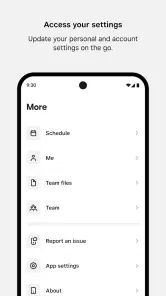
The user interface is sleek and modern, which I personally love. It's not cluttered, making navigation straightforward. You can tell the developers focused on user experience, ensuring that everything you need is just a few taps away.
Because this is a finance-category app from Block, Inc., I’d approach it as a work tool for employees and managers, not as a general-purpose social chat app or a personal calendar replacement. A practical first step is to ask whoever manages your workplace whether Square Team is part of the way your team organizes work; an employee app is only useful when the people setting schedules and sharing updates are using the same setup. It’s free, rated for Everyone, and has a 4.7 average from around 6,400 ratings, which gives newcomers a useful sense of its reception without telling them whether it fits their particular workplace.
Features That Make a Difference
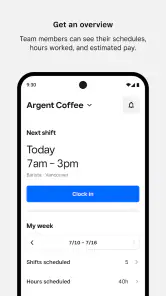
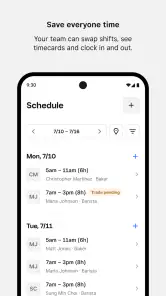
One of the standout features of Square Team is its task management system. You can easily create tasks, assign them to team members, and set deadlines. The app sends timely notifications to keep everyone in the loop, which is a lifesaver when you're managing a large team. Plus, the built-in calendar view gives you a snapshot of your schedule, helping you prioritize tasks effectively.
For a realistic shift-work routine, I’d use the calendar as a quick check before leaving home, then rely on team communication for a change or question that needs context. That helps keep a scheduling detail from getting buried in a separate chat thread. A useful habit is to check the schedule at a consistent point in the day and confirm any uncertainty with the relevant teammate or manager, rather than assuming an old notification still reflects the current plan.
More From Our News Desk

Weather by Xiaomi Review: Clear at a Glance, Less Clear Up Close

X Under Pressure: Can It Recover When Posting Goes Wrong?

Clash of Clans Is Won Between the Battles

Android Auto Makes the Case for Quieter Car Software

MobiOffice: Transforming Mobile Productivity with Seamless Integration

EA SPORTS FC™ Mobile Soccer: Redefining Mobile Sports Gaming
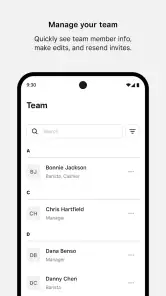
Another feature that deserves a shout-out is the communication tools. You can chat with team members directly within the app, eliminating the need for multiple communication platforms. This integration saves time and ensures that discussions are always tied to relevant tasks.
The trade-off is that a shared work space depends on team participation. If coworkers keep updates in personal messages or another chat app, conversations can still become fragmented; the app cannot make everyone adopt the same routine. I’d keep urgent or time-sensitive communication aligned with the process your workplace already uses, and treat in-app messages as most useful when the whole team knows to check them.
Why You Should Consider Square Team
If you're anything like me, you're always on the lookout for tools that can enhance productivity. Here's why I think Square Team is worth a shot. First off, its cross-platform compatibility is a huge plus. Whether you're on the go with your phone or at your desk with a tablet, you can access your projects without a hitch.
Compared with a standalone calendar, a workplace team app can bring schedule coordination and colleague communication into one place; compared with broad project-management software, it may feel more approachable for routine team coordination. I’d choose based on the actual job: a small team sharing shifts and basic updates may value fewer separate tools, while a department that needs detailed project plans, advanced workflows, or extensive documentation may be better served by a dedicated platform. The key question is not which app has the longest feature list, but whether your team will consistently use the same place for the information you need.
Moreover, the app's focus on collaboration is evident. By consolidating task management and communication, it reduces the back-and-forth typically associated with project management. This means less time spent managing the process and more time actually getting work done.
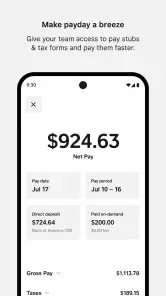
For earnings-related use, I’d treat the app as a convenient on-the-go access point rather than assume it replaces every financial or payroll tool a workplace might use. Before relying on it for a particular work task, check that your employer has set up the relevant access and that you can see the information you need. This is also a sensible way to avoid mixing up a team communication tool with a personal banking app: the intended use depends on your workplace arrangement.
Finally, the app's design is a breath of fresh air. Its minimalist approach reduces cognitive load, allowing you to focus on what matters most—completing your tasks.
On speed and reliability, I’d set expectations around a lightweight work companion rather than a heavy planning system. The uncluttered layout makes routine checks feel direct, but actual responsiveness can depend on the phone, connection, and the amount of activity happening in a team. If something seems out of date, I’d reopen the relevant schedule or conversation and verify it with a manager before acting on a consequential change. That simple check is more useful than treating any mobile app notification as an unquestionable source of truth.
The app has over one million installs, and its current version is 6.83.0. It supports devices running Android 9 or later, so anyone with an older Android phone should check compatibility before planning to use it. For an older or crowded device, I’d also leave enough room for normal system updates and avoid keeping many apps active if the phone already feels sluggish. I can’t infer battery use or memory demands from the app’s purpose alone, so my practical advice is to try it during an ordinary shift and see how it behaves on your own device.
Finally, this is a better fit for someone whose workplace already uses it than for a person hoping to independently organize a household, freelance projects, or a social group. If you need personal finance tracking, a dedicated budgeting app is a more natural choice; if your team’s work revolves around complex project plans, a specialist project tool may be clearer. Square Team makes most sense when your everyday questions are about team coordination, schedules, communication, and accessing work-related earnings.
In conclusion, Square Team has impressed me with its thoughtful design and functionality. It's an essential tool for anyone looking to improve team collaboration and productivity. Whether you're a small startup or a large corporation, this app offers features that cater to various needs, making it a versatile choice for teams of all sizes.
Square Team Frequently Asked Questions
Is Square Team free to download, and who is it intended for?
Square Team is a free finance app developed by Block, Inc. Its store summary describes it as a way to communicate, manage schedules, and access earnings while on the go, so it is aimed at people who use Square Team for work. The content rating is Everyone. Before downloading, consider whether these workplace-focused functions fit what you need from an app.
Which devices and software versions can run Square Team?
Square Team is available for Android and iOS, with a minimum operating system requirement of version 9. Checking your device’s operating system before downloading can help you avoid compatibility issues. The app’s current version is 6.83.0, and keeping an installed app updated is a practical way to use its latest available release.
What is Square Team and how does it work?
Square Team is a comprehensive team management application designed to streamline communication and collaboration among team members. It offers features such as task management, real-time messaging, and project tracking. Users can assign tasks, set deadlines, and monitor progress within the app, making it easier to manage projects and improve team productivity.
Is Square Team suitable for small businesses or large enterprises?
Square Team is versatile and can be used by both small businesses and large enterprises. Its scalable features allow small teams to efficiently manage tasks, while larger organizations can benefit from its robust project management tools. The app's ability to customize workflows and integrate with other platforms makes it adaptable for various business sizes and needs.
How secure is the data stored in Square Team?
Security is a top priority for Square Team. The app employs advanced encryption protocols to protect user data and ensure that sensitive information remains confidential. Regular security updates are implemented to address potential vulnerabilities, and users can manage access controls to further safeguard their data. This ensures a secure environment for all users.
Pros
- User-friendly interface for easy navigation.
- Seamless integration with other Square apps.
- Robust security features for data protection.
- Customizable settings to suit business needs.
- Efficient customer support available.
Cons
- Limited offline functionality.
- Requires stable internet connection.
- Some features may be costly.
- Initial setup can be time-consuming.
- Occasional sync issues reported.
- Category
- Finance
- Version
- 6.83.0