Solid Starts: Baby Food App
- 656.00
- 4.8
- Installs
- 1.00M
- Price
- Free

Screenshots
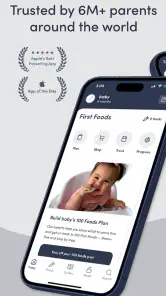
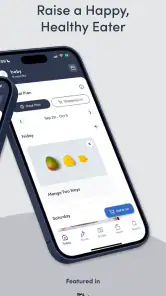
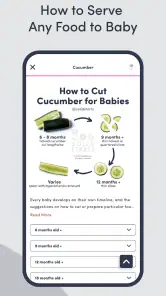
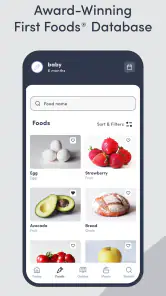

Analysis by Reviewed
When I’m choosing a feeding app for a baby, I care less about flashy meal ideas and more about whether I can quickly answer practical questions: what a food looks like when served, how to prepare it, and what I should keep in mind before offering it. Solid Starts: Baby Food App is aimed squarely at that early-solids stage, especially for families exploring baby-led weaning. I’d treat it as a reference to use alongside your own judgement, not as a substitute for advice from your child’s health professional.
What I’d want from a feeding reference
Before relying on any app about starting solids, I’d ask whether it helps with the decision in front of me, whether its guidance is easy to revisit, and whether it leaves room for a baby’s individual needs. Solid Starts is most useful when the question is concrete: how to approach a particular ingredient, or what to consider before putting it on the plate. It is less suited to parents looking for a complete, individualized feeding plan.
I’d also decide how I want to use it before making it part of every meal. A food reference can support confidence, but it should not become a rulebook that makes ordinary choices feel like tests. My best use for it is as a second look when I’m introducing something unfamiliar, while keeping professional advice and my child’s cues at the center of decisions.
A useful companion at the moment of decision
The app’s strongest role is helping turn an unfamiliar ingredient into a more manageable next step. If you’re standing in the kitchen with a ripe pear and wondering how to serve it, a food-focused reference can be more useful than scrolling through broad parenting discussions or searching several recipe pages. I’d use it before shopping or meal prep to look up a food, then return to it when I’m ready to prepare that ingredient.
That workflow also makes the app easier to approach if you don’t want to plan every meal in advance. Rather than treating a database as a course you must study from start to finish, I’d dip into it as questions come up. One practical tip is to look up a food before your baby is hungry and you’re rushed; checking preparation guidance while juggling a meal is a poor time to absorb new details.
Where it fits among feeding resources
Compared with a general recipe app, Solid Starts is more focused on the particular questions that come with introducing foods to babies. A recipe collection may offer inspiration for the whole family, while a food database is better suited to checking an individual ingredient. Parenting forums can provide reassurance and personal stories, but advice there may vary from one family to another. I’d use those resources for different purposes rather than expect one of them to do everything.
It may be less satisfying if what you want is a simple, fixed menu that tells you exactly what to serve each day. A planner can help organize meals, but families who prefer a familiar routine or rely on clinician-led guidance may be better served by following that plan and using an app only as a supplementary reference. In my view, the choice depends on whether you want flexible food information or a more prescriptive feeding routine.
More From Our News Desk

Weather by Xiaomi Review: Clear at a Glance, Less Clear Up Close

X Under Pressure: Can It Recover When Posting Goes Wrong?

Clash of Clans Is Won Between the Battles

Android Auto Makes the Case for Quieter Car Software

MobiOffice: Transforming Mobile Productivity with Seamless Integration

EA SPORTS FC™ Mobile Soccer: Redefining Mobile Sports Gaming
Questions worth settling before you rely on it
Is it only for baby-led weaning? Its focus makes it especially relevant to families considering that approach, but I’d still judge any food and preparation choice against my baby’s needs rather than assume one method suits every household. Can it replace personalized allergy or nutrition advice? No app should be treated as a diagnosis or a tailored medical plan; if you have a concern about a reaction, growth, or a specific health need, ask a qualified professional.
Will it work for a busy parent? It can be useful as a quick lookup, but the amount of information may take time to get comfortable with, so I wouldn’t expect it to remove every decision or make feeding effortless. Is it free? The app is free to download, with optional in-app purchases; I’d check what is included before paying for anything and decide whether those extras match how often you use it.
Why I Decided to Give It a Try
So, picture this: I’m a new parent, and I want to make sure my baby is getting the best start when it comes to solids. Enter the Solid Starts: Baby Food App, a nifty little tool that popped up during one of my late-night app store browsing sessions. The promise of a comprehensive guide to baby food, right at my fingertips, was just too good to pass up.
Features that Stand Out
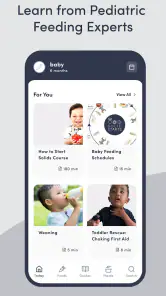
First off, the app is super intuitive. You don’t need to be a tech wizard to figure it out, which is a massive plus when you’re juggling a baby in one hand and your phone in the other. The database of foods is extensive, and each entry is packed with information about how to prepare the food, the nutritional benefits, and even potential allergens. It’s like having a baby nutritionist on speed dial!
What really sold me was the app's detailed instructions on how to serve each food based on your baby’s age. For instance, I learned that carrots should be cooked and mashed for younger babies, while older ones can handle them steamed and cut into small sticks. It's these kinds of insights that make meal prep a breeze.
Personal Experience
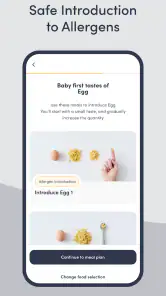
Using the app has not only expanded my baby’s palate but also my own cooking skills. Who knew there were so many ways to prepare a simple avocado? And let’s not forget the peace of mind that comes from knowing exactly what’s going into your baby’s tummy. The allergen guide is a lifesaver, especially if allergies are a concern in your family.
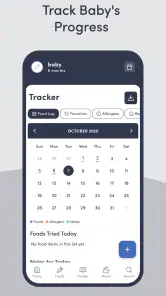
Another feature I adore is the meal planner. It lets me plan out meals for the week, taking the guesswork out of daily food prep. Plus, the shopping list feature ensures I never forget the essential ingredients when I’m dashing through the grocery store.
A Few Words of Caution
While the app is mostly a dream, it’s worth noting that some parents might find the sheer amount of information a bit overwhelming at first. But trust me, once you get the hang of it, it’s smooth sailing. Also, while the app provides guidelines, every baby is different, so it’s crucial to tailor advice to suit your little one’s needs.
For context, this is a free parenting app from Solid Starts, rated for Everyone and available on Android from version 7.0. Its average rating is 4.8 from around 19,000 ratings, and it has been installed over a million times. It was released in May 2021; version 3.6.6 is the current version. Those figures suggest a well-used resource, though popularity alone cannot tell you whether its approach suits your family.
A calmer way to use the database
One small habit can make a detailed food guide feel much more manageable: choose one unfamiliar ingredient at a time and decide what you want to learn from its entry. I’d focus first on how to prepare it, then consider whether it fits the meal and the child in front of me. That keeps the lookup purposeful instead of turning every meal into a long research session.
It can also help to share the same reference with another caregiver before they are responsible for a meal. Rather than sending a string of instructions while someone is already cooking, I’d agree on the general approach in advance and use the entry to clarify a specific food. This is especially useful when caregivers have different levels of confidence or different assumptions about what “baby-sized” preparation means.
Who will get the most from it
I’d recommend it most to parents who want to offer a wider range of ordinary foods but feel uncertain about preparation, or who like having a food reference close by while making their own choices. It can also help a partner, grandparent, or other caregiver understand the approach you’re using: checking the same entry together is more practical than trying to relay instructions from memory. That shared reference is useful, but it doesn’t remove the need to discuss feeding expectations with anyone caring for your baby.
Imagine you’re planning a family dinner and want to adapt part of it for your baby. You could check the ingredient ahead of time, decide whether it suits your meal, and make a separate preparation choice if needed. That is a more realistic use than expecting the app to transform every adult recipe into a baby meal. Keeping the lookup step separate from cooking also gives you time to consider the guidance rather than making a rushed choice at the table.
Who may prefer a different approach
If you want a daily menu that removes nearly all planning, a fixed meal schedule or a clinician’s instructions may be a better starting point than an ingredient-by-ingredient reference. Likewise, if your household already has a short rotation of familiar foods and you rarely need help with preparation, you may find that a printed note or your existing routine is quicker. I wouldn’t install this expecting it to take over every part of feeding.
It may also be the wrong primary resource for a family dealing with a medical feeding concern, a suspected reaction, or a need for individualized nutrition guidance. The app can help you look up food information, but it cannot assess a child or adapt its guidance to a clinical history. In those cases, I’d follow qualified advice first and use general app content only if it fits that plan.
Where I’d be careful
Food guidance can feel reassuring, but it should not become a reason to ignore your baby’s cues or individual circumstances. I’d be especially cautious about treating general allergen information as a personalized plan when a family already has concerns. The app can support preparation and planning; it cannot observe how a particular child responds. For families who need tailored feeding advice, a clinician or dietitian is a better primary resource, with the app serving only as a secondary aid.
There is also a trade-off between detail and speed. A broad database is valuable when you’re exploring, but repeatedly reading long entries may feel like extra work if your household already has a short list of familiar foods. I’d save the app for new ingredients and questions that genuinely affect preparation, rather than consult it for every bite. That keeps it helpful without turning meals into a research project.
Making the choice—and the switch
If you already use recipe notes, a printed guide, or advice from a health professional, you don’t need to abandon those habits to try this. The simplest transition is to keep your trusted routine and use Solid Starts when you want another food-specific reference. If you later decide it isn’t a good fit, your meals need not depend on it: the app is a support tool, not the system your family has to organize around.
Solid Starts is free to download, with in-app purchases ranging from $1.99 to $99.99 per item, so I’d look at the available options and their contents before spending. The free starting point makes it easier to judge whether the database and planning approach are useful to you, but paid extras only make sense if they address a need you actually have. I wouldn’t pay simply because feeding a baby feels daunting; first see whether the app’s core reference changes your day-to-day decisions.
My recommendation
For a practical trial, I’d use it for a few real questions rather than browse it without a purpose: check an ingredient before shopping, revisit it during meal prep, and see whether that information genuinely makes the decision clearer. If it does, it has earned a place as a reference. If it adds more steps than confidence, there is no reason to force it into your routine.
In conclusion, if you’re looking to make the transition to solids as seamless as possible, the Solid Starts: Baby Food App is definitely worth checking out. It’s a handy companion that makes feeding your baby an enjoyable experience rather than a daunting task. Happy feeding!
Solid Starts: Baby Food App Frequently Asked Questions
What should I consider before using a food database to make feeding decisions?
A food database can be a useful starting point when you are introducing solids, but it should support—not replace—your judgment and guidance from a qualified health professional. Solid Starts: Baby Food App centers on its First Foods® Database and baby-led weaning guidance, helping caregivers explore real foods and ways to serve them. Consider your baby’s individual needs and seek professional advice when you have questions about feeding or health.
Can Solid Starts: Baby Food App help me explore baby-led weaning?
Yes. Solid Starts: Baby Food App is intended to help caregivers introduce real food and explore baby-led weaning, often abbreviated as BLW. Its First Foods® Database gives parents a place to look up foods as they begin offering solids. The app can be a practical resource while you learn about this approach, though decisions about what and how to offer should take your child’s needs into account.
Who is Solid Starts: Baby Food App designed for?
Solid Starts: Baby Food App is a parenting app for caregivers introducing real food to a baby. Its First Foods® Database and baby-led weaning guidance can help parents look up foods and consider how to serve them as their child begins eating solids. It is intended as a practical companion to a parent’s feeding decisions, rather than a replacement for advice from a qualified health professional.
What is Solid Starts: Baby Food App?
Solid Starts: Baby Food App is designed to guide parents through introducing solid foods to their babies. It offers information on various foods, including nutritional content, preparation tips, and safety guidance, making it a handy resource for parents looking to support a balanced and safe diet for their infants.
Is Solid Starts: Baby Food App free to use?
Solid Starts: Baby Food App is free to download and offers some features for parents to explore. In-app purchases are available, with prices ranging from $1.99 to $99.99 per item, so check the purchase details in the app before buying. The app is rated for Everyone, and its core purpose is helping parents explore foods and feeding guidance for babies.
Pros
- Comprehensive database of baby foods.
- Easy-to-navigate user interface.
- Includes personalized meal plans.
- Provides food allergy guidance.
- Regular updates with new features.
Cons
- Subscription required for full access.
- Limited offline functionality.
- Initial setup can be time-consuming.
- Some features need improvement.
- Occasional app crashes reported.
- Category
- Parenting
- Version
- 3.6.6











