شرطة الأطفال
- 135.00
- 4.5
- Installs
- 5.00M
- Price
- Free

Screenshots


Analysis by Reviewed
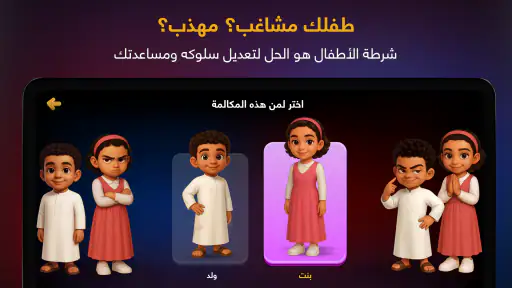
When a child wants to play police officer, a short pretend-play app can be easier to manage than a complicated game with several menus, competitive systems, or a long learning curve. شرطة الأطفال is a free parenting app from Romman Smart Applications LLC that turns the familiar idea of “children’s police” into a light, playful experience. I see it as something designed for a shared phone or tablet, especially when an adult wants to join the joke rather than hand over a full game for independent play.
My first impression is that the app works best as a social prop. The child is not simply sitting alone trying to master difficult controls; the adult can be part of the scene, setting up a playful conversation and using the app as a small prompt for role-play. That makes it quite different from a typical educational app, where the child is expected to complete lessons or repeat exercises. Here, the value comes from the interaction around the screen.
It is available at no charge and is rated for Everyone, which makes it approachable for households looking for a simple option. It has also been around since Oct 9, 2014, so this is not a newly launched experiment. The current version is 7.15, and it requires at least OS 8.1, covering older compatible devices as well as newer phones and tablets.
How it fits into everyday family use
I’d use شرطة الأطفال as a brief, shared activity when the family needs a playful pause, rather than expecting it to carry a whole afternoon. Thinking about where it fits in your routine also makes it easier to choose a comfortable moment and keep the pretend scenario light.
A shared-device activity rather than a solo game
I would not treat شرطة الأطفال as a replacement for a long-form children’s game. Its strongest use is a quick shared moment: a parent has a few minutes, a child wants attention, and both can act out a harmless police-themed scene. The device becomes a prop that supports the conversation instead of becoming the entire activity.
A realistic example would be a child refusing to put away toys before dinner. Instead of turning the situation into a serious confrontation, an adult might invite the child into a pretend police scenario, open the app, and let the child participate in the joke. The important part is the adult’s tone. If the exchange stays clearly playful, the app can add excitement to an ordinary household routine.
This is also useful when siblings share one device. One child can hold the phone while another plays the “officer,” then they can swap roles. Because the appeal is based on interaction, the device does not need to remain in one child’s hands for the whole session. That makes it more practical than many single-player apps when the household has one older phone or tablet available for everyone.
More From Our News Desk

Weather by Xiaomi Review: Clear at a Glance, Less Clear Up Close

X Under Pressure: Can It Recover When Posting Goes Wrong?

Clash of Clans Is Won Between the Battles

Android Auto Makes the Case for Quieter Car Software

MobiOffice: Transforming Mobile Productivity with Seamless Integration

EA SPORTS FC™ Mobile Soccer: Redefining Mobile Sports Gaming
There is a trade-off, though. If you are searching for a game that keeps a child occupied independently for a long period, this is probably the wrong choice. The experience depends heavily on the people around the screen. Without an adult or another child willing to participate, the novelty may fade quickly.
Set the boundaries before handing over the device
Because this is a shared-use app, I recommend deciding in advance who is holding the device and what the play session is supposed to be. On a family tablet, that can mean keeping the app in a clearly defined folder and explaining that it is for pretend play, not for changing unrelated settings or opening other applications. These are simple household rules, but they matter more than any in-app routine when a young child is using a shared screen.
I would also start the session myself rather than giving the device over without context. That lets me check the current screen, adjust the volume, and make sure the child understands that the police theme is make-believe. This is especially helpful with younger children who may take an adult’s “police” voice literally or become worried if the role-play feels too stern.
The app is free to download and use, but it includes optional purchases priced from $2.99 to $17.99 per item. On a family device, that is a good reason to keep purchase approval with the adult and avoid letting a child explore payment screens alone. I would not describe this as a major problem, but it is a practical boundary that parents should set before the first session.
A useful routine is to make the app one part of a short activity rather than the whole reward. For example, I might use it for a few minutes, then ask the child to explain the pretend case, put away the “evidence” represented by scattered toys, and finish with a normal conversation. That keeps the screen from becoming the only source of fun and gives the role-play a clear beginning and end.
Coordinate the joke so it stays enjoyable
The best results come when adults coordinate their approach. If one parent treats the app as a funny game while another uses it as a threat, the child can receive mixed signals. I would agree with other caregivers on the basic rule: this is pretend police play, not a way to frighten, shame, or pressure a child into obeying.
That distinction is important because the same police theme can feel amusing to one child and uncomfortable to another. A child who enjoys costumes, pretend jobs, and make-believe conversations may find it entertaining. A child who is sensitive to authority figures, alarms, or disciplinary language may prefer a gentler theme. The app does not automatically solve that difference; the adult has to read the child’s reaction.
I also found that the adult should avoid making the session too elaborate. There is no need to invent a complicated investigation with a long list of rules. A short scenario works better: a missing toy, a messy play area, or a “case” involving bedtime preparation. The simpler the setup, the easier it is for the child to understand that the goal is shared play rather than a real accusation.
For siblings, turn-taking should be explicit. One child can be the officer, another can be the person explaining what happened, and then the roles can change. If the same child always controls the phone, the activity can quickly become an argument over the device. The app is more successful in a household when the adult manages the social part as carefully as the screen part.
Age context matters more than the Everyone label
The Everyone rating tells me that the app is broadly suitable for general audiences, but it does not mean every child will enjoy the same style of humor. I would consider the child’s understanding of pretend play, their reaction to police imagery, and their ability to stop when the adult says the game is over.
For a preschool-age child, I would keep the language very clear and avoid pretending that a real authority is coming to punish them. For an older child, the app may work better as a shared joke or a prompt for imaginative play rather than as a complete game. The same screen can therefore serve different ages, but the adult’s explanation needs to change.
Trust is the central issue. If a child believes the app is being used to manipulate them, the playful value disappears. I would never use it to threaten consequences that are not real, claim that the police are watching, or create fear around ordinary mistakes. Used responsibly, it can support a light household moment; used as intimidation, it can damage the very trust that makes family play worthwhile.
This is also where the app differs from a standard parenting tool. It does not replace a conversation about behavior, routines, or boundaries. It can help open that conversation, but the adult still needs to explain what is expected in ordinary language. If the child needs reassurance, emotional support, or a calm discussion about a serious issue, another approach is clearly better.
What the developer’s format gets right—and where it feels limited
Romman Smart Applications LLC has kept this experience focused on a recognizable idea rather than turning it into a large, demanding game. That focus is a strength for quick household use. I do not need to teach a child a complex control scheme before the role-play can begin, and the concept is easy to explain in one sentence.
At the same time, the narrow concept limits replay value. Children who want progression, exploration, puzzles, character customization, or a richer pretend world will probably move on quickly. A conventional children’s game may be a better purchase of time if the goal is independent play. A creative drawing app may be better if the child wants to invent stories without an authority theme. A calm routine or timer app may be more appropriate when the real need is structure rather than entertainment.
The app’s popularity suggests that the concept has broad appeal: it has an average rating of 4.5 from around 29 thousand ratings and more than 5 million installs. I take that as a sign that many families recognize the format, but popularity does not remove the need to match it to the child. A widely used playful tool can still be the wrong fit for a household that avoids police-themed humor or wants more educational depth.
Practical questions before you install it
If you are wondering whether it works on an older family device, the minimum requirement is OS 8.1. That makes it potentially useful for a spare phone or tablet that is no longer suitable for demanding games. I would still test the device before a planned family activity, especially if the child is expecting an immediate response and the hardware is old.
If you are asking whether it is suitable for a child to explore alone, my answer is: sometimes, but that is not where I see its main strength. The app is better when an adult explains the pretend context and participates. Independent use may be fine for a child who already understands the format, but I would not rely on it as an unattended behavior-management tool.
If you are concerned about household purchases, remember that the app is free but offers optional items within the stated price range. I would use the device’s normal purchase safeguards and keep the account holder in charge. This matters particularly on a shared tablet where several children know the unlock code.
If you are choosing between this and a normal children’s game, decide what you want the screen to accomplish. Choose this app for a short, interactive police-themed joke with a parent or sibling. Choose a traditional game for longer solo sessions, a learning app for structured practice, or a creative app for open-ended storytelling. That decision is more useful than comparing download counts or store labels.
Finally, if a child dislikes the theme, do not push it simply because the app is free. The cost is low, but a forced joke is still a poor family activity. The strongest sign that it is working is not that the child obeys immediately; it is that the child understands the pretend setup, joins willingly, and can move on comfortably when the session ends.
My household verdict
After looking at it as a family-use app rather than a conventional game, I think شرطة الأطفال has a clear but modest purpose. It is a playful conversation starter for parents, siblings, and children who enjoy role-play. Its free entry, Everyone rating, and support for an older operating system make it easy to consider for a shared device, while the optional purchases mean adults should establish account boundaries from the start.
My main recommendation is to use it as a shared prop, not as a substitute for parenting. Keep the tone warm, explain that the police scenario is imaginary, give children a turn, and stop if the joke becomes uncomfortable. Those choices determine the experience more than the app itself.
I would recommend it to families looking for a quick, humorous activity that can fit between dinner, cleanup, and bedtime. I would skip it if I needed a deep game, a structured learning program, a reliable solo distraction, or a tool for serious behavior correction. In the right household, it can create a memorable few minutes with very little setup. In the wrong one, its narrow theme and dependence on adult participation will become obvious quickly.
Overall, I see it as a small and specific parenting companion: useful when the family wants to play together, less useful when the device is expected to do all the work. That honest limitation is also its charm. It does not need to be a complete game to succeed; it only needs to give the people in the room a reason to join the same pretend story.
شرطة الأطفال Frequently Asked Questions
What age group might enjoy شرطة الأطفال?
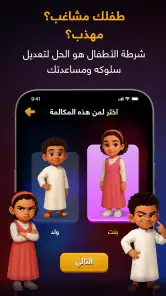
شرطة الأطفال is a parenting app built around pretend calls and police-themed role-play. Its Everyone age rating makes it broadly suitable, but a child’s comfort with the theme matters more than the label alone. It may work best for children who understand make-believe conversations. Parents can preview the scenarios and explain that the calls are pretend before inviting a child to try them.
Can شرطة الأطفال be used as a regular parenting tool?
The app can add a playful element to familiar household routines, but it is best treated as an occasional parenting aid rather than a replacement for conversation, encouragement, or consistent boundaries. Its pretend police calls may appeal to some children and unsettle others. Parents should choose scenarios thoughtfully, make clear that the interaction is fictional, and avoid presenting the app as a genuine authority or a threat.
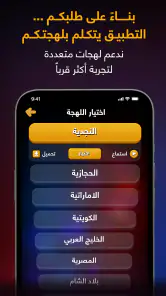
What languages or types of content does شرطة الأطفال offer?
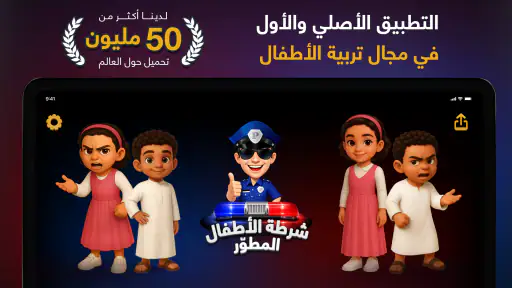
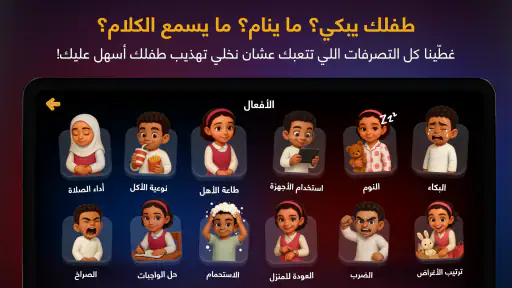
The app’s store summary describes a new Kids Police experience, a police-officer game, and entertaining police games. The central idea is pretend interaction with a police character, making it more of a themed role-play experience than a real communication tool. Parents should preview the available content on their device to decide whether its presentation and scenarios suit their child.
Who developed شرطة الأطفال, and is it free to download?
شرطة الأطفال is a parenting app developed by Romman Smart Applications LLC. It is free to download, though in-app purchases are offered, with listed prices ranging from around three dollars to eighteen dollars per item. Parents should check the purchase options before handing the device to a child and use the device’s purchase controls if they want to prevent accidental spending.
What is شرطة الأطفال, and what is the app designed for?
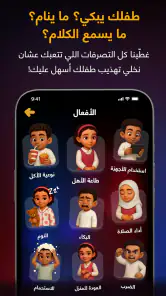
شرطة الأطفال, commonly translated as “Kids Police,” is a pretend-call app designed mainly for parents who want to encourage children to behave through playful role-play. It simulates conversations with a police officer, usually about topics such as listening, tidying up, sleeping, or following household rules. It should be treated as entertainment and a parenting aid, not as a real emergency or law-enforcement service.
Pros
- Helps children learn basic safety rules through simple
- familiar scenarios.
- Arabic interface makes the content accessible for young native speakers.
- Short activities are easy to use during brief learning sessions.
- Encourages children to recognize when contacting emergency services is appropriate.
- Child-friendly presentation can make serious safety topics less intimidating.
Cons
- Some scenarios may oversimplify real emergencies and need parental explanation.
- Content may become repetitive for children who use it frequently.
- Limited language options reduce its usefulness for non-Arabic-speaking families.
- Children could misunderstand the app as a substitute for trusted adult guidance.
- Quality and availability of features may vary across Android and iOS versions.
- Category
- Parenting
- Version
- 7.15











