Video Maker Music Video Editor
- 16.10K
- 4.4
- Installs
- 100.00M
- Price
- Free

Screenshots
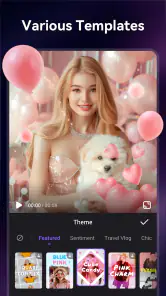
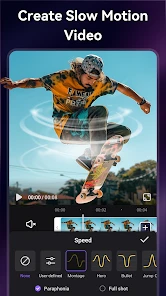
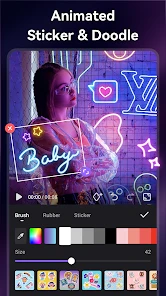
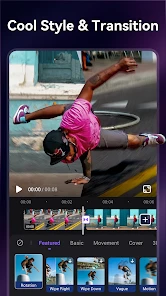
Analysis by Reviewed
When I want to turn a handful of phone clips into something I can share without opening a desktop editor, I look for a tool that feels approachable and gets me to a finished cut quickly. Video Maker Music Video Editor is aimed at that kind of casual project: it is a free video-editing app from VIDEOSHOW Video Editor & Maker & AI Chat Generator, with music, effects, filters, and slow motion among its advertised creative options. My impression is that its appeal is less about replacing a professional editing setup and more about making everyday video projects feel manageable.
What free access means in practice
The app is free to download, and its age rating is Everyone. It also offers in-app purchases, with listed prices ranging from $0.99 to $199.99 per item. That range is worth noticing before you commit to any optional purchase: free access is the clear starting point, but the upper end means paid items can represent a much bigger spend. I would try the free experience first and only consider paying if a specific option solves a problem I actually have.
Its scale suggests that many people have found it useful: it has an average rating of 4.4 from around 1.3 million ratings, with about 16,000 written reviews and over 100 million installs. Those figures are reassuring signs of broad use, not a promise that every feature or workflow will suit me. The current version is 6.5.0.0, and it runs on Android 6.0 or later.
Getting Started with the Basics
Right off the bat, the first thing that struck me was the user-friendly interface. It's like the app designers knew exactly what we needed. When you first open Video Maker Music Video Editor, you're greeted with an intuitive layout that's super easy to navigate. Whether you're a total newbie or someone who's dabbled in video editing before, you'll find yourself at home.
Features That Stand Out
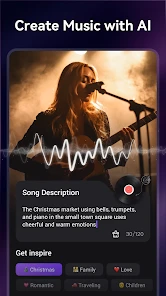
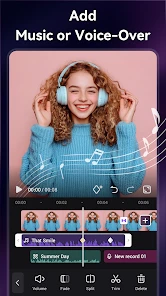
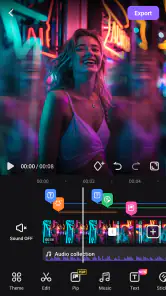
This app boasts a plethora of features that make video editing a breeze. You can easily trim, cut, and merge clips, add transitions, and text overlays. But wait, there's more! The app also offers a rich library of music tracks to add that perfect background score to your videos. And if that's not enough, you can even import your own music files. How cool is that?
Another feature that I absolutely love is the array of filters and effects available. Want to give your video a vintage look or maybe something more cinematic? With just a few taps, you can transform your video into a masterpiece. Creativity is at your fingertips with this app.
Getting more control from a simple workflow
For a personal recap, I would sort my clips before editing, put the moments in the order I want, and then trim each one before adding music. That order matters: choosing a soundtrack too early can make me cut to a rhythm that does not fit the story. Once the sequence feels right, I can use a filter consistently rather than applying a different look to every shot. This keeps a quick edit from feeling cluttered.
More From Our News Desk

Weather by Xiaomi Review: Clear at a Glance, Less Clear Up Close

X Under Pressure: Can It Recover When Posting Goes Wrong?

Clash of Clans Is Won Between the Battles

Android Auto Makes the Case for Quieter Car Software

MobiOffice: Transforming Mobile Productivity with Seamless Integration

EA SPORTS FC™ Mobile Soccer: Redefining Mobile Sports Gaming
Music is useful, but it can also change the mood more than the images do. I would listen through the finished video before sharing and check that the soundtrack does not drown out any speech or important ambient sound. Importing a personal track gives more choice, though it also means I need to make sure the audio suits the audience and intended destination. For a simple social clip, a restrained soundtrack and a few well-timed transitions often work better than using every effect available.
Making a short edit easier to finish
A small workflow choice can save more time than experimenting with effects: decide what the video is for before opening the editor. If I am making a quick birthday greeting, I need only a few expressive moments and a readable title; a longer montage calls for a clearer beginning and ending. Keeping that purpose in mind helps me avoid adding clips simply because they are available, and it makes the final edit easier to watch.
I would also keep an untouched copy of the source clips until I am happy with the result. That is a useful habit with any mobile editor, especially when I am trimming several moments into a single sequence. If I change my mind about a cut later, having the originals means I can rebuild the edit rather than relying on a compressed or already edited copy. It is a simple bit of housekeeping that makes casual editing less stressful.
Where it fits among mobile editors
Compared with a basic phone gallery editor, this app is better suited to combining several clips with music, text, transitions, and a chosen visual style in one place. That makes it handy for a birthday montage, a short trip recap, or a quick video made from moments recorded during an ordinary day. A gallery editor may still be the faster choice when all I need is to trim one clip and send it privately.
At the other end, a more advanced timeline editor is a better fit when I need precise control over multiple audio layers, detailed timing, or a highly polished project. I would not choose this app on the assumption that a friendly interface also means professional-level control. Its strength is helping casual creators get from raw clips to a shareable edit without turning the task into a major project.
Choosing between convenience and precision
The practical difference between this kind of editor and a more technical one is not just the number of controls; it is how much attention the edit demands. When I want a quick, coherent result, putting clips, text, music, and effects together in one approachable mobile workflow is more useful than spending time learning a dense timeline. If I am matching cuts to exact beats, balancing several spoken voices, or revising a longer project repeatedly, the extra precision of a dedicated timeline editor becomes worth the learning curve.
There is also a sensible middle ground. I can assemble a rough personal montage here, then decide whether it is good enough to share or whether the project deserves a more detailed finishing pass elsewhere. That keeps a casual idea from becoming a chore. The trade-off is that moving between editors can add steps, so I would start with the tool that best matches the final result rather than assuming every project needs a second stage.
Who is likely to get the most from it
I would recommend it most to someone who regularly turns phone footage into short, personal videos and wants more than a basic trim without taking on a complicated editing setup. A parent making a school-event recap, a friend assembling birthday clips, or a traveller shaping a few highlights into a shareable memory can all benefit from music, titles, transitions, and visual effects being available in the same editing session.
It is less compelling for someone who rarely edits and only needs to remove the start or end of a single recording. In that case, a phone’s built-in editor is likely to be quicker and avoids learning another workflow. It is also not my first choice for work that depends on precise audio mixing, detailed frame-level timing, or a carefully controlled professional finish. The right choice depends less on how many creative options sound appealing and more on how much control the project actually needs.
Why It’s a Must-Have
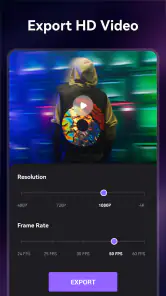
One of the reasons I gravitate towards Video Maker Music Video Editor is its versatility. Whether you're creating content for social media, a personal project, or just for fun, this app has got you covered. Plus, the ability to export videos in high-definition makes sharing your creations even more satisfying.
The app also provides an option to directly share your videos to various social media platforms like Instagram, Facebook, and YouTube. This integration is seamless and perfect for those who love to share their work with the world.
Practical checks before sharing
For an everyday example, imagine making a short family gathering recap on the ride home: I could select a few clips, trim out pauses, add a title, and use music to tie the moments together. Before exporting, I would watch the whole edit once without stopping. That catches abrupt cuts, text that appears too briefly, or a transition that distracts from the moment it is meant to connect.
Direct sharing is convenient when the destination is one of the platforms the app supports, but I would still review the finished file before posting. If I am sending the same video to different places, exporting first gives me a chance to check how it looks and decide where it belongs. That extra step is worthwhile when the clip includes personal moments or needs a different caption for each audience.
Small decisions that improve the result
When I use text overlays, I keep them short and give each one enough time to read. A title that looks fine while editing can disappear too quickly once the video plays at normal speed. I also avoid placing text over the busiest part of the image, where it competes with faces or important action. These checks matter more than adding another decorative effect, particularly in a short video where every second has a job.
For music-led edits, I would preview the opening and ending especially carefully. A sudden start can make a polished sequence feel unfinished, while a clip that cuts off in the middle of a musical phrase can feel abrupt. Even without elaborate audio controls, choosing a soundtrack that suits the length and mood of the visuals is a practical way to make the whole piece feel more deliberate.
One practical question is whether this is suitable for a first-time editor. I think so, especially for someone who wants to learn basic sequencing, trimming, and adding a soundtrack by making a real project rather than studying a complex timeline. If precise control is the main goal, though, a more advanced editor will be a better place to grow. The app is also less appealing if I only make occasional one-clip trims, since the built-in phone editor may already cover that need.
What to expect from the free-to-paid choice
Because the app is free to start, I would treat it as a way to test whether its editing style fits my habits rather than as a commitment to a paid plan. The listed in-app purchase range is broad, so I would look at the exact item and its price in the app before buying anything. A purchase makes sense only if I understand what it adds and expect to use that specific value; the mere presence of optional purchases does not tell me that I need them.
That distinction is useful for occasional creators. If the free tools are enough to complete the videos I actually make, then paying would not improve my experience in a meaningful way. If I repeatedly run into a limitation and an optional purchase clearly addresses it, I can weigh that cost against how often I edit. I would avoid spending based on a vague hope that a paid option will make every project look better.
Final Thoughts
In a nutshell, Video Maker Music Video Editor is a powerhouse app that offers everything you need to create amazing videos. It's packed with features yet remains incredibly user-friendly, making it a top choice for both beginners and experienced users alike. If you've ever thought about diving into the world of video editing, this app is a fantastic starting point.
So, what are you waiting for? Give it a try and let your creativity flow. Trust me, once you start using Video Maker Music Video Editor, you'll wonder how you ever lived without it.
My recommendation is to start without spending, make one small project, and judge the result against what you actually need. If a free workflow is enough for occasional social posts and personal recaps, that is already useful value; I would not treat the availability of paid items as a reason to buy anything automatically. For a creator who needs more exact editing control, a different kind of editor may be a better investment of time. For casual mobile edits, though, this is an approachable place to begin.
Video Maker Music Video Editor Frequently Asked Questions
What is Video Maker Music Video Editor used for?
Video Maker Music Video Editor is a video editing app for creating videos with music and visual effects. Its store summary highlights filters and slow motion, making it a fit for people who want to shape clips into more polished, expressive videos. If those are the kinds of edits you want to make, its focus is easy to understand before you install it.
Is Video Maker Music Video Editor appropriate for all ages?
The app has an Everyone content rating, so it is classified as suitable for a general audience. That rating can help families decide whether it is appropriate to consider, but adults should still use their judgment about any app a child uses, particularly when optional purchases are available. Reviewing purchase settings on the device is a sensible step before handing it to a younger user.
What should I know about the app’s version and release history before downloading?
Video Maker Music Video Editor was released on March 6, 2018, and its current version is 6.5.0.0. Those details can help you identify the app and understand that it has an established release history. As with any app, check the version displayed for your device when you install it, and make sure your Android system meets the stated minimum requirement.
What devices and operating systems can run Video Maker Music Video Editor?
Video Maker Music Video Editor is an Android app that requires Android 6.0 or later. Before downloading, check that your device meets this minimum requirement and has enough available storage for the app and your video projects. The app is listed as suitable for everyone, though the editing experience and performance can vary depending on the device you use.
Is Video Maker Music Video Editor free to download?
Yes, Video Maker Music Video Editor is free to download. You can get started without paying, and the app offers editing features for making videos with music, effects, filters, and slow motion. Optional in-app purchases are available, with prices ranging from $0.99 to $199.99 per item, so review any purchase details in the app before confirming a transaction.
Pros
- Easy to use interface for beginners.
- Wide variety of music tracks available.
- High-quality video export options.
- Numerous editing tools for creativity.
- Supports multiple video formats.
Cons
- Contains ads in the free version.
- Limited features without subscription.
- Occasional app crashes reported.
- Watermark on videos in free version.
- Large file size may slow down device.
- Category
- Video Players & Editors
- Version
- 6.5.0.0













