Screen and Photo Translator
- 498.00
- 4.3
- Installs
- 5.00M
- Price
- Free
Screenshots
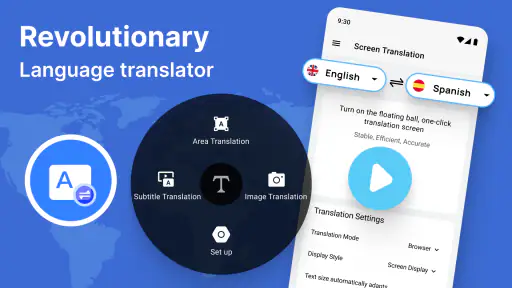
Analysis by Reviewed
When I’m deciding whether to trust a translation app, I separate two questions: is the result useful enough for the task, and do I feel comfortable choosing what text to submit? Those questions matter with Screen and Photo Translator because its focus is visual text—words inside photos, screenshots, and screen content—rather than only text I can select and copy. I see it as an aid for getting oriented, not as a reason to stop checking important details.
Make the translation task small and deliberate
A useful habit is to capture only the passage I need. Before translating a screenshot, I’d crop away message previews, account details, or other surrounding material that has nothing to do with the question I’m trying to answer. With a photo, I’d frame the sign or label tightly. This makes the text easier to review and gives me a clearer chance to notice if the result has skipped a line or misread a character.
I’d also decide in advance what a good-enough answer looks like. For a menu, the general ingredients or dish type may be enough to help me choose what to ask about. For a station notice, I need to confirm the destination and any platform number rather than relying on a translated sentence alone. If the stakes are higher than simple orientation, I would pause and use a more reliable source instead of treating speed as certainty.
Privacy is a choice at the moment of capture
The practical privacy question is often less abstract than it sounds: what exactly is in the image I’m about to translate? A screenshot may include names, notifications, or a fragment of a private conversation, while a camera photo can catch people or documents in the background. I’d check the frame before sending it for translation and avoid using personal or confidential material unless I’m comfortable with the app’s handling of it.
I don’t assume that a translation tool’s convenience tells me what happens to an image after use. When a text is sensitive, my safer option is to avoid capturing it in the first place, or to use a trusted human translator through an appropriate channel. For ordinary signs, packaging, and study passages, the trade-off may feel reasonable; for private records or high-stakes instructions, I’d be much more cautious.
Who benefits from this workflow
This approach suits someone who regularly encounters text that cannot be selected, such as a photographed notice or words embedded in a picture. It can also help a learner get a quick sense of a passage before studying it more closely. The app is less compelling if nearly all my translation needs involve short typed messages, or if I want live conversation support rather than a way to interpret text on a screen.
The app is free to install, rated for Everyone, and developed by Battery Stats Saver. Its 4.3 average from around 45,000 ratings and over 5 million installs show that many people have tried it, but those figures don’t settle whether it suits my own privacy preferences or accuracy needs. I’d judge it by trying a low-stakes example and checking whether the workflow and result are comfortable for me.
More From Our News Desk

Weather by Xiaomi Review: Clear at a Glance, Less Clear Up Close

X Under Pressure: Can It Recover When Posting Goes Wrong?

Clash of Clans Is Won Between the Battles

Android Auto Makes the Case for Quieter Car Software

MobiOffice: Transforming Mobile Productivity with Seamless Integration

EA SPORTS FC™ Mobile Soccer: Redefining Mobile Sports Gaming
The Magic of On-The-Go Translation
Let’s dive into the core of what makes Screen and Photo Translator a must-have. This app is like having a personal translator in your pocket. It can translate text from photos or screenshots in over 100 languages. Imagine being able to point your camera at a street sign in Japan or a menu in France and instantly understanding what it says. It’s like magic!
How It Works
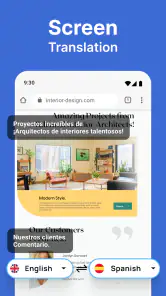
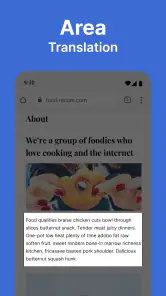
Using the app is as easy as pie. Once installed, simply snap a picture of the text you want to translate, and let the app do its thing. It’s powered by some pretty advanced technology, which means it can recognize text even when it's in funky fonts or weird angles. And if you’re browsing on your phone and stumble upon a foreign language website, you can screenshot the page and have it translated in seconds. Talk about convenience!
For a cleaner result, I’d crop a screenshot or frame a photo so it contains just the text I need. That small step can make it easier to spot whether a heading, price, or line break has been missed. With menus, I’d translate the item name and its description together when possible; a single unfamiliar word may be ambiguous without the surrounding words. If the result looks odd, retaking the image in better light or checking a second translation is a sensible fallback.
When and Where to Use It
Traveling is the obvious scenario where this app shines, but it’s not just for globe-trotters. Language students will find it handy for translating textbook content and practicing their skills. Even business professionals dealing with international clients can use it to ensure nothing gets lost in translation during important communications. It’s versatile, which is why it’s quickly becoming a staple on smartphones everywhere.
A realistic use is arriving at a station and taking a photo of a notice before choosing a platform. I’d use the translation to identify the likely direction, then confirm the platform number and destination from the original text or another sign. For study, a screenshot can help me understand a passage, but I’d still work through the grammar myself rather than treating a translated paragraph as a lesson. That distinction makes this more useful as a support tool than as a way to skip learning.
Where it fits among alternatives
Compared with typing text into a general translation service, translating a photo or screenshot can save time when the words are printed, embedded in an image, or awkward to select. A phone’s built-in translation option may be more convenient for a short passage in a supported app, while a human translator is the safer choice for contracts, medical instructions, or anything where precision has real consequences. I’d reach for this app when the main task is getting the gist from visual text, not when I need a polished or legally reliable translation.
Screen Translator is the short description, and the app’s current version is 3.1.2; it requires Android 6.0 or later. In-app purchases range from $0.99 to $99.99 per item, so I’d check what an optional purchase offers before paying rather than assuming every useful function is included at no cost. That’s particularly relevant if I only need occasional translations: I’d first try the basic workflow and decide whether it fits my routine.
I’ve personally used it while traveling, and let me tell you, the peace of mind it brings is priceless. No more guessing games or awkward situations where you have to mime your way through a conversation. Just snap, translate, and communicate with confidence.
Final Thoughts
If you’re looking for an app that’s going to make your life easier, especially when dealing with different languages, then this is it. Screen and Photo Translator not only translates text but also bridges cultural gaps, allowing you to connect with the world on a deeper level. It’s user-friendly, efficient, and incredibly useful whether you’re a frequent traveler, a student, or a business professional. So go ahead, give it a try, and see how it transforms your interactions with the world around you.
A careful choice for visual text
For me, the deciding question is whether I often need to understand text that I can see but can’t easily copy. If so, the photo-and-screen approach is a useful shortcut. If I mainly translate typed messages, want a conversation tool, or need reliable nuance for a high-stakes document, I’d choose a service designed for that job instead. The app is most compelling when speed and convenience matter, while a quick verification step keeps that convenience in perspective.
Try a low-stakes example first
My preferred first test would be something ordinary whose meaning I can independently check, such as a product label or a short public notice. I’d compare the translated result with the original, paying attention not just to whether the sentence sounds plausible, but whether numbers, names, and separate lines remain distinct. This gives me a practical sense of how well the capture fits my needs without making a consequential decision depend on a first attempt.
That check also helps identify when the image itself is the problem. Small print, glare, a curved package, or text layered over a busy background can make recognition harder for any image-based workflow. I’d move closer, improve the light, and keep the text flat in the frame before concluding that the translation is unreliable. If a second, cleaner capture still produces an uncertain result, I’d switch methods rather than repeatedly submitting nearly identical images.
Small workflow choices make a difference
For a long page, I would work in sections instead of asking one image to carry every paragraph. That keeps the source and translated text easier to compare and reduces the chance that a small but important line gets overlooked in a dense block. For a form, I’d translate the relevant field together with its label and nearby instructions, because isolated words can be misleading when their role depends on layout.
There is a trade-off here: cropping helps focus recognition, but cropping too tightly can remove context that explains a phrase. I’d leave enough of the neighboring words to clarify headings, units, or warnings while excluding unrelated personal details. On a menu, for example, the dish name alone may not tell me what it contains; keeping its description in view can make the translation more useful, while a separate price line should still be checked against the original.
Good for quick reading, not every language task
I’d recommend trying it to travelers who often need to interpret signs, packaging, or menus, and to students who want help approaching material that appears in an image. It can also be useful when a message or web page cannot be copied cleanly, provided the content is not so sensitive that I would hesitate to capture it. The main advantage over typing into a standard translator is the direct route from visible text to a readable starting point.
On the other hand, someone who mainly needs to translate conversations should look for a tool built around speaking and turn-taking. A person who can select text may find a browser or phone translation feature quicker, with less image preparation. And for a contract, medical directions, or a delicate business message, I’d ask a qualified person to confirm the meaning. Those are not failures of this app so much as situations where a visual translation shortcut is the wrong level of assurance.
Questions worth settling before relying on it
One practical question is whether the app will suit an occasional user without paying. It is free to install, but optional in-app purchases are listed from $0.99 to $99.99 per item. I’d begin with the basic image-translation workflow and only consider a purchase after checking its exact purpose and deciding that it addresses a recurring need. If my translations are infrequent, paying for an option before I know how often I’ll use it would not make sense to me.
Another question is what to do when the translation looks confident but seems wrong. I would compare it with the source image, retake a clearer crop, and use another translation source for a second opinion. If the meaning affects a decision with real consequences, I would not treat agreement between automated tools as a substitute for a qualified human review. The original text remains useful evidence, especially for digits, names, dates, and short warnings that can change the meaning substantially.
People also ask whether it replaces ordinary translation apps. In my view, it complements them rather than replacing them: it is most useful when the text is trapped in a photo or screen, while typed-text tools are often simpler for copied passages and conversation-focused products address spoken exchanges. That distinction is worth keeping in mind before installing another translator. The best choice is the one that matches the form of text I actually encounter.
A measured recommendation
As an education app from Battery Stats Saver, Screen and Photo Translator has a clear practical appeal: it can help turn visual language into something I can begin to understand. Its current version is 3.1.2, and it supports devices running Android 6.0 or later. I would approach it as a focused utility, take a moment to review each image before translating, and verify important details rather than treating a quick result as definitive.
My recommendation is cautious but positive for low-stakes reading. If I were traveling, studying, or trying to make sense of an image that I could not copy, I’d be glad to have this workflow available. If privacy concerns make me uncomfortable sharing a particular image, or if accuracy needs to be dependable in a consequential situation, I’d choose a different route. Used with those boundaries in mind, it can be a convenient first step without asking it to do a human translator’s job.
Screen and Photo Translator Frequently Asked Questions
Can I translate signs, menus, or other text captured with my camera?
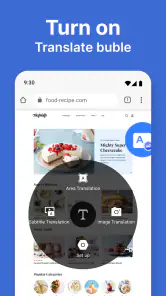
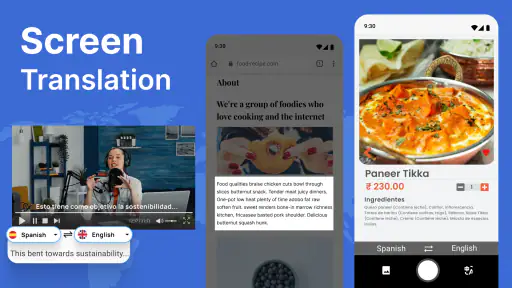
Screen and Photo Translator is described as picture translation software, making it useful for translating text that appears in photographs. The existing feature description says it can recognize text in photos taken with a camera or images saved in a gallery, then translate the recognized text into a chosen language. This can be handy when you come across printed material while traveling or studying.
Does Screen and Photo Translator work with text inside mobile games and other apps?
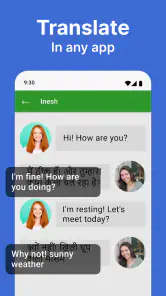
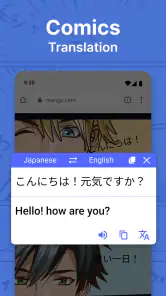
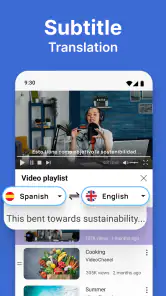
The app is described as screen translation software, so it is intended to help translate text displayed on a device screen, including text encountered in games. It also supports picture translation, which can be useful for text in images. Screen and Photo Translator is an education app, and its short description is simply “Screen Translator.”
What is Screen and Photo Translator and how does it work?
Screen and Photo Translator is an innovative app designed to help users translate text from images or their device's screen into multiple languages. Utilizing advanced OCR (Optical Character Recognition) technology, the app can accurately recognize text in photos taken directly from your camera or images stored in your gallery. Once the text is recognized, it can be translated into your chosen language, making it an invaluable tool for travelers and language learners alike.
Can Screen and Photo Translator be used offline?
Yes, Screen and Photo Translator offers offline functionality for certain languages. While some features, such as real-time translation and access to a broader language database, require an internet connection, the app allows users to download language packs. This way, translations can be performed without being connected to the internet, ensuring convenience when traveling or in areas with limited connectivity.
Is the app free to use, or are there in-app purchases?
Screen and Photo Translator is available as a free download, providing basic translation features at no cost. However, the app also offers optional in-app purchases, with prices ranging from $0.99 to $99.99 per item. This lets users consider whether any paid options suit their needs before downloading.
Pros
- Accurate text identification in images.
- Supports multiple languages for translation.
- Easy-to-use interface for quick navigation.
- Fast processing and translation speed.
- Offline mode available for premium users.
Cons
- Free version has limited features.
- Occasional inaccuracies in complex texts.
- Requires good lighting for best results.
- Premium version can be pricey.
- Large app size may affect storage.
- Category
- Education
- Version
- 3.1.2