RhymeZone Rhyming Dictionary
- 425.00
- 4.7
- Installs
- 10.00K
- Price
- $2.99

Screenshots
Analysis by Reviewed
When I’m working on a line and the obvious rhyme feels forced, I want a quick way to explore other wording without losing the thought I started with. RhymeZone Rhyming Dictionary is built for that kind of moment: a paid Books & Reference app from Merriam-Webster Inc. that brings rhyme and word lookup tools to an Android phone. I see its strongest case in writing sessions where a small nudge is useful, rather than in replacing a full dictionary or a careful editing process.
Start with the kind of writing you do
I find it easiest to judge a rhyming dictionary by the point in the writing process where I would open it. It is not usually the tool I need while planning an argument, checking a citation, or learning a word from scratch. Its natural place is later, when I know roughly what I want to say but a phrase feels flat, an end word is missing, or the line has drifted away from its intended rhythm.
That distinction matters because a rhyme can be technically suitable and still be wrong for the sentence. A line in a comic verse may benefit from an unexpected sound; a lyric built around a quiet, personal image may be weakened by a conspicuous rhyme that draws attention to itself. I use a lookup as a way to widen the field, then decide whether any result belongs in the piece.
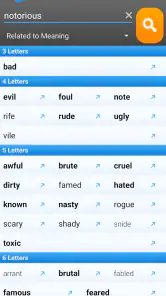
A practical workflow is to search the word that already carries the meaning, rather than the word that would be easiest to rhyme. If I start with the meaning I want to preserve, I am less likely to twist the whole line around a convenient sound. If none of the suggestions fit, the related-word route can give me a different anchor: change the central word first, then see whether a more natural line becomes possible.
What the purchase gets you
The app costs $2.99. That makes it a straightforward one-time purchase decision for someone who expects to reach for rhyme help regularly; it is harder to justify if you only need an occasional suggestion and already have a free way to look up words. I’m judging the value here by the paid price alone, not assuming anything about free access, trials, or other purchase options.
Its audience is reflected in its Teen content rating, and its current version is 2.1.4. The app has a 4.7 average from around 1,300 ratings, with over 10,000 installs. Those figures suggest a focused tool with an established audience, but they don’t tell me whether its particular word choices will suit every writer’s style.
Why RhymeZone?
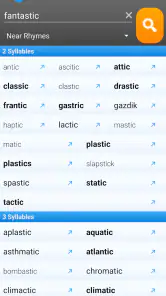
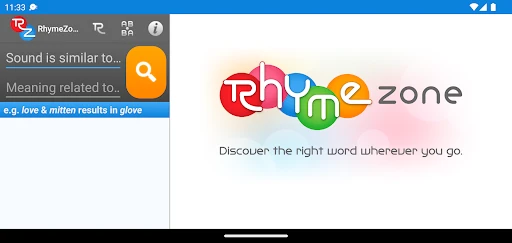
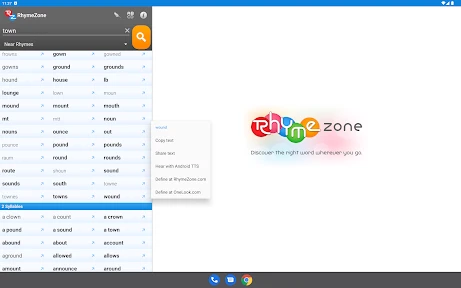
The main highlight of RhymeZone Rhyming Dictionary is its user-friendly interface that makes finding rhymes a breeze. You don’t need to be a tech wizard to navigate through it. Just type in a word, and voila, you have a list of possible rhymes at your fingertips. It’s super handy, especially when you’re in the creative flow and need a quick inspiration boost.
More From Our News Desk

Weather by Xiaomi Review: Clear at a Glance, Less Clear Up Close

X Under Pressure: Can It Recover When Posting Goes Wrong?

Clash of Clans Is Won Between the Battles

Android Auto Makes the Case for Quieter Car Software

MobiOffice: Transforming Mobile Productivity with Seamless Integration

EA SPORTS FC™ Mobile Soccer: Redefining Mobile Sports Gaming
Features that Stand Out
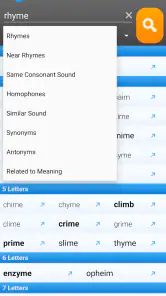
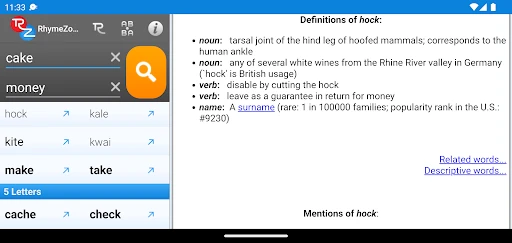
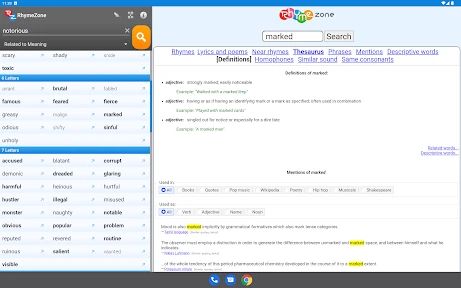
Besides offering a plethora of rhyming words, this app does so much more. It also provides synonyms, antonyms, and definitions, making it a versatile tool for writers. You can even find related words and phrases, which can be incredibly helpful when you’re trying to expand your vocabulary or find just the right expression.
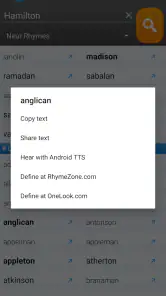
Another nifty feature is the ability to look up famous quotes and lyrics that include your chosen word. This can be a great way to see how the word has been used creatively by others, sparking new ideas for your own work. Plus, the app is regularly updated, ensuring you have access to the latest word trends and usages.
My practical tip is to treat the first rhyme list as a starting point, not a verdict. If a line sounds awkward, I’d look through related words or synonyms and rebuild the phrase around a word that fits the meaning and rhythm. That extra step can produce a more natural line than choosing the closest-sounding option just because it appears first. When browsing quotes or lyrics, I’d use them to notice context and phrasing, not as wording to lift into my own work.
For a useful test, I would keep the original line visible while exploring alternatives and compare each candidate in the full sentence, not in isolation. A word that looks promising on its own can make the surrounding phrase sound stiff. Reading the whole line aloud is a quick way to catch that problem, and it also helps reveal whether a suggestion changes the voice from conversational to overly formal or playful.
The synonym and antonym routes serve different purposes, so I would not treat them as interchangeable ways to find a rhyme. Synonyms are useful when the current word is boxing the line in; antonyms can help when the contrast is part of the idea. Once a better-fitting word emerges, I can search from that new anchor. This takes a little more thought than choosing the first match, but it is often the difference between a line that merely rhymes and one that communicates clearly.
Quotes and lyrics are most useful to me as examples of how a word can sit in a phrase, rather than as ready-made material. I would take note of the surrounding context, stress, or tone and then write a fresh line of my own. That habit keeps the lookup useful for craft without letting examples crowd out the voice I am trying to develop.
Easy to Use on the Go
One of the best things about this app is its mobility. Whether you’re commuting, chilling at a café, or just lounging at home, you can pull out your phone and start rhyming away. The app’s offline mode is a game-changer, allowing you to access its features without needing an internet connection. This is perfect for those moments when inspiration strikes in the most unexpected places.
Picture a songwriter sketching a chorus during a quiet commute: a quick lookup can help test several end words before the idea fades. For a student polishing a poem, definitions and antonyms can also help check whether a rhyme preserves the intended meaning. I’d still review the final line aloud, since matching sounds do not automatically make a phrase natural, accurate, or emotionally right.
For that commute scenario, I would use the phone to capture options rather than attempt to finish the chorus in one sitting. I might jot down a promising end word, test it against the line, and leave the final choice until I can hear the melody or read the verse as a whole. A mobile lookup is good at helping me avoid losing a thought; it cannot decide whether the word works with the song’s full structure.
The same approach works for a student revising a poem between classes. A quick definition check can help distinguish a word that only sounds right from one that actually says what the student means. If the assignment depends on a particular form, the writer still needs to check the form independently: a rhyme suggestion is not a substitute for reviewing meter, line length, or the teacher’s requirements.
Offline access is especially practical when I want to work somewhere with unreliable connectivity or keep a short writing session focused. It means I can consult the app without turning a small wording problem into an extended web search. I would still keep my own draft somewhere reliable and separate; a reference tool is for exploring language, not a replacement for a writing or note-taking routine.
Where it fits among writing tools
Compared with a general dictionary, this app puts rhyme discovery closer to the center of the task and also offers related word routes that can help when a direct rhyme is limiting. A standard dictionary may be the better choice when the main goal is detailed definitions or broader reference work. A quick web search can be enough for a one-off rhyme, while this paid app makes more sense to me if I want a dedicated lookup tool close at hand during repeated writing sessions.
There is a trade-off in relying on any rhyme list: a suggestion can fit the sound but not the sense, tone, or meter of a line. I would also avoid assuming that every result is equally useful for a particular genre or voice. The best workflow is to search, shortlist, and then read the line in context; the app can widen the options, but the writer still has to make the choice.
Its most useful comparison is not simply “app versus dictionary,” but focused lookup versus broader reference. If I am checking a precise meaning, usage, or spelling as the main task, I would turn to a reference source built around that need. If I am trying to break a sound-pattern dead end, a tool organized around rhyming and related words is more direct. For a single quick question, a web search may be adequate; for repeated creative work, having a dedicated tool ready can feel less disruptive.
There is also a difference between a suggestion that is useful on the page and one that sounds right when spoken or sung. A rhyme list can help generate possibilities, but it cannot judge the performance: a lyric may need a word that fits the melody’s stress, while a poem may depend on a subtle or deliberately imperfect sound. I would treat the results as raw material and make the final call in the form where the writing will be heard or read.
One limitation is that a focused rhyme tool is only valuable when the writer has a specific language problem to solve. It will not, by itself, improve a weak idea or make a paragraph more persuasive. If I am stuck because I do not understand the subject, I need research or a fuller reference source, not another sound-alike. Recognizing that boundary keeps the app in its best role: a prompt for options, not an all-purpose writing coach.
Who is likely to get value
I’d recommend it most to people who write often enough to encounter word-search blocks repeatedly: songwriters drafting hooks, poets revising line endings, and writers who enjoy experimenting with sound. The benefit is strongest when the same session may involve trying a rhyme, checking a definition, and exploring a related phrase. Having those routes together can help keep a small creative problem from sending me into several unrelated searches.
It is a less compelling purchase for someone who writes only occasionally, mainly needs long-form reference, or already has a workflow that solves rhyme searches comfortably. A student should also consider the assignment: for a poem or lyric exercise, rhyme discovery can be useful; for research-heavy writing, the app is unlikely to be the reference tool they need most. The right fit depends less on being a “creative person” in general and more on how often this particular sticking point appears.
Before paying, I would ask myself whether I want a specialized tool on my phone often enough to justify its price, rather than expecting it to replace several different writing resources. That is a more useful question than counting possible features. If I regularly pause over end words and want to keep exploring without leaving the writing session, the purchase has a clear purpose; if I rarely do, the convenience may not matter much.
My Personal Experience
I’ve been using the RhymeZone Rhyming Dictionary for a couple of months now, and it’s become an indispensable part of my writing toolkit. It’s not just an app; it’s like having a seasoned wordsmith by your side, ready to offer help whenever you need it. The seamless integration of different features means I can switch from finding a rhyme to looking up a definition without missing a beat.
I’d recommend it most to songwriters, poets, and language-minded writers who often get stuck on a word and value having rhymes, related terms, and definitions together. If you rarely write creatively, prefer a full-featured general reference, or don’t want to pay for a specialized tool, a different option may suit you better. Before buying, it’s worth asking how often you hit that specific word-search problem: frequent use makes the $2.99 cost easier to weigh, while occasional use may not.
In conclusion, whether you’re a professional writer or someone who writes as a hobby, the RhymeZone Rhyming Dictionary is definitely worth checking out. It’s like having a little pocket-sized muse that’s always ready to inspire. So next time you’re stuck trying to find that perfect rhyme, you know where to turn!
RhymeZone Rhyming Dictionary Frequently Asked Questions
Who develops RhymeZone Rhyming Dictionary, and what should I know before downloading it?
RhymeZone Rhyming Dictionary is developed by Merriam-Webster Inc. It is a Books & Reference app for people who want help finding words while writing, and it is intended for Teen users. The app is available on Android, with a minimum operating-system requirement of version 5.0. Its established word-search focus makes it relevant to poets, songwriters, students, and other writers.
What can I search for besides rhyming words?
The app can be useful when a rhyme is not the only thing you need. Along with rhyming words, it can help you explore synonyms, antonyms, related words, and examples of usage. That range makes it handy for finding a more precise expression, testing alternatives, or getting unstuck during a writing session. You can start with a word and use the results to consider different directions for a line or sentence.
What is RhymeZone Rhyming Dictionary and how does it work?
RhymeZone Rhyming Dictionary is a versatile app designed to help poets, songwriters, and creative writers find rhymes, synonyms, and related words. The app works by allowing users to enter a word, and it generates a list of rhyming words, synonyms, antonyms, and even examples of usage. It's a valuable tool for anyone looking to enhance their writing with creative word choices and is available for both Android and iOS devices.
Is RhymeZone Rhyming Dictionary free to use?
RhymeZone Rhyming Dictionary is a paid app, priced at $2.99. This is worth keeping in mind before downloading, especially if you are comparing it with free writing tools. Its core appeal is quick access to rhymes and related word choices in one reference app, which may suit writers who expect to use those searches regularly. Consider whether that focused writing support fits your needs before purchasing.
Can I use RhymeZone Rhyming Dictionary offline?
The ability to use RhymeZone Rhyming Dictionary offline is a feature available in the premium version of the app. This allows users to access the comprehensive database of rhymes and word options without needing an internet connection, making it a convenient option for writers on the go or in areas with limited connectivity.
Pros
- Extensive database of rhymes
- User-friendly interface
- Includes synonyms and antonyms
- Supports multiple languages
- Quick search functionality
Cons
- Ads can be intrusive
- Limited offline access
- Some features require payment
- Occasional crashes reported
- Interface can feel outdated
- Category
- Books & Reference
- Version
- 2.1.4