Dictionary - Merriam-Webster
- 38.84K
- 3.8
- Installs
- 50.00M
- Price
- Free

Screenshots

Analysis by Reviewed
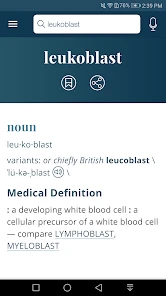
Before relying on a dictionary during a busy moment, I like to know what to try when a lookup stalls, a spoken search goes astray, or an entry does not quite answer the question. Dictionary - Merriam-Webster is most useful when I treat it as a practical English reference: start with a word, check its meaning and sound, then use the examples to judge whether it fits. That approach also makes its limits easier to spot, so I can switch tools when the task is really translation, specialist research, or deeper language study.
Start with the search, then check the result
When I know roughly how a word is spelled, typing it is the most dependable first move. If I have only heard it, voice search can save time, but I still read the result carefully; an unfamiliar pronunciation or background noise can send recognition in the wrong direction. Rather than repeating the same spoken query, I try a likely spelling or a shorter fragment and compare the suggestions with the sentence where I heard the word.
Once I reach an entry, I avoid stopping at the first short definition. I read the examples and related words to see whether the sense matches the context. This is especially helpful with words that have several meanings or with alternatives that look interchangeable at first. A synonym may be more formal, more emphatic, or simply awkward in the sentence I am writing, so I treat it as a candidate to evaluate rather than a ready-made replacement.
Make setup checks before troubleshooting further
If voice input is unavailable or unhelpful, I check that microphone access is available on my device and switch to typing if needed. If a search or another online function seems slow, I retry when the connection is steadier instead of sending the same query over and over. These basic checks help separate a temporary input or connection problem from a word that genuinely needs a different search strategy.
If the app appears stuck, I close and reopen it, then check that both the app and device are up to date. The current version is 5.6.0, and it requires operating-system version 6.0 or later, which is worth checking before installing on an older device. It is free to start, with in-app purchases from $1.99 to $5.99 per item; I would read a purchase prompt before proceeding and decide whether the offer suits how I actually use the app.
Know when the question needs another source
A general English dictionary is not always the right place to settle a specialized question. If a definition seems too broad, I look at the surrounding sentence and the entry’s examples, then consider whether the word belongs to a technical, regional, or otherwise narrow context. When the distinction matters for a consequential decision, I would consult a specialist reference rather than treating a general definition as final advice.
The same principle applies to language tasks. For a full sentence in another language, a translator or bilingual dictionary is more direct. For alternatives alone, a thesaurus may get me there faster, though it may offer less help with meaning and usage. This app makes more sense when I want to understand English wording, hear a pronunciation, or check how a word is used in context.
More From Our News Desk

Weather by Xiaomi Review: Clear at a Glance, Less Clear Up Close

X Under Pressure: Can It Recover When Posting Goes Wrong?

Clash of Clans Is Won Between the Battles

Android Auto Makes the Case for Quieter Car Software

MobiOffice: Transforming Mobile Productivity with Seamless Integration

EA SPORTS FC™ Mobile Soccer: Redefining Mobile Sports Gaming
Use short sessions to build lasting vocabulary
Students can use the quizzes and games for a brief review, especially after meeting a word in reading or class. I would look up any answer I guessed and make a sentence with the word, because getting a quiz item right does not necessarily mean I can use it naturally. The word of the day can provide a useful prompt too, but it is a starting point for exploration, not a complete study routine.
For a more deliberate habit, I would keep the lookup tied to something I am already doing: reading an article, editing a message, or listening to someone speak. After checking a word, I can note the meaning that fits that particular sentence and return to it later. That small step is more likely to help me remember the word than browsing definitions without a reason to use them.
Who will get the most from it
I would recommend this app to curious readers, students, and people who write in English often enough to need quick checks. It is a particularly useful companion when the uncertainty is specific: “What does this word mean here?”, “How is it pronounced?”, or “Would this alternative sound too formal?” The combination of definitions, examples, related words, audio, and occasional learning activities gives those users several ways into the same word without turning every lookup into a research project.
It is less suitable as the only resource for someone learning English from another language, since a bilingual dictionary or translation tool may explain unfamiliar vocabulary more directly. It is also not my first choice for a specialist paper or a high-stakes interpretation. And if I only want a synonym for a familiar word, opening a thesaurus may be quicker. Knowing that distinction keeps the app useful rather than asking it to do a job it was not designed for.
Getting unstuck during a word search
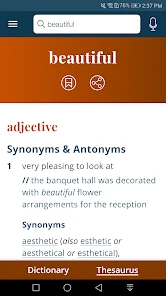
The most useful dictionary search is one that helps you move forward, not one that leaves you wondering which result fits. I find definitions most helpful when I read the example sentences as well as the meaning; a short definition can be technically correct but still leave the word’s tone or typical context unclear. Synonyms and antonyms offer another angle, though I wouldn’t swap one in blindly: near-synonyms can differ in formality, emphasis, or the situations where they sound natural.
Voice search can help when I have heard a word but don’t know how to spell it. It is a convenient starting point, not a substitute for checking the result: speech recognition may misunderstand an unfamiliar pronunciation or a noisy-room utterance. If the first result looks off, I’d try typing a likely spelling or a shorter fragment instead of assuming the word itself is missing. Audio pronunciations are useful for checking a sound, while the written entry and examples help me decide how to use it.
Quick checks that become useful habits
For a student, the app’s quizzes and games can turn spare minutes into a small vocabulary review. I’d use them to revisit words I have already encountered, then look up any answer I guessed rather than treating a quiz score as proof that I know a word. The word of the day can also spark curiosity, but it works best as a prompt to read an entry and make up a sentence of your own, not as a complete study plan.
A realistic use: while drafting an email, I pause over a word that feels too formal. I search it, compare the definition and examples, then check a synonym before deciding whether it suits the message. That small sequence is more reliable than choosing the first alternative in a thesaurus. For pronunciation practice, I would listen and repeat, then check the word in a sentence; hearing a sound alone does not teach every detail of stress or conversational use.
Setup and everyday friction
If a search or voice input does not behave as expected, I start with simple checks: confirm the spelling, try typing instead of speaking, and make sure the device’s microphone access is available if I’m using voice search. A weak connection can also affect online app functions, so retrying after connectivity improves is a sensible first step. These checks are more useful than repeatedly submitting the same unclear query.
If the app seems slow or stuck, I close and reopen it, then check whether the device and app are up to date. The current version is 5.6.0 and the minimum operating-system requirement is 6.0, details worth checking before installing on an older device. The app is free to start, with in-app purchases ranging from $1.99 to $5.99 per item; I’d review any purchase prompt carefully and decide whether the extra offering is worth it for my own routine.
Where a dictionary is—and isn’t—the right tool
Compared with a translation app, this is better suited to understanding English words in English: definitions, examples, related words, and pronunciation are the point. A translator is usually the better choice when I need to move a full sentence between languages. A thesaurus can be faster when I already know the meaning and only want alternatives, but it may give less help with definition and usage. For a specialist term, a subject-specific reference may offer more context than a general dictionary.
That distinction matters when a lookup seems incomplete. A word can have a technical meaning, a regional use, or a context-specific sense that a general entry does not resolve for my particular question. I’d compare the examples, consider the sentence where I found it, and consult a specialist source when accuracy has real consequences. The app is a strong everyday companion, but it should not be the final authority for legal, medical, or other high-stakes interpretation.
Why this reference works for word lovers
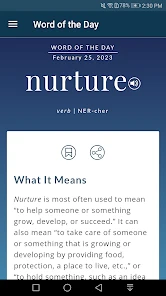
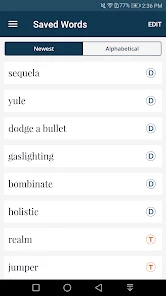
What I value about the Dictionary - Merriam-Webster is that a lookup can lead somewhere useful beyond a bare definition. Synonyms, antonyms, and example sentences help me get a feel for how a word is used, while the word of the day gives curious readers a reason to explore something they might not otherwise search for. I still check each option against my own sentence, but these extra angles make the app more useful than a simple spelling check.
A straightforward interface for quick lookups
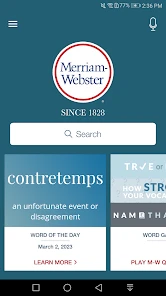
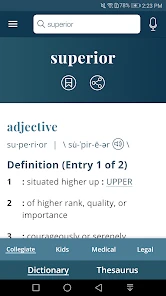
The interface is clean and intuitive, which means you’re not going to get lost in a sea of unnecessary buttons and options. Just type your word into the search bar, and off you go! The voice search is a nifty addition, especially for those moments when you’re not quite sure how to spell that tricky word. Just say it out loud, and let the app do the work.
Learning and fun in short bursts
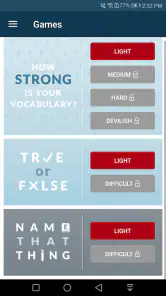
One of my favorite things about the app is how it manages to make learning fun. The quizzes and games are a fantastic way to challenge yourself and reinforce your learning. Plus, they’re perfect for those idle moments when you’re waiting in line or chilling on the couch. It’s like having a pocket-sized teacher, ready to drop some knowledge whenever you need it.
And let’s not forget about the audio pronunciations. Whether you’re trying to perfect your accent or just want to make sure you’re saying it right, this feature is a lifesaver. No more second-guessing or awkward mispronunciations at dinner parties!
My view after using it
In a world where words are our most powerful tools, having the Dictionary - Merriam-Webster app at your fingertips is like carrying around a library in your pocket. It’s perfect for students, professionals, or anyone with a curiosity for words. Whether you’re prepping for a big test, writing an important email, or just trying to win arguments, this app has got you covered.
So, if you haven’t already, do yourself a favor and download this app. You’ll be amazed at how often you use it and how much you learn. Happy word hunting!
There are a few reasons I would choose another option. If I need a full translation, a bilingual dictionary or translator is a more direct fit; if I am polishing a specialized paper, a subject reference can be more precise. And if I only want a quick synonym, a thesaurus may involve fewer steps. I’d also skip this as my sole study method: looking up words is useful, but remembering them takes rereading and using them in context.
My practical verdict
The app suits curious readers, students, and anyone who regularly writes in English and wants a quick way to check meaning, spelling, or pronunciation. Its 3.8 average across around 529,000 ratings suggests a widely used tool that still may not satisfy every user’s expectations. I’d install it for dependable everyday reference, use examples to judge nuance, and switch to a more specialized tool when the question calls for one. That balance is why I’d recommend it to a friend without pretending it solves every language problem.
Dictionary - Merriam-Webster Frequently Asked Questions
Can I install Dictionary - Merriam-Webster on both Android and iOS?
Dictionary - Merriam-Webster is an app from Merriam-Webster Inc. The device requirements described for this version specify Android 6.0 or later, so check your phone’s operating system before downloading it from an Android store. The app is rated for Everyone, making its stated age classification suitable for a general audience. Its reference tools are intended for looking up words and exploring their meanings.
What kind of reference material can I expect from the app?
The app is a Books & Reference tool centered on dictionary and thesaurus access. It can help when you want to check a word’s meaning, find examples, hear a pronunciation, or explore vocabulary through its learning features. Merriam-Webster describes it as “America’s most useful and respected dictionary,” while the short description is simply “Dictionary.” It may be useful for reading, studying, and writing.
Who publishes the Merriam-Webster Dictionary app, and what is it for?
Published by Merriam-Webster Inc., this app is a Books & Reference tool for looking up words and exploring their meanings. Its concise store description is “Dictionary,” while its broader appeal comes from combining reference material with vocabulary features. It may suit students, readers, and anyone who wants a familiar dictionary close at hand on a mobile device.
What features does the Merriam-Webster Dictionary app offer?
The Merriam-Webster Dictionary app provides users with access to a comprehensive dictionary and thesaurus. It includes features like voice search, word of the day, example sentences, audio pronunciations, and even quizzes to test your vocabulary. The app works offline, allowing you to look up words without an internet connection, making it a versatile tool for learners and language enthusiasts.
Is the Merriam-Webster Dictionary app free to use?
The app is available for free download and offers many features at no cost. However, there is a premium version available, which provides an ad-free experience and additional features such as expanded definitions and advanced search options. Users can choose to upgrade to the premium version through in-app purchases if they desire a more enhanced experience. The listed in-app purchase range is $1.99 to $5.99 per item, so check the purchase details before choosing an upgrade.
Pros
- Extensive word database.
- Easy-to-use interface.
- Offline access available.
- Daily word features.
- Voice search capability.
Cons
- Contains ads in free version.
- Limited features without subscription.
- Occasional app crashes.
- Pronunciation feature needs improvement.
- Slow loading times occasionally.
- Category
- Books & Reference
- Version
- 5.6.0