Resume - Intelligent CV maker
- 5.84K
- 4.6
- Installs
- 50.00M
- Price
- Free

Screenshots
Analysis by Reviewed
When I need to put together a CV quickly, I’d rather start with a guided form than wrestle with a blank document on my phone. Resume - Intelligent CV maker is a free business app from Intelligent CV, built around creating a résumé and saving it as a PDF. Its focus is practical: help you assemble a document without needing a desktop editor or design skills.
What free access means here
The app is free, which makes it easy to try for a one-off job application or a full career update without committing money first. I’d judge its value on whether the finished document is useful to you, rather than assuming that every feature or service is included forever. If you’re comparing it with paid résumé tools, check what each option actually provides before deciding; the confirmed price here is free, not a promise about every possible add-on or future charge.
That free starting point matters most when you need a straightforward PDF and don’t want to buy specialist software. The app has a 4.6 average from around 513,000 ratings, and it has passed 50 million installs. Those figures suggest it has broad appeal, but they don’t guarantee that its layouts will suit every profession or that every exported CV will meet a particular employer’s expectations.
Putting the CV maker to work
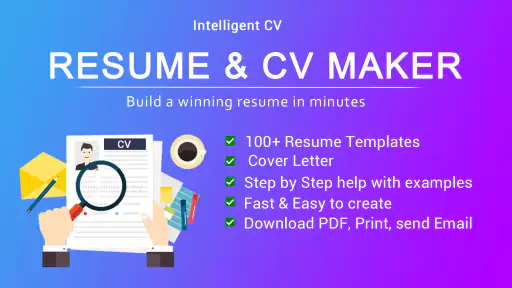
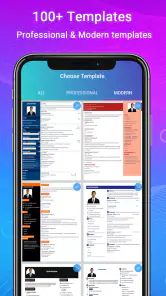
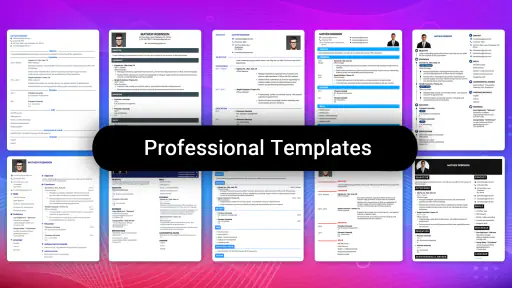
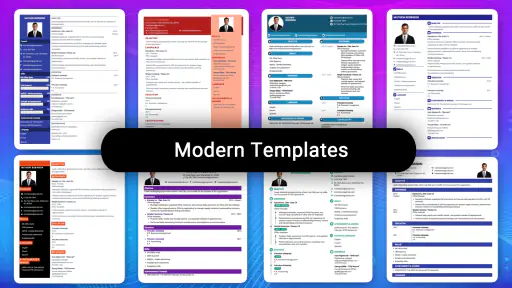
First off, this app is like having a personal resume coach right in your pocket. With its intuitive design, you can whip up a professional-looking resume without breaking a sweat. The interface is super user-friendly, even if tech isn't your strong suit. I love how the app offers a variety of templates that cater to different industries. Whether you’re in tech, arts, or finance, there’s a template that fits your vibe.
Guided drafting and useful checks
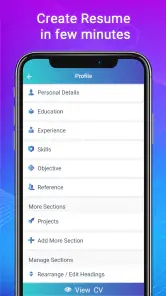
One of the features that I find incredibly helpful is the step-by-step guidance. It’s like the app holds your hand through the entire process. You just fill in the blanks, and voila! You have a polished resume ready to go. The app also provides suggestions on wording, which is super handy. I mean, who knew that changing a single word could make such a difference?
To get more value from that guidance, I’d prepare the facts before starting: dates, job titles, responsibilities, and results you can honestly support. Then use the wording suggestions as prompts, not as a substitute for your own voice. A phrase can sound polished while still being too vague; I’d replace general claims with a concrete example of what I did wherever possible. That small editing pass is often more important than choosing a fancier layout.
Choosing a layout with a purpose
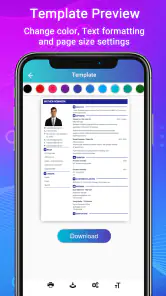
Another cool feature is the ability to easily swap between templates. Sometimes, I like to see how different layouts look, and this app makes it effortless. Plus, the export options are top-notch. You can save your resume in various formats like PDF or Word, making it easy to send out applications directly from your phone.
More From Our News Desk

Weather by Xiaomi Review: Clear at a Glance, Less Clear Up Close

X Under Pressure: Can It Recover When Posting Goes Wrong?

Clash of Clans Is Won Between the Battles

Android Auto Makes the Case for Quieter Car Software

MobiOffice: Transforming Mobile Productivity with Seamless Integration

EA SPORTS FC™ Mobile Soccer: Redefining Mobile Sports Gaming
Template switching is most useful when you have a clear reason to compare designs, rather than endlessly changing styles. I’d keep the wording and section order stable, then preview a couple of layouts to see which makes the most relevant experience easiest to scan. For a creative role, visual character may help; for a conventional application, a restrained page can keep attention on your work history. Before sending a PDF, open it and check that contact details, spacing, and page breaks look right on the exported file.
A realistic application routine
Imagine I spot a suitable opening during a commute and want to apply that evening. I can use the phone-based workflow to prepare a first draft, compare the presentation, and save a PDF without waiting to get back to a computer. I would still tailor the summary and most relevant experience to that particular role; a general CV is a starting point, not a ready-made answer for every vacancy. Keeping a master copy of accurate career details also makes later updates less likely to introduce inconsistent dates or titles.
Compared with building a CV from scratch in a word processor, a guided maker can reduce the time spent arranging headings and aligning sections. A word processor is still better if you need exact control over margins, unusual formatting, or a highly customized portfolio-style document. A professional designer may be worth considering when presentation is central to the role, while this app makes more sense when speed and a conventional, readable document matter more.
Making a master CV useful for each application
I would treat the first finished document as a reliable source file, not as the exact version to send everywhere. Keep a separate note of the strongest examples from each job, project, or period of study, then select only the details that match the vacancy. This avoids the common trap of squeezing every responsibility into one crowded CV. A short, relevant document is easier to review than a long list that gives equal weight to unrelated experience.
For a practical routine, I’d read the job advert once for the role’s main requirements, then compare those requirements with my own evidence before editing. If the position emphasizes customer contact, for example, I’d bring a genuine service example forward rather than simply repeating the employer’s wording. That approach makes the app’s guided structure more useful: it helps organize your case, but the substance still needs to come from your actual experience.
Real-world application
So, how does Resume - Intelligent CV maker perform in real life? In my experience, it’s been nothing short of amazing. I’ve had several potential employers compliment the layout and presentation of my resume. It’s not just about looking good; it’s about making a lasting impression.
I also appreciate the privacy features. Your data stays on your device, so you don’t have to worry about your personal information being shared without your consent. This is a huge plus for me, as I’m always cautious about where my information ends up.
Where I’d be cautious
A template can make a CV look orderly, but it cannot check whether a claim is accurate or whether a recruiter will find the most important details quickly. I’d proofread carefully, especially after switching layouts, and avoid adding personal information that a particular application does not need. If you need a specialized academic CV, a portfolio-heavy presentation, or precise control over every design detail, a standard template-based workflow may feel limiting; starting in a document editor could be the better choice.
It also helps to consider the person who will read the file. Some employers may prefer a plain, conventional layout over one with decorative elements, and a template that looks appealing on a phone can still deserve a careful review on a larger screen. I’d check that the exported document remains clear when opened elsewhere, that headings are easy to follow, and that no page ends with an awkward fragment. The final check is a small step, but it prevents the design from distracting from your experience.
Another trade-off is the difference between a quick draft and a finished application. A guided form can make the first stage less intimidating, but it cannot decide which achievements deserve space or whether your wording sounds authentic. If you are changing careers, returning after a long break, or applying for a role with unusual requirements, expect to do more editing than someone with a straightforward work history. The app can provide structure; it should not make you feel obliged to fit every career into the same formula.
The app is rated for Everyone, and version 8.4 is listed for Android 6.0 and later. It was released on February 21, 2019, and the current version is one practical reason to check compatibility on your own device before building a document you need right away. It has 5.8K written reviews, but I’d still treat other people’s experiences as context rather than proof that a particular template will fit my needs.
Who gets the most from it?
I’d recommend this for students preparing a first CV, people returning to work, and busy applicants who want a tidy PDF without learning a desktop design tool. It is especially useful when you already know your work history but need help turning it into a presentable structure. If you need detailed control, a highly distinctive format, or a résumé tailored to a field with strict conventions, I’d compare the result with a specialist template or a word processor before sending it.
It is also a sensible option if you are updating your CV in short bursts rather than setting aside a long session at a computer. You might add a recent responsibility after work, revisit the wording later, and export only when you have checked the details. For that kind of incremental maintenance, a phone-based maker can lower the friction of keeping career information current. I would still keep a separate copy of the facts you rely on, so a future edit does not depend on remembering dates or project details from scratch.
I would be less likely to choose it as my main tool if the document itself needs to demonstrate advanced design ability, if an academic application calls for an extensive publication record, or if I need exact control over every line break. In those cases, a word processor or a specialist document workflow offers more room to meet specific conventions. The useful distinction is not that one tool is universally better: it is whether speed and guided structure matter more than fine-grained control for this particular application.
My verdict on the value
Overall, I would highly recommend Resume - Intelligent CV maker to anyone looking to boost their job application game. It’s efficient, easy to use, and offers a professional touch that can set you apart in a competitive job market. Whether you’re a seasoned professional or just starting out, this app is worth checking out. It’s like having a career coach, graphic designer, and tech guru all rolled into one neat package.
So next time you need to spruce up your resume, skip the stress and let this app do the heavy lifting. Trust me, you won’t regret it.
When I’d use it—and when I wouldn’t
My buy-or-skip judgment is simple: because access is free, I’d try it when I need a clear CV draft and want to work from my phone. The value is in getting from scattered career notes to an organized document without first mastering layout tools. I would not choose it blindly for a specialist application, though. I’d compare the exported result with the employer’s instructions and use another editor if those instructions require a format the templates cannot represent neatly.
Before sending anything, I’d confirm that the contact details are current, remove information that is irrelevant to the role, and read the document aloud once to catch clumsy wording. If the application asks for a particular file type or structure, I’d follow that request rather than assuming a standard CV is suitable. That modest final review is what turns a convenient draft into a document I’m comfortable sharing.
For an applicant who wants a fast, approachable starting point, this is an easy recommendation to test. For someone who needs strict formatting control or a highly specialized career document, it is better viewed as a possible first draft than as the whole solution. I like that distinction: the app can save effort on assembling a résumé, while the applicant remains responsible for accuracy, relevance, and the final choice of format.
Resume - Intelligent CV maker Frequently Asked Questions
Can I create a resume quickly with Resume - Intelligent CV maker?
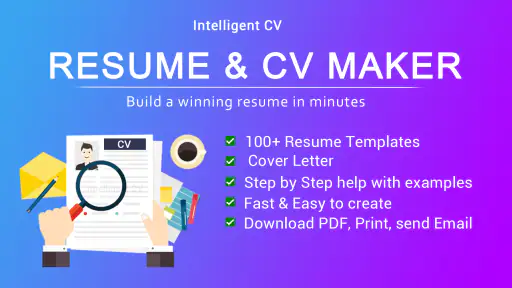
The app’s store summary presents it as a way to make a resume in about two minutes using a CV-builder template. That makes it appealing if you want a guided starting point rather than building a document from scratch. You will still need to enter and review your own work history, qualifications, and contact details before sharing the finished resume.
What file format is the resume created in?
Resume - Intelligent CV maker focuses on creating a resume or CV in PDF format, which is useful when you want a document that is easy to share with an employer. Before sending it with a job application, review the exported file to make sure your details are correct and the layout is readable. The app’s core description specifically highlights PDF output.
Is this app intended for job seekers or employers?
It is aimed at people preparing a resume or CV for a job application, rather than employers managing recruitment. You can use it to organize your work history and qualifications into a document to share with prospective employers. It may be especially useful if you want a template-based starting point, though you should tailor the content to each role you apply for.
What kind of app is Resume - Intelligent CV maker, and who might find it useful?
Resume - Intelligent CV maker is a business app for people preparing a résumé or CV for a job application. Its focus is creating a résumé in PDF format, with a store summary highlighting the possibility of making one quickly using a CV-builder template. It may suit job seekers who want a straightforward way to put their work history and qualifications into a shareable document.
Is Resume - Intelligent CV maker compatible with my Android device?
The app requires Android 6.0 or later, so check your device’s Android version before downloading. If your phone or tablet meets that requirement, you can consider installing it from the Android app store. The app is free to download, and its Everyone age rating indicates that it is intended for a general audience. Compatibility can also depend on the device and its software.
Pros
- Easy-to-use interface for quick resume creation.
- Wide range of templates to choose from.
- Allows export in multiple formats including PDF.
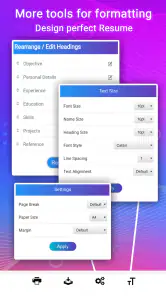
- Customizable sections for personalized resumes.
- Includes tips and examples for better resumes.
Cons
- Limited free features compared to premium.
- Some templates feel outdated.
- Occasional app crashes reported.
- Ads in free version can be distracting.
- Limited customer support options.
- Category
- Business
- Version
- 8.4











