Remove Objects - Photo Editor
- 3.67K
- 4.7
- Installs
- 10.00M
- Price
- Free

Screenshots





Analysis by Reviewed
Have you ever taken a picture only to realize that there’s an unwanted object photobombing your masterpiece? Enter the Remove Objects - Photo Editor, your new best friend in mobile photo editing. This app promises to make those pesky intrusions a thing of the past with just a few taps. I’ve spent some quality time tinkering around with it, and here’s the lowdown on how it performs.
Features That Stand Out
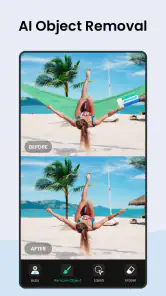
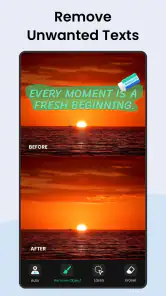
First things first, the interface is super intuitive. Even if you’re not a tech wizard, navigating through the app feels like a breeze. The main attraction here is the object removal tool. You simply highlight the object you want gone, tap a button, and voilà! The app does its magic. It’s quite satisfying to see an unwanted object disappear as if it never existed.
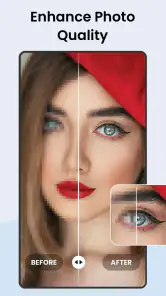
Another feature worth mentioning is the healing tool. This comes in handy for those moments when you need to touch up small imperfections. It’s like having a mini Photoshop in your pocket. Trust me, I’ve had some fun erasing everything from photobombers to street signs.
Performance and Usability
Now, let’s talk performance. The app runs smoothly without any hiccups, which is crucial for maintaining your patience while editing photos. However, I did notice that the object removal tool can sometimes leave behind a slight trace or blur, especially in more complex backgrounds. But, hey, no app is perfect, right?
Usability-wise, it’s fantastic. The app doesn’t bombard you with ads every five seconds, which is a huge plus in my book. You can focus on editing without constant interruptions. Plus, it doesn’t require a steep learning curve, making it accessible for casual users and enthusiasts alike.
Conclusion: Is It Worth It?
So, is the Remove Objects - Photo Editor worth downloading? In my opinion, absolutely. It’s a handy tool to have on your phone, especially if you’re someone who loves snapping photos on the go. While it might not replace a full-fledged desktop editor, it’s perfect for quick fixes and edits. The convenience factor alone makes it a must-have for any photo aficionado.
In summary, if you’re tired of unwanted objects ruining your perfect shots, give this app a whirl. It’s fun, easy to use, and gets the job done with minimal fuss. Happy editing!
Pros
- Intuitive user interface for easy editing
- Quick object removal with AI technology
- High-quality output without noticeable artifacts
- Supports multiple photo formats
- No intrusive ads during editing
Cons
- Limited free version features
- Occasional lag with high-resolution images
- No batch processing for multiple photos
- Watermark on free version outputs
- Requires internet connection for AI features

- Category
- Photography
- Version
- 1.281.74











