QuickBooks Workforce
- 8.07K
- 4.7
- Installs
- 1.00M
- Price
- Free

Screenshots
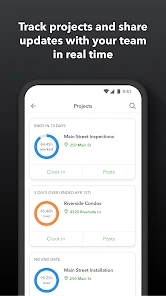
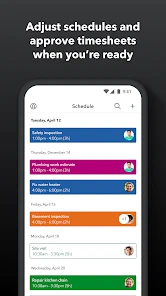
Analysis by Reviewed
I find QuickBooks Workforce most useful when it saves an employee a small but annoying trip to a computer: checking a pay record, looking over work hours, or finding a tax document. It is a mobile productivity app from Intuit Inc, and its value depends on a simple condition: your employer needs to use it and give you access. That makes it a focused workplace companion, not a general-purpose money manager or a way for freelancers to set up payroll on their own.
Where a steady connection matters
In practice, the most useful moments are often brief: checking a pay detail before a conversation with a manager, or confirming a shift entry while wrapping up work. Those checks depend on being able to reach the account, so I’d treat a reliable connection as part of the workflow rather than assume every screen will be available anywhere. If a page does not load, I pause before drawing conclusions about the pay information itself.
That distinction matters for people who move between job sites, public transit, and home. I would check important payroll details while connected, then avoid relying on a last-minute lookup in a place where service is unreliable. The app is best as a convenient route to work information, not as a replacement for keeping track of questions that need follow-up with an employer.
Why employer access shapes the experience
Before installing it, I’d ask whether my workplace actually uses QuickBooks Workforce and how employees are expected to sign in. The employer invitation is not a minor setup detail; it determines whether the app has a role in your work routine at all. If you are comparing payroll apps for a small business you run yourself, this is the wrong starting point: it is designed around employee access rather than running payroll as an owner.
That distinction also helps set expectations about support. The app can put work records within reach, but a missing or confusing entry may still need an explanation from a manager or payroll contact. I would note the date, shift, and specific discrepancy before asking about it. That makes a conversation more productive than relying on a vague memory or assuming the screen tells the whole story.
Getting Started with QuickBooks Workforce
When you first open the QuickBooks Workforce app, you’re greeted with a user-friendly interface that’s as welcoming as your favorite coffee shop. Setting up is a breeze—all you need is your employer's email invitation, and you’re good to go! The app is available on both Android and iOS, so no one’s left out in the cold.
Features that Make Life Easier
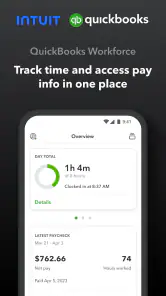
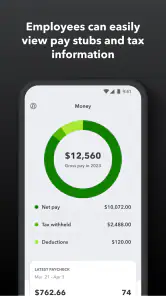
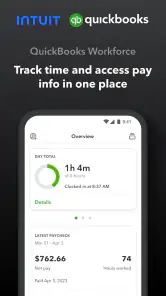
What caught my attention first was how seamless the entire process is. The app allows you to view your current and past pay stubs, making it super easy to track your earnings over time. For those of us who’ve ever misplaced a paper pay stub, this feature is a lifesaver. Plus, the app stores your W-2s, so you can say goodbye to that annual scramble during tax season.
More From Our News Desk

Clash of Clans Is Won Between the Battles

Android Auto Makes the Case for Quieter Car Software

MobiOffice: Transforming Mobile Productivity with Seamless Integration

EA SPORTS FC™ Mobile Soccer: Redefining Mobile Sports Gaming

How Microsoft OneDrive Became a Mobile Productivity Giant

How Google Translate Breaks Language Barriers Effortlessly
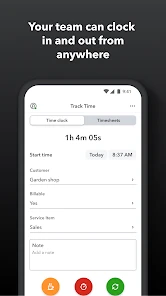
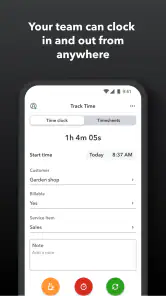
The time tracking feature is another gem. It allows you to clock in and out directly from your phone. So, whether you’re working from your couch or your favorite co-working space, logging hours has never been simpler. And let’s be honest, who doesn’t love anything that simplifies their work life?
A practical routine for shifts and paychecks
For a shift worker, one sensible routine is to review a time entry soon after clocking out, while the details are fresh. If a start or finish time looks wrong, it is easier to raise the issue promptly than to reconstruct a week of shifts later. I would still follow the employer’s process for corrections; a phone record is useful for spotting a mismatch, not proof that a change has been approved.
When payday arrives, a quick comparison between the pay stub and the hours you expected can also make the app more useful. A difference may have an ordinary explanation, such as a schedule change, but checking early gives you a clearer question to take to payroll. This is a practical advantage over paper slips kept in a drawer, while a spreadsheet may be better for someone who needs to combine income from several employers or track a broader household budget.
A useful end-of-shift check
Here is the kind of routine where mobile access earns its place: after leaving a busy shift, you check the recorded time while you still remember whether you stayed late or took an unusual break. If the entry appears off, make a note of what you remember and use the workplace’s normal correction route. The benefit is not that the app settles a disagreement; it helps you raise a precise question while the details are still fresh.
I would also avoid turning every paycheck check into a full budget review. The app’s employee records can help you understand what was recorded and paid, but a household budget needs a wider view of rent, bills, savings, and income from other sources. Keeping those jobs separate makes the app easier to use and reduces the temptation to treat a payroll screen as a complete financial picture.
User Experience
The app’s design is sleek and intuitive. Navigating through QuickBooks Workforce feels like a walk in the park. You can easily find what you’re looking for without getting lost in a sea of options. The app also includes helpful notifications, so you’re always in the loop with any updates or changes.
Notifications without over-reliance
Notifications can make the app more convenient, but I treat them as prompts to check rather than as the record itself. A notification might tell you something needs attention; opening the relevant screen gives you a better basis for deciding what to do next. If alerts become distracting, adjusting the phone’s notification settings can help keep them useful without making work updates interrupt every part of the day.
There is a privacy trade-off here. A notification preview may appear when your phone is locked, which is not ideal if someone nearby can see the screen. I would check the device’s lock-screen settings and choose a level of preview that suits the sensitivity of work and pay information. That small adjustment matters particularly when using a phone in shared spaces.
When a mobile workflow is the right fit
I see the strongest fit for employees whose workplace uses QuickBooks for workforce tasks and who want a straightforward way to check pay records or record time from a phone. It can reduce the back-and-forth of finding a printed stub, especially when someone needs to review a detail away from a desk. The employer invitation is an important first step, though: this is not a general payroll tool that lets any freelancer create a payroll account independently.
It may be the wrong choice for someone who wants to run payroll for a business, manage invoices, or consolidate earnings across unrelated jobs. A full accounting tool or a simple personal finance spreadsheet would suit those needs better. Likewise, if a role requires detailed project timers, task billing, or extensive shift planning, a dedicated time-management system may offer a more appropriate workflow than an employee-focused app.
Choosing between employee records and broader tools
Compared with paper pay slips, the main advantage is having records in a phone-based workflow rather than depending on a folder or a printout. Compared with a spreadsheet, it is more closely tied to employer-provided work information, while the spreadsheet gives you more freedom to combine separate jobs or make your own categories. Neither is a universal replacement for the other: I’d use Workforce for the employee records it is meant to surface, and a separate personal system if I needed a consolidated income history.
For a business owner choosing software, the comparison is different. An employee-facing app does not replace a payroll platform that lets the employer manage payroll operations, nor does it stand in for accounting software that handles invoices and business finances. If you are an employee, though, a general accounting app can be an awkward substitute for the specific pay and time details your employer makes available here. The best choice depends less on which tool has the longest feature list and more on whether you need access as a worker or control as an administrator.
Connectivity, recovery, and careful use
If a connection drops while checking a record or recording time, I would first reconnect and reopen the relevant screen before trying repeatedly. Then I’d confirm what was saved rather than assume a tap completed the action. For a time-sensitive clock-in, the safest habit is to follow workplace instructions if the app cannot complete the step and tell a supervisor promptly; guessing later can create avoidable confusion.
For a data-conscious routine, I’d use a screen lock on the phone and avoid opening pay details where other people can easily see them. Notifications can be helpful for noticing changes, but it is worth checking how they appear on a locked screen and adjusting device settings if private details are exposed. I would also keep tax documents organized in a place I can find during filing season instead of treating one app as my only record-keeping plan.
Handling a failed or uncertain action
The most important recovery habit is to distinguish between a screen that failed to load and an action that may or may not have gone through. I would reconnect, reopen the relevant area, and check the result before repeating a clock-in or clock-out attempt. Repeated taps can create uncertainty about what the system recorded, so a brief pause and a clear check are more useful than acting in a hurry.
If the phone is unavailable or the connection is too unreliable at the moment a time entry is needed, I would follow the employer’s stated backup procedure rather than invent one. A quick note of the time and a message to a supervisor can help explain the situation, but the workplace process determines how the record should be corrected. This is one reason I would learn that procedure before relying on a phone at a job site.
For a pay detail that still looks wrong after reconnecting, I would avoid making assumptions based on a single screen. Check the relevant period, compare it with your own shift notes, and then ask payroll or a manager a focused question. The app makes it easier to notice a possible discrepancy; it does not remove the need for a human explanation when a schedule, adjustment, or workplace rule is involved.
Security and Reliability
One of my top priorities when using any financial app is security. QuickBooks doesn’t disappoint. The app employs top-notch encryption to ensure all your sensitive information is safe and sound. Plus, Intuit, the company behind QuickBooks, has a solid reputation for reliability, so you know you’re in good hands.
QuickBooks Workforce is a free productivity app from Intuit Inc, with an Everyone age rating. It has a 4.7 average from around 54,000 ratings, and more than a million installs. Its release dates back to 2013, and version 4.80.2.20251119.1.RELEASE supports Android 8.0 and later. Those details make it easy to identify the app, but the day-to-day value still depends on whether your employer uses it and whether mobile access suits your routine.
Who will get the most from it
I’d point employees toward it when they already have an invitation and want pay records and timekeeping within easy reach. It is especially practical for people who do not sit at a desk all day and would otherwise wait until they can access a computer or find a paper document. The convenience is modest but real: a quick check can make it easier to spot a question before it grows into a confusing end-of-month recollection.
I would skip it if I needed a self-service payroll account, a tool for issuing payments to staff, or one place to manage several unrelated sources of income. It is also a poor fit if my work requires sophisticated project billing or detailed scheduling rather than basic employee time records. In those cases, a dedicated business, accounting, or time-management product is a better match, while Workforce remains useful only if the employer’s chosen process relies on it.
Cost, access, and platform fit
The app is free to use, and its Everyone rating makes its intended audience broad, but access still begins with the employer’s invitation. A free download does not mean that anyone can use it for any payroll purpose. I’d check the work setup first, then install it on a device I use regularly, rather than expect the app itself to create a relationship with a company or supply work records independently.
On Android, the listed minimum operating system is version 8.0; on iOS, it is available as well. The current Android release is 4.80.2.20251119.1.RELEASE, so anyone troubleshooting should make sure they are looking at the current app rather than an old installation. The practical question is not simply whether the phone can install it, but whether the employer’s sign-in process and the employee’s normal connection make mobile access dependable enough for important tasks.
My connectivity verdict
I’d recommend it to employees who want pay information and timekeeping close at hand, provided their workplace has invited them to use it. Its convenience is strongest when the connection is dependable and the employer’s process is clear. If you mainly need business accounting, independent payroll management, or detailed records across several unrelated jobs, choose a tool built for that instead. For the right employee, it is a useful mobile companion; I would simply keep a practical backup plan for connection trouble and questions that need a manager or payroll team to resolve.
QuickBooks Workforce Frequently Asked Questions
Can QuickBooks Workforce help me track my work time as well as view pay details?
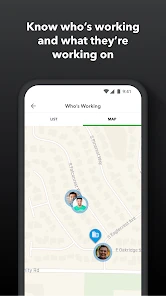
QuickBooks Workforce brings pay information and time tracking together in one place for teams. Whether you can use time-tracking tools depends on what your employer has set up for your workplace. If tracking hours is a main reason you are considering the app, ask your employer how your team uses Workforce so you know which tools will be available to you.
Will QuickBooks Workforce work for my particular workplace?
QuickBooks Workforce is most useful when your employer uses it to provide employee access to workplace pay information and time tracking. The tools you can use may depend on your employer’s setup, so the experience can differ between workplaces. Before downloading, check whether your employer uses Workforce and whether they have invited you to connect to your workplace account.
Does QuickBooks Workforce require an employer to use it, or can I create an account on my own?
QuickBooks Workforce is intended for employees whose workplace uses QuickBooks for payroll. To get started, you generally need an invitation from your employer; the app is not a standalone payroll service where you set up an employee account and add your own pay information. If your employer uses it, the invitation helps connect your account to the right workplace records.
What is QuickBooks Workforce and how does it benefit employees?
QuickBooks Workforce is an online platform that allows employees to access their pay stubs, W-2s, and other payroll information directly from their mobile devices or computers. This app benefits employees by providing a convenient and secure way to view and manage their payroll details without having to rely on their employers for paper copies. It streamlines the process of obtaining financial documents needed for tax filings or loan applications, giving employees more control over their financial information.
Is QuickBooks Workforce secure for storing sensitive payroll information?
Yes, QuickBooks Workforce is designed with security as a top priority. The app uses advanced encryption technologies to protect sensitive payroll information from unauthorized access. It also requires secure login credentials and offers multi-factor authentication for added security. Users can feel confident that their personal and financial data is safeguarded against breaches and cyber threats.
Pros
- User-friendly interface for all users
- Seamless integration with QuickBooks
- Mobile access for on-the-go use
- Efficient payroll management
- Timely updates and notifications
Cons
- Limited offline functionality
- Requires stable internet connection
- Subscription may be costly
- Limited customization options
- Initial setup can be complex

- Category
- Productivity
- Version
- 4.80.2.20251119.1.RELEASE













