Intuit Connect
- 12.00
- 4.1
- Installs
- 10.00K
- Price
- Free

Screenshots

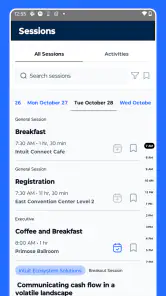
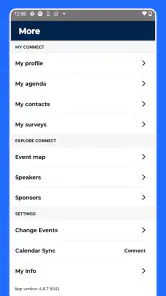
Analysis by Reviewed
When I attend an Intuit event, I want the practical details in one place rather than scattered across emails, printed schedules, and last-minute announcements. That is the role Intuit Connect is designed to play: it is an event companion from Intuit Inc, aimed at helping attendees stay oriented while they are on site. I found its purpose easy to understand, but its usefulness depends heavily on whether I am actually attending the event it supports.
This is not a general calendar, a conference-discovery service, or a replacement for a normal note-taking app. It is a focused event app. That narrow purpose is both its main strength and its biggest limitation. If I am preparing for an Intuit gathering, the app can make event information easier to reach from my phone. If I am not connected to one of those events, there is little reason to keep it installed.
What the app is really for
The store description presents Intuit Connect as a companion for an Intuit event, and that framing matters. I would not download it expecting a broad collection of public events or a social network for professional meetups. Its value begins when there is a specific event experience behind it and I need mobile access to the information associated with that experience.
That makes the app different from familiar alternatives such as a general calendar, an email inbox, or a conference website opened in a browser. Those tools can display individual pieces of information, but they are not necessarily arranged around the rhythm of attending an event. A calendar may show an appointment, while an inbox may contain an update, yet neither is automatically the most convenient place to check what matters when plans change during a busy day.
My first practical recommendation is to install it before leaving for the event, not while standing in a crowded entrance area. That gives me time to open the app, check whether the expected event information is available, and become familiar with where I need to look. A companion app is most helpful when it removes small delays, and setup friction at the worst possible moment defeats that purpose.
The application is listed in the Events category and is available at no cost. That is an important distinction: I can access the app without paying a purchase price, but free access does not automatically mean it will be useful to everyone. The real value comes from having a relevant Intuit event to attend, not from installing it as a standalone utility.
Cost is simple, but usefulness is conditional
Because the app is free, there is no paid upgrade decision for me to weigh before trying it. I can test whether it fits my event needs without committing money. That makes the sensible approach straightforward: download it ahead of time, inspect the available event information, and remove it later if it has no continuing purpose.
More From Our News Desk

Weather by Xiaomi Review: Clear at a Glance, Less Clear Up Close

X Under Pressure: Can It Recover When Posting Goes Wrong?

Clash of Clans Is Won Between the Battles

Android Auto Makes the Case for Quieter Car Software

MobiOffice: Transforming Mobile Productivity with Seamless Integration

EA SPORTS FC™ Mobile Soccer: Redefining Mobile Sports Gaming
Still, I would not describe it as universally valuable simply because it costs nothing. A free app can still consume attention, storage, and time. Someone who has no connection with an Intuit event gains very little from installing it. In that situation, a normal calendar or the event organizer’s own communication may be more relevant.
The app has a general Everyone content rating, which makes it approachable for a broad audience. I would still judge it by context rather than age suitability alone. The important question is not whether I can use it, but whether the event it supports is relevant to me and whether I prefer a dedicated mobile companion over browser-based information.
For a first-time user, the cost question is therefore easy to answer: there is no purchase price to budget for the app itself. The harder question is opportunity cost. If I already have every schedule detail in my calendar and receive timely updates elsewhere, the dedicated app may offer convenience rather than a major change in how I manage the event.
Where the value appears during a real event day
Imagine I arrive at an Intuit event early in the morning with a full agenda and several decisions to make. I need to know what is happening next, where I should be, and whether the event information has changed since I planned my day. In that situation, a purpose-built companion is more comfortable than searching through a long email thread or repeatedly loading a website.
The useful habit is to treat the app as a quick-reference layer, not as my only source of preparation. Before the event, I would review the information calmly and save any essential details in my own notes or calendar. During the event, I would use the app for checking rather than trying to reconstruct my entire day from scratch. This reduces the risk of becoming dependent on a single screen at a moment when I am already distracted.
Another non-obvious advantage of a dedicated event app is mental separation. My personal calendar contains appointments, reminders, errands, and work obligations. Event information can become buried among all of those. Keeping event-related material in its own space helps me switch into the event context more quickly, especially when the day includes several sessions or changes of plan.
There is also a trade-off in that separation. If I use the app alone, I may overlook conflicts with commitments outside the event. My preferred workflow would be to use the companion for event context and my regular calendar for personal timing. That division gives each tool a clear job instead of forcing one application to manage everything.
For people who attend events with colleagues, another useful approach is to agree on a shared checking routine. Rather than everyone forwarding every update through a group chat, each person can verify the current event information directly and then discuss only decisions that require coordination. This does not turn the app into a team workspace, but it can reduce unnecessary message traffic around basic logistics.
What I would check before relying on it
I would pay attention to how quickly the event information becomes available after installation. A companion app is only helpful when it connects me to the correct event experience. If I open it well before the event and see little relevant content, I would not immediately assume it is broken; I would first check that I am using the appropriate event access path and that I have completed any required setup shown within the app.
I would also check the app shortly before traveling and again when I arrive. This is a practical safeguard, not a criticism unique to this product. Event details can matter most when I am away from my desk, and discovering a problem only after I have begun moving between locations is inconvenient. Keeping a backup of the most important time and location details in my calendar is sensible.
The current version is 5.2.0, so I would keep the installation reasonably current before attending. Updating in advance is preferable to waiting until the start of a busy program. I would also confirm that my device meets the minimum requirement of iOS 11 or later, since an otherwise suitable phone may still be unable to install or run the app if its operating system is too old.
These checks reveal an important distinction between convenience and reliability. The app may make event information easier to consult, but I would still prepare a fallback for essentials. A phone battery problem, connectivity issue, or account complication can affect any digital event tool. The dedicated app is best used as a helpful layer over basic preparation, not as permission to stop preparing altogether.
How it compares with ordinary alternatives
A mobile browser is the most obvious alternative. If an event website is well organized and easy to use, the browser may be enough, especially for someone who attends only occasionally. The app’s advantage is the focused experience: I do not need to remember a web address or search through unrelated browser tabs. The browser’s advantage is flexibility, since it avoids installing another application and may work better for a one-time visit.
Email can also be perfectly adequate for a small event. Messages provide a record, are easy to search, and can be forwarded to colleagues. Their weakness is fragmentation. Different updates may arrive in separate threads, and the information I need can be mixed with registration messages, reminders, and unrelated work. A dedicated companion makes more sense when I expect to consult event details repeatedly rather than read one announcement.
My calendar remains essential because it handles the rest of my day. I would not replace it with Intuit Connect. The calendar is better for blocking time, spotting conflicts, and combining the event with personal commitments. The companion is better suited to event-specific context. Using both may feel redundant, but they solve different problems.
Paper schedules still have one advantage: they do not depend on a charged phone. I would not dismiss them entirely. A printed or handwritten backup for the few details I cannot afford to miss can be worthwhile, particularly for travel or a tightly timed day. The app is more convenient when information changes, while paper is more dependable as a static emergency reference.
Small workflows that make the app more useful
My first workflow would be a pre-event sweep. I would open the app at home, identify the information I expect to need most, and place the event’s key commitments in my normal calendar. This avoids the common mistake of assuming that a companion app should also become my complete personal planner.
My second workflow would be a low-distraction check. Instead of constantly refreshing the app, I would consult it at natural transition points: before leaving for the venue, between scheduled activities, and before making a change to my plan. That preserves battery and attention while still giving the app a meaningful role.
My third workflow would be a post-event decision. Once the event is over, I would decide whether the app still serves a purpose for another upcoming Intuit gathering. If not, uninstalling it is reasonable. Since it is free, there is no financial pressure to keep it, and removing unused event tools helps prevent a crowded phone from becoming a source of confusion.
A fourth insight is to separate information retrieval from relationship building. An event companion may help me stay organized, but it should not replace conversations, personal notes, or follow-up tasks. If I meet someone useful, I would record the action I promised to take in my own system rather than assuming the event app will preserve that context for me.
Who will get the most from it
The strongest audience is someone attending an Intuit event and wanting a dedicated place to consult event-related information on a phone. It is especially suitable for attendees who dislike searching through email, who move between activities during the day, or who prefer to keep event details separate from their personal calendar.
It can also suit a first-time attendee who wants a clear mobile starting point. Rather than piecing together an event from several messages, that person can use the companion as the central place to orient themselves, then add personal reminders elsewhere. The benefit is not advanced customization; it is reduced friction at the moments when quick access matters.
People who attend events with a colleague may appreciate the app as a common reference. It can help everyone begin with the same event information instead of relying on one person to forward screenshots or summarize updates. I would still keep team decisions in the communication tool the group already uses, because an event companion should not be mistaken for a full collaboration platform.
The app is less compelling for someone who is not attending an Intuit event, who rarely checks mobile event information, or who already has a simple browser and calendar workflow that works without effort. It is also not my first choice for managing unrelated conferences. A general event-management tool or a calendar is more practical when I need one place for many organizers and appointments.
Performance expectations and practical limitations
The main limitation is its narrow scope. A dedicated event app can feel wonderfully direct when the event fits it, but unnecessary outside that context. I would not install it expecting a lasting everyday utility. Its value is concentrated around preparation and attendance, which means the quality of the experience depends on timing as much as on the app itself.
Another limitation is the risk of overestimating what a companion app can replace. It may centralize event information, but I still need my own system for travel plans, personal commitments, notes, contacts, and follow-up work. Treating it as one component of an event workflow produces a more realistic result than expecting it to manage the whole professional experience.
The app’s public reach is modest, with over ten thousand installs and an average rating of 4.1 from around fifty ratings. Those figures suggest that it has a real user base and generally positive reception, but they are not a reason to assume it will fit every attendee. I would interpret them as a prompt to try the app in the context where it is intended, not as proof that it is superior to every alternative.
Its release date was October 3, 2019, and the listed version is 5.2.0. For me, that combination indicates an app that has had time to develop beyond an initial launch, while still requiring attention to device compatibility. I would update before the event and avoid making the app my only backup for information that affects travel or fixed appointments.
My recommendation for deciding quickly
If I had an upcoming Intuit event, I would download the app because the price is free and the potential convenience is directly relevant. I would install it early, confirm that it presents the event information I need, and pair it with my regular calendar. That is a low-risk way to find out whether the dedicated format improves my day.
If I had no upcoming Intuit event, I would skip the installation for now. There is no reason to keep an event-specific companion ready without a matching event, and a general calendar or browser is more useful for everyday planning. I would reconsider it when an Intuit event becomes part of my schedule.
My final view is positive but deliberately narrow: Intuit Connect is worth using when the event connection is relevant, not because it is a universal planning app. Its free access removes the purchase barrier, and its focused purpose can make event information easier to handle. The trade-off is that the same focus limits its value outside the intended setting.
For an attendee who wants a dedicated mobile companion, I would recommend giving it a try. For someone seeking a permanent organizer, a multi-event planner, or a replacement for a calendar and notes app, I would choose a different tool. That distinction is the key to getting honest value from this app: use event organization where it helps, keep personal planning elsewhere, and let the specific Intuit event determine whether the installation earns its place on your phone.
Intuit Connect Frequently Asked Questions
Is Intuit Connect an event app, and what should I expect from it?
Intuit Connect is an event app described as a companion for an Intuit event. It is intended to help attendees stay connected with the event experience, rather than serve as a general-purpose accounting or banking app. The app is free and rated for Everyone. If you are planning to attend an Intuit event, it may be useful to install it ahead of time so it is ready when you need it.
What is Intuit Connect and who is it designed for?
Intuit Connect is a business and accounting collaboration platform associated with Intuit’s financial software ecosystem. It is primarily intended for accountants, bookkeepers, small-business owners, and their clients who need to exchange information, coordinate tasks, and stay connected around financial work. Before downloading, check whether your accountant or organization specifically uses Intuit Connect, since many of its features may depend on an invitation or an existing Intuit account.
Do I need an Intuit account or an invitation to use Intuit Connect?
In most cases, access to Intuit Connect is connected to an Intuit account, an accounting firm, or a business workspace. Some users may be able to create or sign in with existing Intuit credentials, while others must accept an invitation from an accountant or administrator. If you download the app without having an account or invitation, you may not be able to access its main collaboration features until your organization grants permission.
What can I do with Intuit Connect?
The available tools generally focus on communication and financial collaboration rather than personal banking. Depending on your account and the services enabled by your organization, you may be able to review requests, exchange messages, share documents, monitor tasks, and receive updates from an accountant or business team. Features can vary by region, subscription, and connected Intuit products, so the exact experience may differ between users.
Is Intuit Connect safe for sharing financial documents and business information?
Intuit Connect is intended for professional financial collaboration, so security and privacy are important parts of the experience. Nevertheless, users should protect their login details, enable available security options, and avoid sharing sensitive information through unofficial channels. Before uploading tax records, payroll documents, or identification materials, review the platform’s privacy policy and confirm that you are communicating with the correct accountant, company, or authorized contact.
Pros
- Centralizes client messages
- tasks
- and updates in one workspace.
- Helps teams coordinate work without relying on long email threads.
- Useful notifications make it easier to track important activity.
- Simple interface allows new users to get started quickly.
- Supports smoother collaboration between accountants and their clients.
Cons
- Some features may require an active Intuit subscription or account.
- The app is less useful for users outside the Intuit ecosystem.
- Notification settings may need adjustment to avoid frequent alerts.
- Performance can depend on the quality of your internet connection.
- Advanced collaboration tools may feel limited for larger teams.
- Category
- Events
- Version
- 5.2.0