Intuit QuickBooks for Business
- 13.69K
- 4.7
- Installs
- 5.00M
- Price
- Free

Screenshots


Analysis by Reviewed
I find QuickBooks Online Accounting most useful when business money is arriving and leaving in enough places that a notebook or a basic spreadsheet starts to feel unreliable. It is a business accounting app from Intuit Inc, aimed at freelancers and small businesses that want to keep routine money tasks together. Its average rating is 4.4 from around 67,000 ratings, and it has over 5 million installs, so it is a well-established option rather than a niche tool. The key question, though, is whether its paid features suit the way you actually work.
What the free starting point does—and does not—tell you
The app is free to download, which makes trying it out an easy first step; that does not mean every accounting feature or ongoing use is free. It offers in-app purchases, with listed items ranging from $0.99 to $420.00. Those figures describe a broad range of purchase options, not a single subscription price, so I would check the current plan and its included features before relying on it for a business workflow. The app is rated for Everyone, and its current version is 29.40.0+4.
For me, the practical value is less about the download itself and more about whether it saves enough time to justify any plan you choose. If you only send an occasional invoice and have very few expenses, a free spreadsheet or a simpler invoicing app may be enough. If receipts, mileage, invoices, and business records are scattered across different places, bringing those jobs into one accounting app can be worthwhile. I would decide based on the work you need it to handle, not on the word “free.”
Getting Started with QuickBooks
First things first, setting up QuickBooks Online Accounting is a breeze. The app guides you through the initial setup with ease, making sure you have all your financial ducks in a row. Right from linking your bank accounts to setting up your business profile, it's like having a financial advisor in your pocket. And trust me, you don't need to be a number cruncher to figure this one out.
User Interface and Experience
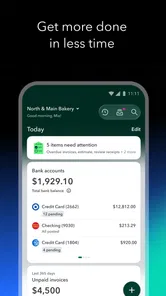
The user interface is clean and intuitive. It's not cluttered with unnecessary options, which makes navigation a piece of cake. You can effortlessly switch between tracking expenses, sending invoices, and checking your cash flow. Plus, the dashboard offers a clear snapshot of your financial health at any given moment. It's like having a crystal ball for your business finances.
Features That Stand Out
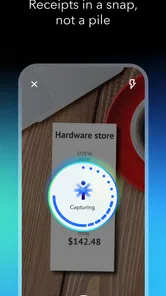
One of the standout features is the ability to track expenses by snapping a photo of your receipts. No more shoeboxes filled with crumpled papers! The app also supports multi-currency transactions, which is a game-changer for businesses dealing internationally. And let’s not forget the seamless integration with other platforms like PayPal and Shopify. This makes managing sales and expenses a whole lot easier.
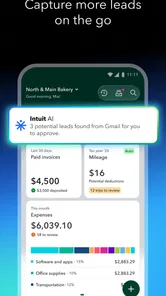
A useful habit is to capture a receipt close to the moment you spend, then review it while the purchase is still fresh in your mind. That small check can help you recognize the purpose of an expense later instead of facing a pile of unfamiliar images at tax time. Mileage tracking can also suit people who drive for work, but it is worth keeping business trips distinct from personal travel and checking the entries rather than assuming every record is ready to use without review.
More From Our News Desk

Weather by Xiaomi Review: Clear at a Glance, Less Clear Up Close

X Under Pressure: Can It Recover When Posting Goes Wrong?

Clash of Clans Is Won Between the Battles

Android Auto Makes the Case for Quieter Car Software

MobiOffice: Transforming Mobile Productivity with Seamless Integration

EA SPORTS FC™ Mobile Soccer: Redefining Mobile Sports Gaming
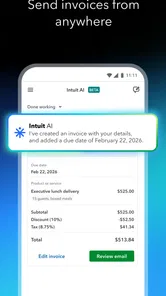
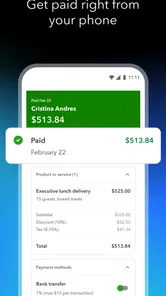
Another feature I love is the invoicing. You can create professional-looking invoices in minutes and send them directly from the app. It's efficient and adds a touch of professionalism to your business dealings. Plus, you get notified once the invoice is viewed, so you’re always in the loop.
For a realistic day-to-day example, imagine a freelance designer who buys supplies, drives to a client meeting, and sends a deposit invoice before starting a project. Capturing the receipt, recording the work trip, and sending the invoice from one place can reduce the end-of-week catch-up. The important trade-off is that the app still needs good input: a photo does not explain why an expense belongs to a project, and a viewed invoice is not the same as a paid one. I would use the notifications as prompts to follow up, not as a replacement for checking cash received.
Where the workflow needs care
Bank linking can make bookkeeping less manual, but it is not a substitute for reviewing transactions. I would check how imported activity is categorized and correct mistakes before relying on reports or totals. This is especially useful when a business account has mixed or unusual spending: a quick review can prevent an innocent-looking category choice from distorting the picture. For someone who prefers to enter every transaction by hand, or whose records are already tidy in another system, connecting accounts may add complexity rather than save time.
Compared with the usual alternatives, such as a spreadsheet, a basic invoice maker, or desktop accounting software, QuickBooks sits in the middle: it combines several business-money tasks in a mobile-first workflow, while a spreadsheet offers more control with more manual upkeep. A simple invoicing tool may be easier if billing is the only need. Desktop software can suit someone who prefers a computer-centered process. I would choose QuickBooks when keeping receipts, mileage, invoicing, and accounting activity together matters more than having the lightest possible tool.
Security and Support
When it comes to handling financial data, security is a top concern. QuickBooks doesn't disappoint here. The app uses bank-grade encryption to protect your data, ensuring that your sensitive information remains confidential. Plus, if you ever hit a snag, the customer support is top-notch. They're quick to respond and incredibly helpful, making sure you never feel lost in the world of finance.
There is still a learning curve once you move beyond everyday tasks. A new business owner may need time to understand categories and keep records consistent, while an established business may need to check that its existing bookkeeping habits fit the app’s workflow. If your needs include more involved accounting oversight, I would treat the mobile app as a convenient way to handle routine work, not as a reason to skip careful review or professional advice where you need it.
In conclusion, QuickBooks Online Accounting is more than just an app; it's a comprehensive financial tool that simplifies managing your business finances. Whether you're a freelancer or a small business owner, this app can help streamline your financial processes, giving you more time to focus on what truly matters – growing your business.
So, if you're on the hunt for an accounting app that combines functionality with ease of use, give QuickBooks a try. It might just be the financial partner you've been looking for.
Who is likely to get the most from it?
I would recommend it to freelancers and small-business owners who regularly send invoices, collect receipts, track work mileage, or need a clearer view of business activity while away from a desk. It is less compelling for someone with only a handful of yearly transactions, or for anyone who wants a free tool with no paid options to consider. Before committing to a purchase, identify the specific tasks you expect it to replace and confirm that the relevant plan covers them. That is the fairest way to judge whether the convenience is worth the ongoing cost.
Deciding whether the workflow fits your business
Before moving all your records into an accounting app, I would make a short list of the jobs that cause the most friction today. For one person, the problem may be chasing invoice details; for another, it may be remembering which card purchase was for a client. QuickBooks is most convincing when it brings together several recurring jobs, rather than when it is used as a more elaborate place to store numbers. That distinction helps you assess the time saved without assuming that a larger feature set automatically means better value.
It also helps to decide how you want to handle bookkeeping at the end of a busy day. A practical routine might be to photograph receipts as they happen, check imported bank activity on a regular schedule, and send invoices when the relevant work milestone is reached. This is a more dependable approach than leaving every task until month-end. If you know you will not maintain even a small review habit, the convenience of automation may not prevent a backlog; it can simply make the backlog look more organized.
Small-business situations where it earns its place
A consultant who works with multiple clients may find the combination of invoice creation and expense records helpful when preparing for a project review. Rather than searching through email and camera photos, they can make bookkeeping part of the workday. A tradesperson might value the mobile workflow differently: recording a receipt between jobs and noting a work journey can be easier than reconstructing the week from memory. In both cases, the benefit depends on recording information consistently, not merely installing the app.
For a side business with a few invoices a year, the balance can shift. If there are no regular purchases to document and mileage is irrelevant, an accounting suite may introduce setup and review work without removing much manual effort. I would not choose it just because a business might grow someday. I would choose it when current activity already creates enough small administrative tasks that having them together makes a noticeable difference.
What to check before making it your system
One useful way to test the fit is to follow a single ordinary transaction from beginning to end. Consider a purchase made for work: record it, check its category, and see whether you can later understand its business purpose from the information you saved. Then try the same with an invoice, including the step of confirming whether payment actually arrived. These simple checks reveal whether the app supports your own habits and whether you are comfortable with the amount of review involved.
Another question is where you prefer to do careful financial work. A phone is handy for capturing a receipt immediately or sending an invoice while away from your desk, but some people find longer bookkeeping sessions easier on a computer. If your business process is already centered on desktop accounting, the mobile app may be a useful companion rather than a full replacement. If you want a single, very simple tool for billing alone, a dedicated invoice app may involve less learning and fewer decisions.
International work can make the multi-currency support more relevant, but it does not remove the need to keep transactions understandable. I would use clear notes and review unfamiliar entries, especially when the same business handles spending in different currencies. Likewise, integrations can reduce duplicate entry, but I would still check that activity from connected services is represented the way I expect before using it to judge business performance. Convenience is valuable only when the resulting records remain trustworthy.
My recommendation on cost and commitment
The free download lowers the barrier to exploring the app, while the in-app purchase range makes clear that costs can vary considerably depending on what is selected. I would not treat the highest listed item as the price of ordinary use, nor assume that downloading it gives access to every feature. Instead, identify the work you need covered and verify the current plan terms before building a routine around it. That is particularly important for a small operation keeping a close eye on recurring expenses.
My overall view is that QuickBooks is best for someone who will actively use its combination of business accounting tasks, rather than someone looking for a no-cost place to make the occasional invoice. Intuit Inc has built a familiar, established product, but familiarity alone does not settle whether its purchase options are worthwhile for your situation. If receipts, mileage, invoices, and transaction review are regular parts of your week, the convenience may justify the commitment. If not, a spreadsheet or narrower tool is likely the cleaner choice.
Who should skip it—and who should try it
I would skip it if you want a completely free, minimal invoicing tool, if you already have a bookkeeping process that works smoothly, or if you are not prepared to review categorized transactions and keep records current. The app is not a substitute for understanding your accounts, and a neat dashboard cannot fix incomplete information. Someone who needs detailed oversight should also avoid treating a mobile workflow as a replacement for careful accounting review.
I would give it a closer look if you are a freelancer or small-business owner who handles several kinds of routine money admin and wants to manage them away from a desk. It is free to download, rated for Everyone, and has been available since June 29, 2011; the current release is 29.40.0+4. The best decision is still a practical one: compare the plan’s cost with the time and separate tools it could realistically replace. If that calculation works for your actual week, it is a sensible option to try; if it does not, there is no need to pay for more accounting capacity than your business uses.
Intuit QuickBooks for Business Frequently Asked Questions
What does QuickBooks Online Accounting help a business do day to day?
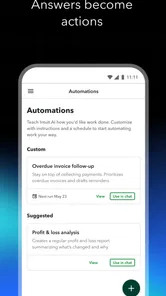
QuickBooks Online Accounting is a business app for handling everyday financial tasks. Its store summary highlights AI-led business accounting, invoicing, a mileage tracker, and a receipt scanner. These features can help bring common bookkeeping activities into one mobile workflow, whether you are recording expenses or preparing invoices. The app is developed by Intuit Inc.
Can QuickBooks Online Accounting help me send invoices to customers?
Yes. Invoicing is one of the app’s highlighted business accounting features, making it relevant for users who need to prepare and manage customer bills from a mobile device. It sits alongside tools such as a receipt scanner and mileage tracker. QuickBooks is a free app to download, while purchases inside the app may apply to particular plans or services.
Can I use QuickBooks Online Accounting to scan receipts or track business mileage?
The app’s business accounting toolkit includes a receipt scanner and a mileage tracker, alongside invoicing and other financial features. These tools can help you capture everyday business expenses and keep relevant records together while working from a mobile device. QuickBooks is a free app to download, though some features or services may depend on an in-app purchase or subscription.
What does QuickBooks Online Accounting cost to download and use?
QuickBooks Online Accounting is free to download, and it offers in-app purchases ranging from $0.99 to $420.00 per item. The published pricing answer below describes subscription plans for different business needs, so the free download should not be taken to mean that every plan or feature is included at no cost. Review the available options in the app before choosing what suits your business.
What is QuickBooks Online Accounting and who is it for?
QuickBooks Online Accounting is a cloud-based financial management software designed for small to medium-sized businesses. It helps business owners manage their finances, including tracking income and expenses, invoicing, and generating financial reports. It's ideal for entrepreneurs and small business owners who need a reliable way to manage their financial operations without the complexity of traditional accounting software.
Pros
- User-friendly interface for easy navigation
- Integrates with many financial institutions
- Real-time financial data access
- Comprehensive reporting and analytics
- Strong mobile app functionality
Cons
- Can be expensive for small businesses
- Limited customer support options
- Complex setup for first-time users
- Occasional syncing issues with banks
- May require additional training to use effectively













