Pregnant Tracker - Baby Bump
- 12.00
- 3.9
- Installs
- 1.00M
- Price
- Free

Screenshots
Analysis by Reviewed
Pregnancy information often arrives at inconvenient times: between appointments, while running errands, or when a new question comes up at home. Pregnant Tracker - Baby Bump is a free parenting app aimed at keeping pregnancy health and wellness guidance close at hand. I see its main appeal as having a dedicated place to turn when you want pregnancy-related context, rather than trying to sort through a jumble of general search results.
That focus also sets a sensible expectation. This is a companion for everyday learning and reflection, not a replacement for prenatal care. Its usefulness depends partly on whether you can reach the guidance when you need it and whether the material answers your particular question. If you want a simple, pregnancy-centered resource, it is worth considering; if you need clinical monitoring or personalized medical advice, your care team remains the right source.
When connection becomes part of the routine
Useful guidance, with a practical caveat
The app’s purpose is to support pregnancy health and wellness with healthcare advice. That makes it most relevant in moments when you have enough attention to read and think: perhaps after noticing a change, while preparing for an appointment, or when deciding what you want to ask a clinician. I would treat it as a source of orientation, not as a tool for deciding whether a symptom is safe to ignore.
Articles Related to Pregnant Tracker - Baby Bump
Clash of Clans Is Won Between the Battles
Its raids are quick; its community is a long-term project of coordination, teaching, rivalry, and shared responsibility—with all the friction that entails.
Android Auto Makes the Case for Quieter Car Software
The car interface is no longer judged by how much it can do, but by how quietly it helps. Android Auto shows what drivers now expect—and what still gets in the way.
MobiOffice: Transforming Mobile Productivity with Seamless Integration
MobiOffice: Word, Sheets, PDF is redefining mobile productivity with a surprising blend of functionality and innovation.
EA SPORTS FC™ Mobile Soccer: Redefining Mobile Sports Gaming
Dive into EA SPORTS FC™ Mobile Soccer, where immersive gameplay and strategic depth transform mobile sports gaming.
Connectivity matters whenever you open an app for guidance. A weak signal can turn a quick check into a frustrating pause, particularly when you are away from home or moving between places. I would not plan an important health decision around being able to retrieve a page at exactly the right moment. For urgent concerns, contact a medical professional or local emergency service rather than waiting on an app.
A useful habit is to look up non-urgent questions when you have a steady connection, then write down the points you want to discuss at your next appointment. That way, the app can help you prepare without becoming the sole place you rely on for information. It also makes a brief visit more productive: instead of trying to remember a concern in the examination room, you can bring a focused question.
Short sessions on a busy day
Pregnancy apps are often opened in small gaps rather than during a long, uninterrupted session. I can imagine using this one while waiting for a ride, sitting in a clinic lobby, or taking a quiet break at home. In those settings, a focused parenting app feels more manageable than searching broadly across websites, where the first results may mix personal stories, commercial content, and medical explanations.
On the other hand, a phone is not always the best place to absorb advice. Reading while distracted, tired, or in a noisy setting can make nuanced health information easy to misread. If a topic feels important, I would revisit it somewhere calm and make a note of what remains unclear. The app can help start that process, but a hurried glance should not be mistaken for a full understanding.
You May Like

How Microsoft OneDrive Became a Mobile Productivity Giant

How Google Translate Breaks Language Barriers Effortlessly

Why Google Sheets Is the Ultimate Mobile Productivity Tool

Unveiling the Dynamic World of My Talking Tom Friends

Free Fire MAX: Dominating the Battle Royale Arena

Free Fire: Winterlands – The Ultimate Winter Gaming Adventure
One practical workflow is to separate curiosity from action. Use the app to learn the language around a topic, then bring the underlying concern to your clinician rather than treating the app’s wording as a personal diagnosis. This is especially valuable when advice depends on medical history, pregnancy stage, or symptoms that an app cannot assess in a conversation with you.
What to do when access is interrupted
Any resource that you open on a phone can be affected by a poor connection, a stalled loading screen, or a device that is low on battery. I would avoid repeatedly tapping through the same screen if it appears stuck; check whether your connection has returned, reopen the app, and try again when you have a stable signal. If you need a time-sensitive answer, use a direct medical contact instead of spending valuable minutes troubleshooting.
For routine use, it helps to keep expectations modest: open the app when you have a moment, and do not rely on it as your only record of questions or concerns. A note on your phone or a paper list can serve as a backup for what you want to ask at an appointment. That small step is useful even if the app is working perfectly, since it keeps your own priorities accessible regardless of signal or battery.
I also recommend distinguishing a technical problem from a health question. If a page does not load, that says nothing about the seriousness of what prompted you to look it up. When symptoms are worrying, worsening, or urgent, contact a qualified professional. A parenting app may support your understanding, but it cannot examine you or respond to changes in your condition.
Using health guidance thoughtfully
Because pregnancy information can feel personal, it is reasonable to be deliberate about where and when you use it. Avoid entering sensitive details into any digital service unless you have reviewed its privacy information and are comfortable with its terms. I would also be cautious about using a shared phone or leaving health-related screens visible to someone else, especially if you prefer to keep pregnancy questions private.
Connectivity can create a second consideration: mobile data. If you are trying to limit data use, save app browsing for a trusted Wi-Fi connection when practical, and check your device’s data settings if usage matters to you. I would not assume that any particular content is available without an internet connection. Planning around that uncertainty is more sensible than counting on access while traveling or in a low-signal area.
For a more useful reading session, keep a short list of questions before opening the app. Look for the guidance that relates to those questions, then note anything that needs a clinician’s interpretation. This approach limits aimless browsing and helps you avoid treating a general explanation as a recommendation tailored to your circumstances. It is a small but meaningful difference between using a pregnancy resource actively and letting it overwhelm you with information.
Who is likely to find it worthwhile
Am Foundation Inc’s app is aimed at people who want pregnancy-focused wellness guidance in a mobile format. It may suit someone who likes checking a dedicated resource during the week and using what they learn to prepare for conversations with a midwife, doctor, or other care provider. Its parenting category makes the intended audience clear, while its Everyone age rating means the app is not presented as mature-only content.
The app has a 3.9 average from around 3.3 thousand ratings, with roughly 12 written reviews, and it has passed over a million installs. Those figures suggest that many people have tried it, while the modest number of written reviews means star ratings alone cannot tell you whether its approach will match your preferences. I would judge it by whether the advice is understandable, relevant to your questions, and easy for you to access in your usual mobile settings.
It is less suitable if you want a direct line to a clinician, a personalized assessment, or a dependable answer during an emergency. It may also disappoint someone who prefers to read from a comprehensive medical reference or discuss every question with a professional rather than use an app. In those cases, a clinician’s patient materials or a trusted health service may be a better fit. The app makes more sense as one small part of a broader support system.
How it compares with familiar alternatives
Compared with general web searching, a pregnancy-specific app can make the subject feel more focused and less scattered. The trade-off is that a focused app still cannot account for every individual circumstance, and its content should not be treated as a personalized care plan. General search offers breadth, but it can take more effort to judge which sources are dependable. I would use either route to learn vocabulary and prepare questions, then confirm personal decisions with a healthcare professional.
Compared with keeping a paper journal, a phone app is easier to reach when your device is already with you, while paper can be dependable without a signal or battery. A journal is also flexible: you can record exactly what matters to you. I would not assume Pregnant Tracker - Baby Bump replaces a personal record-keeping routine. If remembering questions is important, keep a separate note in whatever format you reliably use.
There is also a difference between a general pregnancy resource and a clinic’s own patient portal. A portal may be the more appropriate place for appointment details or messages to your care team, while an informational app can serve as a reading companion. I would not choose one expecting it to perform the other’s role. Keeping those jobs separate can prevent confusion about where to look for official instructions and where to find general background.
Version, cost, and everyday expectations
The app is free, and its current release is version 1.0.6. It was released on November 26, 2025, and requires Android 9 or later. These details make it straightforward to assess basic fit: check your device’s operating system before installing, and remember that an app update may change how it behaves over time. The free price removes an upfront payment decision, but it does not by itself tell you how the app handles information or connectivity.
In an ordinary scenario, imagine you are on the bus home from an appointment and realize you did not ask about a wellness topic. If you have a reliable connection, you can use the app to get some background and jot down a follow-up question. If service is patchy, it is better to save the question for later than to assume a partially viewed explanation is enough. That is the kind of modest, realistic role where I think a pregnancy tracker can help without overpromising.
A measured recommendation
My connectivity verdict is that this app is best treated as a convenient reading companion, not an always-available medical safety net. Its pregnancy-centered purpose is appealing for people who want health and wellness guidance close by, and the free entry point makes trying it less of a commitment. The sensible trade-offs are to plan around mobile access, protect your privacy, and keep clinical questions connected to your care team.
I would recommend Pregnant Tracker - Baby Bump to someone who wants a focused mobile resource for everyday pregnancy questions and is comfortable using general guidance thoughtfully. I would skip it as a primary solution if you need personalized monitoring, urgent answers, or a guaranteed connection-independent reference. Used with realistic expectations, it can help you prepare for conversations and make brief moments of curiosity more productive—while leaving medical decisions where they belong, with you and your healthcare professionals.
A small routine that makes the app more useful
I would keep use deliberately simple: open it with one question in mind, read when you can give the topic your attention, and capture any follow-up for your next care conversation. This is a better fit for a pregnancy guidance app than browsing whenever a worry appears, because it gives you a clear stopping point. If a question changes from general curiosity to a concern about your own symptoms, stop researching and contact your care team.
That approach also helps answer a practical question: whether the app can replace other pregnancy resources. I would not make it your only reference. Keep appointment instructions in the channel your clinic uses, personal reminders in a dependable note or journal, and urgent concerns with a qualified professional. Used alongside those resources, the app has a narrower but more realistic job: helping you prepare and understand the subject before you ask for advice tailored to you.
Pregnant Tracker - Baby Bump Frequently Asked Questions
What is Pregnant Tracker - Baby Bump?
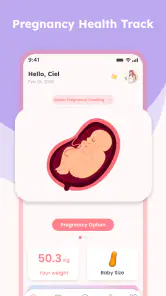
Pregnant Tracker - Baby Bump is a pregnancy-focused app designed to help expectant parents follow a pregnancy week by week. Depending on the features available in your version, it may offer information about fetal development, pregnancy milestones, and changes to expect during each stage. It is best viewed as an organizational and informational companion rather than a substitute for advice from a doctor or midwife.
How does the app calculate my pregnancy week and due date?
Pregnancy apps commonly estimate these dates using information such as the first day of your last menstrual period or a due date supplied by your healthcare professional. The estimate may differ from dates determined during an ultrasound, particularly if your cycle is irregular or you are unsure of the date. Check the app’s settings and enter the information carefully, then follow your clinician’s guidance for official pregnancy dating.
Does Pregnant Tracker - Baby Bump provide medical advice?
The app may explain common pregnancy changes and provide general educational content, but that information cannot assess your individual health or diagnose a problem. Pregnancy needs vary, and symptoms that seem ordinary in an app may require professional attention. Use your doctor or midwife as your primary source for medical decisions, and contact a healthcare professional promptly about concerning symptoms rather than relying on an app entry.
Is Pregnant Tracker - Baby Bump free, and does it include ads or in-app purchases?
Pricing, advertising, and paid features can vary by app version, country, and the store listing available on your device. Before installing, review the current Google Play or Apple App Store page for subscription terms, in-app purchases, and whether particular tools require payment. If the app offers a trial or subscription, check its renewal and cancellation details so you understand any charges before signing up.
What personal information does the app collect, and can I use it on Android or iOS?
Pregnancy tracking can involve sensitive details, so review the app’s privacy policy and the data disclosures on the relevant store page before entering personal information. Check what data may be collected, how it is used or shared, and whether you can delete your account or information. Confirm device compatibility in the Google Play or Apple App Store listing, since availability and features may differ between Android and iOS.
Pros
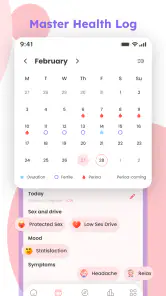
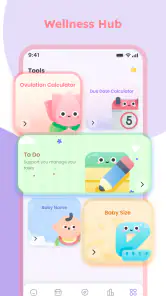
- Tracks pregnancy progress by week with helpful fetal development details.
- Includes a kick counter and contraction timer for quick tracking.
- Appointment reminders help you stay on top of prenatal visits.
- A pregnancy journal lets you record notes and memorable moments.
- Simple interface makes key tracking tools easy to find.
Cons
- Some features or content may require a paid subscription.
- Pregnancy estimates are informational and should not replace medical advice.
- The app may request sensitive health and pregnancy details.
- Reminders are only useful if notifications are enabled.
- Not all tracking features may be relevant to every pregnancy.

- Category
- Parenting
- Version
- 1.0.6











