Pregnancy Tracker & Day by Day
- 405.00
- 4.8
- Installs
- 1.00M
- Price
- Free

Screenshots
Analysis by Reviewed
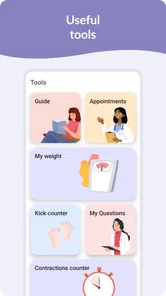
When I’m choosing a pregnancy app, I look for something that can answer two different needs without making the day feel more complicated: a quick sense of what stage I’m at, and a practical way to keep track of details I may want to discuss with a care provider. Pregnancy Tracker & Day by Day is aimed at that mix. It is a free parenting app from Timskiy, with a 4.8 average from around 73,000 ratings and over a million installs. Its appeal is the combination of pregnancy updates, tips, a kick counter and a contraction timer rather than a single narrow tool.
Start with the kind of support you actually want
Before installing any pregnancy app, I’d decide whether I want a week-by-week reading companion, a place to record personal details, a community, or a few practical tools. Trying to make one app do all of those jobs can turn a helpful routine into another task to manage. This one makes the most sense if I want pregnancy-stage updates alongside timing tools, rather than a detailed medical record or a full appointment planner.
That distinction matters in everyday use. If I’m mainly curious about what may be changing as pregnancy progresses, tips and daily updates can give me a reason to check in briefly. If I need to keep a formal log for a care team, I’d first confirm that the app’s available tracking fits the information I have been asked to record. A tool can be convenient without being the right place for every detail.
A simple way to make the counters useful
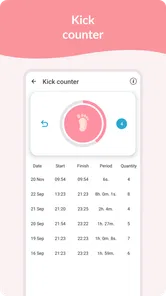
For a movement-counting routine, consistency is more valuable than opening the counter repeatedly throughout the day. I’d use it at the time and in the manner recommended by my care provider, then note anything I want to raise at the next appointment. The counter can reduce the mental work of keeping track, but it should not set my expectations for what is normal or tell me when to seek care.
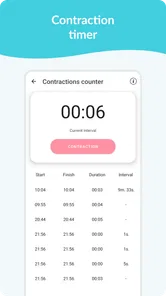
The contraction timer has a different job: it can help me capture timing when I’m tired or distracted. A useful habit is to have the app ready before I need it and to follow the instructions from my care team about what to do with those observations. I would not wait for a pattern in an app to decide whether to call. These tools are best treated as practical aids for recording, not as interpreters of pregnancy symptoms.
How it fits alongside other pregnancy apps
Compared with a week-by-week reading app, this one has a more practical angle because the kick counter and contraction timer sit alongside the pregnancy updates. Compared with a logging-first tracker, its appeal is the broader mix rather than a promise of detailed record-keeping. And compared with a community-centered app, it offers tools that can be useful even when I do not want to spend time reading other people’s posts.
Those are differences in emphasis, not proof that one style is better for everyone. If I already have a trusted resource for weekly information and my care team has given me a specific way to record symptoms, I may be better off keeping that routine. If I want daily prompts and simple timing tools in the same place, this app is a more natural fit. I’d compare the actual screens and options available to me before moving important records into any new tracker.
More From Our News Desk

 Remini - AI Photo Enhancer
Remini Is Our App of the Week for Bringing Old Photos Back to Life
A quick AI restoration tool earns its place by making faded portraits and soft, older photos feel vivid again—provided you know where its polish ends.

 PayPal - Pay, Send, Save
PayPal Reviewed: Who Benefits from Its Reach, and Who Should Skip It
PayPal is most useful when its reach and familiar checkout solve a real payment problem. These reader-by-reader recommendations show where it earns a place—and where friction wins.

 Millionaire 2026 Quiz & Trivia
 Makes Every Answer Count
A familiar quiz-show format succeeds or falters on tiny design decisions: how clearly the game guides a first answer, handles hesitation, and invites one more round.

 Decor Life - Home Design Game
Decor Life Turns Short Breaks Into Bite-Sized Decorating Jobs
A room-by-room decorating game built for quick sessions gains from modern phone habits, but its gentle pace still depends on patience, repetition, and a steady stream of design jobs.

 Sniper 3D:Gun Shooting Games
Sniper 3D’s Quick-Shot Appeal Faces the Upgrade Treadmill
The appeal is immediate: line up a target, steady your aim, and fire. The harder question is whether Sniper 3D can keep players returning after the first rush.

 Blockudoku®: Block Puzzle Game
Blockudoku vs. the Puzzle Pack: A Quick Puzzle With a Repetitive Edge
Blockudoku turns a clean grid into a quiet test of foresight. Against match-three polish and head-to-head simplicity, its lasting appeal is also its biggest limitation.
Latest News



Choose it for a useful routine, not a medical answer
I’d treat this as a companion for everyday organization and curiosity, not as a way to diagnose symptoms or decide whether something is wrong. For example, a daily check-in can help me notice a change in movement or jot down contraction timing so I can explain what I have observed more clearly. Those notes can support a conversation, but they cannot replace advice from a qualified professional. If a concern feels urgent, I would contact my care team rather than wait for an app to interpret it.
A practical way to use the tools is to keep the kick counter and contraction timer for the situations they are designed to help with, instead of turning them into constant monitoring. I would also note questions as they come up during the week, then bring them to an appointment. This makes the app more useful as a memory aid and less likely to become another source of pressure.
First Impressions and User Interface
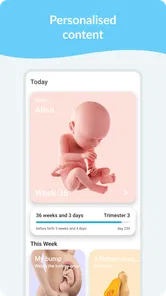
From the moment I downloaded the Pregnancy Tracker & Day by Day app, I was impressed by its clean and intuitive interface. The developers have clearly put a lot of thought into making navigation as smooth as possible, which is essential when you’re juggling a million things during pregnancy. The app greets you with a friendly dashboard that provides all the essential information at a glance. You can track your baby’s growth, your health stats, and even get daily tips tailored to your pregnancy stage.
Features That Stand Out
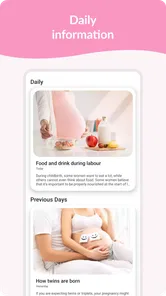
Now, let’s talk features, because this app is packed with them! One of the highlights is the daily pregnancy tips that offer insights on everything from what to expect during different trimesters to dietary advice. It’s like having a mini-guide in your pocket. I also loved the countdown feature, which keeps you excited with a day-by-day update until the big day arrives.
The app also includes a kick counter and contraction timer, which are practical tools for the later stages of pregnancy. Trust me, when those Braxton Hicks contractions start, you’ll be glad to have an easy way to track them! Plus, the integration with health apps means you can sync your health data seamlessly, ensuring you have all the important info in one place.
Make the tools fit real life
These features are most helpful when they fit naturally into an existing routine. I’d use a daily tip as a quick read over breakfast, then close the app rather than browse for reassurance every time a new sensation appears. Later on, if I’m tracking movement, I’d pick a calm moment and use the counter consistently, following any instructions from my care team. For timing contractions, having the timer ready can save mental effort when I’m tired, but I would still follow the guidance I’ve received about when to call or go in.
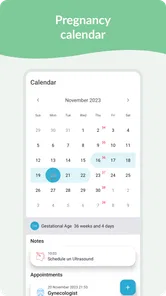
There is also a useful trade-off in keeping pregnancy information together: convenience is welcome, but more tracking is not automatically better. If recording numbers makes someone anxious, it is reasonable to focus on the countdown and tips and leave the counters unused until they are needed. And while the original experience describes health-app integration, I would check the available options on my own device before building a routine around syncing; a paper note or a separate calendar can be a simpler fallback.
Who will get the most from it
I can see this working especially well for someone who likes a gentle daily prompt and wants a few practical tools in one place. A first pregnancy may bring many small questions, while someone who has been pregnant before may value having the counter and timer close at hand without needing a separate utility for each. The app is rated for Everyone, and it runs on Android 5.0 or later; its current version is 1.5.1. Those details make it approachable on compatible devices, though I’d still check the app’s behavior on my own phone before relying on it for an important routine.
It may be less suitable for a person who wants a strictly clinical record, a detailed appointment-management system, or a quiet experience with no community element. Pregnancy apps vary: some focus on week-by-week reading, others on personal logging, and some are mainly discussion spaces. This one’s strongest case is its blend of tips and timing tools. If you already have a tracker that handles your preferred records well, switching may add little; if you keep losing track of separate tools, bringing these functions together may be worthwhile.
Everyday use without making it a chore
A realistic routine might be checking the day’s update while having breakfast, saving a question that comes to mind, and then leaving the app closed for the rest of the morning. If movement tracking is part of my care plan, I’d use the counter during the specific check-in my provider recommends rather than repeatedly checking just to feel reassured. On a busy day, that boundary helps the app stay useful without making pregnancy feel like a series of measurements.
There is also a small but helpful preparation step: decide in advance where important observations will live. If I plan to discuss something at an appointment, I’d make sure I can find the note again, whether I record it in the app or use a separate notebook. I would not assume that a convenient tracker automatically creates the kind of record my clinician needs. This is especially worth thinking through before a change of phone or a switch to another app.
When another approach is the better choice
I would skip this app if I were looking for a substitute for clinical monitoring, a comprehensive medical chart, or a system that organizes appointments and care instructions. A plain calendar or notebook may be a better fit for someone who wants minimal prompts and complete control over what gets recorded. Someone who finds daily pregnancy content stressful may prefer a resource they consult only when they have a specific question.
On the other hand, if I’m tired of opening one tool for weekly information and another for timing, combining those needs can be a meaningful convenience. The trade-off is that an all-in-one app may not match the depth or style of a specialist tool. I’d keep whichever method my care team recommends for essential tracking, and treat this app as an optional companion rather than moving every part of my routine at once.
Community and Support
One thing that sets this app apart is its community feature. You can connect with other moms-to-be, share experiences, and even ask questions. It’s comforting to know you’re not alone on this journey, and having a support network at your fingertips can make all the difference. The app also offers a Q&A section with professionals, which is super handy for those burning questions you need answered ASAP.
I’d use community conversations for shared experiences and practical reassurance, while treating personal medical questions differently. Other parents can be kind and helpful, but their circumstances may not match mine; professional guidance is the better route for decisions about symptoms or care. The same distinction applies to a Q&A space: it can help me organize what I want to ask, but it shouldn’t be mistaken for emergency support or a substitute for an appointment.
Costs, switching and the final call
The app is free to download, with in-app purchases ranging from $2.49 to $16.99 per item. I’d start with the free experience and decide whether any paid option solves a real need before spending. Switching is easy if I’m only using the countdown and tips, but it takes more effort if I have built a habit around logs or community conversations. Before moving to another app, I’d save any notes I might need and make sure my essential tracking method is still available.
For anyone wondering whether it is worth trying, I’d begin with the free features and give the routine a few ordinary days: a quick look at the pregnancy update, then the counter or timer only when it serves a clear purpose. That makes it easier to judge whether the app genuinely reduces friction or simply adds another place to check. If a paid option is tempting, I’d first identify the specific need it would meet rather than paying just because it is available.
All in all, the Pregnancy Tracker & Day by Day app is a fantastic resource for expecting parents. It combines practical tools with a supportive community, making it more than just a tracker. It’s like having a digital doula guiding you every step of the way. If you’re on the lookout for a comprehensive pregnancy app, give this one a try. You might just find it becomes an indispensable part of your pregnancy journey. Happy tracking!
Pregnancy Tracker & Day by Day Frequently Asked Questions
Can Pregnancy Tracker & Day by Day help me follow pregnancy progress from day to day?
Yes. Pregnancy Tracker & Day by Day is designed to help users follow pregnancy with daily and weekly tracking. It is a parenting app intended for expectant parents who want pregnancy-related updates alongside practical tracking tools. Its focus is on keeping this information together, so consider whether that approach fits the kind of support and routine you want from an app.
Does Pregnancy Tracker & Day by Day include tools for monitoring contractions or baby movements?
The app’s listed tools include a kicker counter and a contraction timer, alongside daily and weekly pregnancy tracking and tips. These features can help you record activity and time contractions, but they are tracking aids rather than a substitute for clinical assessment. If you have concerns about movement, contractions, or your pregnancy, contact your healthcare provider for advice.
What does the app’s Everyone age rating mean for prospective users?
Pregnancy Tracker & Day by Day is a parenting app with an Everyone content rating, so its age classification is broad. The app is designed around pregnancy tracking and related guidance, making it most relevant to expectant parents. Before downloading, consider whether its pregnancy-focused tools and content suit your needs and the person who will be using the device.
Which devices can install Pregnancy Tracker & Day by Day?
The app requires Android 5.0 or later, so check your device’s operating system before downloading. It is a parenting app for tracking pregnancy, with daily and weekly updates, a kicker counter, a contraction timer, and tips. If your device meets the minimum requirement, you can assess whether those tools fit the way you want to follow your pregnancy.
What features does the Pregnancy Tracker & Day by Day app offer?
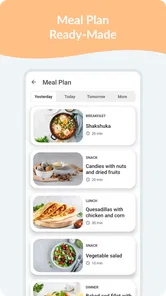
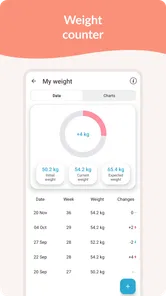
The Pregnancy Tracker & Day by Day app provides a comprehensive suite of features to help expectant mothers track their pregnancy progress. It includes daily and weekly updates on baby's development, personalized tips, a weight tracker, contraction timer, and a kick counter. Additionally, users can access nutritional advice, and community support for sharing experiences and asking questions.
Pros
- Comprehensive tracking of pregnancy milestones.
- Easy-to-use interface with intuitive design.
- Rich library of educational pregnancy articles.
- Customizable notifications for daily insights.
- Community support features for sharing experiences.
Cons
- Limited features in the free version.
- Occasional bugs in the calendar feature.
- Requires internet for most functionalities.
- Some ads in the free version can be intrusive.
- Limited personalization options for profiles.